Running a retail store involves much more than selling products and collecting payments. Behind every successful store, inventory tracking, sales management, employee coordination, customer service and daily reporting all have to work together.
As a business grows, spreadsheets, paper records and separate applications become hard to manage. Stock numbers stop matching the shelves, sales records need manual updates, and managers struggle to see how the store is really performing.
A store management software system solves this by bringing the essential store operations into one centralized platform. Instead of managing each activity on its own, businesses can organize product information, monitor inventory, record transactions, maintain customer details and review reports in one place.
For example, when an employee completes a sale, the system can record the transaction and update the available stock automatically, as long as the sales and inventory modules are integrated. Managers then see current information without collecting records from several sources.
In this guide, we cover what store management software is, how it works, which features matter, what it costs, and when custom software development makes sense.
What Is a Store Management Software System?
A store management software system is a digital application that helps businesses organize, monitor and manage their everyday store operations from one platform.
It typically brings together several business functions:
- Inventory and stock management
- Sales and transaction tracking
- Point-of-sale (POS) operations
- Customer information management
- Employee scheduling and task coordination
- Product and supplier records
- Sales and inventory reporting
- Multi-location store management
The goal is to connect these activities so that information is shared across the business instead of being locked in separate tools.
Consider a clothing retailer. Its staff manage products in different sizes and colors, stock quantities and customer purchases. Without a centralized application, sales might be recorded in one system and inventory in another. With store management software, selling an item updates its inventory record, and managers can check product availability, sales history and stock movement from the same screen.
Store management software can be built as a web application, desktop application, mobile application, or a combination of these. The right format depends on the business model and how the team works.
How Does Store Management Software Work?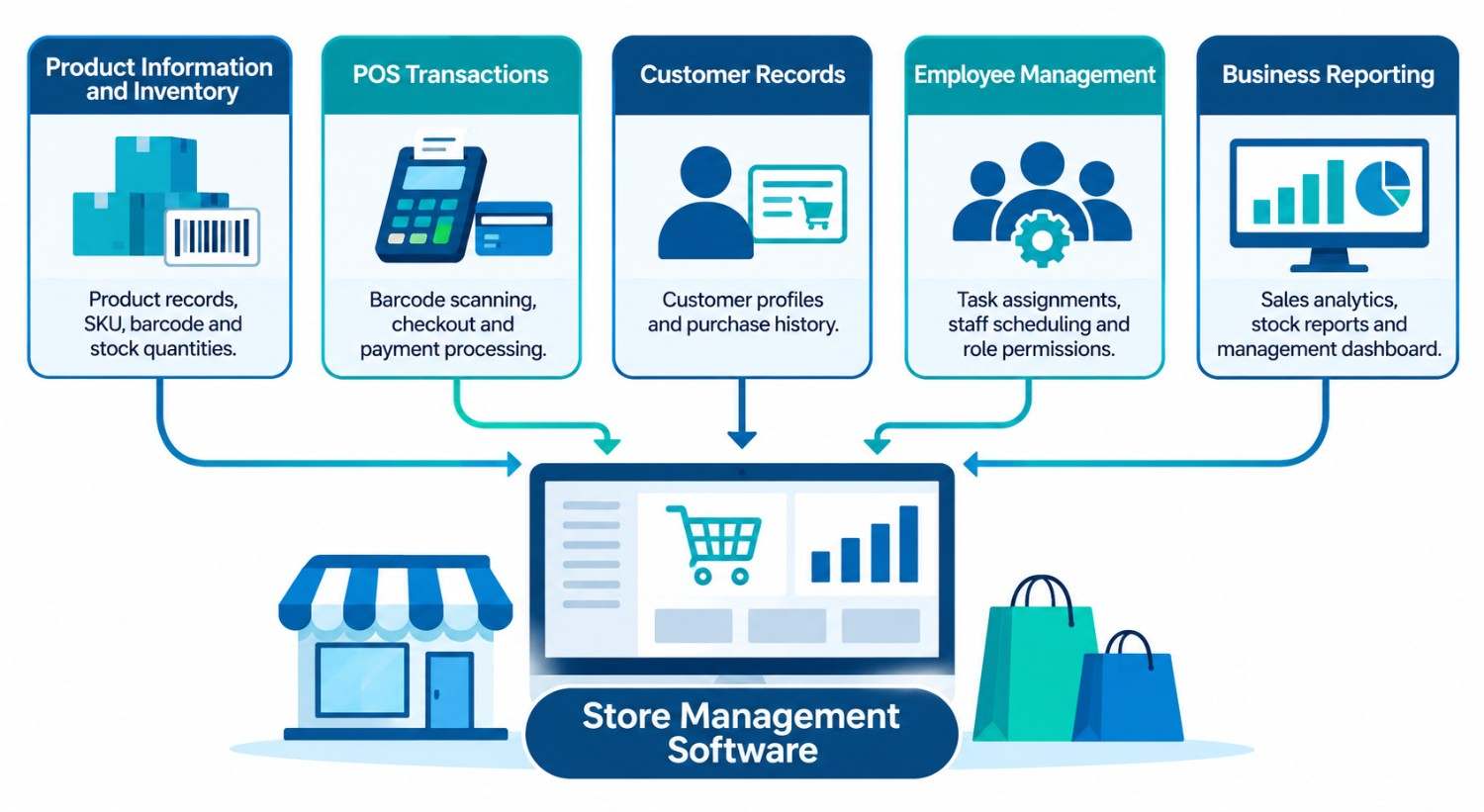
Store management software collects information from different store activities, processes it through connected modules, and shows the relevant information to authorized users. The exact workflow varies between applications, but most systems follow the same five steps.
1. Product Information and Inventory Are Added
The process starts when the business adds its products to the application. Each product gets a record with details such as name, SKU, barcode, category, description, supplier and available quantity.
When new stock arrives, authorized employees record it. Sales, returns, damaged items and stock transfers are recorded the same way, so inventory stays current.
Most systems also support minimum stock thresholds. When a product falls to a set level, the system sends a low-stock notification to the responsible employee, which makes replenishment easier to plan.
2. Customer Purchases Are Recorded Through POS
When a customer is ready to buy, the employee uses the POS module to prepare the transaction. Depending on the setup, this can include barcode scanning, manual product selection, discounts, tax calculation and payment processing.
Once the transaction is complete, the software records the items, transaction details and payment information. If the POS and inventory modules are connected, product quantities update automatically. This keeps sales records consistent and removes the need for separate manual stock updates.
3. Customer Records Are Updated
Customer management lets businesses keep relevant customer information in the system. Depending on the features, a profile can include contact details, previous purchases, preferences and interaction history.
When a returning customer visits, staff can see past purchases and give more informed help. Businesses can also use these records for loyalty programs, customer communication and targeted promotions.
4. Employees Manage Daily Responsibilities
A store management application can include tools for employee records, work schedules, task assignments and activity monitoring. For example, a manager can assign inventory duties to certain employees while giving sales staff access only to the POS screen.
Role-based permissions keep sensitive data and administrative functions limited to the people who need them. This makes responsibilities clearer and daily coordination easier.
5. Operational Data Is Converted Into Reports
Every transaction, inventory movement and customer interaction adds to the data inside the application. The reporting module turns that data into summaries.
Managers can review daily sales, product performance, stock availability and stock movement on a single dashboard. Instead of combining records from different applications by hand, they get the full picture in one place and can use it for business decisions.
How It Works in a Real Retail Business
A practical example makes the process easier to follow. Take a store that sells electronic accessories such as headphones, chargers, keyboards and mobile accessories.
At the start of the day, employees check available inventory in the application. When a supplier delivers new products, the received quantities are recorded against the relevant product entries.
Later, a customer buys a wireless keyboard. The employee scans the barcode in the POS screen, confirms the product details and completes the payment. The system records the sale and reduces the keyboard’s stock, provided the POS and inventory modules are integrated.
At the end of the day, the store manager opens the reporting dashboard to review completed transactions, product sales and remaining stock. If another product is close to its minimum level, the manager can open its inventory record and raise a replenishment request.
The same approach adapts to supermarkets, clothing stores, electronics retailers, grocery businesses and other store-based operations.
What Features Should Store Management Software Include?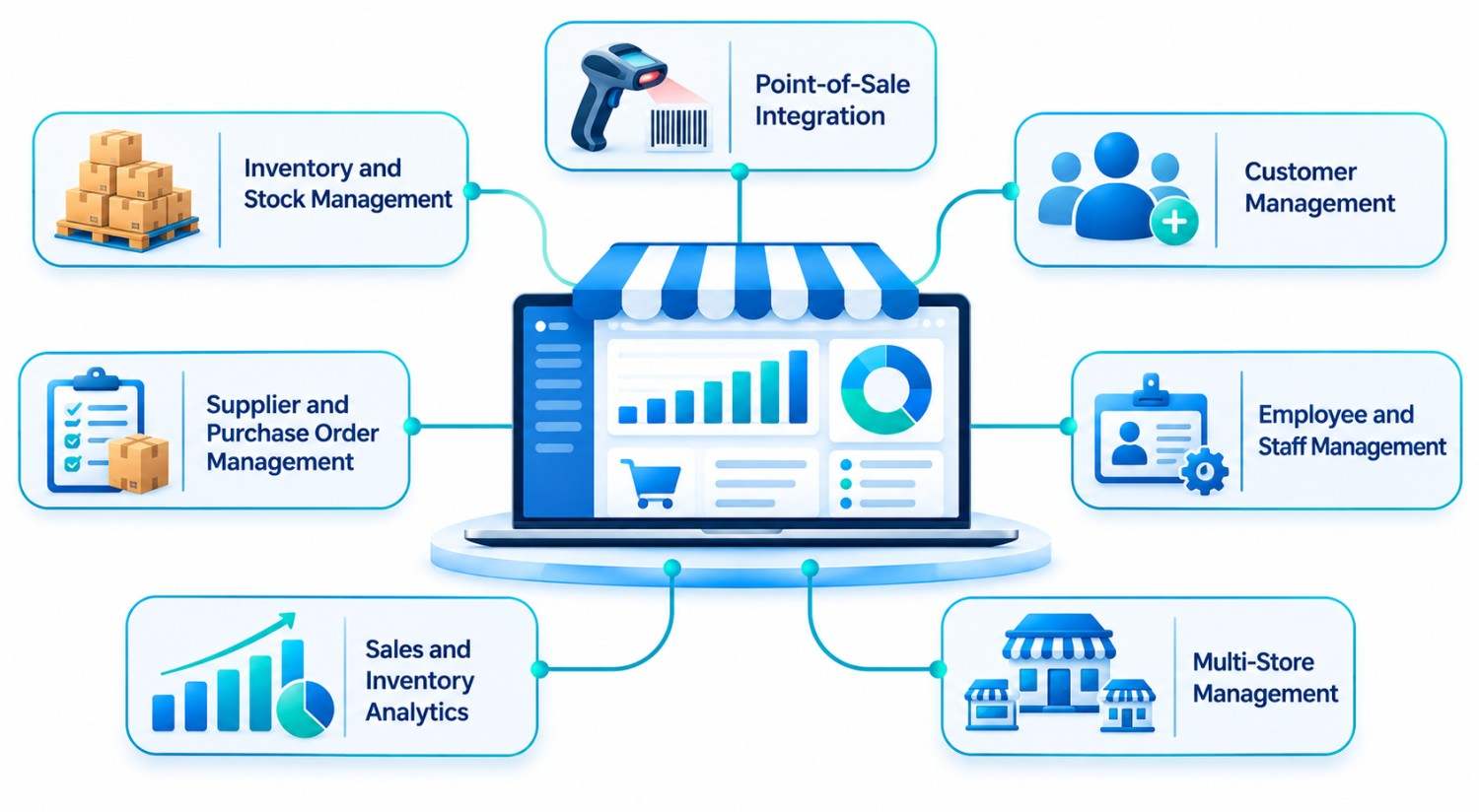
The features should match the actual needs of the business. A small outlet may need only basic inventory and sales functions, while a growing retail chain may need advanced reporting, integrations and multi-location management. These capabilities are commonly the most important.
Inventory and Stock Management
Inventory management helps businesses maintain accurate product records, monitor stock movement, and keep inventory levels under control. A well-designed store management system may include:
- Product and SKU management
- Barcode-based product identification
- Real-time stock quantity tracking
- Incoming and outgoing inventory records
- Stock adjustments and transfers
- Low-stock alerts and notifications
- Supplier and purchase order management
- Inventory history and reporting
These capabilities give businesses better visibility into available stock, help identify discrepancies, and support timely inventory replenishment.
To understand how connected systems improve stock control and inventory operations, read our guide on how ERP software helps businesses manage inventory better.
Point-of-Sale Integration
POS functionality connects customer purchases with the store’s operational records. Depending on requirements, it can include:
- Barcode scanning
- Product selection and checkout
- Discount and tax management
- Payment gateway integration
- Receipt generation
- Refund and return processing
- Transaction history
Integrating POS with inventory keeps recorded sales and available quantities in sync.
Customer Management
Customer management keeps customer records organized and shows purchasing activity. Useful capabilities include customer profiles, purchase history, contact management, loyalty program records and interaction tracking. Connected with other business applications, this data can also support marketing and more consistent customer service.
Employee and Staff Management
These features help store managers coordinate their teams. Depending on the application, they include employee profiles, shift scheduling, attendance records, task assignments and role-based access. Managers can organize responsibilities, and employees get the tools their jobs require.
Sales and Inventory Analytics
Reporting turns operational records into information managers can act on. A store management dashboard may show:
- Daily, weekly and monthly sales summaries
- Best-selling and slow-moving products
- Inventory availability
- Stock movement history
- Product category performance
- Customer purchase activity
- Branch-wise operational reports
These insights help managers spot patterns, investigate problems and plan ahead.
Multi-Store and Multi-Location Management
Businesses with several branches need a central view of their operations. Multi-store functionality lets managers monitor inventory, sales and other records across locations. It may also support location-specific permissions, stock transfers between branches and individual branch reports, so there is no need for a separate management process in every store.
Supplier and Purchase Order Management
Businesses that buy regularly from vendors benefit from supplier management. The system keeps supplier details, purchase records, order status and incoming inventory information. When it is connected to inventory, receiving a purchase order updates the relevant stock records, which links purchasing directly to what is on the shelf.
What Are the Benefits of Using Store Management Software?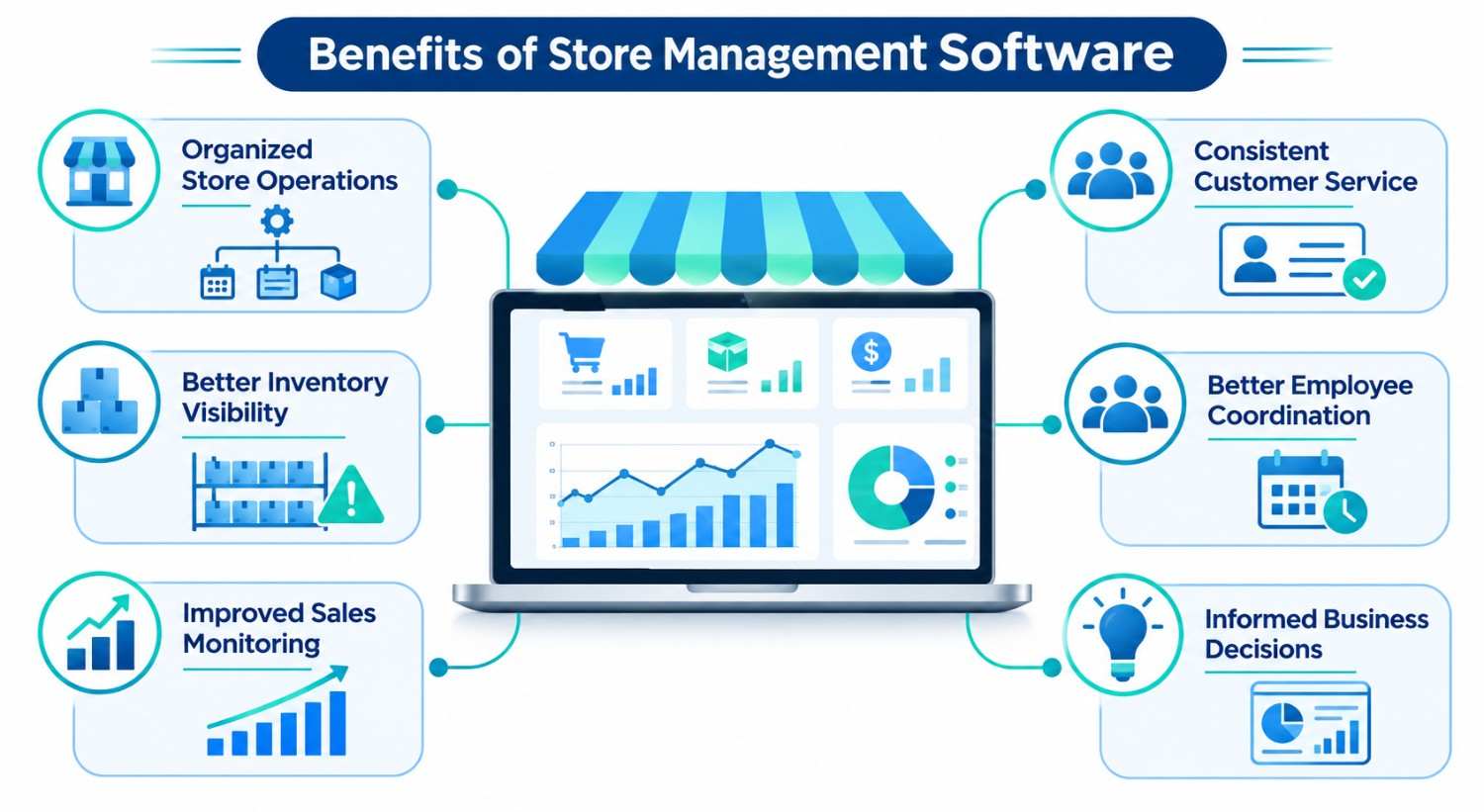
The main advantage is that it connects activities that would otherwise need separate records and manual coordination. Here is how that improves everyday operations.
1. More Organized Store Operations
When sales, inventory, employee records and customer data live in separate places, staff end up entering the same information more than once. A centralized application removes that duplication. A completed transaction updates both the sales history and the inventory without any re-entry.
2. Better Inventory Visibility
Without proper tracking, popular products run out while slow-moving items sit unnoticed. Store management software shows product quantities, stock movement and replenishment needs in one view, so managers can catch shortages earlier.
3. Improved Sales Monitoring
Sales records show which products customers buy and how activity changes over time. A reporting dashboard organizes this into summaries that are easy to review. Managers can identify popular products, compare periods and investigate changes in performance.
4. More Consistent Customer Service
Staff give better help when they can see accurate availability and customer history. An employee can confirm whether a product is in stock before promising it, and purchase history helps make conversations more relevant.
5. Better Employee Coordination
A central platform helps managers assign work, organize schedules and keep records. Employees find what they need without depending on scattered messages or paper notes, which matters most in stores with larger teams.
6. More Informed Decisions
The software builds a record of daily activity. Repeated stock shortages may show that purchasing schedules need a review, and slow-moving inventory may need attention. Decisions rest on recorded data, not assumptions.
How Is Store Management Software Different From POS, CRM and ERP Systems?
These systems are related, but each has a different purpose.
- POS software manages customer transactions, checkout and payment processing. It records purchases and can update inventory.
- Store management software covers the wider set of daily store activities, including inventory, POS functions, employee coordination, customer records and reporting.
- CRM software focuses on customer relationships: profiles, communication history and sales interactions.
- ERP software connects broader organizational functions such as finance, procurement, accounting, inventory and supply chain.
They are meant to work together. A retailer might process sales through POS, coordinate daily activity with store management software, manage relationships in a CRM and connect purchasing and finance through an ERP. The right mix depends on your operations and how closely the systems must be integrated.
For a deeper comparison of these systems, see our post on CRM vs ERP: understanding the differences.
Which Systems Can Store Management Software Integrate With?
Store management applications often need to exchange data with other tools. Integration lets different activities connect without employees managing disconnected records. Common options include:
- Accounting applications: connect sales and transaction records with financial reporting.
- CRM platforms: share customer information and purchase activity.
- ERP systems: link store operations with procurement, finance and inventory planning.
- Ecommerce platforms: sync product information, stock availability and order details between physical and online channels.
- Payment gateways: support electronic payments and transaction confirmation.
- Barcode scanners and receipt printers: connect store hardware to POS functions.
Define integration requirements during planning, because each application may use different APIs, data formats and authentication methods.
When Should a Business Consider Custom Store Management Software?
Ready-made applications work well when their features match how your business operates. But some businesses have processes that standard tools cannot handle easily. In those cases, custom software development is worth considering.
Business-Specific Inventory Requirements
If you manage product variations, specialized stock categories, multiple warehouses or unique inventory workflows, standard modules may fall short. Custom development lets these requirements shape the data structure and workflows from the start.
Multiple Branches and Complex Operations
Companies with several locations may need centralized dashboards, branch-level reporting, location-specific permissions and coordinated stock transfers. A custom application can be designed around exactly these needs.
Integration With Existing Applications
If your accounting software, ecommerce platform, CRM or ERP does not connect easily to an off-the-shelf store management tool, custom development can build the required data exchange. If you also need a full business system, see our custom ERP development and custom CRM development services.
Unique Approval and Reporting Processes
Some businesses follow specific procedures for stock adjustments, purchase approvals, returns and reporting. Custom software can follow those processes instead of forcing employees to change established workflows.
Future Business Expansion
A system should support more than today’s needs. A custom application can be designed to handle more users, locations, products, integrations and modules as the business grows.
The decision to build custom software should rest on real business needs, not on the appeal of extra features.
What Should You Consider Before Developing Store Management Software?
Building a store management application needs careful planning. The aim is a system that solves real operational problems and stays manageable as requirements change.
Understand the Actual Business Workflow
Start by documenting how the store works today: how products are received, how inventory is updated, how transactions are processed and how employees share responsibilities. Also list current problems such as inventory mismatches, repeated data entry, reporting delays and disconnected tools. This tells you which features belong in the first version.
Select an Appropriate Technology Stack
Choose technologies based on the required functionality, expected user volume, integration requirements, scalability, and long-term maintenance needs. Depending on the project’s architecture, the development team may consider:
- Python and Django for backend development
- Node.js for server-side applications and API development
- React.js, Angular, or Vue.js for frontend interfaces
- Laravel for PHP-based backend development
- React Native for cross-platform mobile applications
- Swift and Kotlin for native iOS and Android applications
The best combination depends on technical requirements, team expertise and the long-term maintenance strategy.
Make Security a Priority
These applications hold customer information, employee records, transaction details and confidential business data, so security must be built in from the start. Key measures include secure authentication, role-based access control, data encryption, API security, database permissions, audit logs and regular backups. For instance, a cashier may only process transactions, while a store manager can also adjust inventory and view reports.
Plan Third-Party Integrations Early
List the external applications and devices the system must talk to, such as payment services, accounting software, ecommerce platforms, POS hardware and existing CRM or ERP systems. Planning these early prevents expensive complications later.
Consider Performance and Scalability
As the business expands, the application may need to support more users, products, branches and transactions. Database design, API performance, infrastructure and data management should all be planned with that growth in mind.
Include Testing and Ongoing Maintenance
The application must work reliably across all its modules. Testing should cover inventory updates, transaction processing, returns, user permissions, integrations and report accuracy. After launch, regular maintenance, security updates, performance monitoring and bug fixes keep it dependable.
How Is Store Management Software Developed?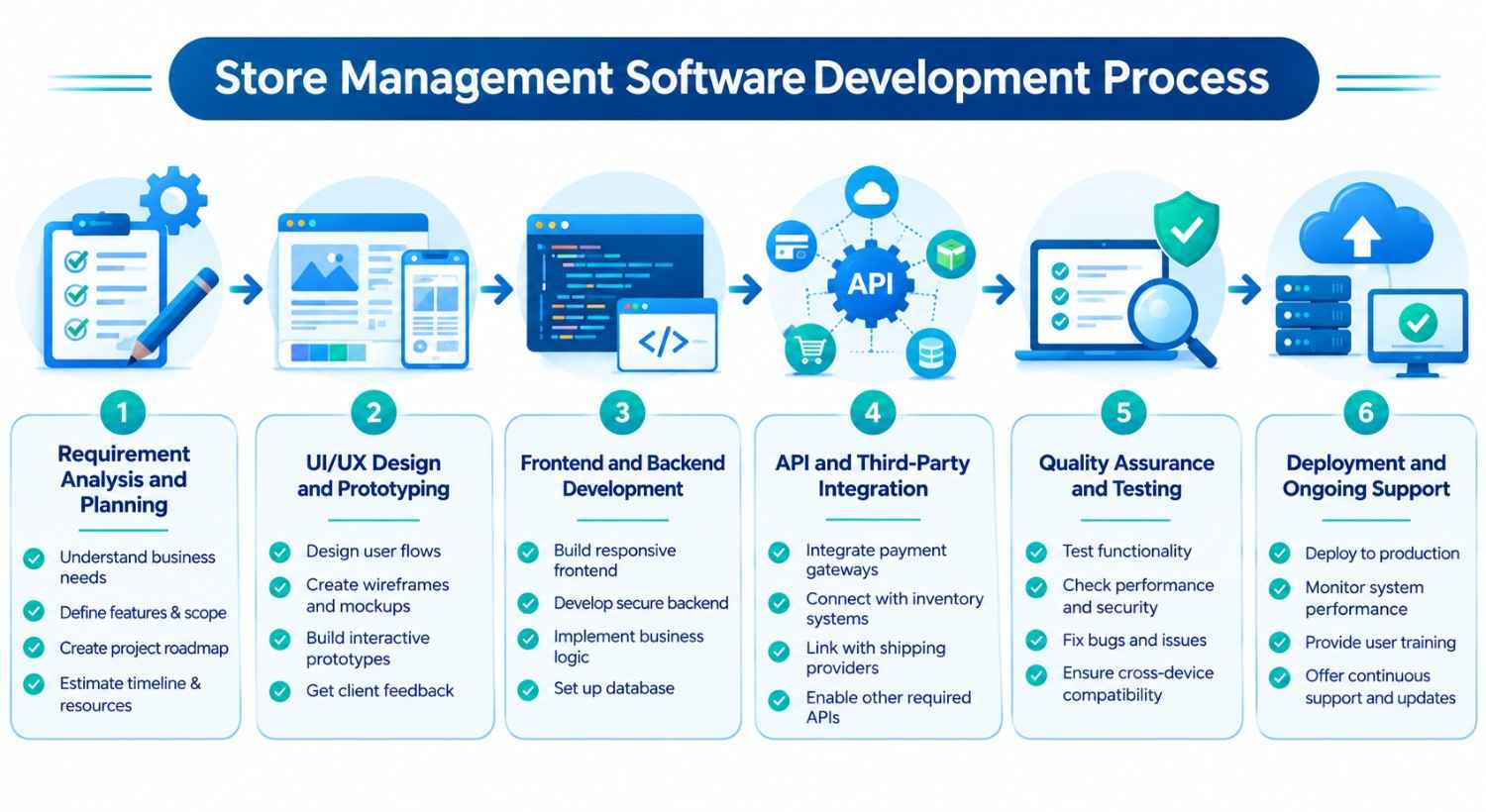
Custom development follows a structured process, and each stage helps make sure the final product reflects what the business needs.
Step 1: Requirement Analysis and Planning
The team discusses the business model, current processes, user needs and technical expectations with stakeholders. From this, they document the required modules, workflows, integrations and priorities.
Step 2: UI/UX Design and Prototyping
Designers create the structure, navigation, dashboards and individual screens, aiming for an interface employees can use quickly during busy store hours. Prototypes are reviewed with stakeholders before development starts.
Step 3: Frontend and Backend Development
Developers build the frontend, backend services, database and business modules, such as inventory management, POS, employee management, customer records and reporting, according to the approved requirements and architecture.
Step 4: API and Third-Party Integration
The application is connected to external services and existing systems. Depending on the project, this can involve payment gateways, accounting software, ecommerce platforms, POS devices and ERP or CRM systems.
Step 5: Quality Assurance and Testing
The team tests for functional issues, incorrect data updates, integration problems, security weaknesses and performance concerns. Testing should use real scenarios: sales, stock adjustments, returns and multi-user access.
Step 6: Deployment and Ongoing Support
After the software passes testing and approval, it is deployed to the chosen environment. Following launch, the team can provide support, updates, performance improvements and new features as requirements evolve.
How Much Does Store Management Software Development Cost?
There is no single price, because the cost depends on what you need the system to do. These factors have the biggest effect:
- Scope and number of modules: A simple inventory and POS tool costs far less than a platform with CRM, employee management, supplier management and analytics.
- Platforms: A web-only application is simpler than a solution that also includes Android and iOS apps.
- Number of integrations: Each connection to a payment gateway, accounting tool, ecommerce platform, ERP or hardware device adds design, development and testing work.
- Multi-location support: Branch-level permissions, stock transfers and consolidated reporting add complexity.
- UI/UX complexity: Custom dashboards and workflows take more design time than standard screens.
- Security and compliance: Detailed role-based access, audit logs and data protection requirements increase the effort.
- Team and location: The size, experience and location of the development team affect hourly rates and timelines.
- Post-launch support: Maintenance, updates and hosting are ongoing costs and should be budgeted from the start.
A practical way to control cost is to launch an MVP with the most important modules first, usually inventory, POS and basic reporting, and then add features as the business grows. For an accurate estimate, share your requirements with a development team so they can scope the project.
Our Experience Building Business Management Software
At KanhaSoft, we have developed business management solutions covering inventory management, ERP, CRM, workforce management, and business analytics. Although these projects are not dedicated retail store management systems, they demonstrate our experience in building software that supports many of the essential operations involved in running a business.
Here are some relevant examples from our portfolio and case studies :
- Inventory Management: We developed a lightweight, SaaS-based inventory management system for a cigar manufacturer using PHP and MySQL. The system handles order management, raw material procurement, stock transfers between departments, shipping, and daily inventory valuation.
- Inventory, Sales, and Purchasing: We developed a SaaS-based CRM and ERP solution for a custom apparel business in Canada using Yii, Angular, and MySQL. It manages inventory, customer records, quotations, sales and purchase orders, pick lists, and invoices, with integrations for Xero and QuickBooks.
- Workforce Management and Daily Reporting: We built a workforce management and daily reporting platform for software delivery teams using Next.js, React, TypeScript, and PostgreSQL. It includes daily reporting, approval workflows, leave management, resource availability tracking, and analytics.
- Sales Analytics and Reporting: We developed a real-time analytics dashboard for Walmart sellers using React, Node.js, Python, PostgreSQL, and AWS. It collects sales, advertising, and profit data through Walmart APIs and displays it in interactive dashboards, with multi-store access and Excel export capabilities.
- ERP Integration (In Development): We are developing a CRM and sales force automation platform for a manufacturing business designed to work alongside SAP HANA, which continues to handle the client’s core ERP transactions.
These projects demonstrate our experience in developing connected business management systems that streamline operations, improve data visibility, and support informed business decisions.
Explore more of our work through our case studies and project portfolio.
Conclusion
Managing a store means coordinating inventory tracking, sales processing, customer service, employee management and reporting. When these depend on disconnected tools, accurate records and clear performance monitoring become difficult.
A store management software system brings these processes together in one application. It gives businesses better visibility into inventory, organizes sales information, supports employee coordination and makes reporting easier to manage.
The right solution depends on how your business operates. Ready-made software may suit standard needs, while businesses with specialized workflows, multiple locations or complex integrations can benefit from custom development.
Need a Store Management System Built Around Your Business?
Off-the-shelf software does not always fit how your store really works. At KanhaSoft, we have spent over 13 years building custom web and mobile applications, ERP, CRM and inventory platforms for businesses across industries.
Whether you need inventory tracking, POS integration, multi-store management or reporting dashboards, our team can plan and build a scalable solution that connects with your existing systems.