AI-powered CRM systems improve lead management by helping businesses capture leads faster, score them more accurately, assign them to the right salespeople, automate follow-ups, and identify which opportunities are most likely to convert. Instead of treating every lead the same, an AI-enabled CRM uses customer data, behavior, history, and sales activity to help teams focus on the right leads at the right time.
For growing businesses, this can mean fewer missed opportunities, cleaner pipelines, better sales forecasting, and more consistent follow-up without adding unnecessary manual work.
This Article Is Especially Useful For:
- Business owners who receive leads from multiple sources and struggle to track them properly
- Sales managers who want better lead prioritization and pipeline visibility
- Marketing teams that need cleaner handoff between campaigns and sales
- B2B companies evaluating AI CRM, custom CRM, or CRM automation tools
- Operations teams trying to reduce manual lead assignment, reporting, and follow-up work
- Companies using spreadsheets, email inboxes, or outdated CRM systems for lead tracking
How Do AI-Powered CRM Systems Improve Lead Management?
AI-powered CRM systems for lead management improve the sales process by using artificial intelligence to analyze lead data, predict buying intent, automate repetitive tasks, and recommend next actions. They help businesses answer practical questions such as:
- Which leads should sales contact first?
- Which lead source is producing quality opportunities?
- Which follow-up message should be sent next?
- Which deals are at risk of going cold?
- Which salesperson or team should handle a specific lead?
- What is the expected value of the current pipeline?
In simple terms, AI helps the CRM move from being a data storage tool to becoming a decision-support system for sales, marketing, and leadership teams.
What Is an AI-Powered CRM System?
An AI-powered CRM system is a customer relationship management platform that uses artificial intelligence, machine learning, automation, and analytics to improve how businesses manage leads, customers, sales activity, and communication.
A traditional CRM mainly stores customer data and tracks sales activities. An AI-powered CRM can also analyze that data and suggest what should happen next.
For example, a traditional CRM may show that a lead filled out a website form. An AI-enabled CRM may also identify that the lead matches your ideal customer profile, visited pricing pages twice, opened two emails, and should be contacted within the next hour.
Key Terms Explained Simply
| Term | Simple Meaning | Why It Matters |
|---|---|---|
| Lead scoring | Ranking leads based on quality or conversion potential | Helps sales teams prioritize better leads |
| Predictive analytics | Using past data to forecast future outcomes | Helps estimate which leads may convert |
| Lead routing | Assigning leads to the right salesperson or team | Improves response time and accountability |
| Lead enrichment | Adding missing company, industry, location, or contact data | Helps sales teams personalize outreach |
| Workflow automation | Automatically triggering tasks, emails, reminders, or updates | Reduces manual work and missed follow-ups |
| Sales forecasting | Predicting future sales based on pipeline and historical data | Helps leadership plan revenue and resources |
Why Lead Management Becomes Difficult as a Business Grows
Lead management is simple when a company receives a few inquiries per week. It becomes harder when leads start coming from many sources, such as website forms, Google Ads, LinkedIn, WhatsApp, referrals, marketplaces, trade shows, email campaigns, and partner channels.
Common problems include:
- Leads are captured in different tools and spreadsheets
- Sales teams do not know which lead to call first
- Follow-ups depend on memory instead of process
- Duplicate records create confusion
- Marketing sends leads that sales considers low quality
- Managers cannot see which campaigns are producing real pipeline
- Hot leads go cold because response time is too slow
This is where AI-powered CRM systems can create real operational value. The goal is not to replace the sales team. The goal is to help the team work with better timing, better context, and better prioritization.
How AI-Powered CRM Systems Improve Lead Management
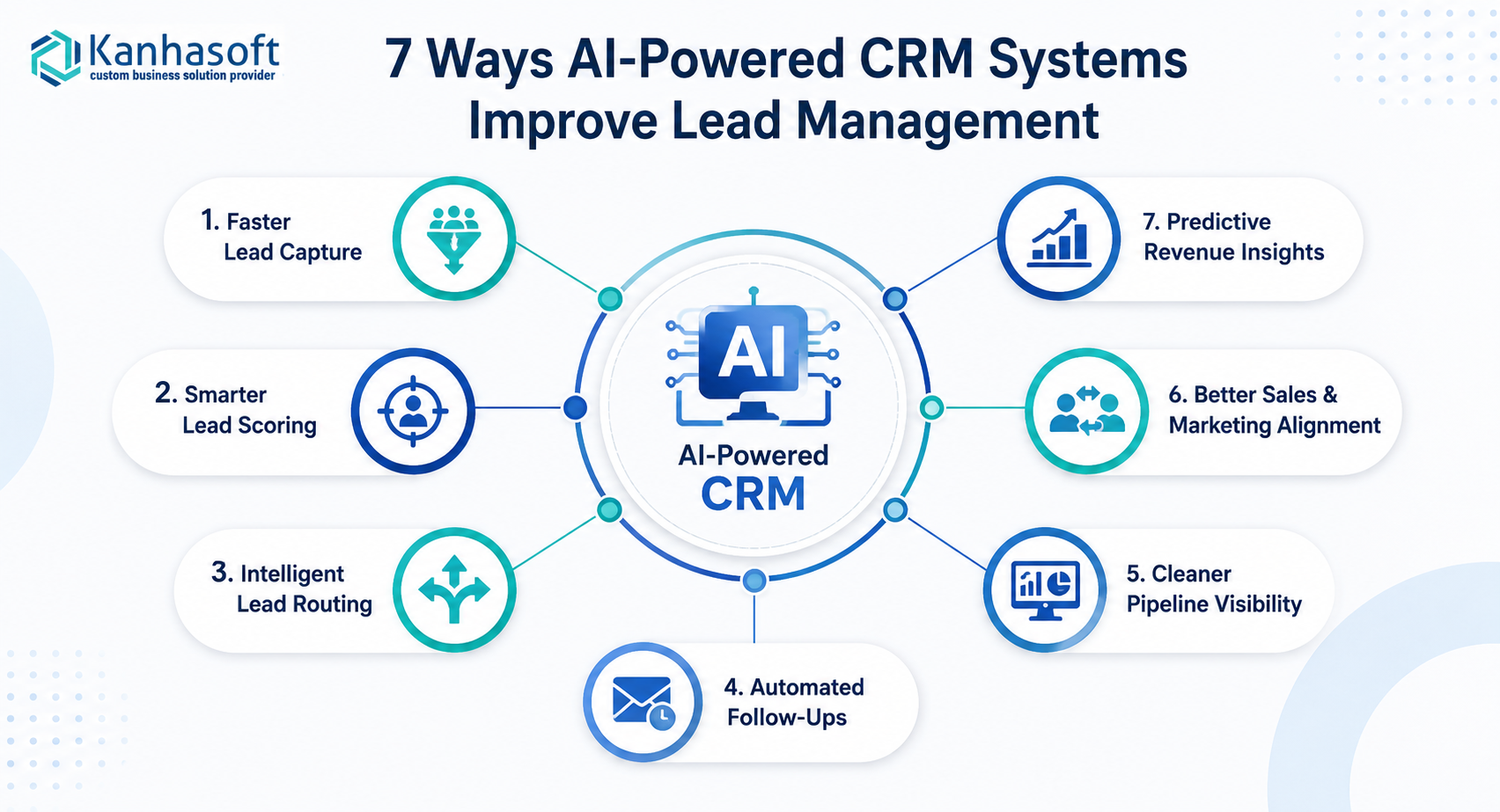
1. Faster Lead Capture From Multiple Sources
AI-enabled CRM systems can centralize leads from different channels, including website forms, landing pages, email, WhatsApp, social media, paid ads, marketplaces, and third-party platforms.
Instead of sales teams manually checking multiple inboxes or sheets, the CRM becomes one source of truth.
For example, a B2B software company may receive leads from Google Ads, organic search, LinkedIn outreach, and referral partners. An AI-powered CRM can capture these leads in one system, detect duplicates, enrich missing company information, and assign the lead to the right team automatically.
2. Smarter Lead Scoring
Lead scoring is one of the most valuable uses of AI in CRM. Instead of relying only on basic rules such as company size or form submission type, AI can consider many data points together.
These may include:
- Industry
- Company size
- Job title
- Location
- Website behavior
- Email engagement
- Previous interaction history
- Deal size
- Source quality
- Similarity to past converted customers
A lead who visits a pricing page, downloads a guide, and matches your ideal customer profile may receive a higher score than a lead who only fills out a generic contact form.
This helps sales teams focus effort where it matters most.
3. Better Lead Routing and Assignment
Manual lead assignment often creates delays. AI-powered CRM systems can route leads based on predefined rules and intelligent patterns.
Leads can be assigned by:
- Geography
- Product interest
- Industry
- Deal size
- Language
- Account ownership
- Salesperson availability
- Lead score
- Existing customer relationship
For example, a Pan-India manufacturing company may need different sales teams for B2B enterprise clients, dealer networks, and B2C inquiries. An AI-enabled CRM can identify the lead type and route it to the correct regional, product, or vertical team.
4. Automated Follow-Ups Without Losing Personalization
Many leads are lost because follow-ups are inconsistent. AI-powered CRM systems help automate reminders, email sequences, task creation, and next-step suggestions.
Good CRM automation does not mean sending robotic messages to every lead. It means creating structured follow-up logic based on lead behavior.
For example:
- If a lead requests pricing, create a call task within 15 minutes
- If a lead opens a proposal but does not reply, send a follow-up reminder
- If a deal has no activity for seven days, alert the sales manager
- If a lead asks about a specific product, recommend a relevant case study or brochure
This keeps the sales process consistent while still allowing the salesperson to personalize communication.
5. Cleaner Sales Pipeline Visibility
A CRM is only useful if the pipeline is accurate. AI can help detect missing fields, stale deals, duplicate entries, inconsistent stages, and unusual pipeline movement.
For leadership, this improves visibility into:
- Number of new leads
- Qualified leads by source
- Conversion rate by salesperson
- Average response time
- Deal aging
- Sales stage bottlenecks
- Forecasted revenue
- Lost deal reasons
In real business use, this matters because many sales pipelines look healthy on paper but contain outdated or poorly qualified opportunities. AI can help flag those risks earlier.
6. Better Sales and Marketing Alignment
Sales and marketing teams often disagree on lead quality. Marketing may focus on lead volume, while sales cares about conversion potential.
AI-powered CRM systems help both teams look at the same data.
Marketing can see which campaigns produce qualified opportunities, not just form submissions. Sales can give structured feedback on lead quality, lost reasons, and common objections. Over time, the system can help improve campaign targeting and lead qualification rules.
7. Predictive Insights for Revenue Planning
AI-powered CRM systems can support sales forecasting by analyzing historical conversion rates, current pipeline value, deal stage movement, and salesperson activity.
This helps leadership answer questions such as:
- Are we likely to hit this quarter’s revenue target?
- Which deals need management attention?
- Which lead sources generate the highest-value opportunities?
- Which sales activities correlate with closed deals?
- Where are leads slowing down in the funnel?
AI forecasting should not be treated as perfect. It works best when the CRM has clean, consistent, and sufficient historical data.
Traditional CRM vs AI-Powered CRM for Lead Management
| Area | Traditional CRM | AI-Powered CRM |
|---|---|---|
| Lead capture | Stores leads entered by users or forms | Captures, cleans, deduplicates, and enriches leads |
| Lead scoring | Based on static rules | Uses behavior, history, and patterns to rank leads |
| Follow-ups | Manual tasks and reminders | Automated reminders, triggers, and next-step suggestions |
| Lead routing | Basic assignment rules | Intelligent routing based on lead profile and availability |
| Reporting | Shows historical data | Highlights trends, risks, and likely outcomes |
| Forecasting | Manual or stage-based | Predictive and data-assisted |
| Sales productivity | Depends heavily on user discipline | Reduces repetitive admin work |
| Best fit | Small teams with simple processes | Growing teams with multiple lead sources and complex pipelines |
Best Choice by Situation
| Business Situation | Best CRM Approach | Why |
|---|---|---|
| Small team with low lead volume | Simple CRM with basic automation | Affordable and easy to manage |
| Growing sales team with multiple lead sources | AI-enabled CRM or custom CRM automation | Improves routing, scoring, and follow-up consistency |
| Enterprise with complex workflows | Custom AI-powered CRM | Fits unique approval flows, roles, integrations, and reporting needs |
| Heavy field sales or dealer network | Mobile-first CRM with AI routing and activity tracking | Supports distributed teams and location-based workflows |
| Strong marketing engine but weak sales handoff | CRM with lead scoring and campaign attribution | Improves sales-marketing alignment |
| Regulated industry | Secure custom CRM with audit logs and access control | Helps manage privacy, compliance, and accountability |
Practical Business Examples
Example 1: B2B Software Company
A SaaS company receives demo requests, trial signups, webinar leads, and paid ad inquiries. Without AI, all leads may enter the same sales queue.
With AI-powered lead management, the CRM can score leads based on company size, product interest, page visits, engagement, and past conversion patterns. High-intent leads can be routed to senior sales reps, while low-intent leads can enter a nurturing sequence.
Example 2: Franchise Business
A franchise network may receive leads for different locations, service categories, and ownership territories. If routing is manual, leads can be delayed or sent to the wrong branch.
An AI-enabled CRM can identify the location, lead type, service interest, and nearest franchise unit. It can then assign the lead automatically and alert managers if follow-up is delayed.
Practical observation: In franchise-style CRM implementations, lead visibility across branches is often as important as automation itself. Owners need to know not only how many leads arrived, but also which locations are responding quickly and which ones are losing opportunities.
Example 3: Manufacturing or Distribution Company
A manufacturer may receive leads from dealers, distributors, enterprise buyers, field sales teams, and website inquiries. Not every lead should follow the same path.
An AI-powered CRM can classify leads by business type, product category, location, credit terms, and expected order value. It can also integrate with ERP or inventory systems so sales teams know whether products are available before committing to a customer.
Example 4: Healthcare or Professional Services
In healthcare, wellness, consulting, or professional services, lead handling often requires careful communication and privacy controls.
A secure CRM can help teams manage inquiries, consultations, follow-ups, document collection, and appointment scheduling. AI can assist with prioritization and reminders, but access control, consent, and data privacy must be handled carefully.
Main Benefits of AI-Powered CRM Systems for Lead Management
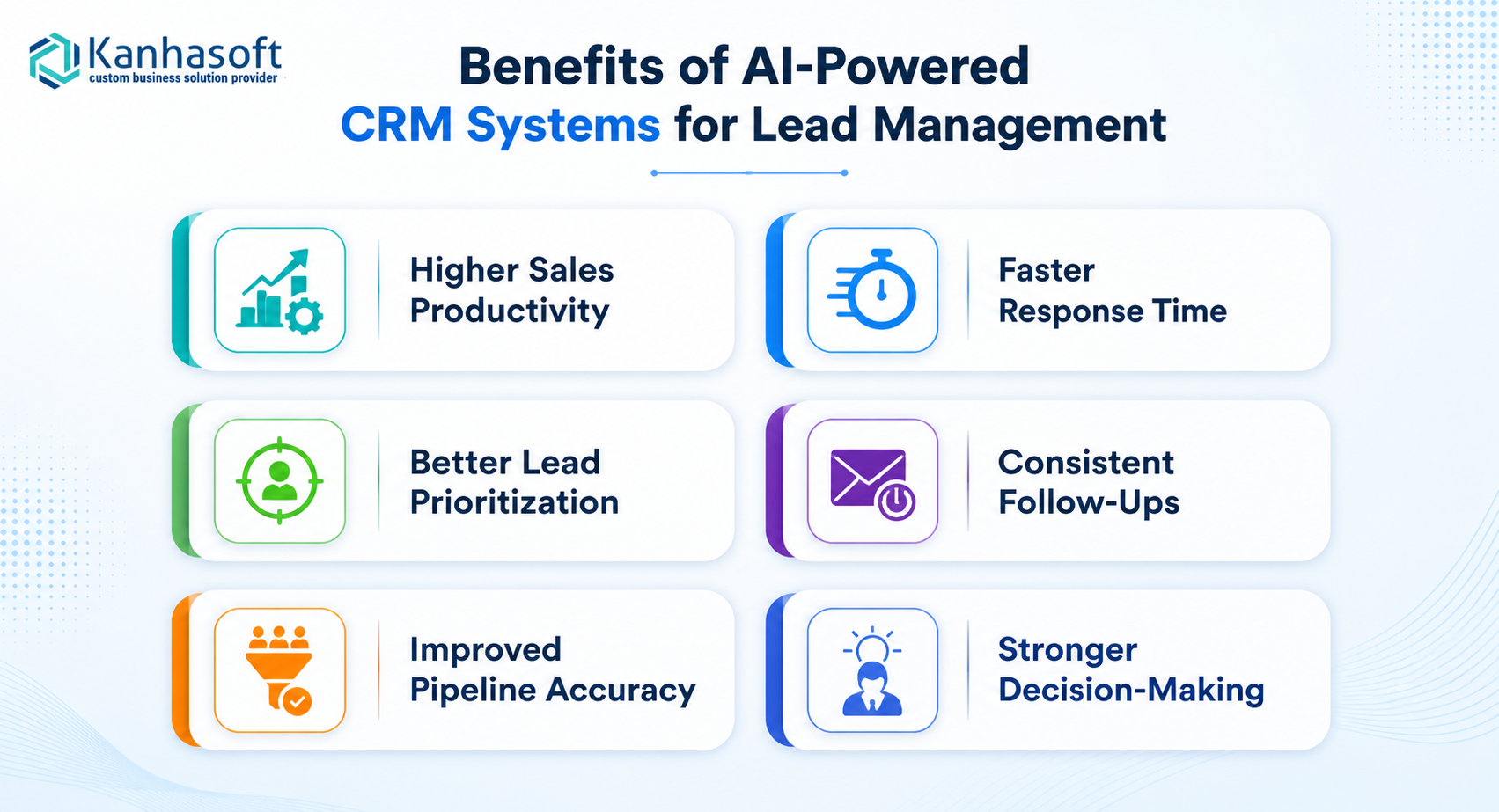
Higher Sales Productivity
AI reduces manual work such as data entry, duplicate checking, task creation, lead assignment, and basic reporting. This gives sales teams more time for conversations and deal progress.
Faster Response Time
Speed matters in lead management. Automated routing and alerts help teams respond while the lead is still interested.
Better Lead Prioritization
Sales teams can focus on leads with higher buying intent instead of treating every inquiry equally.
More Consistent Follow-Up
Automated reminders and workflows reduce the risk of missed calls, forgotten proposals, and cold leads.
Improved Pipeline Accuracy
AI can identify stale deals, missing data, and unusual patterns that make pipeline reports unreliable.
Stronger Decision-Making
Managers get clearer visibility into lead sources, conversion rates, sales activity, and forecasted revenue.
Limitations and Challenges to Consider
AI-powered CRM systems are useful, but they are not magic. Their success depends on data quality, process clarity, user adoption, and responsible implementation.
Poor Data Creates Poor Recommendations
If the CRM contains duplicate records, incomplete fields, outdated deal stages, or inconsistent activity logs, AI insights may be unreliable.
AI Needs Clear Business Rules
AI can assist with decisions, but your business still needs to define what a qualified lead means, when sales should follow up, and how leads move through the pipeline.
Sales Teams May Resist Automation
Some salespeople may feel that AI scoring or activity tracking is a control mechanism. Adoption improves when the CRM clearly saves time and helps them close more deals.
Customization Can Increase Complexity
A custom AI-powered CRM can fit your workflow better, but it also requires careful planning, technical expertise, and ongoing maintenance.
Compliance Cannot Be Ignored
If your CRM stores personal data, communication history, health data, financial information, or customer documents, privacy and security controls are essential.
Common Mistakes Businesses Make With AI CRM
Mistake 1: Automating a Broken Process
If your lead process is unclear, AI will not fix it automatically. First define lead stages, ownership rules, qualification criteria, and follow-up expectations.
Mistake 2: Scoring Leads Without Sales Feedback
Lead scoring should improve over time using real conversion data and sales feedback. If sales teams are not involved, the scoring model may prioritize the wrong leads.
Mistake 3: Tracking Too Many Fields
More data is not always better. Too many mandatory fields can slow down the team and reduce CRM adoption.
Mistake 4: Ignoring Integration Needs
A CRM becomes more useful when it connects with email, website forms, marketing tools, WhatsApp, ERP, accounting software, customer support tools, and reporting dashboards.
Mistake 5: Treating AI as a Replacement for Sales Judgment
AI should support sales decisions, not replace human judgment. Complex B2B sales still require relationship-building, negotiation, and context.
Compliance, Security, and Ethical Considerations
AI-powered CRM systems often process sensitive business and customer data. Companies should design these systems carefully.
Important considerations include:
- Role-based access control so users only see relevant data
- Audit logs to track important changes and user activity
- Data encryption for sensitive information
- Consent management for marketing communication
- Clear data retention policies
- Compliance with applicable privacy laws such as GDPR, CCPA, HIPAA, or industry-specific regulations
- Human review for important decisions such as lead rejection, pricing, eligibility, or account prioritization
- Transparent AI usage so teams understand how recommendations are generated
If your CRM handles regulated data, consult qualified legal, compliance, or data privacy professionals before finalizing your AI workflows.
Real-World Use Cases by Industry
|
Industry or Business Type |
AI CRM Lead Management Use Case |
|---|---|
|
Real estate |
Score buyer and investor leads based on budget, location, property interest, and urgency |
|
Healthcare |
Manage inquiries, consultations, follow-ups, and consent-sensitive communication |
|
Manufacturing |
Route distributor, dealer, and enterprise leads based on product category and region |
|
SaaS |
Prioritize trial users, demo requests, and product-qualified leads |
|
Logistics |
Assign leads based on route, location, service type, and contract size |
|
Franchise networks |
Route leads to the correct branch and monitor location-level response time |
|
Financial services |
Track inquiries, qualification steps, document collection, and compliance workflows |
|
Education and EdTech |
Manage student inquiries, counselor assignments, and admission pipeline stages |
|
Professional services |
Prioritize consultation requests by budget, service fit, and timeline |
Practical Decision Checklist Before Choosing an AI-Powered CRM
Use this checklist before selecting or building an AI CRM system:
- Do we have clear lead stages and qualification rules?
- Which lead sources need to be connected?
- What makes a lead high-quality for our business?
- Which tasks should be automated first?
- Which reports do sales and leadership need weekly?
- Do we need integration with ERP, accounting, marketing, WhatsApp, or support tools?
- Do we need role-based access for teams, branches, dealers, or locations?
- What customer data will the CRM store?
- Are there privacy or compliance requirements?
- Do we need a ready-made CRM or a custom CRM built around our workflows?
- How will we train users and measure adoption?
- Who will maintain and improve the CRM after launch?
Need Help Evaluating an AI-Powered CRM?
If your sales team is managing leads through spreadsheets, disconnected tools, or a CRM that no longer fits your workflow, it may be worth reviewing your current lead management process before choosing a new system.
Kanhasoft helps businesses plan and build custom CRM systems with lead tracking, workflow automation, role-based access, dashboards, integrations, and AI-enabled features where they make practical business sense. A good starting point is a CRM discovery session to map your lead sources, sales stages, automation needs, and reporting gaps before deciding whether a ready-made CRM, custom CRM, or hybrid approach is the right fit.
Final Words
AI-powered CRM systems improve lead management by helping businesses capture leads faster, prioritize better opportunities, automate follow-ups, improve pipeline visibility, and make more informed sales decisions. The biggest value comes when AI is applied to a clear sales process with clean data, practical automation, and strong user adoption.
For growing B2B companies, AI-powered CRM systems for lead management can turn scattered lead activity into a structured, measurable, and more predictable sales operation.