A CRM implementation can be technically complete and still fail the business.
The software may be live, yet sales representatives continue using spreadsheets. Reports may exist, yet leadership does not trust them. Automations may run, yet they create more manual corrections than they remove.
This is when CRM project rescue becomes necessary. The goal is not simply to fix a few bugs. It is to determine why the CRM is failing, protect what still works, correct the underlying problems, and rebuild confidence without wasting more time or budget.
Quick Answer: How Do You Rescue a Failed CRM Project?
CRM project rescue begins with an independent assessment of workflows, data, integrations, system architecture, user adoption, and project governance. The rescue team then stabilizes critical operations, narrows the scope, prioritizes business outcomes, fixes high-impact problems, and relaunches the CRM in controlled phases. Replacement should be considered only when recovery is riskier or more expensive than rebuilding.
This article is especially useful for:
- CEOs, CIOs, CTOs, and business owners responsible for CRM investment
- Sales and operations leaders dealing with low CRM adoption
- IT teams inheriting an incomplete or unstable implementation
- Companies experiencing unreliable CRM data or reporting
- Organizations deciding whether to repair, reconfigure, or replace a CRM
- Project sponsors evaluating CRM consulting services
What Is a Failed CRM Implementation?
A failed CRM implementation is one that does not deliver its intended business outcomes, even if the software has technically launched.
Failure does not always mean the CRM has crashed. In many cases, the warning signs are less dramatic:
- Users avoid the system or enter only the minimum required data.
- Sales teams maintain separate spreadsheets.
- Customer records contain duplicates or missing information.
- Reports show conflicting numbers.
- Integrations fail without clear alerts.
- Automations assign records incorrectly.
- Managers cannot see an accurate pipeline.
- Routine changes require expensive technical work.
- The implementation remains “almost finished” for months.
CRM implementation normally includes goal setting, process alignment, data migration, configuration, integration, training, and post-launch support. Missing any of these areas can weaken the overall outcome.
A CRM should support daily work. When employees must work around it, the implementation problem is operational, not merely technical.
Why CRM Implementations Fail

A CRM implementation failure rarely has one cause. It usually develops from several decisions that appeared reasonable when viewed separately.
| Root cause | What it looks like in practice | Business impact |
|---|---|---|
| Unclear business goals | The project focuses on features instead of measurable outcomes | High cost without visible value |
| Weak process discovery | The CRM reflects an idealized workflow rather than actual work | Users create manual workarounds |
| Excessive customization | Every stakeholder request becomes a custom feature | Delays, complexity, and maintenance problems |
| Poor data migration | Duplicate, incomplete, or outdated records are imported | Unreliable reports and low user trust |
| Fragile integrations | CRM, ERP, email, finance, and support tools fall out of sync | Repeated data entry and operational errors |
| Limited user involvement | Employees see the system only during training | Resistance and low adoption |
| Weak ownership | No business leader controls priorities after launch | Conflicting requests and scope drift |
| Inadequate testing | Individual screens are tested, but full workflows are not | Failures appear during real operations |
| Poor change management | The organization treats CRM as a software installation | Teams return to familiar tools |
Microsoft’s implementation guidance warns that weak change management can lead to low adoption, poor usage, and misaligned expectations. A technically functional platform may become little more than another data-entry tool when users do not understand its value.
Expert Observation
In troubled CRM projects, teams often begin by discussing screens, bugs, and missing features. However, the deeper issue is usually a lack of agreement about how leads, customers, deals, approvals, handoffs, and reports should work.
Fixing the interface before resolving that disagreement usually produces a cleaner version of the same problem.
Is the CRM Recoverable?
Not every failed implementation needs to be replaced. Many systems contain usable data models, integrations, configurations, or custom modules.
The first rescue decision should therefore be whether to optimize, partially rebuild, or replace the CRM.
| Option | Best when | Main risk |
|---|---|---|
| Reconfigure the current CRM | The platform is suitable, but workflows, fields, roles, or reports are poorly configured | Existing limitations may remain |
| Repair and optimize | The core architecture is usable, but data, integrations, usability, or performance need work | Hidden technical debt may expand the scope |
| Rebuild selected modules | Some areas work, while critical modules are fundamentally flawed | Old and new components must coexist temporarily |
| Replace the CRM | The platform cannot support required workflows, security, scale, or integration needs | Migration cost and organizational disruption |
| Return to a standard setup | Customization has become the main source of complexity | Some specialized requirements may be lost |
A rescue assessment should consider:
- Can the existing platform support the required business processes?
- Is the data model reliable and extendable?
- Are integrations documented and maintainable?
- Can security weaknesses be corrected?
- Does the organization own the source code, configuration, and documentation?
- Will users accept an improved version of the system?
- Is recovery financially sensible compared with replacement?
Do not let sunk cost make the decision. Money already spent should not justify another year of patching an unsuitable platform.
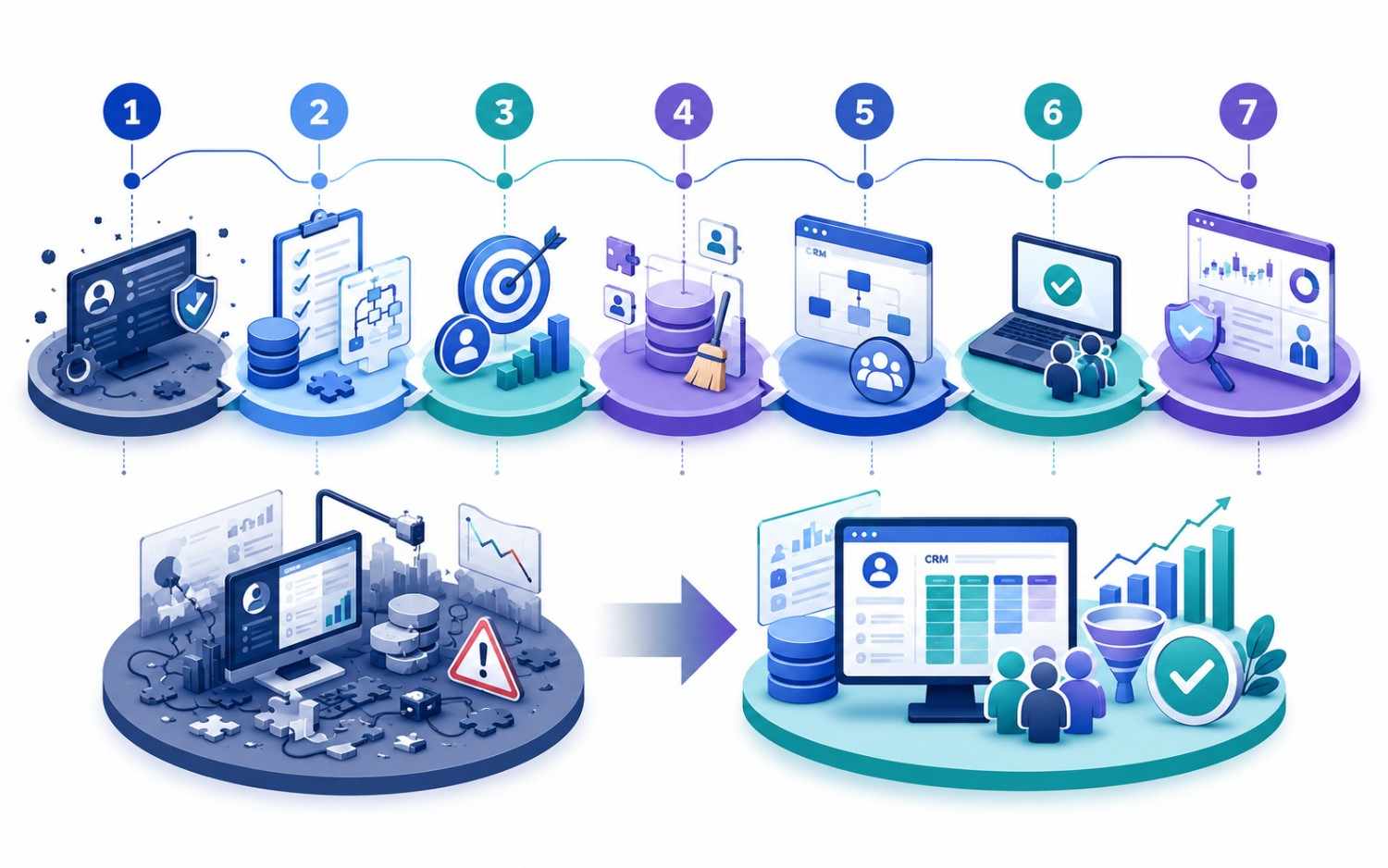
How CRM Project Rescue Works: A Seven-Step Recovery Plan
1. Stabilize the Current System
Before changing the CRM, protect business continuity.
Pause nonessential development and create backups of databases, configuration, source code, integration settings, documents, and deployment environments. Record current system behavior before developers make further changes.
Critical workflows may need temporary controls. For example, a sales team could manually verify high-value lead assignments while faulty automation is disabled.
The objective is containment. The CRM does not need to become perfect immediately. It first needs to stop creating new operational damage.
2. Conduct an Independent CRM Assessment
A rescue should begin with evidence, not assumptions.
Review the CRM across six areas:
- Business workflows and approval rules
- Data structure and data quality
- Integrations and synchronization
- Application architecture and code quality
- User experience and adoption
- Governance, documentation, and support
Interview executives, managers, frontline users, administrators, and technical teams separately. Their descriptions of the same process may differ significantly.
The assessment should produce a prioritized issue register. Each issue needs a business impact, technical cause, dependency, risk level, and recommended action.
3. Reset the Success Criteria
A failed project often carries an oversized backlog filled with old requests, emergency fixes, and conflicting stakeholder ideas.
Do not treat that backlog as the new rescue plan.
Define a smaller set of measurable outcomes, such as:
- One trusted view of each customer
- Accurate opportunity and revenue reporting
- Consistent lead assignment
- Reliable sales-to-operations handoffs
- Fewer manual follow-up tasks
- Faster quote or approval processing
- Higher active CRM usage
Then divide requirements into three groups:
- Essential for recovery
- Useful after stabilization
- Not currently justified
A disciplined scope may disappoint a few stakeholders. However, it gives the business a realistic path back to value.
4. Repair Data, Integrations, and Security
CRM system optimization depends on trustworthy information.
Start by defining the authoritative source for each major field. The CRM might own lead status, while an ERP owns invoice status and an accounting platform owns payment confirmation.
Next, clean duplicate records, standardize values, correct invalid relationships, archive irrelevant data, and validate migrated histories. Salesforce recommends defining migration scope, identifying source systems, designing the target data model, transforming records, and testing data integrity.
Integration repair should include:
- Field-mapping documentation
- API authentication review
- Retry and failure-handling logic
- Synchronization logs
- Duplicate-prevention rules
- Reconciliation reports
- Alerts for failed transactions
- Clear ownership of integration errors
Security should be reviewed at the same time. CRM integrations can expose customer, financial, and operational data. OWASP identifies broken authorization, authentication weaknesses, security misconfiguration, and unsafe API consumption among significant API risks.
Businesses handling regulated or sensitive data should involve qualified security, privacy, compliance, or legal professionals where appropriate.
For a more detailed data plan, review these CRM data migration best practices.
5. Redesign Workflows Around Real User Behavior
A CRM cannot improve a process that nobody has defined clearly.
Map what users actually do from the moment a lead enters the business until the customer is onboarded, served, renewed, or lost.
Look for practical friction:
- Too many required fields
- Repeated data entry
- Unclear record ownership
- Excessive approval steps
- Separate screens for one simple task
- Notifications that users ignore
- Reports that require manual cleanup
- Mobile workflows that are difficult to complete
Then simplify.
A salesperson should not need twelve clicks to record a call. A manager should not need three exports to understand the pipeline. A support agent should not need to ask finance whether a customer has paid.
For businesses struggling with disconnected tools, the guide to common CRM integration challenges explains how data models, APIs, validation, and workflow design affect CRM reliability.
6. Relaunch Through Controlled Pilots
Avoid another company-wide “big bang” launch.
Choose one team, location, pipeline, or customer segment for the first rescue release. Select users who understand the process and will provide direct feedback.
The pilot should test complete business scenarios, not isolated features. For example:
- A lead enters from a website.
- The CRM checks for duplicates.
- Assignment rules select an owner.
- A follow-up task is created.
- Communication is recorded.
- The opportunity moves through approvals.
- Management reports update correctly.
- Data synchronizes with connected systems.
Training should be role-specific and based on daily tasks. Microsoft notes that training gives users the confidence to work effectively, while adoption connects the technology to business outcomes.
7. Establish Long-Term CRM Governance
A rescued CRM can fail again without clear ownership.
Create a governance structure that defines:
- Who approves workflow changes
- Who owns data quality
- Who manages fields and permissions
- How enhancement requests are prioritized
- How integrations are monitored
- Which performance indicators are reviewed
- How users receive support
- When security and access are audited
Track both system metrics and business metrics.
System metrics may include login frequency, failed integrations, duplicate records, page performance, and unresolved errors. Business metrics may include lead response time, pipeline accuracy, conversion rates, follow-up completion, approval turnaround, and forecast reliability.
CRM project rescue ends only when the business can manage the system confidently without returning to emergency mode.
Practical CRM Implementation Scenario
A documented Kanhasoft project involved a multi-location franchise business that was dealing with manual lead handling, inconsistent SMS follow-ups, fragmented deal tracking, and heavy administrative dependency.
The resulting CRM centralized lead management while preserving local flexibility. It included Twilio-based SMS workflows, multiple pipeline views, reusable message templates, HubSpot synchronization, and scalable cloud architecture.
This project is not presented as a rescue engagement. However, it illustrates an important recovery principle: successful CRM design connects governance, automation, integrations, usability, and reporting rather than treating each as a separate feature.
You can review the franchise CRM and lead management case study for additional implementation context.
How to Choose CRM Consulting Services for a Rescue
CRM rescue requires more than platform configuration. The consulting team must understand business processes, data, integrations, software architecture, change management, and delivery governance.
Ask potential partners to explain:
- How they will assess the existing implementation
- What access and documentation they require
- How they separate urgent fixes from long-term improvements
- How they evaluate whether recovery or replacement is better
- How they protect data during the transition
- How they test end-to-end workflows
- How they transfer knowledge to internal teams
- How they measure adoption and business outcomes
Be cautious when a provider recommends a complete rebuild before reviewing the current system. Be equally cautious when a provider promises to repair everything without discussing business priorities or technical debt.
A credible rescue partner should be comfortable saying that some features should be removed, delayed, or replaced with simpler processes.
Planning a CRM Recovery with Kanhasoft

Kanhasoft’s custom CRM development services cover workflow discovery, CRM architecture, API integration, data migration, role-based access, testing, deployment, training, and long-term enhancements. The company also documents experience with franchise, insurance, logistics, healthcare, and service-business CRM systems.
If your CRM is live but not delivering dependable results, Kanhasoft can review the current workflows, data, architecture, integrations, and adoption problems before recommending whether to repair, rebuild, or replace it.
The first useful deliverable is often not a new proposal. It is an honest recovery assessment with priorities, risks, and realistic next steps.
Final Words
A failed CRM does not always require a fresh platform. However, it does require a fresh diagnosis.
Effective CRM project rescue starts by stabilizing operations, identifying the true causes of failure, resetting priorities, repairing data and integrations, simplifying user workflows, and relaunching in controlled phases.
The central question is not, “How do we finish the original project?” It is, “What does the business now need the CRM to achieve?”
That shift turns recovery from an endless bug-fixing exercise into a practical business improvement program.