A logistics operation cannot move in real time when its software exchanges data every 15 minutes.
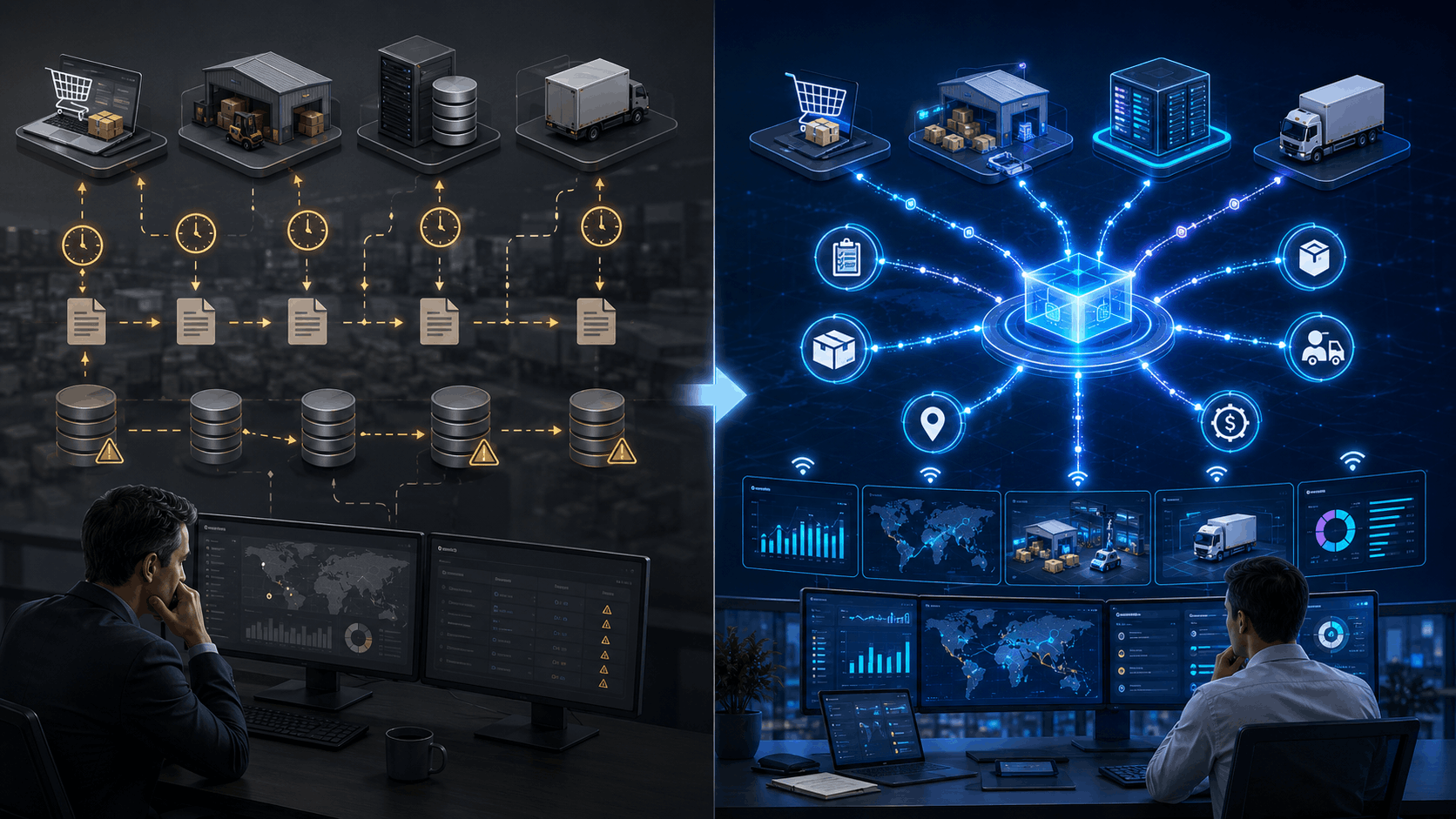
During that gap, a shipment may leave the warehouse, inventory may change, a delivery may fail, or a customer may request an updated arrival time. Yet the ERP still shows the previous state.
An event-driven Custom Logistics ERP addresses this delay by processing operational changes as events occur. Instead of repeatedly asking connected systems whether something has changed, applications publish events such as “shipment dispatched,” “stock reserved,” or “delivery failed.” The ERP and other authorized systems can then respond immediately.
This architecture can improve operational visibility and system scalability. However, it also introduces challenges involving duplicate events, processing order, monitoring, security, and eventual consistency.
Quick Answer
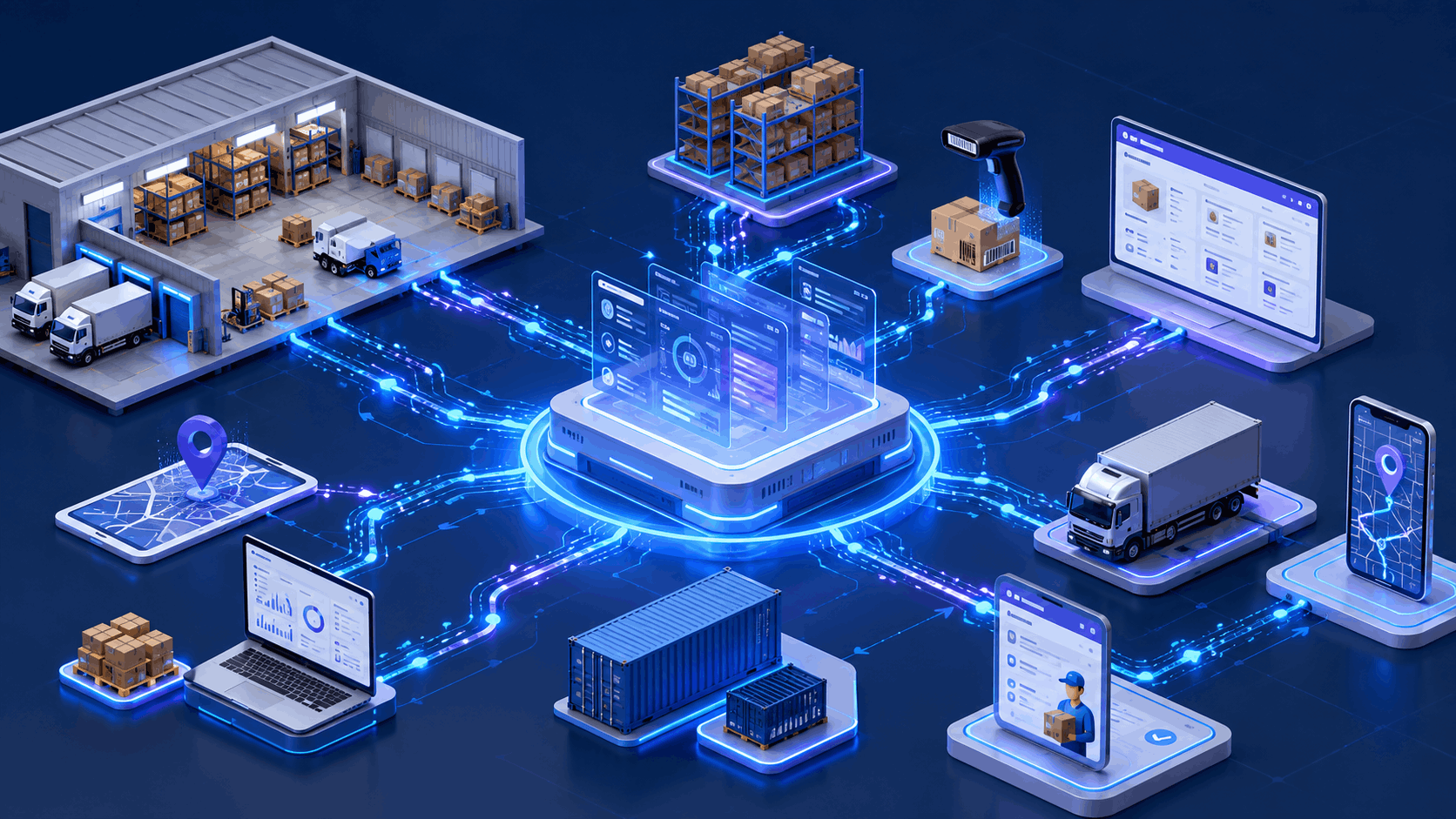
Event-driven ERP architecture allows logistics systems to exchange operational updates whenever a meaningful business event occurs. An order confirmation can trigger inventory reservation, warehouse picking, carrier booking, customer notifications, and financial updates without waiting for the next scheduled synchronization. It works best for frequent, time-sensitive workflows but requires strong controls for retries, duplicates, event ordering, monitoring, and data ownership.
Why Scheduled ERP Synchronization Becomes a Logistics Bottleneck
Traditional ERP integrations often use scheduled jobs.
A warehouse management system may send inventory updates every 10 minutes. A transportation management system may upload shipment statuses every hour. Carrier files may enter the ERP overnight.
This approach is predictable and relatively simple. It works well for payroll, monthly reports, historical data imports, and other processes that do not require immediate action.
The problem appears when scheduled synchronization controls live operations.
Consider a distributor that promises same-day dispatch. Its ecommerce platform accepts an order at 2:02 p.m., but the ERP does not receive it until 2:15 p.m. During those 13 minutes, another channel may sell the same inventory.
The systems are technically connected. The business process is still behind.
Frequent polling also creates unnecessary traffic. Applications repeatedly ask, “Has anything changed?” even when the answer is no. Event-driven systems reverse that process. The source application announces the change only when something happens. AWS describes this as a push-based model that reduces continuous polling and allows connected components to scale and fail more independently.
Businesses evaluating this broader problem can also review why logistics companies need custom ERP systems.
What Is Event-Driven ERP Architecture?
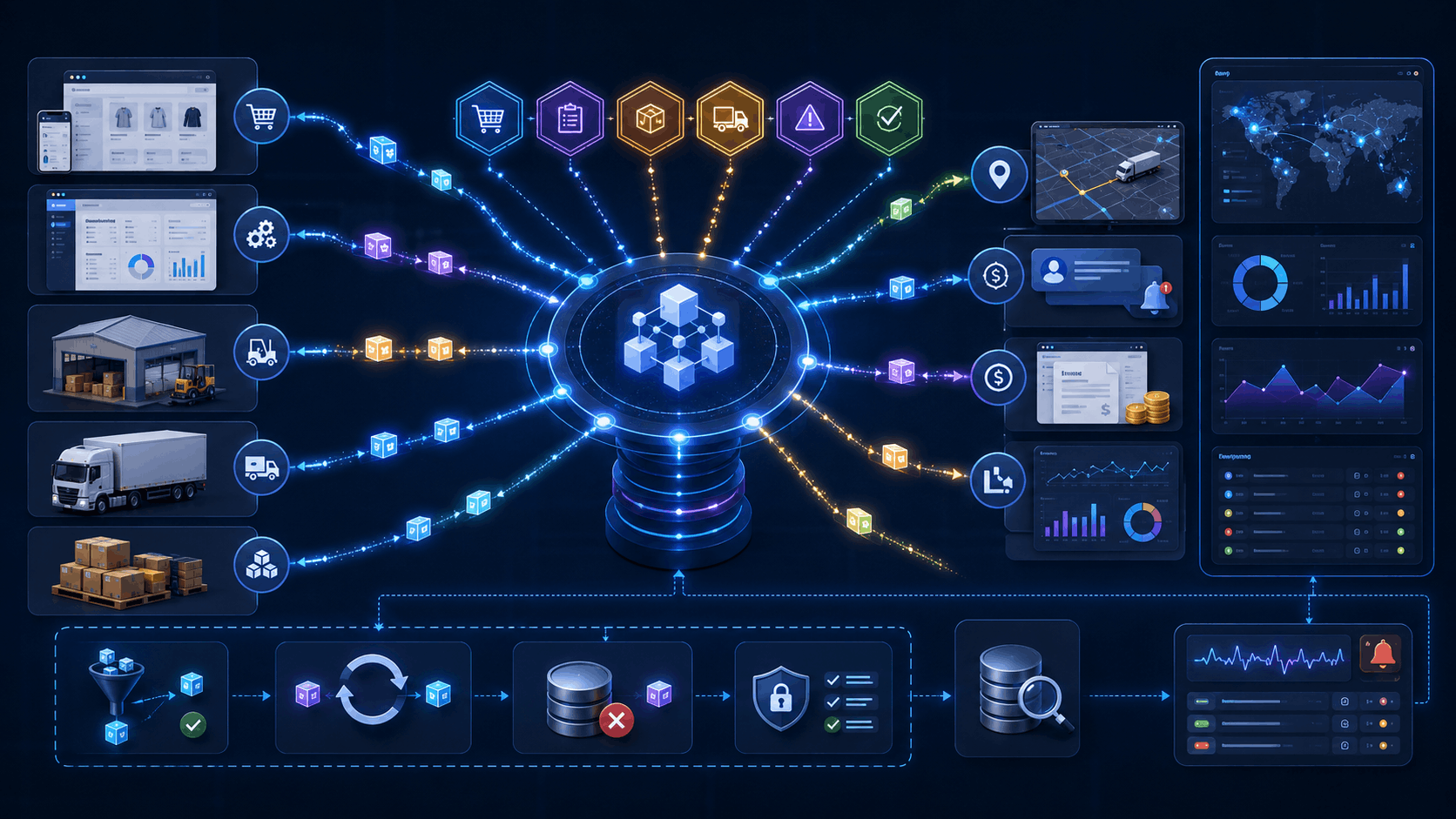
Event-driven ERP architecture is a software design approach in which systems produce, distribute, and process messages about completed business events.
Microsoft defines the core architecture through three roles:
- Event producers generate events.
- Event channels or brokers transport and route events.
- Event consumers listen for relevant events and take action.
Because producers and consumers remain separated, one system does not need detailed knowledge of every application using its events.
For example, a warehouse system may publish:
ShipmentPacked
Several consumers can use that single event:
- The transportation system books carrier pickup.
- The ERP updates the order status.
- The customer portal displays the latest progress.
- The notification service sends an email or SMS.
- The analytics platform records packing time.
The warehouse system does not need five direct integrations. It only needs to publish a reliable event.
Real time does not always mean instantaneous
In business systems, “real time” usually means that processing begins within seconds or moments of an event. It does not guarantee zero delay.
Network conditions, downstream availability, validation rules, queue backlogs, and retry policies affect processing time. Therefore, ERP teams should define measurable expectations, such as:
- Inventory reservations processed within five seconds
- Carrier updates displayed within 30 seconds
- Failed deliveries escalated within one minute
- Financial reconciliation completed within one hour
Clear service-level expectations are more useful than a vague promise of “instant updates.”
How an Event Moves Through a Custom Logistics ERP
A practical event-driven order flow may work like this:
- The ecommerce platform confirms payment.
- It publishes an OrderConfirmed event.
- The ERP validates the customer and order.
- The inventory service reserves available stock.
- A StockReserved event creates a warehouse task.
- The warehouse confirms picking and packing.
- A ShipmentReady event requests a carrier label.
- The carrier sends tracking events during transportation.
- A ShipmentDelivered event updates the ERP, finance system, customer portal, and performance dashboard.
Each service performs a focused responsibility. If the notification service becomes unavailable, inventory reservation can still continue. The failed notification remains available for retry rather than blocking the complete order.
This loose coupling is one of the strongest reasons to adopt real-time ERP integration. However, loose coupling does not mean loose governance. Teams must still define which system owns orders, products, inventory, customers, invoices, and shipment status.
For broader integration planning, see Kanhasoft’s guide to ERP API integration best practices.
Scheduled Sync vs Direct APIs vs Event-Driven Integration
Most logistics environments need more than one integration method.
|
Integration method |
Best suited for | Main strength |
Main limitation |
|---|---|---|---|
|
Scheduled batch sync |
Payroll, historical imports, reconciliation, large reports | Simple and predictable |
Information remains outdated between runs |
|
Direct API request |
User actions that require an immediate response | Clear request-and-response flow |
Creates dependencies between connected systems |
|
Webhook |
Notifications from supported external platforms | Reduces polling |
Requires duplicate and failure controls |
|
Event-driven integration |
Orders, inventory, scans, shipment status, alerts | Responsive and scalable |
Requires stronger architecture and monitoring |
|
Hybrid architecture |
Complex ERP environments with mixed timing needs | Matches each workflow to the right method |
Requires careful governance |
A carrier rate request may still use a direct API because the ERP needs an immediate price response.
A shipment status change is different. The carrier can publish the update, and interested systems can consume it asynchronously.
The goal is not to make every ERP process event-driven. The goal is to use event processing where waiting creates operational risk or unnecessary manual work.
Core Components of Real-Time ERP Integration
Domain events
Events should describe completed business facts rather than vague technical changes.
Good event names include:
- OrderApproved
- InventoryReserved
- PickListCompleted
- VehicleAssigned
- ShipmentDelayed
- ProofOfDeliveryReceived
- InvoiceGenerated
Names such as RecordUpdated provide too little context. Consumers should not need to guess what changed or why it matters.
Event broker or streaming platform
The broker receives events and routes them to consumers. Depending on volume, hosting strategy, and internal skills, a business may consider Apache Kafka, RabbitMQ, Amazon EventBridge, Amazon SQS, Azure Service Bus, Azure Event Grid, Google Pub/Sub, or another managed messaging platform.
The technology should follow the operational need. A regional distributor processing moderate order volume may not need the same streaming infrastructure as a global marketplace handling continuous telemetry and tracking updates.
Integration adapters
Logistics businesses rarely replace every system at once. Adapters can translate data from carrier APIs, electronic data interchange files, barcode platforms, GPS devices, warehouse applications, accounting tools, and older databases into consistent ERP events.
Event schemas and versioning
Every event requires a defined structure.
A shipment event may include an event ID, shipment ID, customer account, timestamp, location, status, source, and schema version.
Microsoft warns that consumers may break when producers change an event structure without a versioning strategy. Schema governance should therefore begin before the first production integration.
CloudEvents can also provide a vendor-neutral format for common event metadata across platforms and services.
Reliability Controls That Logistics ERPs Cannot Ignore
Idempotency and duplicate protection
Message systems may deliver the same event more than once. Therefore, consumers must recognize events they have already processed.
Without this protection, one shipment event could create two invoices, reserve stock twice, or send repeated customer notifications.
AWS recommends making state-changing operations idempotent because duplicate delivery can occur in event-driven systems.
Common controls include:
- Unique event IDs
- Idempotency keys
- Processed-event records
- Database uniqueness constraints
- Safe retry rules
Ordering
Events do not always arrive in the order they occurred.
A delayed network request might cause ShipmentDelivered to arrive before ShipmentOutForDelivery. The ERP should compare event timestamps, sequence numbers, and valid status transitions before changing the record.
Retries and dead-letter queues
Temporary failures should trigger controlled retries. Events that continue to fail should move to a dead-letter queue for investigation.
However, endless automatic retries can make a small data issue much larger. Teams should define retry limits, delay intervals, escalation rules, and ownership.
Replay and reconciliation
An event log can help rebuild a downstream view after an outage. Still, replay must be controlled. Reprocessing every historical event could resend notifications or repeat external transactions.
Daily or hourly reconciliation remains valuable even in a real-time architecture. Event processing improves speed, while reconciliation confirms completeness.
Apache Kafka can durably store events in topics and supports configurable processing guarantees, including exactly-once capabilities in supported stream-processing scenarios. That does not remove the need for business-level duplicate protection when events reach external systems.
When Event-Driven Architecture Is the Right Choice
|
Business situation |
Recommended approach |
|---|---|
|
Shipment and inventory updates occur throughout the day |
Event-driven |
|
Customers expect live tracking and exception alerts |
Event-driven |
|
Several systems need the same operational update |
Publish-subscribe events |
|
One user action needs an immediate answer |
Direct API |
|
Data is used only for overnight reporting |
Batch processing |
|
Legacy systems cannot publish events |
Adapter plus hybrid integration |
|
Transaction volume is low and workflows are simple |
Direct API or scheduled sync |
|
The organization lacks monitoring and integration ownership |
Improve governance before expanding EDA |
A smaller logistics company may gain more value from improving master data and API reliability than from deploying a complex streaming platform.
Event-driven architecture becomes practical when the cost of delayed information, system dependency, and manual intervention justifies the additional technical ownership.
A Practical Implementation Roadmap

1. Map time-sensitive workflows
Start with business events, not infrastructure products.
Identify where delayed data affects dispatch, customer communication, stock availability, billing, compliance, or service-level performance.
2. Define data ownership
Assign one authoritative system for every important entity. Decide whether the ERP, WMS, TMS, CRM, ecommerce platform, or accounting system owns each field.
3. Create an event catalog
Document event names, producers, consumers, schemas, security classification, retention rules, and expected processing time.
4. Build one high-value pilot
A good pilot may connect order confirmation, stock reservation, and warehouse task creation. This flow has visible business value without requiring every logistics process to change at once.
5. Add operational controls
Implement tracing, event IDs, retries, dead-letter queues, alerts, dashboards, and reconciliation before expanding volume.
6. Migrate in phases
Run scheduled synchronization and events together during a controlled transition. Compare results, investigate mismatches, and remove the old process only after the new flow proves dependable.
Implementation Risks and Honest Trade-Offs
Event-driven logistics management software can improve responsiveness, but it is not automatically simpler.
Teams must prepare for:
- Eventual consistency between applications
- More complex troubleshooting
- Schema changes across independent services
- Duplicate and out-of-order messages
- Growing cloud and observability costs
- Sensitive data appearing in event payloads
- Unclear responsibility for failed transactions
- Skills gaps in distributed system management
Security teams should review encryption, access controls, tenant separation, audit logs, event retention, and personal-data exposure. Legal or privacy specialists may also need to review cross-border data movement and industry-specific requirements.
A practical architecture publishes only the data each consumer needs. An event bus should not become a convenient place to copy entire customer or shipment records without purpose.
Experience-Based Observation: Connect the Transaction, Not Just the Screen
One Kanhasoft case study describes a production and logistics ERP that unified production, inventory, procurement, sales, and logistics. The platform included bill-of-material-driven planning, real-time inventory tracking, role-based workflows, REST APIs, and sales-to-logistics integration.
The useful lesson is that integration should follow the complete business transaction. Sending a sales order to an ERP has limited value if stock reservation, warehouse execution, procurement, dispatch, and delivery confirmation remain disconnected.
The case study does not specify the use of an event broker. Therefore, it should not be presented as proof of an event-driven implementation. It does, however, demonstrate the operational need for connected, timely information across logistics functions.
Planning a Real-Time Custom Logistics ERP?
Kanhasoft can help logistics and operations teams map time-sensitive workflows, define data ownership, evaluate integration options, and design a phased ERP architecture.
Our custom ERP development services cover workflow discovery, ERP modules, API integration, data migration, event processing, security planning, testing, deployment, and long-term enhancement.
A focused architecture review can help determine where events will create measurable value and where direct APIs or scheduled processing remain the better choice.
Final Thoughts
An event-driven Custom Logistics ERP can break the cycle of delayed synchronization by allowing operational systems to respond when orders, inventory, warehouse activities, and shipments actually change.
However, real-time processing requires more than a message broker. It depends on clear data ownership, useful event definitions, duplicate protection, schema governance, monitoring, reconciliation, and phased implementation.
The best architecture is usually hybrid. Use events for frequent and time-sensitive logistics workflows, direct APIs for immediate requests, and scheduled processing where speed adds little business value. That balanced approach creates a logistics ERP that responds faster without adding unnecessary complexity.