A production delay rarely starts and ends on the factory floor.
A missing component affects the work order. The work-order delay changes the delivery date. Sales still promises the original date because nobody updated the customer record. Finance, meanwhile, is calculating margin from a bill of materials that changed two revisions ago.
This is the kind of problem ERP for manufacturing is designed to solve.
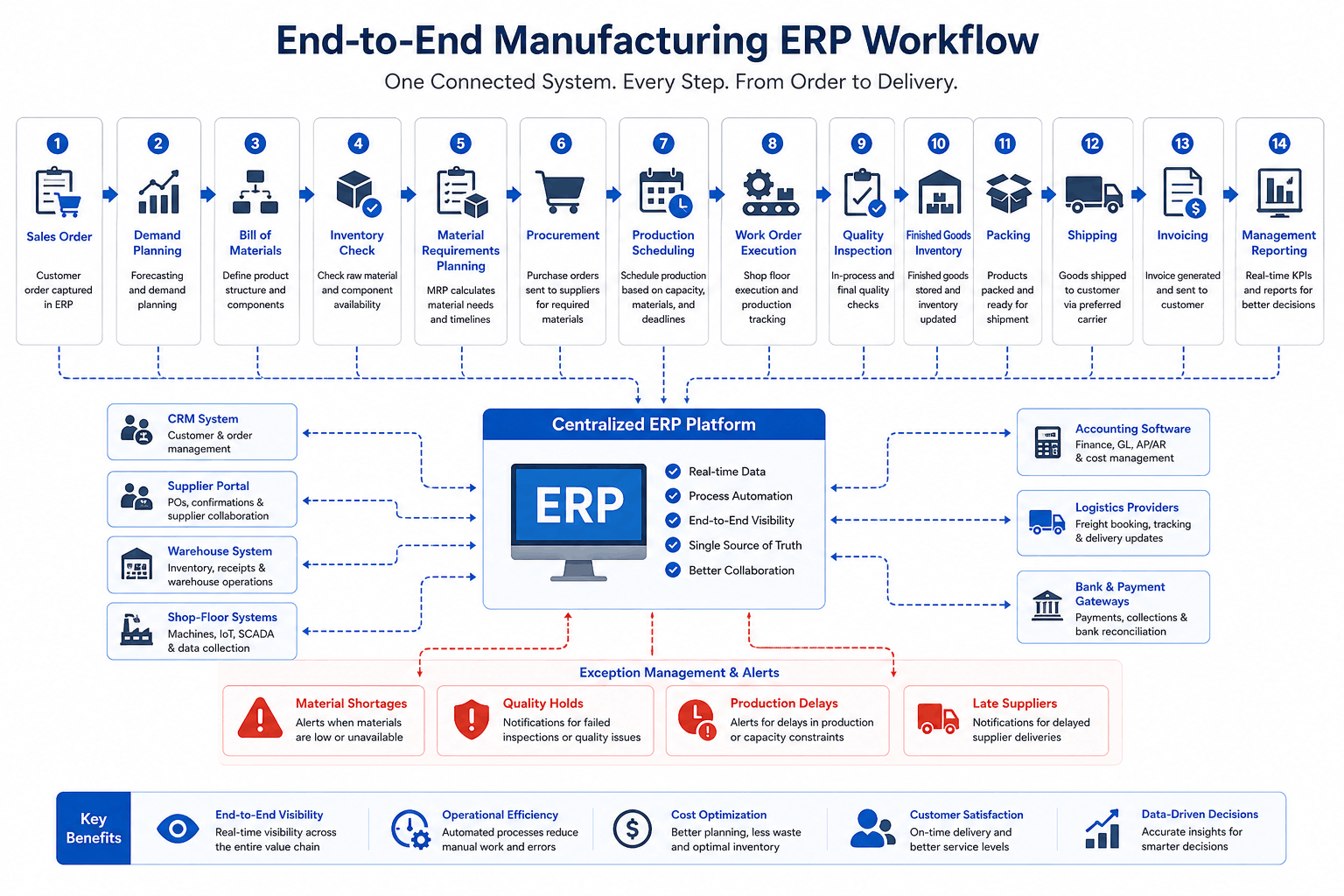
A manufacturing ERP system connects demand, materials, production, purchasing, quality, inventory, logistics, and finance. Instead of each department working from its own spreadsheet or application, the company gets one coordinated operational record.
ERP does not make production problems disappear. It makes them visible earlier, shows which processes they affect, and gives the right people a structured way to respond.
This article is especially useful for:
- Manufacturing business owners
- Plant and operations managers
- Production planners
- Procurement and supply chain teams
- Inventory and warehouse managers
- Finance leaders evaluating production costs
- Companies comparing ERP development services
Quick Answer
ERP for manufacturing solves operational challenges by connecting production plans with the materials, people, machines, orders, and approvals needed to complete them.
A practical manufacturing ERP can help a company:
- Build production plans from current demand and inventory
- Maintain controlled bills of materials
- identify shortages before work begins
- Generate purchasing requirements
- Track work orders and production progress
- Record scrap, rework, downtime, and quality results
- Trace materials and finished goods by lot or serial number
- Connect sales commitments with production and shipping
- Compare planned costs with actual production costs
- Give each role a relevant operational dashboard
The software still depends on clean data and consistent use. An ERP cannot repair an inaccurate BOM, a missing stock transaction, or an unclear approval rule unless the business first defines the correct process.
Why Manufacturing Problems Spread So Quickly
Manufacturing is a chain of dependent decisions.
Production cannot begin without materials. Procurement cannot order correctly without reliable demand. Warehouse teams cannot reserve the right stock without accurate item codes. Sales cannot give a dependable delivery date without knowing production capacity.
When departments work in separate systems, each team may complete its own task correctly while the overall process still fails.
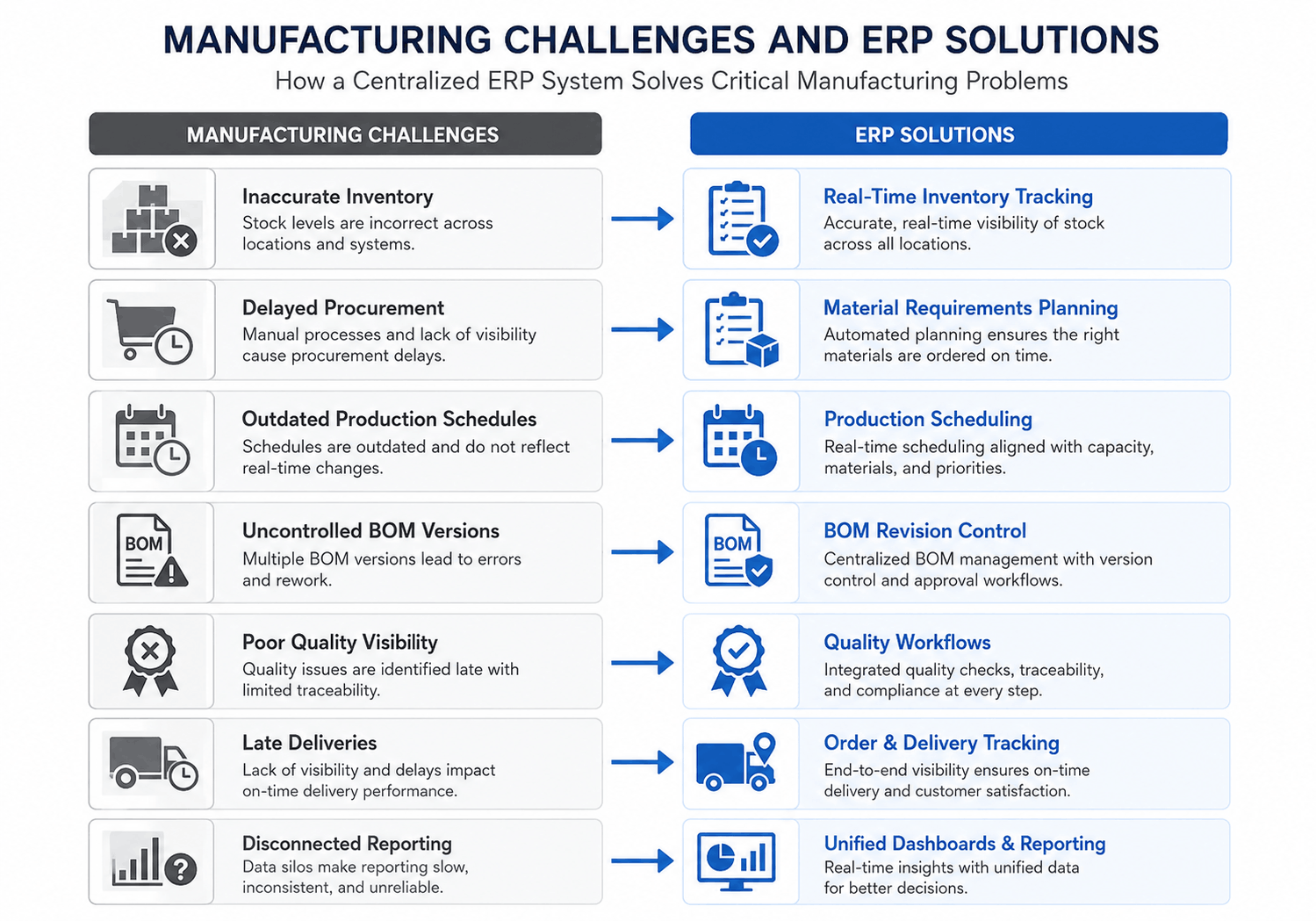
|
Operational challenge |
What usually happens without an integrated ERP |
|---|---|
|
Production schedules change |
Updates remain in spreadsheets or meetings |
|
Material shortages appear |
Purchasing learns about them too late |
|
BOM revisions are released |
Production and procurement use different versions |
|
Inventory moves |
Physical stock and system records drift apart |
|
Quality rejects material |
Planning still treats it as available |
|
Work orders fall behind |
Sales continues using the old delivery date |
|
Actual costs increase |
Management sees the variance after the order closes |
ERP brings these events into the same workflow. A change in one area can then update—or at least alert; the other teams that depend on it.
How ERP for Manufacturing Improves Production Planning
Production planning becomes unreliable when it is built from yesterday’s information.
A planner may have confirmed demand but no clear view of material availability. Another spreadsheet may show machine capacity. A supervisor knows that one work center is unavailable, although that update has not reached the plan.
A manufacturing ERP system can bring together:
- Customer orders
- Forecast demand
- Available and reserved stock
- Open purchase orders
- Bills of materials
- Production lead times
- Work-center availability
- Current work orders
- Order priorities
The planner can then see which jobs are ready, which are waiting for materials, and which delivery dates are at risk.
This does not mean the system should make every production decision automatically. A planning engine may recommend a schedule, but the planner still understands practical constraints that the data may not capture.
That balance matters. Good automation reduces calculation work. It does not remove operational judgment.
BOM Control Prevents Expensive Confusion
The bill of materials looks simple on paper: a list of components and quantities needed to make a product.
In a working factory, it may include subassemblies, alternative parts, scrap factors, effective dates, units of measure, packaging, and approved substitutions.
Things become messy when engineering, purchasing, and production use different versions.
A manufacturing ERP can maintain:
- Approved BOM versions
- Revision histories
- Effective dates
- Multi-level assemblies
- Alternative components
- Scrap allowances
- Approval workflows
- Links to work instructions or drawings
Consider a manufacturer that replaces one component after a supplier issue. Purchasing must know which substitute to order. Production must know when the new component becomes valid. Costing must reflect the new price.
Without revision control, each team may make a reasonable decision based on a different version of the truth.
ERP creates the control point. However, the business must still decide who can create, review, approve, and release a BOM change.
Inventory Accuracy Starts With Process Discipline
It is tempting to think that an ERP automatically creates accurate inventory.
It does not.
Inventory becomes accurate when physical movements and system transactions happen together.
That includes:
- Receiving raw materials
- Moving stock between bins
- Issuing components to production
- Returning unused material
- Recording scrap
- Completing finished goods
- Moving items into quality hold
- Releasing inspected stock
- Shipping customer orders
A barcode or mobile scanning workflow can make these transactions easier. Yet the scanner only records what the process tells it to record.
If employees complete production at the end of a shift but update the ERP the following morning, the system will show yesterday’s work-in-progress and today’s availability. Planning decisions made during that gap may be wrong.
A useful ERP design keeps transactions close to the physical activity and avoids asking employees to enter the same information twice.
Procurement Moves From Reaction to Planning
Procurement often gets blamed for shortages that it could not have predicted.
A buyer may know the supplier lead time but not the latest production demand. Production may know which components are missing but not whether a purchase order is already on the way.
ERP manufacturing process automation software can calculate material requirements using:
- Confirmed production orders
- BOM quantities
- Available stock
- Reserved quantities
- Safety stock
- Open purchase orders
- Supplier lead times
- Minimum order quantities
The system can suggest purchase requirements or generate draft purchase orders.
The buyer still needs to assess supplier capacity, quality history, pricing, transport risk, and commercial terms. ERP improves the starting information. It does not replace supplier management.
|
Manual procurement process |
ERP-supported process |
|---|---|
|
Shortages are found during production |
Shortages appear during planning |
|
Requests arrive by email or spreadsheet |
Demand comes from approved work orders |
|
Buyers check order status manually |
Open orders and expected dates are visible |
|
Supplier performance is difficult to compare |
Delivery and quality history can be reviewed |
|
Production changes are easy to miss |
Changed demand can trigger alerts |
Work-Order Visibility Gives Sales a More Honest Delivery Date
“In production” is not a useful status by itself.
The material may not have been issued. The first operation may be complete, while the job is waiting for inspection. Half the quantity may have failed a quality check.
A manufacturing ERP can show a work order through meaningful stages:
- Planned
- Approved
- Material allocated
- Released to production
- In progress
- Waiting for inspection
- Partially completed
- Completed
- Packed
- Shipped
Supervisors can record quantities, labor time, material usage, scrap, rework, and reasons for delay.
For detailed machine events, an MES may remain the better system. ISA-95 provides a framework for separating enterprise planning functions from manufacturing operations and control while defining the information that moves between them.
In other words, the ERP does not need to control every machine cycle. It needs trustworthy updates about what production has completed and what is blocking the next step.
Quality and Traceability Become Part of the Workflow
Quality records often live outside the systems used by production and inventory.
That creates a dangerous gap. A rejected component may still appear available. A finished batch may move toward shipping while an inspection result is sitting in someone’s inbox.
ERP-supported quality workflows can include:
- Incoming material checks
- In-process inspections
- Final product inspection
- Quality holds
- Nonconformance records
- Rework instructions
- Corrective actions
- Supplier quality history
- Test certificates
Traceability adds another layer.
When a defect is reported, the manufacturer may need to find the material lot, supplier, work order, inspection result, finished batch, and every customer who received affected units.
Regulated industries may have specific recordkeeping obligations. For example, FDA rules require traceability lot codes for certain covered foods, while some medical devices require lot, batch, or other control numbers. The exact requirements depend on the product and jurisdiction.
Manufacturers in regulated sectors should involve qualified quality, legal, and compliance professionals when defining these workflows.
ERP Shows Why Actual Production Costs Changed
Standard costing may suggest that an order is profitable.
Actual production may tell another story.
Perhaps more material was consumed than planned. Labor took longer. A machine breakdown caused overtime. One batch required rework. Freight costs changed because the shipment became urgent.
A manufacturing ERP system can compare planned and actual values for:
- Material usage
- Purchase price
- Labor time
- Machine time
- Scrap
- Rework
- Outside processing
- Freight
- Overhead
The goal is not simply to produce another financial report. It is to connect the variance with an operational cause.
Finance teams should define costing and inventory valuation rules. Production teams should make sure shop-floor transactions are timely enough to support those calculations.
What ERP Cannot Fix on Its Own
ERP is not a substitute for process decisions.
|
Warning sign |
What must happen before automation |
|---|---|
|
Several versions of the same BOM exist |
Approve one controlled version |
|
Employees use different item codes |
Clean and standardize master data |
|
No one owns production priorities |
Define scheduling responsibility |
|
Stock is moved without recording it |
Redesign the warehouse transaction process |
|
Quality decisions happen informally |
Document inspection and release authority |
|
Every customer receives a unique process |
Separate genuine exceptions from habits |
|
Managers request different reports |
Agree on KPI definitions |
This is where ERP projects often become uncomfortable. The software exposes disagreements that spreadsheets allowed teams to avoid.
That is not a reason to stop. It is a reason to handle discovery properly.
NIST’s Manufacturing Extension Partnership advises manufacturers to evaluate technology fit, scope implementation around business goals, and plan adoption rather than starting with a vendor pitch.
Standard ERP or Custom Manufacturing ERP?
A packaged system and a custom manufacturing ERP can both be reasonable choices.
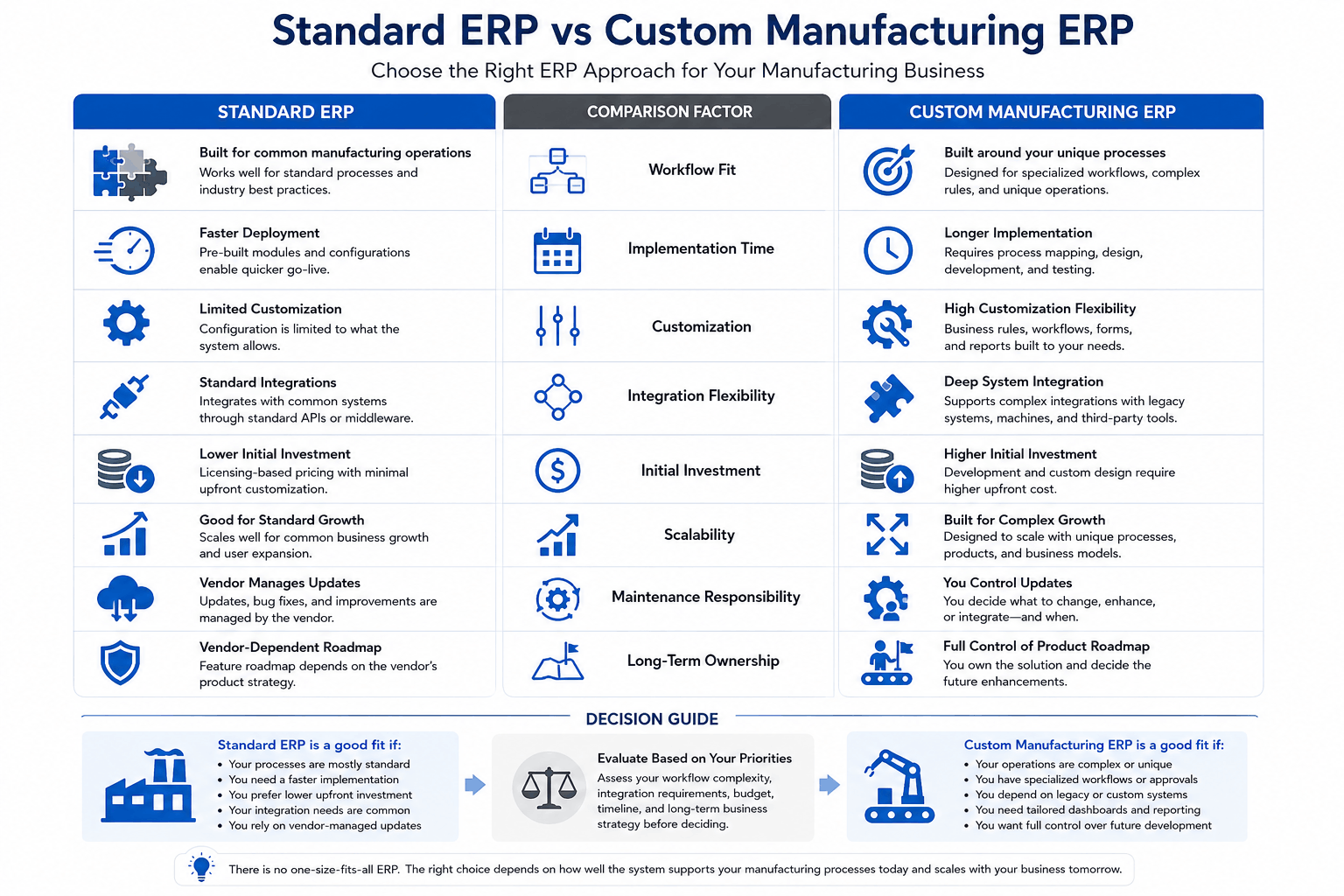
| Decision factor | Standard manufacturing ERP |
Custom manufacturing ERP |
|---|---|---|
| Common manufacturing functions | Often available already |
Must be designed or developed |
|
Deployment speed |
Usually faster |
Usually slower initially |
|
Workflow flexibility |
Limited by configuration options |
Can follow specialized processes |
|
Integrations |
Depends on supported APIs |
Can be designed around existing systems |
|
Product roadmap |
Controlled by the vendor |
Controlled more directly by the business |
|
Upfront investment |
Often lower |
Usually higher |
|
Ongoing responsibility |
Vendor manages the core platform |
Business owns more maintenance decisions |
A standard ERP often works well when the manufacturer follows common production, purchasing, inventory, and accounting processes.
Custom development may be justified when the business has unusual BOM structures, customer-specific production rules, complex approvals, legacy system dependencies, specialized portals, or reporting that is central to its competitive model.
The key question is not, “Can the software be customized?”
It is, “How much of our process is genuinely different, and how much are we willing to change?”
Practical Example: Connecting Production and Logistics
A mid-sized US manufacturer was managing production, inventory, procurement, sales, and logistics through spreadsheets and disconnected tools.
Kanhasoft developed a role-based web ERP that brought those activities into one platform. The solution included BOM-driven planning, real-time inventory tracking, procurement workflows, REST API integrations, and a connected sales-to-logistics process.
The source reports improvements in inventory accuracy, production planning, order fulfillment, and procurement timing. Those figures relate to that implementation and should not be treated as guaranteed results for another manufacturer.
The more useful takeaway is architectural: production, purchasing, stock, sales, and delivery were treated as one workflow rather than five separate modules.
A separate NIST MEP case study also describes how connecting PLC, ERP, and quality-management data improved traceability and reduced manual error for one manufacturer. Again, the outcome is project-specific, but it shows why integration matters.
A Practical Implementation Sequence
A sensible manufacturing ERP rollout usually follows this order:
Map the current operation
Document what actually happens, including exceptions. Do not rely only on formal procedures.
Clean the master data
Review item codes, BOMs, suppliers, units, lead times, warehouse locations, and open orders.
Define the first operational release
Start with the modules needed to control a complete workflow. Production planning without inventory or procurement visibility will deliver limited value.
Test difficult scenarios
Include shortages, scrap, substitute materials, partial completion, rework, late suppliers, urgent orders, and quality holds.
Train by role
A warehouse employee, buyer, planner, supervisor, and finance manager should not receive the same training.
Measure whether the process moved into the ERP
After launch, review how many spreadsheets remain, how often transactions are late, and where employees still maintain unofficial records.
Evaluating ERP Development Services?
Kanhasoft helps manufacturers map production workflows, define modules, assess integrations, and decide whether a standard, modernized, or custom ERP approach makes the most sense.
Our ERP development services cover production planning, BOM management, inventory, procurement, logistics, dashboards, role-based workflows, and third-party integrations.
You can also review our manufacturing and ERP case studies before planning a discovery phase.
The purpose of early discovery should be to identify the operational decisions the system must support—not to begin development before the process is understood.
Final Words
ERP for manufacturing solves operational challenges by connecting decisions that were previously made in isolation.
It gives planners a clearer view of demand and capacity. In addition, it links purchasing to real material requirements. It makes production status more useful to sales. It connects quality and traceability with the inventory records that depend on them.
Yet the ERP is only as dependable as the process and data behind it.
The strongest implementations do not begin by digitizing every existing form. They begin by deciding how production should work, which data can be trusted, and who owns each decision. The software then supports that operating model instead of preserving the confusion it was meant to replace.