A business can deploy an advanced AI agent and still get disappointing results. Often, the problem is not the model. It is the information underneath it. AI agents depend on accurate customer, sales, inventory, finance, workflow, and operational data to understand what is happening before deciding what to do. That makes AI-ready CRM and ERP data a foundation, not a cleanup task for later.
For businesses already considering custom CRM development or AI-enabled ERP modernization, this changes the order of priorities. Before asking, “Which AI model should we use?” a better question is, “Can an AI agent safely understand and act on the data we already have?”
This article is especially useful for CEOs, CTOs, CIOs, operations leaders, sales leaders, product teams, and businesses planning AI agents around existing CRM or ERP workflows.
Quick Answer: Why Do AI Agents Fail When CRM and ERP Data Is Not AI-Ready?
AI agents fail when CRM and ERP data is incomplete, duplicated, outdated, inconsistent, poorly structured, or disconnected from business context. The agent may reason correctly from the information it receives while still reaching the wrong business conclusion.
Making data AI-ready means more than cleaning a database. Records need consistent definitions, reliable relationships, timestamps, ownership, permissions, workflow states, and enough business context for an agent to interpret them safely.
Put simply:
Better AI cannot compensate for unreliable business data.
A sophisticated agent connected to a confused CRM is simply able to process confusion faster.
What Does “AI-Ready CRM and ERP Data” Actually Mean?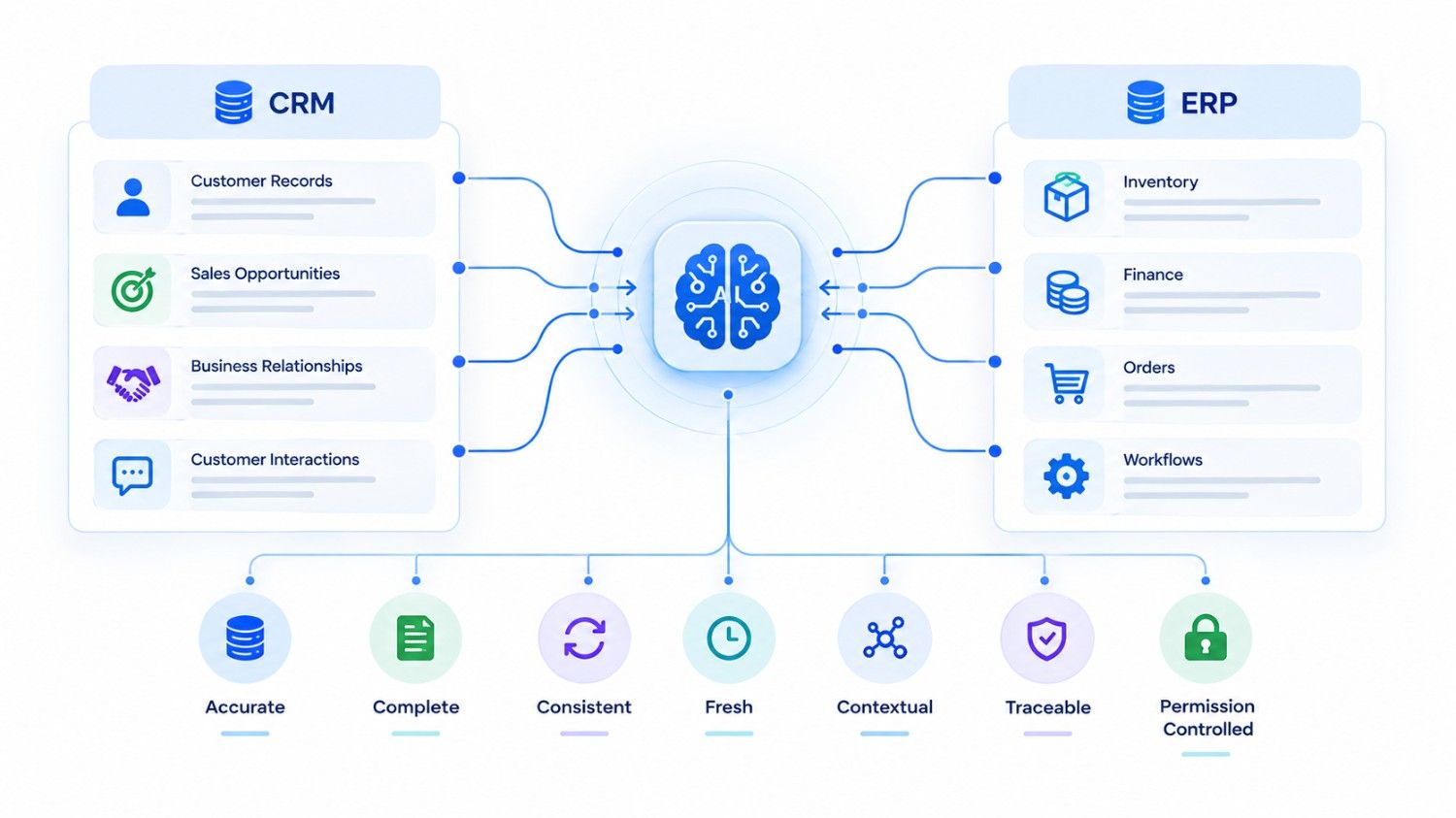
AI-ready data is business information that an AI system can retrieve, interpret, relate, and use with an acceptable level of reliability.
Traditional data quality usually focuses on whether records are correct enough for employees and reports. Agentic AI raises the standard because an AI agent may use those records to recommend or initiate an action.
Consider a salesperson who sees two records for the same customer. The salesperson may recognize the duplicate from experience.
An AI agent may not.
If one record says the customer has an open opportunity worth $200,000 and another says the account is inactive, which record represents reality?
AI-ready data therefore needs several qualities:
- Accuracy: Does the record reflect reality?
- Completeness: Are important fields and relationships available?
- Consistency: Do different systems describe the same entity in compatible ways?
- Freshness: Is the information current enough for the decision?
- Context: Can the agent understand what the data means?
- Governance: Is ownership and authority defined?
- Traceability: Can the business determine where information came from?
- Permission awareness: Can the system determine what an agent is allowed to see and do?
That last point matters. Data being technically accessible does not mean an AI agent should automatically use it.
The Real Failure Chain: Bad Data Becomes Bad Agent Decisions
AI agent failures often look like an AI problem at the surface.
Underneath, the sequence can be much simpler:
Poor source data → incomplete context → incorrect interpretation → inappropriate recommendation → unsafe action
Imagine an AI sales agent asked:
“Find our highest-priority deals and prepare follow-ups.”
The CRM contains a deal marked “Negotiation,” so the agent ranks it highly. However, the customer rejected the proposal three days ago, and that update exists only in an email thread that was never synchronized with the CRM.
The agent has not necessarily hallucinated. It has used the available data correctly.
The available data was wrong.
Now consider an ERP purchasing agent. Inventory says 120 units are available, but 80 are already reserved for confirmed orders and the reservation status is stored in another application. An agent using only the stock figure may decide no replenishment is required.
Again, the reasoning can be internally sound while the business decision is poor.
That distinction matters when teams diagnose enterprise AI projects.
Seven Data Problems That Commonly Break AI Agents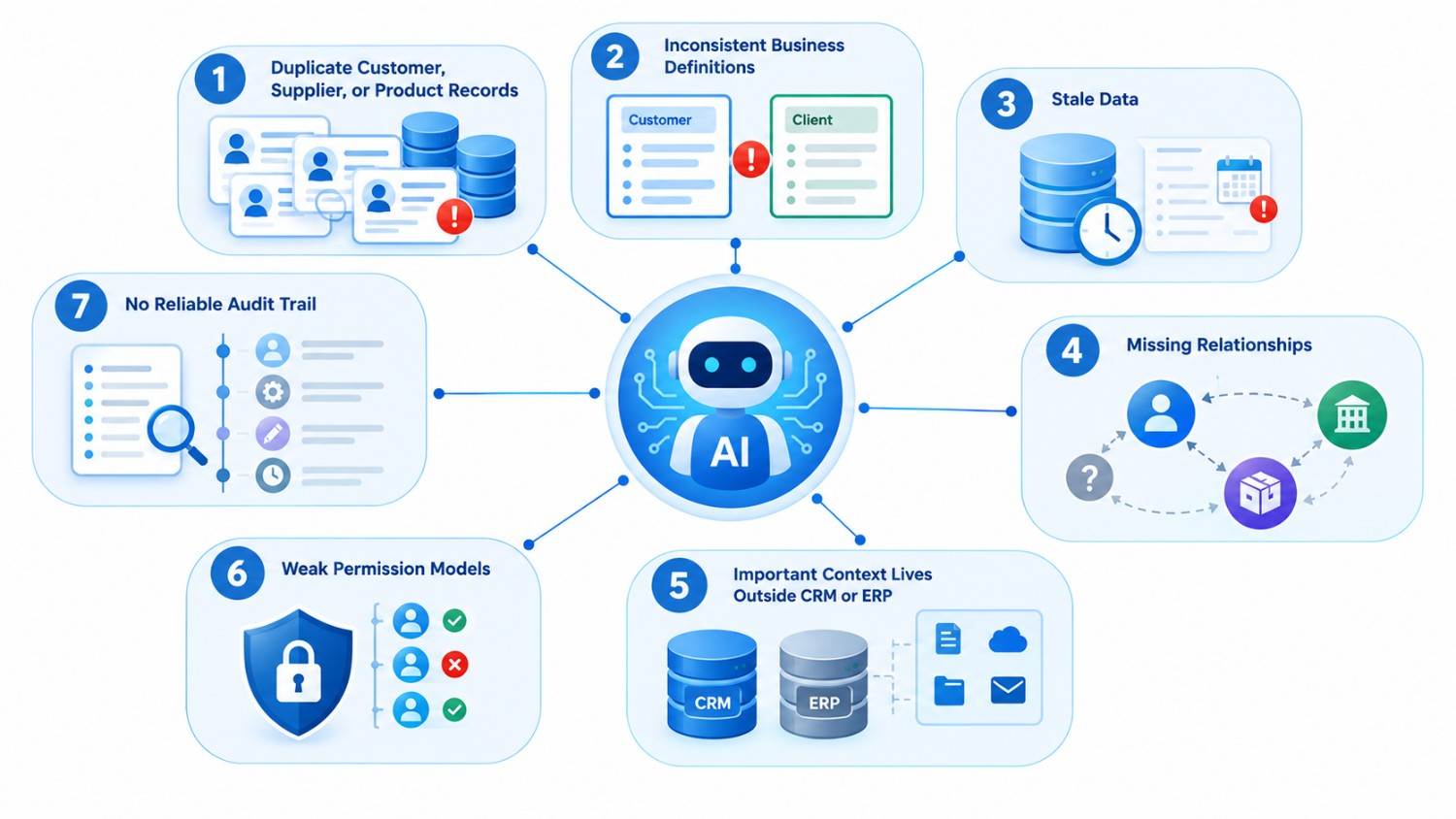
1. Duplicate Customer, Supplier, or Product Records
Duplicates confuse identity.
“ABC Manufacturing,” “ABC Manufacturing Inc.,” and “ABC Mfg.” may represent one customer. If those records carry separate orders, contacts, credit information, and conversations, an AI agent sees three incomplete versions of reality.
Entity resolution and master-data management therefore become important parts of AI readiness.
2. Inconsistent Business Definitions
Humans often learn undocumented definitions over time.
One sales team may use “qualified” after a discovery call. Another may use it when a lead simply matches the target market.
An AI agent cannot reliably interpret pipeline stages when the business itself has not agreed on what those stages mean.
The same problem appears in ERP systems with terms such as “available stock,” “committed inventory,” “completed order,” or “approved supplier.”
3. Stale Data
Data quality is partly about time.
A six-month-old address may be fine for historical analysis. Yesterday’s inventory figure may be unacceptable for an agent deciding whether to release an order today.
Every agent use case should therefore define how fresh its underlying data must be.
4. Missing Relationships
A record can be accurate but still lack context.
An invoice may be linked to a customer but not the contract that controls its payment terms. A support case may exist without its related product installation. A purchase request may lack the project or cost center responsible for it.
Agents need relationships, not just rows.
5. Important Context Lives Outside CRM or ERP
Real businesses rarely keep everything in one application.
Relevant information may live in email, Slack, documents, spreadsheets, support platforms, warehouse systems, accounting software, or external portals.
This is why an AI strategy sometimes requires APIs, synchronization, retrieval systems, or an urlAI-enabled knowledge basehttps://kanhasoft.com/ai-enabled-knowledge-base.html rather than simply giving a model access to one database.
6. Weak Permission Models
An agent should not gain unrestricted access simply because integration is technically possible.
CRM and ERP platforms can contain salaries, financial records, customer information, pricing agreements, employee data, contracts, and commercially sensitive information.
Agent access should follow defined roles, purpose, and authorization rules.
7. No Reliable Audit Trail
When an agent recommends or performs an action, teams should be able to reconstruct what happened.
What data did it use? Which version? Which tools did it call? What did it change? Did a person approve the action?
For important workflows, traceability is part of AI readiness.
Traditional CRM/ERP Data vs AI-Ready Data
| Area | Traditional Data Environment | AI-Ready Environment |
| Customer records | Duplicates may be tolerated | Clear entity identity |
| Field definitions | Understood informally by teams | Documented business meaning |
| Data freshness | Updated when users remember | Defined synchronization rules |
| Relationships | Often fragmented | Explicit links between entities |
| Permissions | Designed mainly for users | Users, services, and agents governed |
| Workflow status | Free text or inconsistent stages | Controlled states and transitions |
| Data origin | Difficult to trace | Source and timestamps available |
| Agent actions | Broad system access | Approved tools and boundaries |
| Exceptions | Handled through tribal knowledge | Rules and escalation paths documented |
The goal is not perfect data. Few businesses have that.
The goal is data reliable enough for the risk of the task.
An agent summarizing old opportunities can tolerate more uncertainty than an agent approving a refund or initiating procurement.
Why CRM Data Quality Matters Differently From ERP Data Quality
CRM and ERP systems create different risks for AI agents.
CRM data is often conversational and behavior-driven. It includes leads, contacts, opportunities, calls, emails, tasks, support interactions, and notes. Missing context can cause poor prioritization or awkward customer communication.
ERP data is often more transactional. Inventory, purchasing, production, invoices, suppliers, costs, orders, and approvals may directly affect money or physical operations.
| AI Agent Task | Main Data Risk | Sensible Control |
| Draft sales follow-up | Missing recent communication | Human review before sending |
| Prioritize opportunities | Inconsistent stages | Standardize pipeline definitions |
| Recommend replenishment | Stale stock information | Real-time or validated inventory |
| Create purchase request | Supplier/approval errors | Business-rule validation |
| Answer invoice question | Wrong customer relationship | Entity and permission checks |
| Summarize operations | Disconnected source systems | Unified retrieval and timestamps |
This is also why “connect the LLM to our database” is not a sufficient enterprise AI architecture.
A Real ERP Lesson: Centralization Comes Before Intelligence
One useful example comes from a manufacturing ERP project documented in Kanhasoft’s project experience.
The business had production, inventory, procurement, and logistics information spread across spreadsheets and disconnected tools. The solution centralized these workflows in a role-based ERP, including BOM-driven production planning, real-time inventory tracking, procurement, and sales-to-logistics integration.
The important AI lesson is not that every manufacturer needs the same architecture.
It is that intelligent automation becomes easier to reason about once core operational entities and workflows are connected.
Suppose an AI production agent eventually needs to answer:
“Can we complete Order 842 by Friday?”
That question may require customer-order data, BOM requirements, component availability, procurement status, production capacity, and logistics information.
If those facts disagree across five systems, improving the prompt will not solve the underlying problem.
How to Make CRM and ERP Data Ready for AI Agents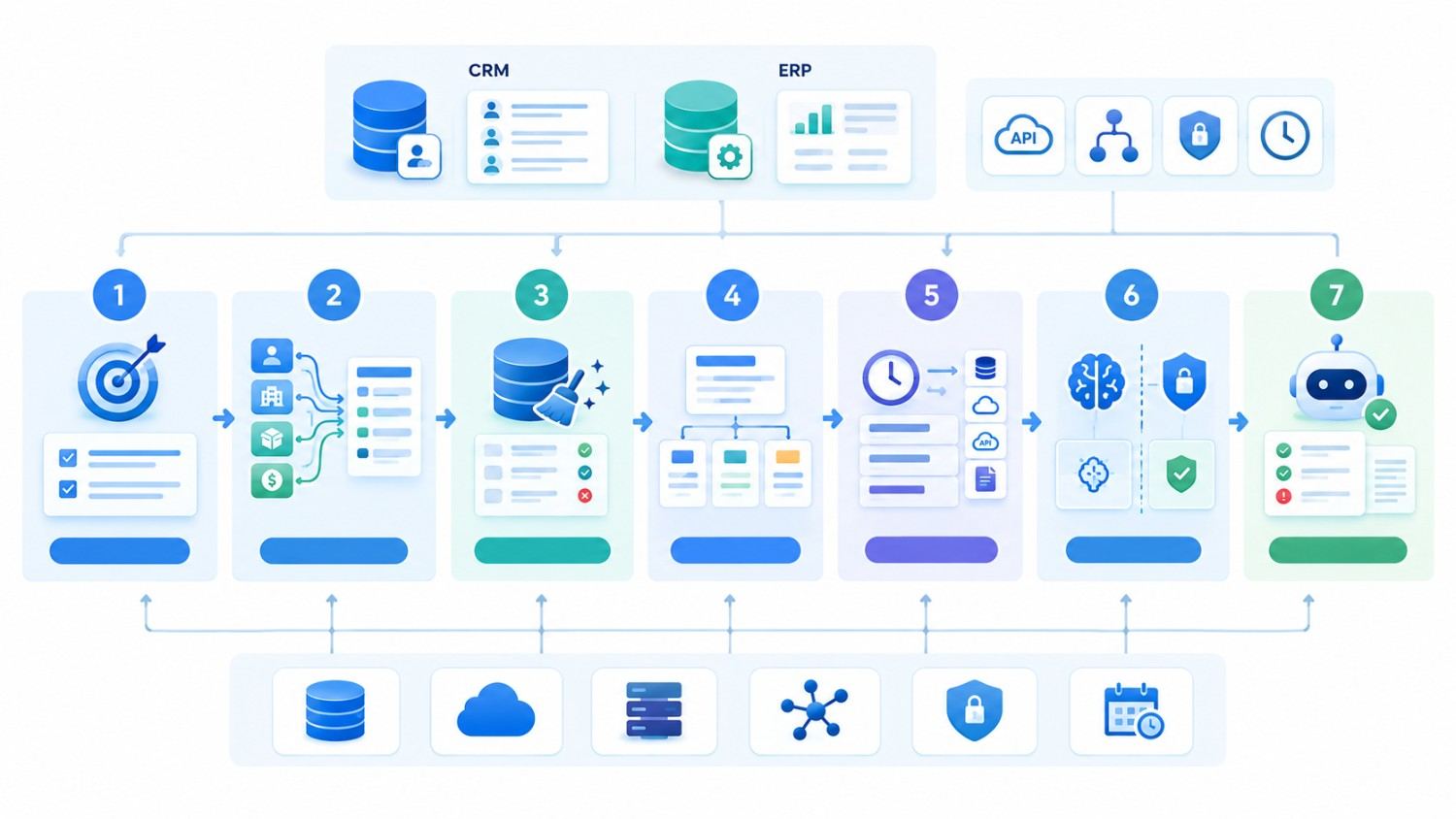
Businesses do not need to rebuild everything before experimenting with AI. A focused readiness process is usually more practical.
Step 1: Start With One Agent Use Case
Do not begin with “make our ERP AI-powered.”
Choose a specific outcome, such as:
- identify stalled opportunities;
- summarize customer accounts;
- investigate delayed orders;
- recommend inventory replenishment;
- classify support cases; or
- prepare purchase requests.
A narrow use case makes the required data easier to identify.
Step 2: Map the Data the Agent Actually Needs
For every decision, identify the source fields, systems, relationships, and documents involved.
Also ask which source is authoritative when two systems disagree.
Step 3: Fix Critical Master Data
Prioritize customers, suppliers, products, employees, SKUs, locations, accounts, and other entities relevant to the selected workflow.
You do not necessarily need to clean every historical record before launching a controlled pilot.
Step 4: Define Business Semantics
Document what important fields mean.
What makes a lead “qualified”? When is inventory “available”? What exactly counts as an overdue invoice? When does an order become “complete”?
These definitions give AI systems a more stable business vocabulary.
Step 5: Add Freshness and Source Metadata
An agent should know whether information was updated two minutes ago or two months ago when freshness affects the decision.
Where appropriate, preserve timestamps, source systems, synchronization status, and record versions.
Step 6: Separate Reasoning From Authority
An AI agent may decide that an action appears appropriate. Your application should still enforce business rules.
For example, before creating a purchase order, the ERP can validate budget limits, approved vendors, duplicate requests, permissions, and approval thresholds.
This principle also aligns with modern headless CRM and ERP architecture for AI agents: connectivity should not become unrestricted authority.
Step 7: Test With Real Exceptions
Happy-path demos are easy.
Test duplicate customers, cancelled orders, missing fields, stale inventory, conflicting statuses, unusual discounts, unavailable suppliers, and permission failures.
Those cases reveal whether the data foundation is truly ready.
Should You Clean the Existing System or Build an AI-Ready CRM/ERP?
There is no universal answer.
| Situation | Practical Direction |
| Core CRM/ERP is reliable and well integrated | Improve data quality and add controlled AI capabilities |
| System works but has inconsistent data | Clean priority datasets and standardize workflows first |
| Important information is spread across several good systems | Integrate rather than replace everything |
| Legacy system lacks APIs and clear data structures | Consider modernization or an integration layer |
| Business processes themselves are inconsistent | Fix process definitions before increasing autonomy |
| Existing platform cannot support required workflows | Evaluate custom ERP development |
Off-the-shelf platforms can be perfectly suitable when their data model and workflows fit the business.
Custom development becomes more relevant when unique workflows, legacy integrations, complex permissions, specialized data models, or agent-specific controls cannot be handled cleanly through configuration.
A Practical AI-Readiness Checklist for Decision-Makers
Before allowing an AI agent to act on CRM or ERP data, ask:
- Do we know the authoritative source for each important business entity?
- Are duplicate customer, supplier, and product records controlled?
- Are critical statuses and fields consistently defined?
- Is the data fresh enough for this particular decision?
- Can records be connected across CRM, ERP, email, documents, and other required systems?
- Can the agent determine which information it is authorized to access?
- Are high-risk actions validated by deterministic business rules?
- Can important actions require human approval?
- Can we trace the information and tools used in an agent decision?
- What happens when the data is missing, conflicting, or uncertain?
If several answers are “no,” expanding agent autonomy is probably premature.
Practical observation: In enterprise AI, the difficult work is often not generating an impressive answer. It is making sure the answer is grounded in the right record, at the right time, under the right permissions, and connected to the right business rule.
Build the Data Foundation Before Expanding Agent Autonomy
AI agents can make CRM and ERP workflows more useful because they can investigate information, interpret context, coordinate tools, and help users move work forward.
However, autonomy increases the cost of bad data.
A poor dashboard may inconvenience an employee. An autonomous workflow based on the same bad record may create a customer communication, inventory decision, or transaction that someone then has to undo.
That is why AI-ready CRM and ERP data should be treated as part of the AI architecture itself.
The sensible sequence is straightforward: choose a valuable workflow, identify the required data, improve the weak points, establish governance, give the agent limited capabilities, test exceptions, and expand autonomy only when evidence supports it.
How Kanhasoft Can Help
If you are evaluating AI agents but are unsure whether your current CRM or ERP data is ready, Kanhasoft can help review the underlying workflow, data sources, integrations, permissions, and automation boundaries before development begins.
Rather than starting with a model or chatbot, the objective is to identify what data the agent needs, where reliability gaps exist, and which actions should remain governed by your application or human approvals. This can support a more practical roadmap for CRM modernization, ERP integration, AI agents, or custom enterprise software.