A patient calls to reschedule an appointment. The front desk updates the calendar, but the care coordinator still sees the old date. Meanwhile, a follow-up message is sitting in another system, and the referral team has its own spreadsheet. None of these tools is necessarily bad. The problem is that they do not work together.
That is where healthcare CRM software becomes useful. Unlike a conventional sales CRM, a healthcare CRM helps clinics, hospitals, specialty practices, healthcare networks, and other providers manage patient relationships, communications, referrals, appointments, follow-ups, and administrative workflows around the patient journey.
Organizations with workflows that do not fit standard platforms may also consider custom CRM development services rather than forcing staff to work around a generic CRM.
Quick Answer: What Is Healthcare CRM Software?
Healthcare CRM software is a patient relationship management platform designed to organize patient interactions before, during, and after care. It can manage inquiries, appointments, referrals, reminders, communications, follow-ups, patient segmentation, feedback, and operational reporting.
The important distinction is this: a healthcare CRM normally complements an EHR or EMR rather than replacing it. The clinical system remains responsible for medical records and clinical workflows, while the CRM helps healthcare organizations coordinate patient engagement and relationship-driven processes.
For organizations handling protected health information (PHI), security and compliance requirements must be considered from the architecture stage rather than added after development.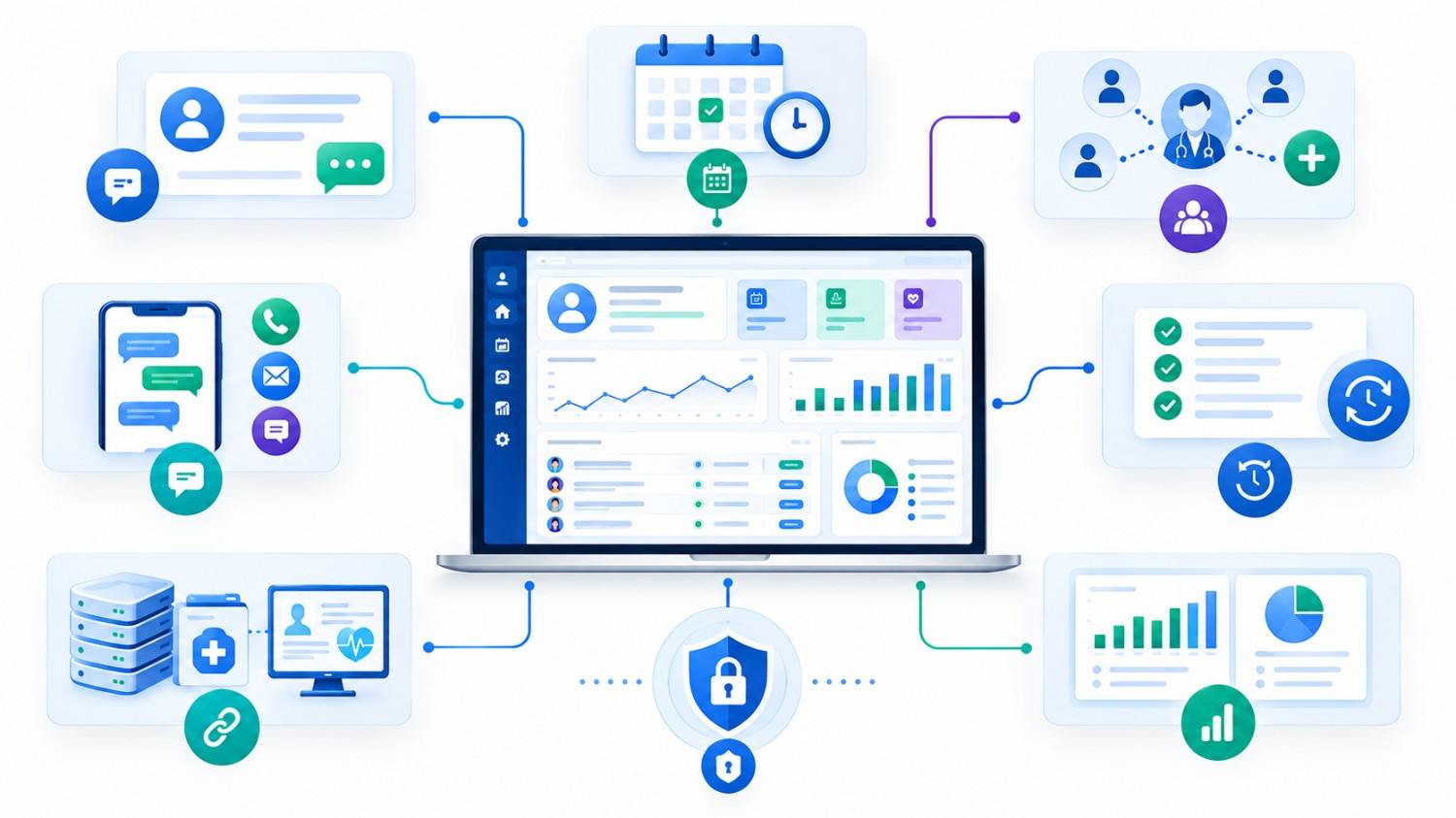
What Does a Healthcare CRM System Actually Manage?
A traditional CRM follows prospects through a sales journey. A healthcare CRM system follows people through a healthcare relationship.
For example, imagine a multi-location dental group. A prospective patient submits an inquiry from the website. The CRM can capture the inquiry, assign it to the right clinic, record communication, schedule an appointment, send reminders, trigger a follow-up after the visit, and track whether the patient returns for recommended treatment.
A specialist clinic may use the same underlying concept differently. Its workflow could focus on physician referrals, insurance-related administrative steps, consultation scheduling, follow-up tasks, and communication history.
That difference matters. Healthcare CRM development should start with actual workflows rather than a generic feature checklist.
Healthcare CRM vs. EHR/EMR
| Area | Healthcare CRM | EHR/EMR |
| Primary purpose | Patient relationships and engagement | Clinical documentation and care records |
| Typical users | Front desk, patient coordinators, referral teams, administrators, management | Physicians, nurses and clinical staff |
| Common data | Inquiries, communications, appointments, campaigns, referrals, feedback | Diagnoses, medications, clinical notes, test results |
| Automation focus | Reminders, follow-ups, outreach and workflow tasks | Clinical and documentation workflows |
| Reporting | Engagement, referrals, appointments and operational KPIs | Clinical and care-related reporting |
In many organizations, the strongest architecture connects these systems instead of trying to make one platform perform every function.
Key Features of Healthcare CRM Software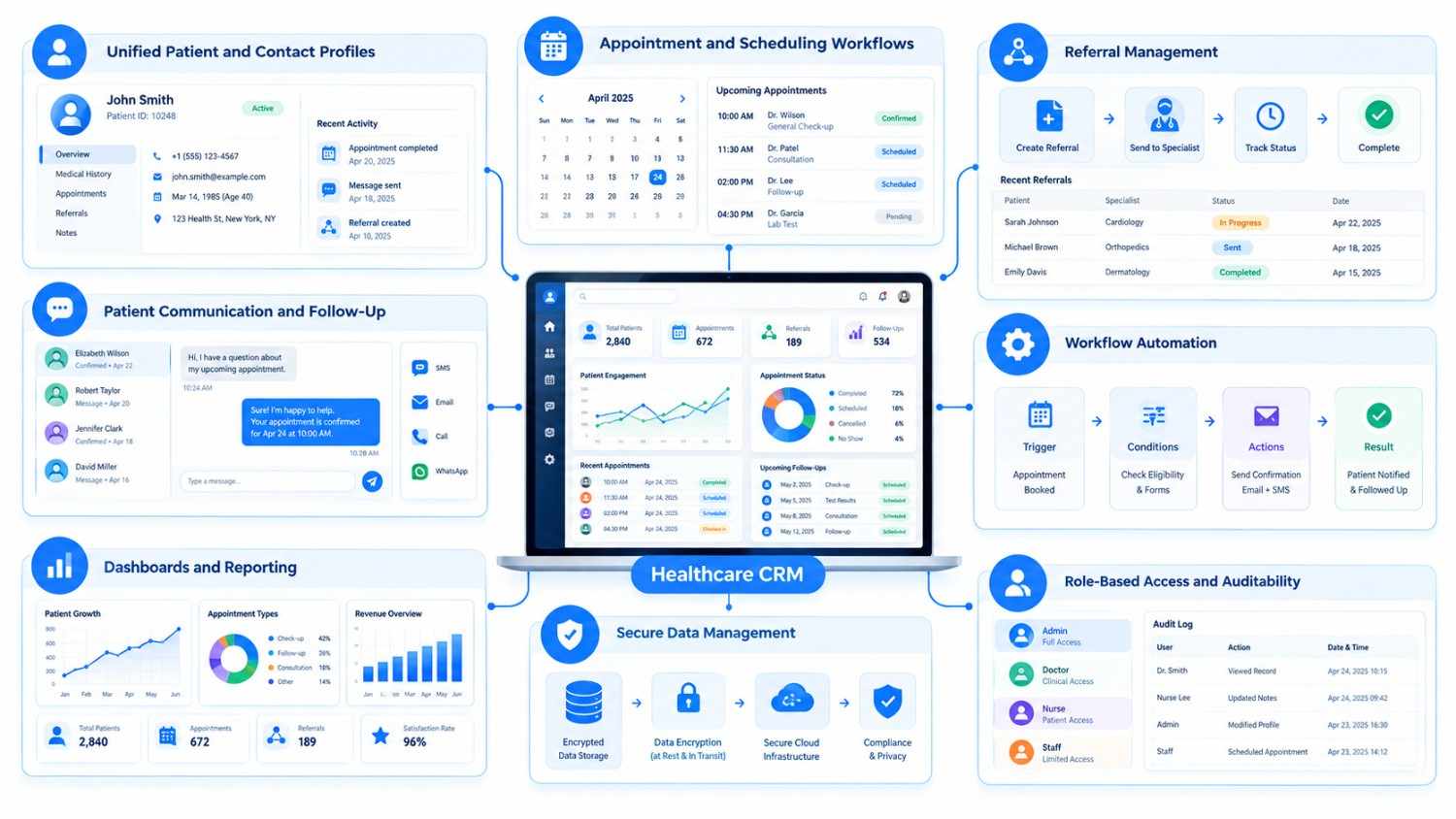
Feature priorities vary by organization. A five-provider clinic does not need the same architecture as a hospital network. However, several capabilities appear repeatedly in effective healthcare CRM projects.
1. Unified Patient and Contact Profiles
Teams need a reliable view of the relationship with each patient.
Depending on the permitted use of data, a profile may bring together contact information, inquiry sources, appointments, referral information, communication history, consent preferences, tasks, and relevant administrative records.
This reduces the need to search through email, spreadsheets, calendars, and separate departmental tools.
2. Appointment and Scheduling Workflows
Scheduling is often more complicated than placing a name on a calendar.
A healthcare CRM may support:
- provider and location availability;
- appointment requests and rescheduling;
- automated confirmations;
- SMS and email reminders;
- cancellation workflows;
- waiting lists;
- follow-up scheduling.
For a multi-location organization, rules can route patients based on location, service, specialty, provider, or availability.
A healthcare booking system developed for a U.S. dental clinic, for example, centralized appointments, patient records, staff availability, calendar synchronization, automated reminders, patient history, and feedback workflows.
3. Referral Management
Referral leakage can become difficult to see when referrals arrive through phone calls, emails, forms, and external providers.
A CRM can record the referral source, receiving provider, current status, required action, appointment outcome, and follow-up responsibility.
Management can then analyze referral activity without asking staff to maintain separate spreadsheets.
4. Patient Communication and Follow-Up
Healthcare organizations communicate across email, SMS, phone, portals, and sometimes mobile applications.
A CRM can centralize communication history and automate approved workflows such as appointment reminders, follow-up tasks, feedback requests, or administrative notices.
However, organizations should not assume that every communication tool is appropriate for PHI. Communication channels, vendors, permissions, and data handling need compliance review.
5. Workflow Automation
Useful automation usually removes repetitive administrative work rather than trying to automate clinical judgment.
Examples include assigning a new inquiry to the correct location, creating a follow-up task after an appointment, notifying a coordinator about an incomplete referral, or escalating an unanswered request.
A good rule is simple: automate predictable processes; keep people responsible for decisions that require professional judgment.
6. Dashboards and Reporting
Healthcare leaders often need operational answers that are surprisingly difficult to obtain from disconnected systems.
A CRM dashboard might track appointment requests, referral status, response times, patient engagement, follow-up completion, communication activity, and location-level performance.
The goal is not to create more dashboards. It is to make important operational questions easier to answer.
7. Role-Based Access and Auditability
Not every employee should see every piece of information.
Access should reflect job responsibilities. Reception teams, administrators, managers, clinicians, and external partners may require very different permissions.
For U.S. organizations subject to HIPAA, HHS states that the Security Rule requires appropriate administrative, physical, and technical safeguards for electronic protected health information (ePHI), including access controls, audit controls, authentication, and transmission security.
What Are the Main Benefits of a Healthcare CRM?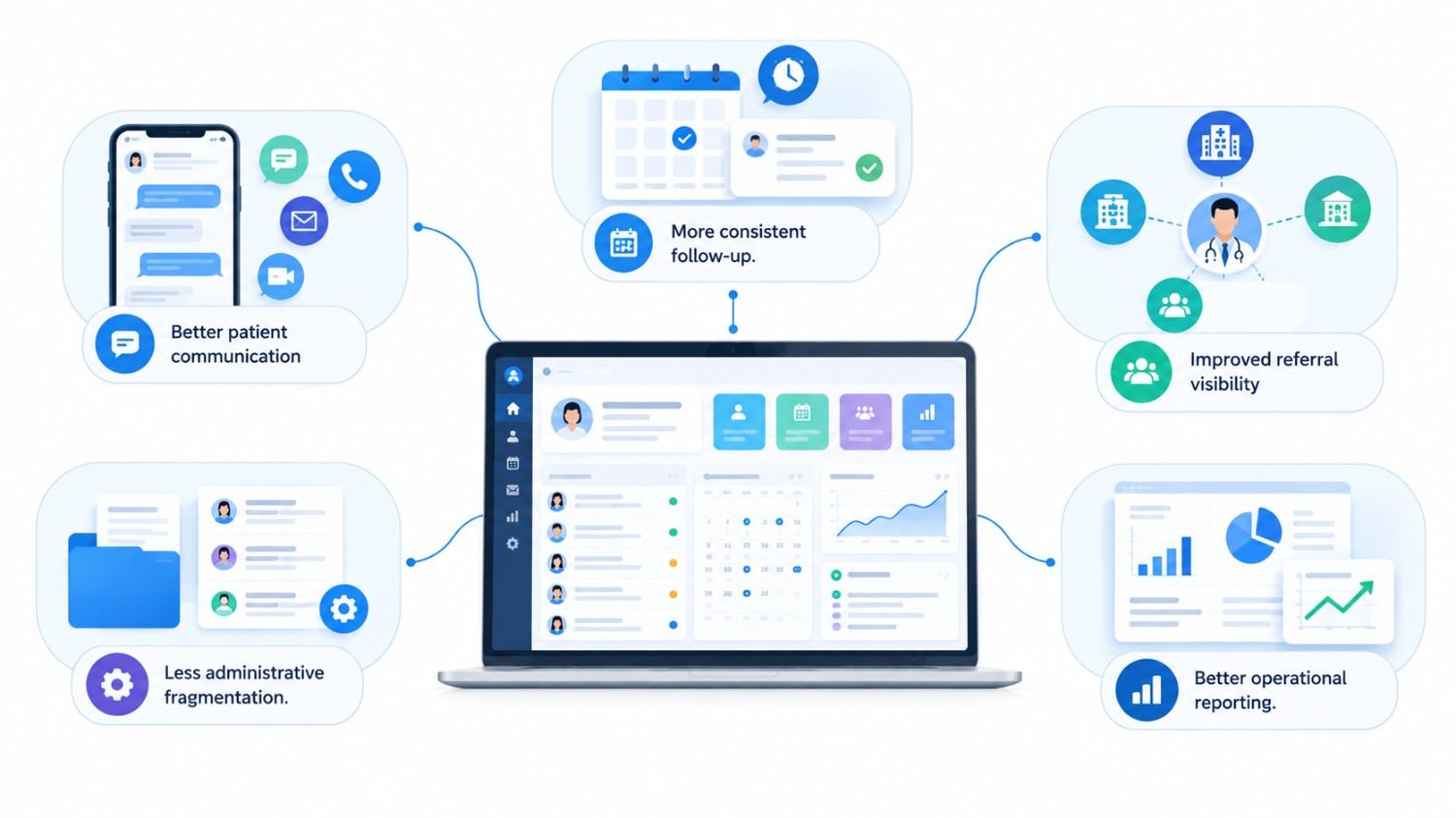
The business value of healthcare CRM software usually comes from coordination rather than from simply storing more data.
Better patient communication. Staff can see prior interactions and outstanding actions, helping reduce disconnected conversations.
More consistent follow-up. Workflow rules can create reminders and tasks instead of depending entirely on individual memory.
Improved referral visibility. Teams can follow a referral from receipt through scheduling and subsequent administrative stages.
Less administrative fragmentation. Integrating calendars, communication tools, forms, EHR/EMR platforms, and other systems can reduce duplicate entry.
Better operational reporting. Management gets a clearer view of patient engagement and workflow bottlenecks.
Still, software cannot repair a poorly defined process on its own. Automating a confusing workflow often produces a faster confusing workflow. Process mapping should therefore come before development.
Custom Healthcare CRM Software vs. Off-the-Shelf CRM
One of the most important decisions is whether to configure an existing product or invest in custom healthcare CRM software.
| Decision Factor | Off-the-Shelf CRM | Custom Healthcare CRM |
| Initial deployment | Usually faster | Requires discovery and development |
| Upfront investment | Usually lower | Usually higher |
| Workflow flexibility | Limited by product | Designed around your processes |
| Specialized integrations | Depends on vendor ecosystem | Can be developed around required systems |
| Feature ownership | Vendor controlled | Greater control over roadmap |
| Maintenance | Mostly vendor managed | Organization/development partner manages it |
| Unique healthcare workflows | May require workarounds | Can be modeled directly |
An off-the-shelf platform can be the sensible choice for a smaller practice with straightforward requirements and supported integrations.
Custom development becomes more relevant when workflows span multiple locations, roles, legacy systems, referral networks, patient portals, specialized reporting, or unusual approval processes.
The right question is not “Is custom better?” It is: Which option creates the lowest operational friction and acceptable total cost of ownership for our requirements?
Healthcare CRM Integrations: Where Projects Often Become Complex
A CRM becomes much more useful when it exchanges information with the systems healthcare teams already use.
Common integration requirements include EHR/EMR systems, scheduling platforms, billing systems, patient portals, communication services, identity providers, analytics platforms, and document systems.
Healthcare interoperability may also involve HL7 and FHIR. HL7 defines FHIR as a standard for healthcare data exchange, while the U.S. health IT authority describes FHIR as supporting the exchange of clinical and administrative health data through modern APIs.
Before development begins, teams should determine exactly which system owns each data element.
For example, if the EHR is the authoritative source for clinical patient data, the CRM should not quietly become a competing clinical database. Clear system ownership prevents synchronization problems later.
Security and HIPAA: What Buyers Should Evaluate
For U.S. healthcare organizations, “HIPAA compliant” should never be treated as a checkbox on a software proposal.
HIPAA obligations depend on the organization, data, relationships, technology environment, and how PHI is created, received, maintained, or transmitted.
HHS states that a cloud service provider handling ePHI on behalf of a covered entity or business associate generally requires an appropriate Business Associate Agreement (BAA). Organizations are also responsible for risk analysis and risk management.
A healthcare CRM architecture may therefore need to consider:
- role-based access;
- strong authentication;
- audit logging;
- encryption and secure transmission;
- backup and recovery;
- data retention;
- incident-response processes;
- vendor and subcontractor responsibilities;
- secure API integrations;
- access revocation;
- appropriate BAAs.
A software vendor can itself become a business associate when it accesses PHI while providing services such as hosting or support.
Practical note: Do not rely solely on a developer saying a system is “HIPAA ready.” Have qualified privacy, security, and legal professionals review the organization’s actual obligations and architecture.
Healthcare organizations outside the United States should similarly assess the privacy, healthcare, and data-residency requirements that apply in their jurisdictions.
How Much Does Healthcare CRM Software Cost?
There is no responsible single answer to healthcare CRM software cost because two systems called “healthcare CRM” can have completely different scopes.
A lightweight system for patient inquiries and appointment follow-ups is fundamentally different from a multi-location platform integrating EHR data, referral workflows, communications, analytics, mobile applications, and complex access controls.
The largest cost drivers usually include:
| Cost Driver | Why It Matters |
| Number of modules | More workflows require more design, development, and testing |
| User roles | Complex permissions increase architecture and QA requirements |
| EHR/EMR integration | APIs, data mapping, testing, and vendor constraints add work |
| Legacy data migration | Old data often requires cleaning and transformation |
| Compliance requirements | Security, logging, documentation, and infrastructure affect scope |
| Mobile applications | Native or cross-platform apps create additional interfaces |
| Reporting | Custom dashboards and complex KPIs require data modeling |
| AI features | Models, guardrails, validation, monitoring, and data pipelines add complexity |
| Multi-location support | Location-specific rules and permissions increase workflow complexity |
| Support and maintenance | Healthcare systems require ongoing monitoring and updates |
Instead of requesting a price from a one-page feature list, ask potential vendors to break the estimate into discovery, UX, development, integrations, migration, testing, infrastructure, deployment, and ongoing support.
That gives decision-makers a far more useful view of total cost.
Best Practices for Healthcare CRM Development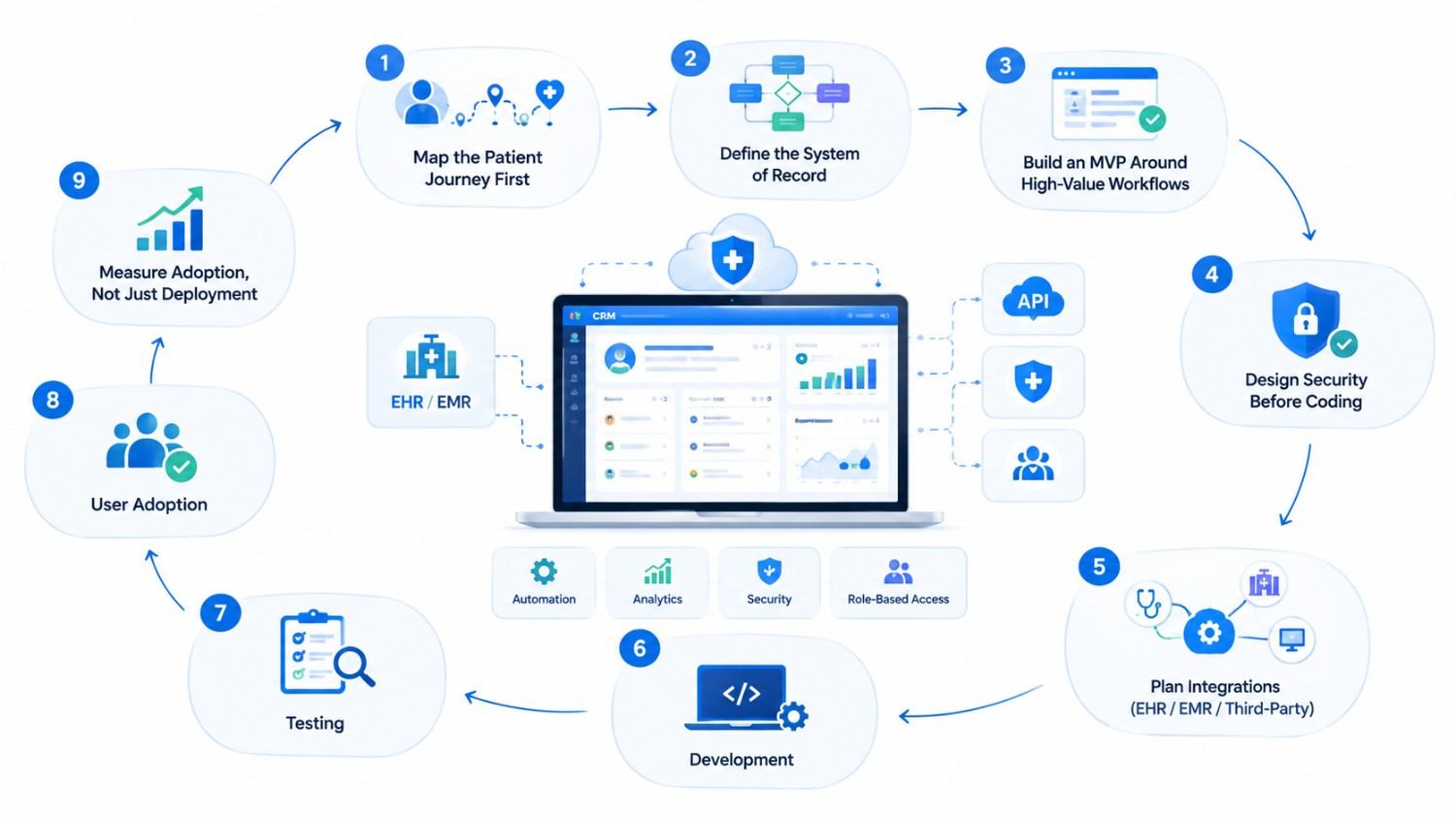
Successful healthcare CRM development usually starts with workflow discovery, not technology selection.
Map the Patient Journey First
Document how an inquiry becomes an appointment, how referrals arrive, who follows up, which systems are involved, and where information gets duplicated.
You will often find that the real requirements are hiding between departments.
Define the System of Record
Decide whether the EHR, CRM, billing platform, or another application owns each category of information. Then define how other systems consume or update that data.
Build an MVP Around High-Value Workflows
Trying to replace every process in version one increases cost and implementation risk.
A practical first release might focus on patient inquiry management, scheduling integration, referral tracking, communication, and management dashboards. Additional workflows can follow once real users validate the foundation.
Design Security Before Coding
Security decisions affect architecture, databases, infrastructure, integrations, permissions, logging, and testing. Moving them to the end of the project creates expensive rework.
Measure Adoption, Not Just Deployment
A CRM sitting unused is not a successful implementation.
Track whether teams actually use the platform, complete workflows correctly, reduce duplicate entry, respond to requests consistently, and rely less on spreadsheets.
Common Healthcare CRM Mistakes to Avoid
One common mistake is trying to make the CRM replace every healthcare application. A CRM should have a clearly defined responsibility.
Another is copying a generic sales CRM workflow and simply changing “customer” to “patient.” Healthcare relationships involve privacy, clinical boundaries, referrals, appointments, consent, and specialized operational processes.
Teams should also avoid excessive customization before users test the core workflow. Build the essential process first. Observe how staff use it. Then improve it.
Finally, integration should not be postponed. If the CRM eventually needs to communicate with an EHR, scheduling platform, or billing system, those dependencies should influence the architecture from the beginning.
How Kanhasoft Can Help Plan a Healthcare CRM
At Kanhasoft, our work includes custom CRM, healthcare, workflow automation, web and mobile applications, API integration, and cloud-based business platforms. Kanhasoft’s current CRM offering specifically includes healthcare CRM workflows for patient relationships, appointments, referrals, communications, role-based access, and data security.
Our healthcare project experience also includes systems for hospitals, patient communities, health monitoring, healthcare staffing, and appointment management. For example, one hospital management project brought patient registration, appointments, EMR, billing, pharmacy, lab reports, notifications, access controls, and operational dashboards into a connected platform.
The useful starting point is not “Which technology should we use?” It is understanding what your teams do today, where data lives, which integrations are required, what compliance constraints apply, and which workflows deserve priority.
Conclusion
The right healthcare CRM software should make patient-facing and administrative workflows easier to manage without creating another disconnected database.
For some healthcare providers, configuring an established CRM will be enough. Others may need custom healthcare CRM software because of specialized referrals, multi-location operations, EHR integrations, reporting requirements, or unique patient journeys.
Before choosing either route, map the workflows, define data ownership, assess compliance requirements, identify essential integrations, and calculate total cost of ownership. Those decisions matter more than the length of the feature list.
Planning a Healthcare CRM?
If your organization is evaluating a new CRM or replacing disconnected healthcare systems, Kanhasoft can help review your current workflows, integration requirements, user roles, security needs, and MVP priorities before recommending a development roadmap.
The objective is not to build the largest possible CRM. It is to determine what your healthcare teams actually need—and build only what creates practical value.