Getting an AI prototype to work is increasingly easy. Getting it to work reliably inside a real business is a very different challenge. Organizations exploring AI and machine learning development often discover that the difficult part of moving an AI pilot to production is not choosing a large language model. It is connecting AI to real data, workflows, users, security controls, measurable outcomes, and operational ownership.
A pilot may impress ten people in a controlled demonstration. Production AI may need to serve hundreds or thousands of users, respect permissions, survive incomplete data, integrate with CRM or ERP systems, control API costs, and produce results the business can trust.
That gap is where many promising AI projects lose momentum.
This article is especially useful for CEOs, CTOs, CIOs, product leaders, operations teams, and business owners who have tested AI successfully and now need to decide what deserves production investment.
Quick Answer: How Do You Move an AI Pilot to Production?
Moving an AI pilot to production requires treating AI as a business system rather than a model experiment.
Start with one measurable business outcome. Establish a baseline, validate the required data, integrate AI into the existing workflow, build an evaluation framework, add security and governance controls, monitor quality and cost, and roll out gradually. Scale only after the solution demonstrates useful business results under real operating conditions.
The practical sequence looks like this:
Business problem → baseline → pilot → evaluation → integration → security → controlled rollout → monitoring → ROI validation → scale
The biggest mistake is jumping directly from “the demo works” to “deploy it everywhere.”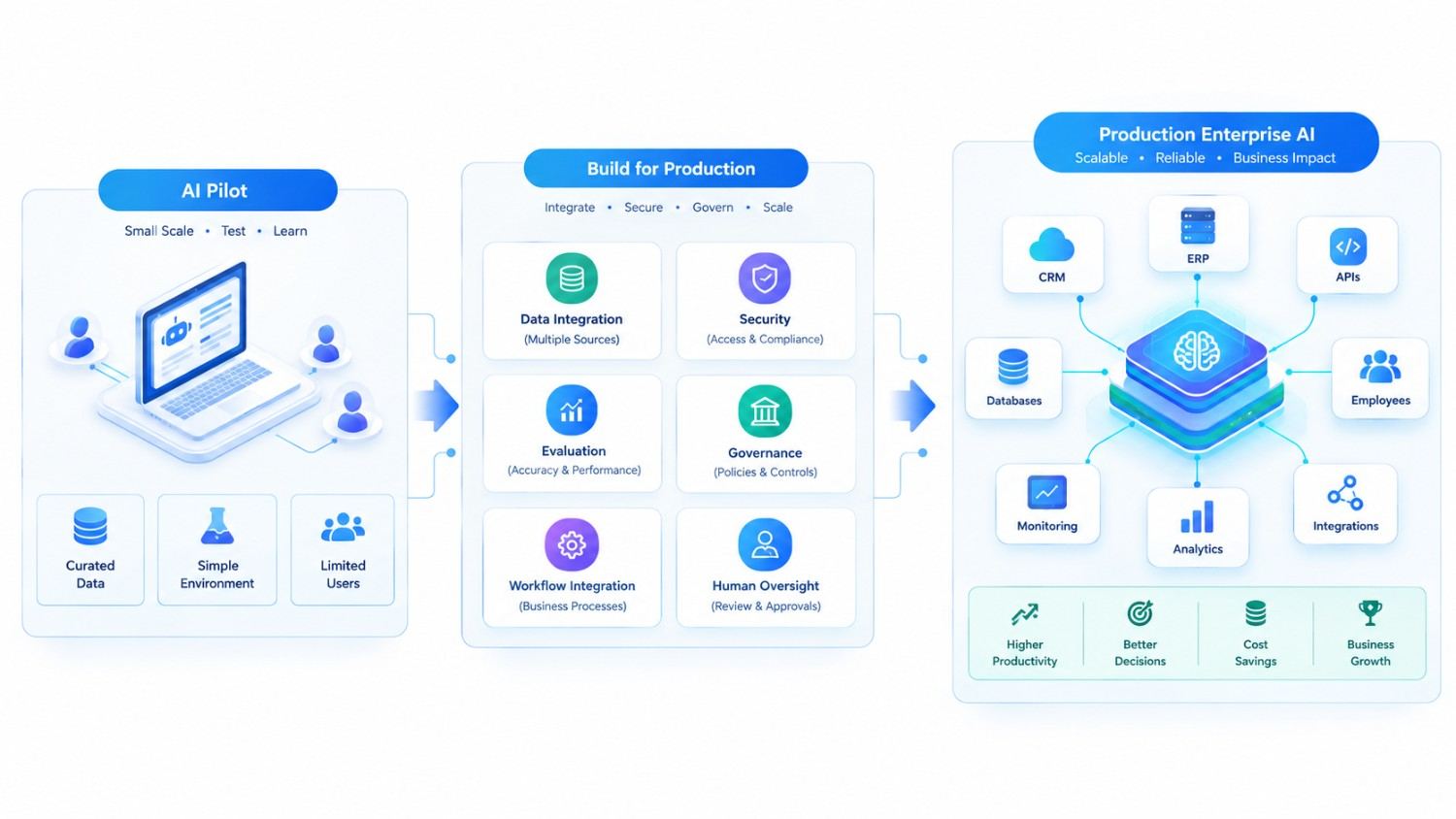
Why Successful AI Pilots Still Fail in Production
A pilot answers a narrow question:
Can AI perform this task?
Production asks much harder questions:
Can AI perform this task reliably, safely, economically, and repeatedly within the way our business actually operates?
Imagine a customer-service pilot. Employees upload a few carefully selected documents, ask predictable questions, and receive useful answers.
The demonstration looks excellent.
Now put that assistant into production. Suddenly, it encounters outdated documents, conflicting policies, unusual customer questions, access restrictions, missing CRM records, peak-hour traffic, multilingual requests, and users who phrase questions in ways nobody tested.
The AI model did not necessarily become worse. The environment became real.
Production systems therefore need more than good prompts.
| Pilot Environment | Production Environment |
| Small test group | Real users at business scale |
| Curated data | Messy and changing enterprise data |
| Controlled questions | Unpredictable inputs |
| Manual checking | Automated quality controls |
| Limited integrations | CRM, ERP, APIs, databases and documents |
| Short test period | Continuous operation |
| Model accuracy focus | Business outcome + quality + cost + risk |
| Easy rollback | Operational dependencies |
| Few permissions | Complex RBAC and data policies |
This distinction matters because production readiness should be designed during the pilot, not added after it.
Start Enterprise AI With ROI, Not With the Model
One of the most useful questions in an AI discovery meeting is surprisingly simple:
What changes financially or operationally if this AI works?
“Build an AI assistant” is not a business objective.
“Reduce the average time required to review a support case before an agent responds” is.
“Use generative AI in procurement” is vague.
“Automatically classify purchase requests, identify missing information, and reduce manual review effort while requiring approval before an order is created” can be measured.
Before development, define the current baseline and the desired improvement.
A Practical Enterprise AI ROI Framework
AI ROI should include both value created and the full cost of operating the system.
A simple framework is:
Net AI Value = Financial/Operational Benefit − Total AI Operating Cost
Then:
AI ROI = Net AI Value ÷ Total AI Investment × 100
Benefits may include:
- employee hours saved;
- faster case or document processing;
- reduced manual errors;
- increased throughput without equivalent headcount growth;
- shorter sales response times;
- improved knowledge retrieval;
- fewer support escalations;
- better conversion or retention where causation can reasonably be measured.
Costs extend beyond model API charges. Include engineering, cloud infrastructure, data preparation, integrations, monitoring, human review, security, maintenance, training, and change management.
This prevents an impressive automation from being labeled successful simply because its output “looks good.”
The Seven Production Gates Between an AI Pilot and ROI
Instead of treating production as one large launch, use clear gates. Each gate answers a different question.
| Production Gate | Question to Answer |
| 1. Business | Does the use case create measurable value? |
| 2. Data | Can AI access trustworthy, authorized context? |
| 3. Quality | Does it perform reliably on realistic cases? |
| 4. Integration | Does it fit the actual business workflow? |
| 5. Risk | Are security, privacy and governance acceptable? |
| 6. Operations | Can we monitor, support and control it? |
| 7. Adoption | Will people actually use it correctly? |
Passing all seven is more meaningful than achieving an impressive result on a handful of prompts.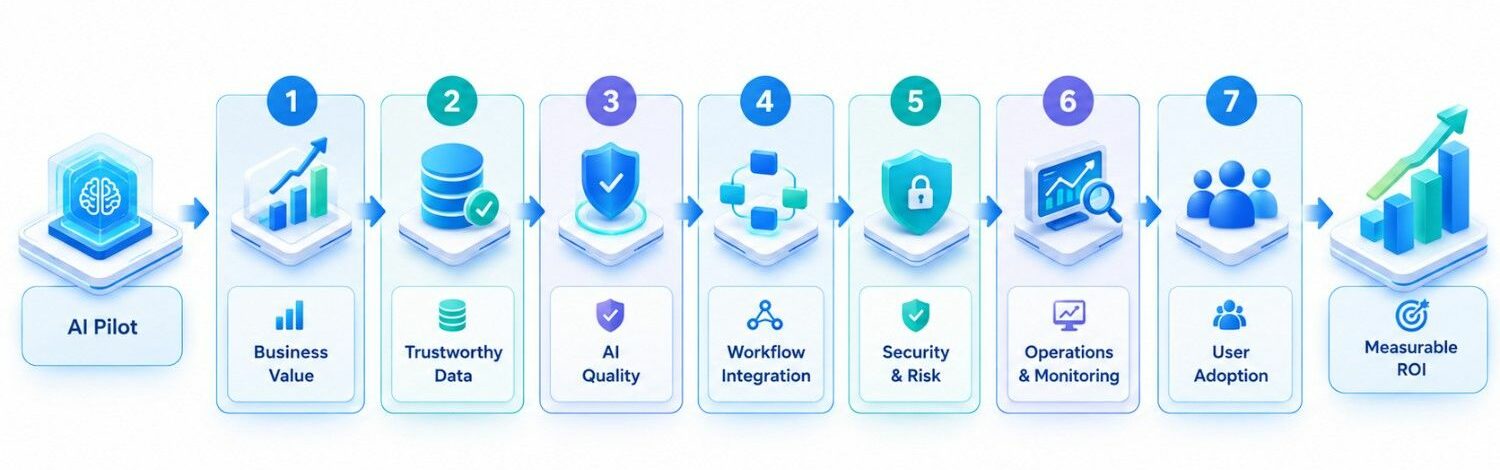
1. Make Enterprise Data AI-Ready
Enterprise AI is heavily dependent on context.
A sales assistant may require customer profiles, opportunities, previous emails, product information, quotations, meeting history, and account ownership. A manufacturing AI system may depend on inventory, BOMs, production capacity, supplier data, orders, and machine information.
If those sources disagree, AI inherits the disagreement.
That does not mean organizations must clean every database before starting. Instead, prepare the information needed for the selected workflow.
For example, if the first use case is an AI assistant that helps account managers prepare for meetings, focus first on the customer, opportunity, communication, product, and activity data required for that task.
This is also why AI-ready CRM and ERP data matters before increasing AI autonomy.
For unstructured information, retrieval-augmented generation (RAG) can connect models to policies, manuals, project documents, product information, and internal knowledge. However, RAG should not be treated as a magical repair tool for inaccurate source data.
2. Build Evaluation Before You Build Scale
A pilot is often evaluated like this:
“I tried twenty questions. Most answers looked pretty good.”
That is useful during exploration, but it is not a production quality system.
Create a representative evaluation dataset containing normal cases, difficult cases, ambiguous requests, incomplete information, and known failure scenarios.
Then measure what matters for that particular application.
For an enterprise knowledge assistant, that could include:
- factual correctness;
- groundedness in approved sources;
- retrieval relevance;
- correct refusal when evidence is missing;
- citation accuracy;
- response usefulness;
- latency;
- cost per interaction.
For an AI agent that performs actions, evaluation becomes stricter. Test whether it selects the correct tool, respects authorization, follows workflow rules, requests approval at the right point, and stops safely when conditions are unclear.
An AI system that is 95% satisfactory on harmless internal summaries may be acceptable. The same error rate could be completely unsuitable for an autonomous financial approval workflow.
Risk determines the quality threshold.
3. Integrate AI Into the Workflow, Not Beside It
A common enterprise AI mistake is creating another chatbot employees must remember to open.
Consider a salesperson who receives a new lead. If the salesperson must leave the CRM, open an AI tool, copy the customer information, paste it into a prompt, copy the response, return to the CRM, and manually create the next action, the company has added AI but may not have improved the workflow much.
A better implementation could generate a lead summary inside the CRM, recommend a next step, draft a personalized response, and allow the salesperson to approve it from the same workflow.
This is where APIs, event-driven architecture, workflow orchestration, RAG, AI agents, and existing enterprise software become important.
The best enterprise AI can sometimes feel almost invisible. It appears at the point where work happens.
4. Design Security and Governance Before Production
An internal AI assistant may access far more information than any individual employee should see.
Therefore, “the model can retrieve it” must never mean “the user can retrieve it.”
Production AI architecture should consider:
- identity and authentication;
- role-based access control;
- source-level permissions;
- encryption;
- secrets management;
- audit logs;
- data retention;
- personally identifiable information;
- prompt-injection defenses;
- approval requirements for sensitive actions;
- model and vendor data-handling policies.
For higher-risk applications, legal, privacy, security, and compliance specialists should review requirements before launch. Requirements can vary by industry, geography, data type, and use case.
Governance should also match the risk. An internal meeting-summary tool does not need the same approval process as an AI agent that changes customer records, approves transactions, or influences regulated decisions.
5. Keep Humans Where Judgment Matters
Enterprise AI does not have to jump directly from “assistant” to “autonomous agent.”
A safer progression is often:
AI recommends → human approves → AI executes → system records the action.
As confidence grows, low-risk and highly predictable actions can become more automated.
Consider invoice processing. AI could initially extract invoice information and flag discrepancies for a finance employee. After the organization gathers enough evidence about accuracy, straightforward cases could be processed automatically while unusual cases still go to a human.
This approach provides something businesses need before autonomy: evidence.
It also creates useful feedback. Human corrections become data for improving prompts, retrieval, business rules, and evaluation cases.
6. Monitor AI Like a Living Production System
Traditional applications are monitored for uptime, latency, errors, CPU usage, and database performance.
Enterprise AI needs those metrics plus another category: behavior quality.
Production monitoring may track:
- output quality;
- groundedness;
- failed retrievals;
- hallucination or unsupported-answer patterns;
- human overrides;
- escalation rates;
- tool failures;
- token and model costs;
- latency;
- user feedback;
- prompt versions;
- knowledge-source versions;
- unusual usage patterns.
This matters because AI behavior can change even when the application code has not.
Source documents change. User behavior changes. Models are updated. Business policies evolve. New edge cases appear.
Production deployment is therefore the beginning of AI operations, not the end of development.
7. Measure Adoption Alongside Model Performance
A technically excellent AI feature can produce almost no ROI if employees avoid it.
Trust can be the biggest factor. In other cases, the feature ends up adding extra clicks instead of making things easier. And sometimes, users simply don’t know when or why they should use it. And sometimes the AI solves a problem that management believed existed rather than one employees actually had.
Track adoption metrics alongside technical metrics.
For example:
| Technical Metric | Business Metric |
| Answer accuracy | Time saved per case |
| Retrieval quality | Reduction in search time |
| Agent task success | Completed workflows without rework |
| Response latency | User adoption |
| Cost per request | Cost per successfully completed task |
| Error rate | Human correction rate |
The right question is not simply, “How intelligent is our AI?”
It is, “Is this system making the business process meaningfully better?”
A Real Implementation Lesson: AI Works Best When It Is Part of a System
Our project experience reinforces this point.
In one AI-driven platform, the solution combined LLM-based personalized strategies, onboarding logic, continuous AI task loops, performance audits, an AI career coach, and human mentorship rather than relying on a standalone AI conversation.
That distinction is important.
Enterprise AI value often comes from the surrounding system: data, workflow logic, integrations, permissions, UI, feedback, analytics, and human decision points.
The model is important. It is rarely the whole product.
Similarly, when AI is added to operational software such as custom ERP systems or custom CRM platforms, the business workflow should determine the architecture rather than forcing every problem into a chatbot interface.
Pilot, Buy, Customize, or Build: Which Approach Makes Sense?
Not every enterprise AI use case needs custom development.
| Situation | Practical Approach |
| Generic writing or meeting summaries | Existing SaaS AI may be enough |
| Standard office productivity | Use AI already available in core platforms |
| Internal knowledge across proprietary sources | RAG or customized knowledge assistant |
| AI embedded in unique CRM/ERP workflows | Custom integration may be justified |
| Proprietary decision logic | Custom AI application or agent |
| High-risk autonomous actions | Controlled custom architecture with strong governance |
The decision should depend on workflow differentiation, integration depth, data sensitivity, required control, scale, and total cost of ownership.
Building custom AI where a standard tool already solves the problem can waste money. Forcing an off-the-shelf assistant into a highly specialized workflow can create the opposite problem.
A Practical 90-Day Path From AI Pilot to Production
The exact timeline varies, but the sequence is more important than the calendar.
Days 1–30: Prove value. Select one high-value workflow. Document the baseline, users, required data, expected outcome, risks, and success criteria. Build or refine the pilot and create the initial evaluation dataset.
Days 31–60: Productionize. Connect approved data sources and business systems. Add authentication, permissions, logging, error handling, evaluations, cost controls, and human approval points. Test realistic edge cases.
Days 61–90: Controlled rollout. Release to a defined user group. Measure quality, adoption, business outcomes, errors, and cost. Compare results with the original baseline. Fix recurring failure patterns before expanding access.
Do not scale because 90 days have passed. Scale because the evidence supports it.
Common Reasons Enterprise AI ROI Disappears
Several patterns repeatedly weaken otherwise promising implementations.
The first is choosing a broad use case such as “AI for customer service” instead of a measurable workflow.
The second is focusing heavily on model selection while ignoring data quality and system integration.
The third is automating too much too early. Human approval is often valuable during the period when an organization is still learning where the AI fails.
Another problem is measuring only model metrics. A highly accurate system that saves employees twelve seconds per week has little business significance.
Finally, teams sometimes treat production launch as project completion. In reality, AI requires evaluation, monitoring, feedback, maintenance, and governance after launch.
How Kanhasoft Can Help Move an AI Pilot Toward Production
If your organization already has an AI prototype, the next step does not necessarily need to be a rebuild.
Kanhasoft can help assess the current pilot, business workflow, data sources, integrations, architecture, security requirements, evaluation strategy, and production constraints. From there, the goal is to identify what needs strengthening before wider deployment.
Our work spans AI and ML development, custom CRM and ERP systems, AI-enabled knowledge bases, workflow automation, APIs, cloud applications, and enterprise integrations.
The useful starting point is not “Which model should we use?” It is “Which workflow should improve, how will we measure it, and what must be true for AI to operate safely inside it?”
If you are evaluating an existing AI pilot, talk with Kanhasoft about a practical production roadmap before committing to a larger rollout.
Conclusion: Production AI Is a Business Capability, Not a Demo
The journey from AI pilot to production succeeds when organizations stop treating AI as an isolated experiment.
A production-ready system needs a measurable business objective, dependable data, realistic evaluations, workflow integration, security, governance, human oversight, observability, and user adoption.
Start narrow. Measure the current process. Prove that AI improves it. Learn where the system fails. Add controls. Then expand.
Enterprise AI does not deliver ROI because the model is impressive. It delivers ROI when the complete system performs useful work reliably enough that the business can measure the difference.