Choosing between custom CRM vs HubSpot usually becomes difficult when a business has moved beyond basic contact management. Sales processes become more complex. New teams need access. Reporting requirements change. Integrations multiply. At that point, leaders must decide whether to keep configuring a ready-made platform or invest in custom CRM development around their actual workflows.
There is no universal winner. HubSpot is often the better choice when speed, ease of adoption, and ready-made sales and marketing tools matter most. A custom-built CRM becomes more attractive when workflows, permissions, integrations, reporting, or operational processes are too specific for a standard platform.
The right decision depends less on the number of features and more on how your business expects to grow.
Quick Answer: Custom CRM vs HubSpot
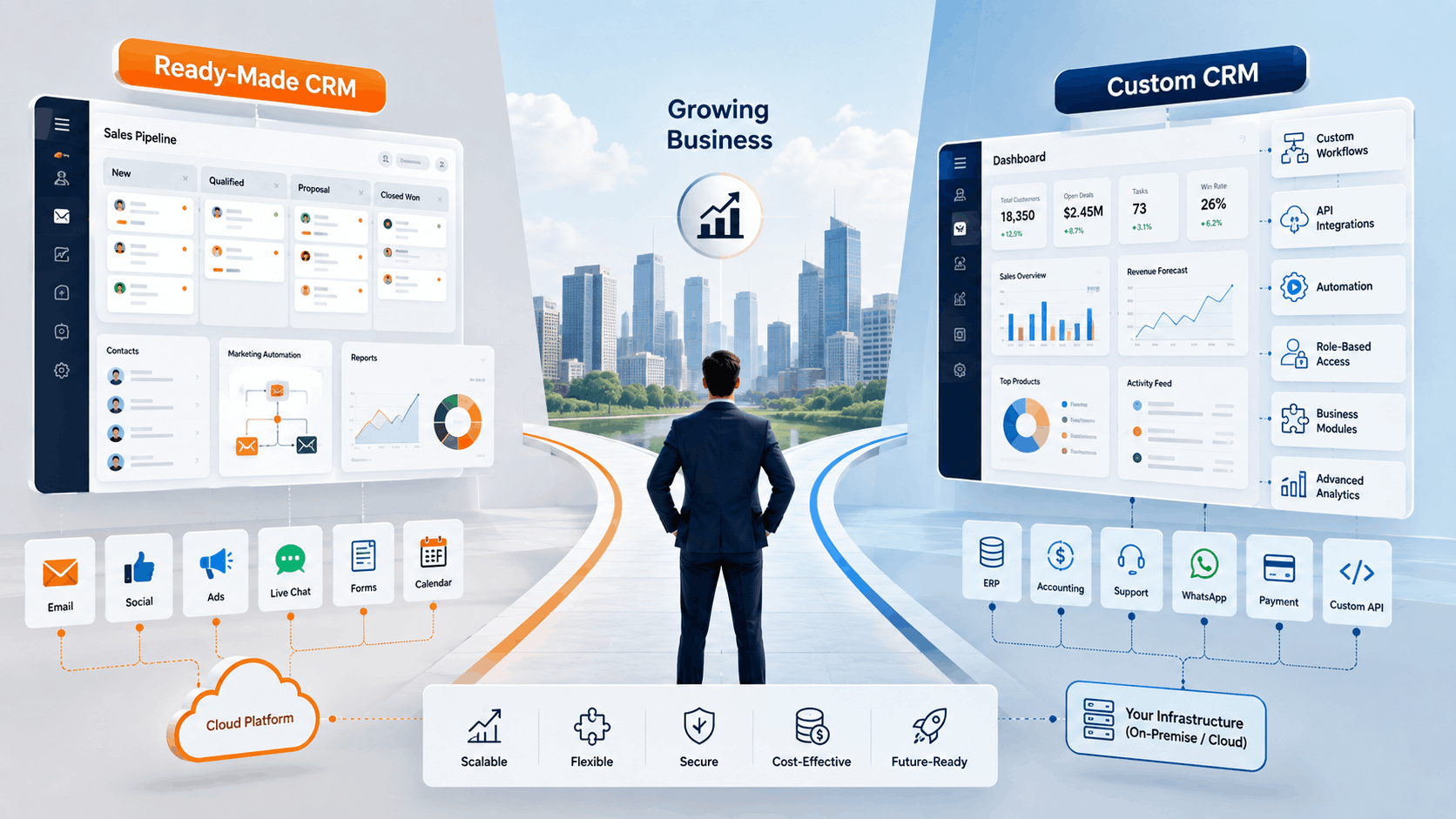
HubSpot is usually better for growing companies with relatively standard sales, marketing, and service workflows that want to get running quickly. A custom CRM is usually better when the business has unique processes, complex automation, specialized integrations, multi-location operations, or reporting requirements that cannot be handled cleanly through standard configuration.
A third option also deserves attention: using HubSpot for marketing or customer acquisition while a custom CRM manages specialized operational workflows.
This Article Is Especially Useful For
- Founders choosing their first serious CRM platform
- Sales and operations leaders who are outgrowing an existing CRM
- Companies evaluating a HubSpot alternative
- Businesses using spreadsheets alongside their CRM
- Multi-location or multi-department organizations
- CTOs evaluating whether custom development is justified
What Is the Difference Between HubSpot and a Custom-Built CRM?
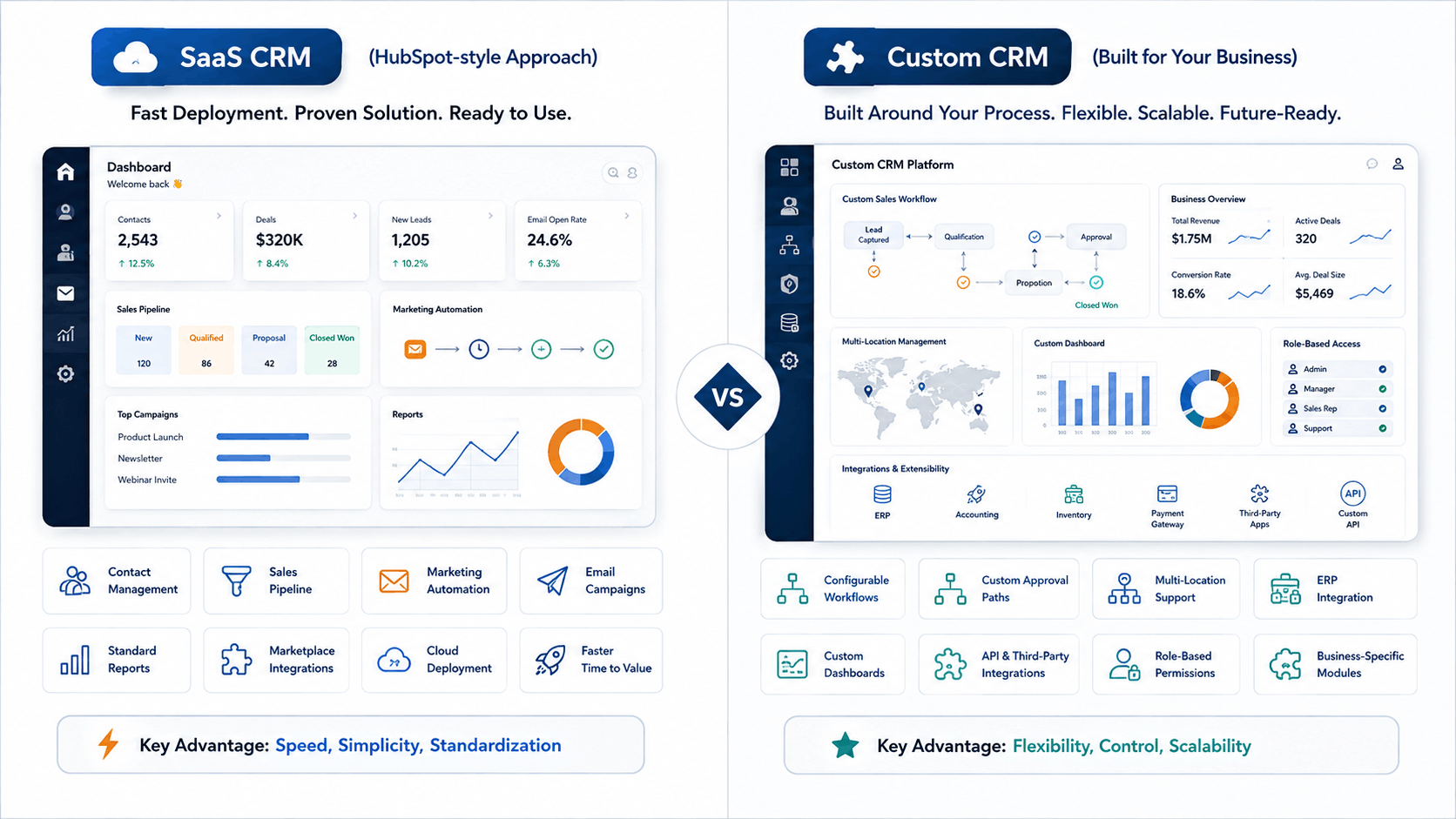
HubSpot is a cloud-based customer platform with CRM, sales, marketing, customer service, content, data, and automation capabilities. Businesses subscribe to the platform and configure its existing features around their requirements. HubSpot also provides APIs and integrations that extend what the platform can do.
A custom-built CRM, by contrast, is software designed around a company’s specific data, sales processes, permissions, reports, integrations, and automation rules.
That distinction matters.
With HubSpot, the question is usually, “How can we configure the platform for our process?”
With custom CRM development, the question becomes, “How should the software support our process?”
Neither approach is automatically better.
Custom CRM vs HubSpot: Side-by-Side Comparison
|
Decision Area |
HubSpot |
Custom CRM |
|
Initial deployment |
Usually faster |
Requires discovery and development |
|
Upfront investment |
Lower |
Higher |
|
Ongoing cost |
Subscription-based |
Hosting, maintenance, and enhancement |
|
Workflow flexibility |
Strong configuration within platform rules |
Can be designed around unique workflows |
|
Integrations |
Large existing ecosystem plus APIs |
APIs can be built around specific systems |
|
User experience |
Standardized HubSpot interface |
Designed around specific users and tasks |
|
Reporting |
Ready-made and configurable reporting |
Business-specific dashboards and calculations |
|
Permissions |
Based on available HubSpot controls |
Custom role, record, department, or location logic |
|
Maintenance |
Platform managed by HubSpot |
Business/development partner manages application |
|
Deployment control |
SaaS environment |
Greater architecture and hosting flexibility |
|
Best fit |
Standard or moderately customized processes |
Complex or differentiated processes |
The real comparison is therefore not “ready-made versus custom.” It is standardization versus process-specific control.
When HubSpot Is the Better Choice
HubSpot makes sense when your team wants a proven CRM without first running a software development project.
For example, imagine a 15-person B2B services company. Leads come from website forms, referrals, paid campaigns, and outbound sales. The company needs contact management, pipelines, email tracking, basic automation, meetings, and reporting.
That company may gain little from building these capabilities from scratch.
HubSpot already provides CRM functionality alongside connected sales, marketing, and service products. Its official product catalog also offers multiple subscription levels as needs increase.
HubSpot is particularly attractive when:
- Your sales process follows recognizable pipeline stages.
- Your team needs to launch quickly.
- Marketing automation is a major requirement.
- You prefer vendor-managed infrastructure.
- Existing integrations cover most of your technology stack.
- Internal technical resources are limited.
There is also less software ownership work. Your team does not need to plan application upgrades, infrastructure maintenance, or every new CRM feature.
For many small and growing businesses, that simplicity has real value.
When a Custom CRM Starts Making More Sense
Growth can create requirements that were not obvious when the CRM was selected.
Perhaps leads now need to pass through different approval paths. One region follows different pricing rules. Franchise locations need independent access while headquarters requires consolidated reporting. Sales data must connect with inventory, finance, project management, or an ERP.
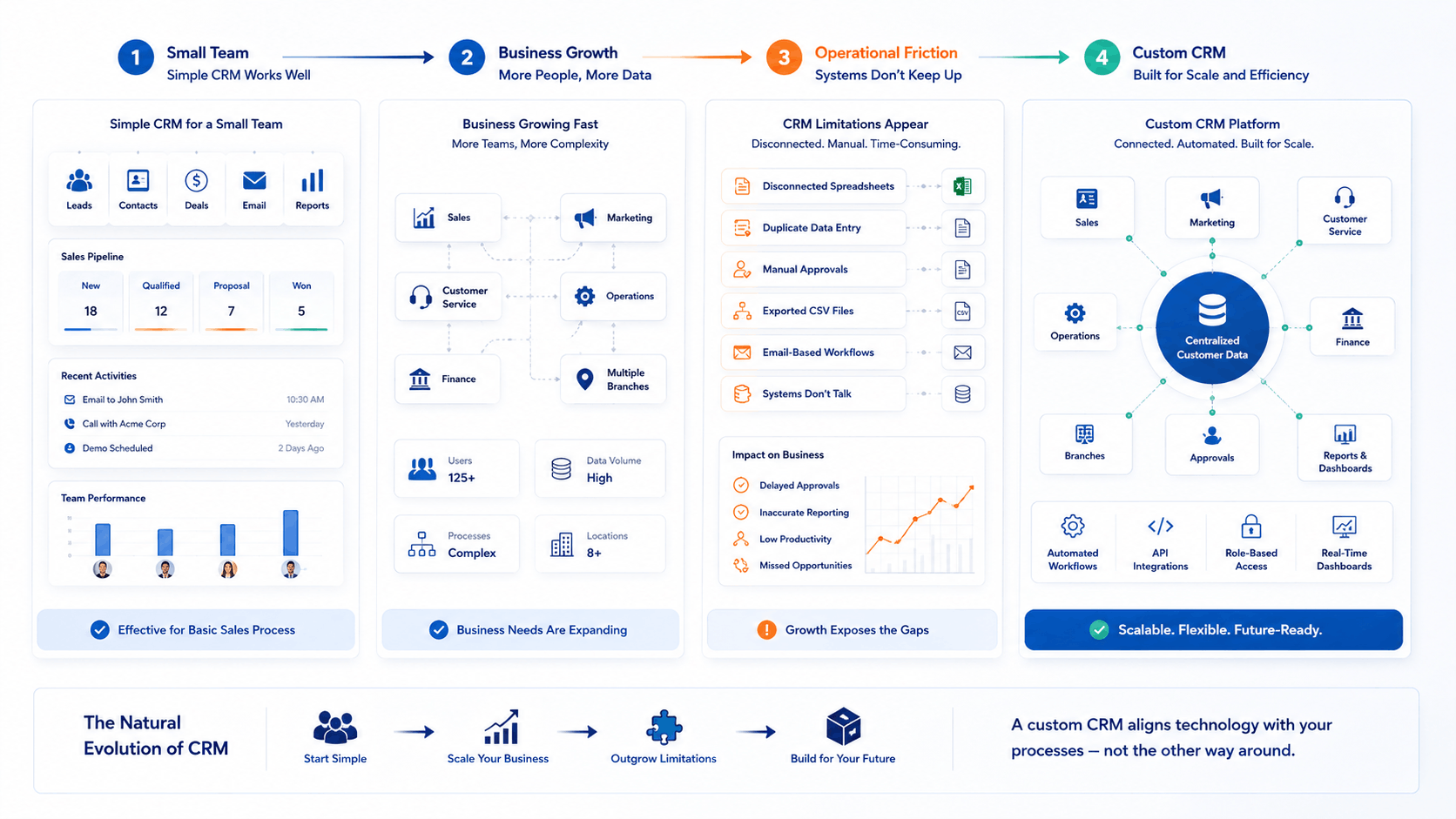
Soon, the team is adding workarounds around the CRM instead of working inside it.
A custom-built CRM becomes worth evaluating when:
- Teams repeatedly export CRM data to spreadsheets.
- Critical processes happen outside the CRM.
- Users enter the same information in several systems.
- Approval logic has multiple levels or exceptions.
- Permissions vary by branch, geography, department, or hierarchy.
- Reports require extensive manual preparation.
- Your CRM must coordinate with ERP or operational software.
- Standard workflows require too many compromises.
These are also common reasons companies start investigating a broader HubSpot alternative rather than simply upgrading their current subscription.
Kanhasoft’s current CRM work, for example, includes lead management, deal pipelines, SMS and email automation, multi-tenant franchise architecture, CRM-ERP integration, and integrations with tools such as HubSpot and Twilio.
The point is not that custom software has more features. The value comes when those features reflect how the company actually operates.
Which Option Costs More?
Custom CRM normally requires a higher initial investment because analysis, UI/UX, architecture, development, testing, migration, deployment, and integrations must be completed before the system is mature.
HubSpot spreads more of the cost across subscriptions.
As of August 2026, HubSpot’s official product catalog lists Smart CRM starting at $20 per seat monthly for Starter, $50 for Professional, and $75 for Enterprise. However, individual Hubs have different pricing structures. For example, Sales Hub Professional starts at $100 per seat, while Marketing Hub Professional starts at $890 per month and includes a required onboarding fee. Pricing can change, so businesses should confirm current figures during procurement.
The better question is therefore:
What will this CRM cost us over the period we realistically expect to use it?
Calculate:
HubSpot total cost = subscriptions + seats + required Hubs + contact tiers + onboarding + integration work + administration.
Custom CRM total cost = discovery + development + migration + infrastructure + maintenance + security + future enhancements.
A custom CRM is not automatically cheaper over time. Likewise, SaaS is not automatically cheaper just because its initial cost is lower.
Our CRM development cost guide explains why integrations, permissions, migration, reporting, and workflow complexity can significantly affect custom development effort.
The Overlooked Option: HubSpot + Custom CRM
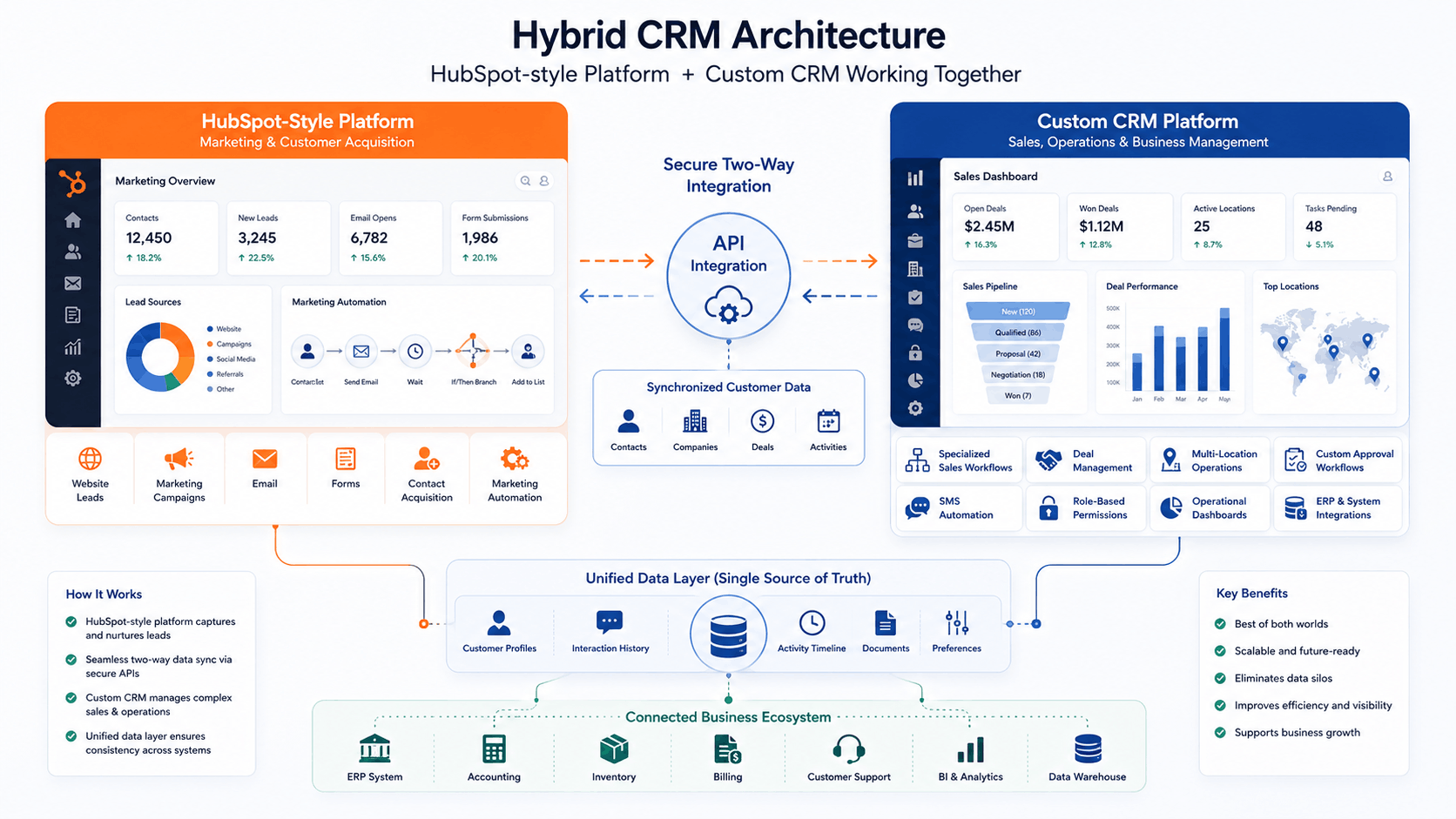
The decision does not always need to be binary.
A growing business may like HubSpot’s marketing ecosystem while needing highly specialized sales or operational workflows elsewhere.
In that situation, HubSpot can remain part of the technology stack.
A relevant example is Kanhasoft’s multi-location franchise CRM project. The business required location-specific workflows, automated SMS campaigns, several deal-management views, role-based controls, centralized administration, and detailed lead handling. A custom platform was developed using React, Next.js, Node.js, PostgreSQL, AWS, Twilio, REST APIs, and HubSpot integration.
The uploaded case-study portfolio documents the same architecture: a custom franchise-ready CRM synchronized with HubSpot while specialized deal and communication workflows remained inside the purpose-built platform.
That is a useful lesson for growing companies.
Replacing HubSpot is not always necessary. Sometimes the better architecture is to let each system handle the work it does best.
A Practical Decision Framework
Instead of starting with a feature checklist, answer these questions.
|
Business Situation |
Better Starting Point |
|
We need a CRM running quickly |
HubSpot |
|
Our sales process is fairly standard |
HubSpot |
|
Marketing automation is central to our strategy |
HubSpot |
|
We have limited IT resources |
HubSpot |
|
Our workflow is a competitive differentiator |
Custom CRM |
|
We have complex role or approval structures |
Custom CRM |
|
Several systems must behave like one platform |
Custom CRM |
|
We operate branches, franchises, or specialized business units |
Often custom CRM |
|
We need both standard marketing and specialized operations |
Hybrid approach |
|
We are unsure what we actually need |
Run discovery before choosing |
Practical Implementation Note
In CRM projects, one warning sign appears repeatedly: people create manual processes to compensate for software limitations.
Watch what employees do outside the CRM.
If sales managers maintain “real” forecasts in Excel, operations tracks approvals over email, and management builds reports from exported CSV files, those behaviors reveal missing requirements.
However, do not assume custom development is the immediate answer. First review whether better HubSpot configuration, automation, integration, or user training can remove the problem.
Changing software when the real issue is process design only produces a more expensive version of the same problem.
What About AI and Future CRM Requirements?
Both paths can support AI.
HubSpot continues to add AI capabilities to its customer platform. A custom CRM can also incorporate features such as lead prioritization, conversation summaries, intelligent search, document processing, forecasting assistance, or recommended next actions.
The key question is not, “Does this CRM have AI?”
Ask:
“Which business decision or repetitive activity will AI improve?”
Our guide to AI-powered CRM lead management covers practical uses such as lead scoring, routing, follow-up automation, and sales insights.
AI should support a clear process. It should not compensate for poor data or unclear sales stages.
Security, Data, and Ownership Also Matter
CRM platforms often contain sensitive customer, employee, pipeline, pricing, and revenue information.
With HubSpot, much of the platform infrastructure and product maintenance is handled by the SaaS provider.
With custom software, the business has more architectural flexibility, but it also takes on greater responsibility for security design, backups, access controls, monitoring, testing, and maintenance.
Organizations operating under GDPR, industry-specific regulations, contractual data requirements, or internal security policies should review both options with qualified privacy, legal, and security specialists before making a final decision.
Need Help Comparing HubSpot With a Custom CRM?
If your company is outgrowing its current CRM, the first step does not have to be a development proposal.
Kanhasoft can help review your sales workflow, user roles, reporting requirements, integrations, automation gaps, and current HubSpot setup. From there, the practical recommendation may be to optimize HubSpot, integrate it with another system, replace selected workflows, or plan a custom CRM.
If you are evaluating those options, you can discuss your CRM requirements with Kanhasoft before committing to a particular architecture.
Conclusion: Which Is Better for a Growing Business?
The custom CRM vs HubSpot decision comes down to business fit.
Choose HubSpot when you need a mature CRM ecosystem, fast implementation, standardized workflows, and limited responsibility for maintaining the underlying software.
Consider a custom CRM when your business depends on specialized workflows, complex integrations, custom permissions, unique reporting, or processes that standard software repeatedly forces you to work around.
And remember the third option: HubSpot and a custom CRM can work together.
The best CRM is not necessarily the platform with the longest feature list. It is the system that removes friction without creating unnecessary complexity.