CRM development cost usually ranges from $5,000 to $150,000+, depending on the scope, number of users, workflows, integrations, reporting needs, security requirements, and long-term product roadmap. A basic CRM MVP with login, lead tracking, admin panel, simple reports, and a dashboard can start around $5,000–$15,000+. A more advanced CRM for growing teams may cost $25,000–$80,000+, while complex systems with automation, AI features, audit logs, cloud architecture, and multiple integrations can reach $50,000–$150,000+.
The real question is not just “What does a CRM cost?” The better question is: What business process are we trying to improve, and what should be built first?
A CRM can be a simple sales tracker, a complete customer operations platform, or a subscription-based SaaS product. Each version has a different budget, timeline, and level of complexity.
This article is especially useful for:
- Business owners replacing spreadsheets and manual tracking
- Sales teams planning better lead and follow-up visibility
- SMEs preparing a CRM software budget
- Founders planning a CRM MVP or SaaS product
- Operations managers who need workflow automation
- IT heads comparing build scope, timeline, and maintenance cost
- Decision-makers who want a realistic estimate before starting development
Short Answer: CRM Development Cost
A small CRM can cost $5,000–$15,000+ when it includes basic login, core workflow, admin panel, simple reports, and a basic dashboard.
A mid-level CRM often costs $15,000–$30,000+ when it includes user roles, integrations, workflow automation, notifications, and dashboards.
A SaaS CRM or internal operations CRM may cost $25,000–$80,000+ if it includes multi-tenant access, billing, API reporting, department modules, and advanced permissions.
A complex enterprise-grade CRM may cost $50,000–$150,000+ when it includes advanced security, AI features, audit logs, custom integrations, and scalable cloud architecture.
These numbers are planning ranges. Final cost depends on the confirmed scope, user roles, automation depth, data migration, integration complexity, and ongoing support needs.
What Does CRM Development Cost Include?
CRM development cost usually includes the work required to design, build, test, deploy, and maintain a CRM system.
A typical budget may include:
- Business requirement discovery
- Workflow planning
- UI/UX design
- Frontend development
- Backend development
- Database architecture
- Admin panel
- User roles and permissions
- Reports and dashboards
- Third-party integrations
- Data import or migration
- QA testing
- Deployment
- Hosting setup
- Maintenance and support
The scope can be small or wide. For example, one company may only need lead tracking and reminders. Another may need sales pipelines, customer support, billing, WhatsApp automation, team performance reports, and ERP connectivity.
Both are CRM projects, but their budgets will be very different.
CRM Development Cost by Scope
| Business need | Typical scope | Estimated budget |
|---|---|---|
| Startup CRM MVP | Login, lead module, contact list, admin panel, basic dashboard | $5,000–$15,000+ |
| SME sales CRM | User roles, pipeline, follow-ups, notifications, reports, basic integrations | $15,000–$30,000+ |
| SaaS CRM product | Multi-tenant setup, billing, roles, subscription plans, API reports | $25,000–$80,000+ |
| Internal business CRM | Leads, sales, tasks, inventory, finance, reports, department workflows | $25,000–$80,000+ |
| Complex CRM platform | Advanced security, custom integrations, AI features, audit logs, cloud architecture | $50,000–$150,000+ |
| Ongoing improvement | Full-time developer, QA, PM, monthly support, new features | Monthly pricing |
The main reason pricing varies so much is that “CRM” is a broad term. A contact database and a full customer operations platform are not the same product.
Key Factors That Affect CRM Development Cost
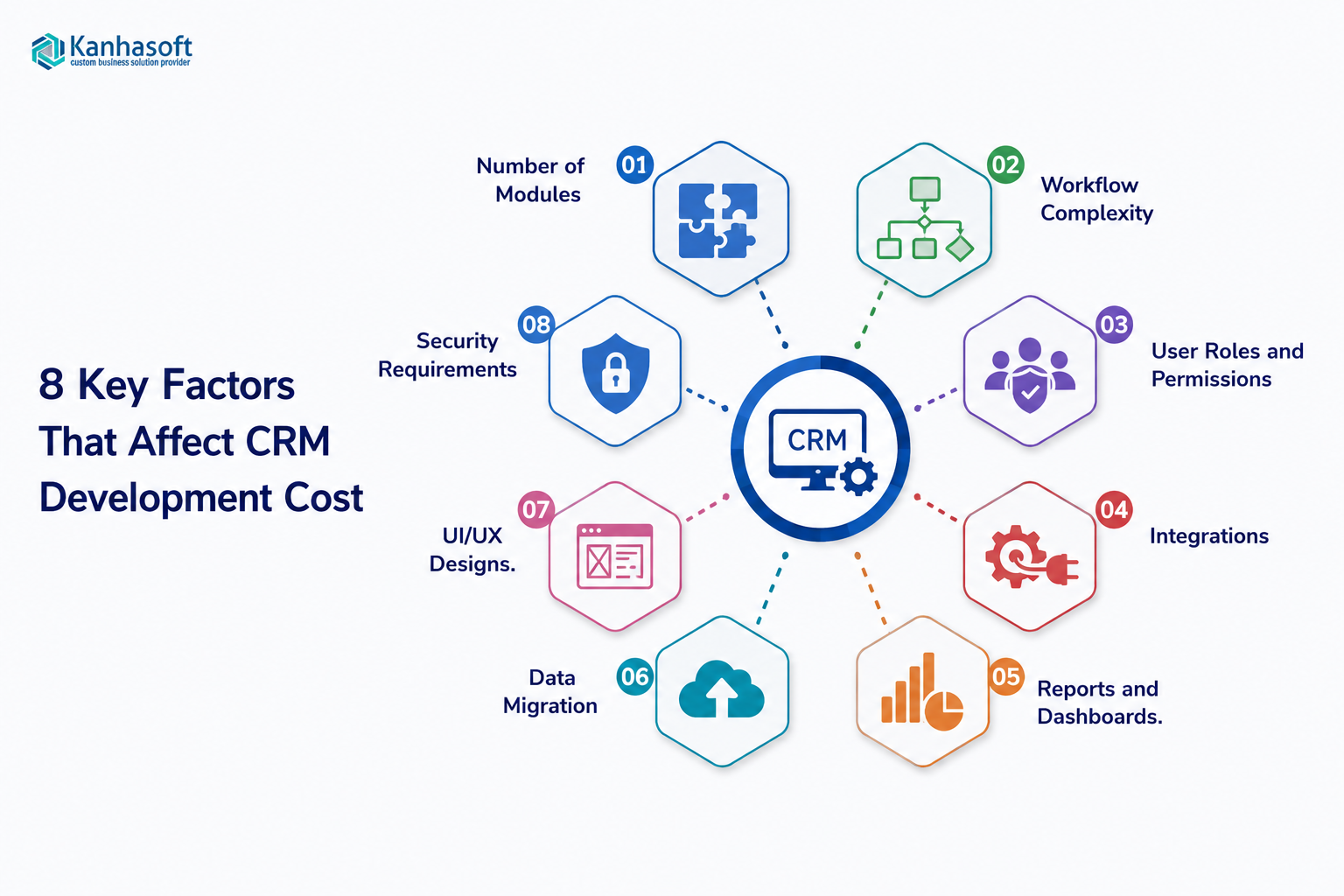
1. Number of Modules
Modules are the functional parts of the CRM. More modules usually mean more screens, workflows, database tables, permissions, and testing.
Common CRM modules include:
- Lead management
- Contact management
- Account management
- Sales pipeline
- Follow-up reminders
- Task management
- Calendar
- Quotes and proposals
- Customer support
- Billing
- Reports and dashboards
- Admin settings
A CRM with lead and contact management will cost less than one that also includes billing, inventory, customer support, and team performance analytics.
2. Workflow Complexity
Workflow complexity has a major impact on cost.
A simple workflow may look like this:
New lead → assign salesperson → follow up → mark won or lost.
A more complex workflow may include:
New lead → source tracking → auto-assignment → lead scoring → SMS follow-up → manager approval → quote generation → task creation → conversion report.
In practice, many CRM budgets increase when teams discover hidden rules during planning. For example, sales managers may want different access for branches, territories, product lines, or customer types. These rules are important, but they add effort.
3. User Roles and Permissions
User roles define who can view, create, edit, approve, export, or delete data.
Simple role structures may include:
- Admin
- Manager
- Sales user
More advanced role structures may include:
- Super admin
- Country manager
- Branch manager
- Sales executive
- Support agent
- Finance user
- Franchise owner
- Read-only user
Role-based access becomes more expensive when permissions change by location, department, deal value, client type, or approval level.
4. Integrations
Integrations connect the CRM with other tools your business already uses.
Common integrations include:
- Gmail or Outlook
- Google Calendar
- Google Drive or Dropbox
- SMS gateways
- WhatsApp tools
- Twilio
- Mailchimp
- HubSpot
- Stripe or PayPal
- QuickBooks or Xero
- ERP systems
- Website forms
- Lead generation platforms
Integrations save time, but they need planning. Each integration may involve API limits, authentication, error handling, field mapping, and testing.
For example, connecting a CRM with email may sound simple. However, the system may need to sync emails, attach messages to contacts, manage permissions, and avoid duplicate records. That adds development effort.
5. Reports and Dashboards
Reports are often underestimated in CRM planning.
A basic dashboard may show:
- Total leads
- Open deals
- Closed deals
- Monthly revenue
- Follow-up reminders
An advanced dashboard may include:
- Conversion rate by source
- Sales forecast
- Revenue by team
- Lost deal reasons
- Average response time
- Follow-up aging
- User activity
- Custom filters
- Export options
- Role-based report visibility
A report is only useful if the data behind it is clean and structured. Therefore, reporting should be planned early.
6. Data Migration
Data migration means moving existing customer data into the new CRM.
This data may come from:
- Excel files
- Google Sheets
- Old CRM tools
- Email inboxes
- ERP systems
- Website forms
- Accounting tools
Migration cost depends on data quality. Clean, structured data is easier to import. Duplicate, incomplete, or inconsistent data needs cleanup first.
A common mistake is to treat migration as a simple upload. It is often more than that. Field mapping, validation, duplicate removal, and sample testing are usually needed.
7. UI/UX Design
Good CRM design reduces daily friction.
A CRM should help users move quickly between leads, calls, tasks, notes, documents, and reports. If users need too many clicks, they will avoid the system and return to spreadsheets.
Useful CRM design focuses on:
- Clear navigation
- Fast search
- Simple forms
- Relevant filters
- Easy follow-up actions
- Mobile-friendly screens
- Clean dashboards
- Minimal unnecessary fields
Clickable prototypes can reduce cost risk. They help stakeholders review screens before coding starts.
8. Security Requirements
CRM systems store important business and customer information. Security cannot be treated as an afterthought.
Security features may include:
- Secure login
- Two-factor authentication
- Role-based access
- Audit logs
- Data encryption
- Session timeout
- IP restrictions
- Backup and recovery
- Activity tracking
- Export restrictions
Businesses in healthcare, finance, insurance, education, legal, and other regulated sectors may need additional compliance review. In those cases, it is wise to involve legal, compliance, or data privacy experts.
CRM Budget Examples by Business Scenario
Example 1: Small Sales Team Replacing Spreadsheets
A small business may need a CRM to manage leads, contacts, tasks, and follow-ups.
Possible features:
- Login
- Lead module
- Contact module
- Task reminders
- Basic pipeline
- Simple dashboard
- Admin panel
Estimated budget: $5,000–$15,000+
This is a good starting point when the business wants better visibility but does not need heavy automation yet.
Example 2: Growing SME With Sales Automation
A growing company may need lead assignment, follow-up reminders, email integration, user roles, and better reporting.
Possible features:
- Lead capture
- Sales pipeline
- User roles
- Email integration
- Notifications
- Dashboard
- Follow-up automation
- Reports
Estimated budget: $15,000–$30,000+
This type of CRM helps reduce missed follow-ups and manual reporting.
Example 3: Multi-Location Business
A franchise, branch-based company, or regional sales organization may need location-wise access and centralized management.
Possible features:
- Multi-location structure
- Branch-wise users
- Central admin panel
- Local dashboards
- SMS or email campaigns
- Lead distribution rules
- Manager reports
Estimated budget: $25,000–$80,000+
The cost increases because permissions, reporting, and workflows must work across multiple levels.
Example 4: SaaS CRM Product
A SaaS founder may want to build a CRM product for external customers.
Possible features:
- Multi-tenant setup
- Subscription billing
- Plan-based features
- Admin panel
- User roles
- API reporting
- Customer onboarding
- Usage tracking
Estimated budget: $25,000–$80,000+
SaaS CRM products need stronger architecture because multiple customers use the same platform.
Example 5: Advanced CRM With AI and Integrations
A larger business may need forecasting, AI-assisted lead scoring, advanced integrations, audit logs, and cloud scalability.
Possible features:
- AI lead scoring
- Smart recommendations
- Advanced reports
- ERP integration
- Accounting integration
- Audit logs
- Cloud architecture
- Security controls
- Workflow automation
Estimated budget: $50,000–$150,000+
This type of CRM should usually be planned in phases to control risk.
Best CRM Budget Approach by Situation
| Situation | Recommended approach | Why it works |
|---|---|---|
| You have a small team and basic needs | Start with a CRM MVP | Keeps cost low and validates usage |
| Your process is unique | Plan workflows before development | Reduces rework and confusion |
| You need many integrations | Build integration scope separately | Helps estimate API work accurately |
| You have messy data | Budget for data cleanup | Prevents poor CRM adoption |
| You need multi-location access | Design roles early | Avoids permission-related rework |
| You are building a SaaS product | Prioritize architecture first | Supports future customers and scaling |
| You are unsure about scope | Start with discovery and prototype | Reduces risk before full development |
Hidden Costs to Consider
CRM budgets often miss important items. These may not be part of the first development quote unless discussed clearly.
Hosting and Infrastructure
Cloud hosting cost depends on users, database size, traffic, storage, backups, and security setup.
A small CRM may have low hosting needs. A larger CRM with files, analytics, and real-time usage may need stronger infrastructure.
Third-Party Tool Fees
Some integrations require paid accounts or usage-based billing.
Examples include:
- SMS credits
- Email sending tools
- Payment gateways
- Cloud storage
- API usage
- AI model usage
- Map services
- Analytics tools
These are separate from development cost.
Maintenance and Support
CRM software needs ongoing care.
Maintenance may include:
- Bug fixes
- Security updates
- API changes
- Performance checks
- New reports
- Small improvements
- User support
- Backup monitoring
A monthly support plan is often more practical than waiting until problems become urgent.
Training and Adoption
Even a well-built CRM can fail if users are not trained.
Training may include:
- Admin training
- Sales team onboarding
- Process documentation
- User manuals
- Short video guides
- Post-launch support
User adoption should be planned before launch, not after.
Benefits of Budgeting CRM Properly
Good CRM budget planning helps businesses avoid surprises.
Key benefits include:
- Clearer project scope
- Better feature prioritization
- Lower rework risk
- Faster decision-making
- More accurate timelines
- Better vendor comparison
- Stronger user adoption
- Easier phased development
- Better control over long-term cost
A clear budget also helps separate must-have features from nice-to-have ideas.
Limitations and Challenges
A tailored CRM can be highly useful, but it is not always the right first step.
Common challenges include:
- Higher upfront investment than ready-made tools
- More planning effort
- Need for stakeholder involvement
- Longer timeline than plug-and-play software
- Ongoing maintenance responsibility
- Risk of scope creep
- Need for training and adoption
A CRM project works best when the business has a clear owner, defined workflows, and practical phase-one goals.
Need Help Planning a Realistic CRM Budget?
If you are unsure what your CRM should cost, the safest next step is not full development. It is a clear scope.
Kanhasoft can help you break your CRM idea into modules, workflows, roles, integrations, reports, and phases. This makes it easier to decide what should be built first, what can wait, and what budget range is realistic before committing to a full build.
Conclusion
CRM development cost depends on the size and complexity of the business problem. A basic CRM MVP may cost $5,000–$15,000+, while a more advanced CRM with automation, integrations, dashboards, security, and scalable architecture may cost $50,000–$150,000+.
The best way to control CRM development cost is to define your workflows clearly, choose phase-one features carefully, plan integrations early, and budget for maintenance. A well-planned CRM should do more than store customer data. It should help your team work faster, follow up better, reduce manual effort, and make decisions with clearer information.