For years, “AI in ERP” often meant adding a chatbot beside an existing dashboard. Ask a question, get an answer, then return to the ERP and do the actual work yourself. AI agents for ERP change that model. When connected safely to custom ERP development services, agents can investigate issues, collect context, recommend actions, execute approved tasks, and coordinate multi-step workflows across finance, procurement, inventory, production, and support.
That distinction matters because most ERP problems are not really question-and-answer problems. They are process problems.
A purchasing manager does not only need to know why an order is delayed. They may need someone-or something-to check inventory, review open purchase orders, contact the supplier, update the expected delivery date, notify production, and escalate the exception.
That is where agents start going beyond chatbots.
What Are AI Agents for ERP?
AI agents for ERP are software components that can understand a business goal, retrieve ERP context, decide what steps are required, use permitted tools, take approved actions, and escalate exceptions to people. Unlike conventional ERP chatbots, which mainly answer questions or summarize information, agents can help move an operational process toward completion.
Microsoft, Oracle, and SAP are already bringing agent-based capabilities into enterprise finance and operations platforms, indicating that ERP is moving from AI-assisted information retrieval toward governed process execution.
This article is especially useful for:
- CIOs, CTOs, and IT leaders evaluating ERP modernization
- Operations and supply chain leaders dealing with repetitive exceptions
- Finance leaders exploring intelligent process automation
- ERP product owners and transformation teams
- Businesses planning custom AI ERP solutions
- Decision-makers comparing chatbots, workflow automation, and AI agents
ERP Chatbots vs. AI Agents: What Actually Changes?
A chatbot usually waits for a user.
You ask: “Which purchase orders are overdue?”
The chatbot searches data and returns an answer.
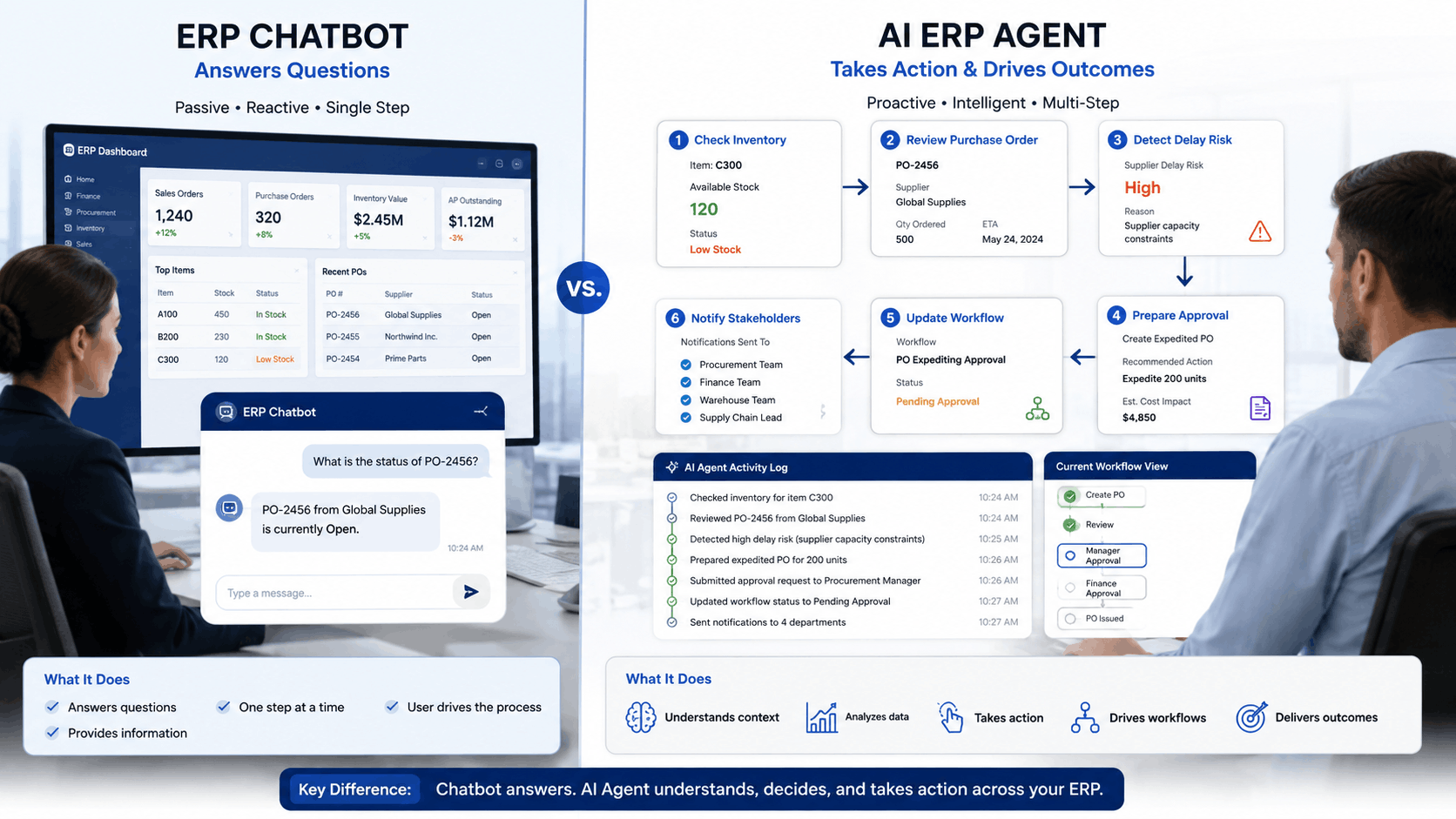
An agent can start with the same question but continue further: identify the affected production orders, check alternative suppliers, prepare a recommended action, draft supplier communication, and create an approval request.
That additional ability to act within controlled boundaries is the important difference.
|
Capability |
ERP Chatbot | Traditional Automation |
AI Agent |
|
Answer ERP questions |
Yes | Usually no |
Yes |
|
Summarize records |
Yes | Limited |
Yes |
|
Follow fixed rules |
Limited | Strong |
Yes |
|
Handle variable situations |
Limited | Weak |
Stronger |
|
Plan several steps |
Usually no | No |
Yes |
|
Use APIs/tools |
Sometimes | Yes |
Yes |
|
Adapt based on results |
Limited | No |
Yes |
|
Request human approval |
Possible | Possible |
Yes |
|
Execute permitted actions |
Limited | Yes |
Yes |
|
Handle exceptions intelligently |
Limited | Rule-dependent |
Potentially strong |
Traditional automation is still valuable. In fact, a fixed rule is often better than an agent when the process is predictable.
If every approved invoice should automatically be posted to the same ledger under clearly defined conditions, you may not need AI at all.
Agents become more useful when a process contains context, ambiguity, exceptions, multiple systems, or decisions that cannot be expressed comfortably as simple if/then rules.
For a broader explanation of this operating model, see our guide to Agentic ERP and AI agents in enterprise operations.
Where AI Agents Can Support ERP Operations
The practical value of AI business process automation appears when agents work inside real workflows instead of sitting beside them as a novelty.
Finance and Accounts Payable
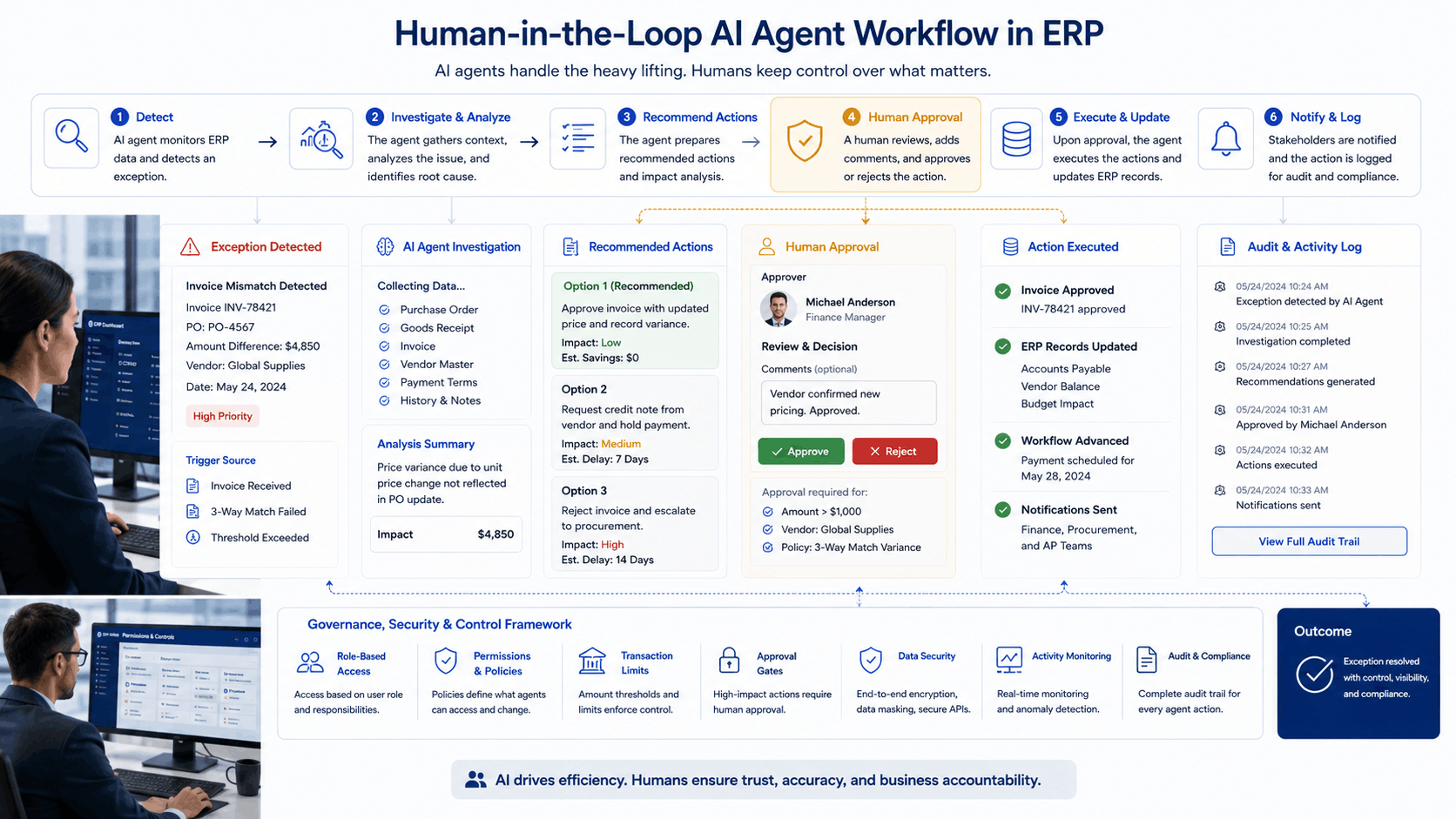
Consider an invoice mismatch.
A traditional ERP may flag the discrepancy. An employee then investigates it manually.
A finance agent could:
- Read the supplier invoice.
- Find the related purchase order.
- Compare quantities, prices, taxes, and received goods.
- Review previous supplier transactions.
- Identify the likely cause of the mismatch.
- Recommend a correction.
- Route the case for approval if required.
The agent should not necessarily post a material financial adjustment automatically. High-impact actions can remain behind human approval.
Microsoft and Oracle are already applying agents to areas such as account reconciliation, supplier communication, expense management, and financial operations.
Procurement and Supplier Management
Imagine production is scheduled for Monday, but a critical raw material will arrive Tuesday.
An ERP agent could detect the risk, inspect available stock at other warehouses, check alternative approved suppliers, estimate the impact on production, and prepare options for the procurement manager.
The important word here is prepare.
The best early ERP agents are often not autonomous executives. They are very fast operational assistants with controlled permissions.
Inventory and Warehouse Operations
Agents can also monitor ERP events such as:
- abnormal stock consumption
- potential stockouts
- delayed transfers
- inventory mismatches
- slow-moving items
- incomplete warehouse transactions
Instead of producing another alert, an agent can investigate why the alert exists and recommend the next step.
That distinction may sound small. Operationally, it is significant. Businesses usually do not suffer from a shortage of notifications. They suffer from a shortage of time to investigate them.
ERP Help Desk and User Support
AI agents can also improve traditional ERP support.
Suppose an employee says:
“I cannot release this purchase order.”
A chatbot might provide instructions from the knowledge base.
An ERP support agent could inspect the user’s role, workflow state, validation errors, approval history, configuration rules, and related records. It could then explain the exact issue and, when permitted, initiate the appropriate corrective workflow.
An AI-enabled knowledge base can still play an important role here. The knowledge layer explains policies and procedures, while the agent connects that knowledge to live business context and approved actions.
How AI Agents for ERP Actually Work
There is no magic “agent” switch inside an ERP.
A reliable architecture normally needs several layers.
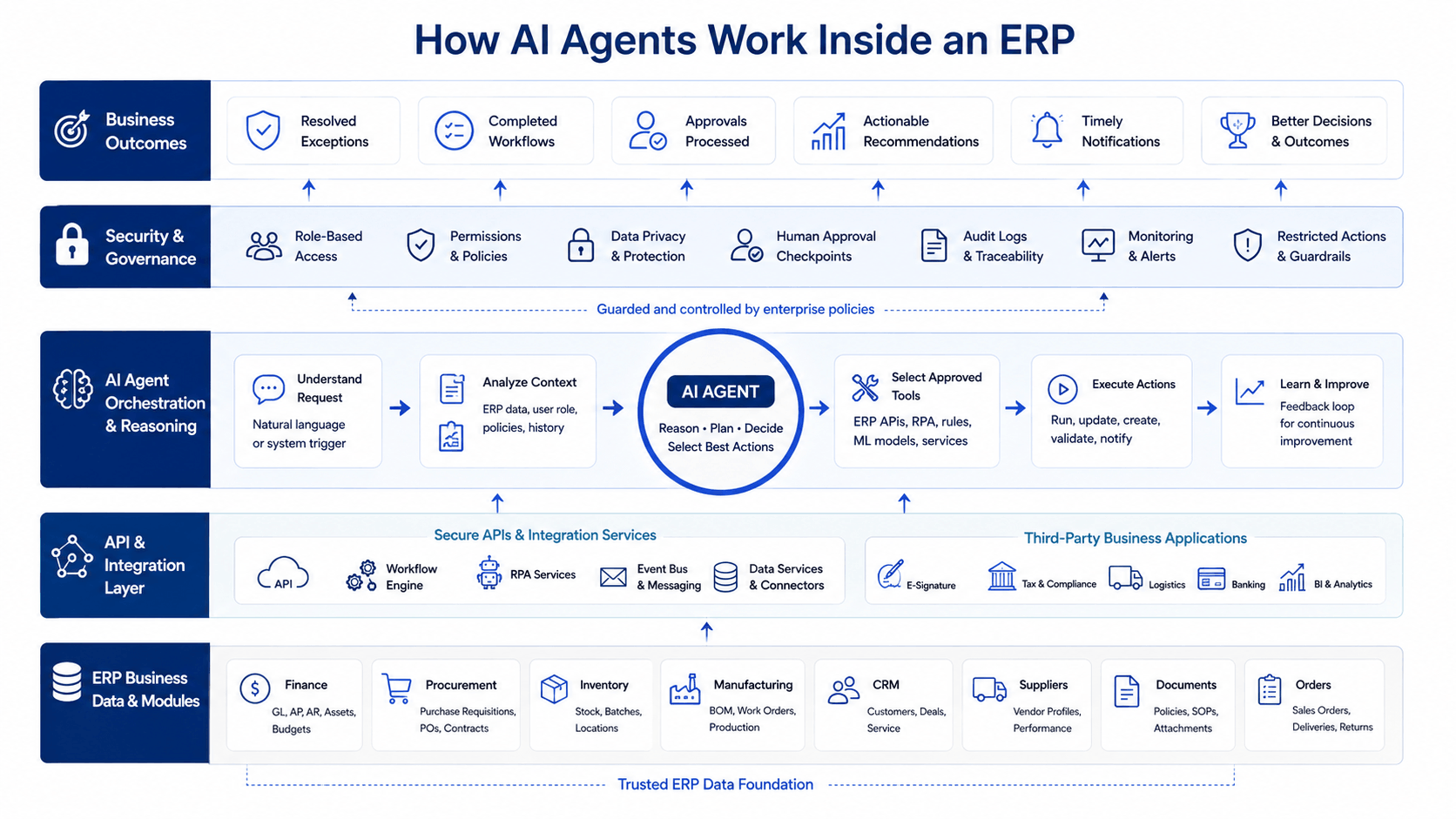
- ERP data and business logic: The agent needs structured access to customers, suppliers, products, inventory, transactions, approvals, documents, and workflow states.
- Tool and integration layer: APIs, functions, or protocols allow the agent to perform defined operations. Microsoft, for example, now provides an ERP Model Context Protocol framework that lets agents interact with Dynamics 365 finance and operations data and business logic.
- Reasoning and orchestration: An LLM or agent framework determines what information is needed and which permitted tools should be used.
- Identity and permissions: The agent should not gain unlimited ERP access simply because it uses AI.
- Human approvals: High-risk actions should stop at defined checkpoints.
- Logging and observability: Businesses need to know what the agent saw, what it decided, which tool it called, and what changed.
Without those controls, an impressive demonstration can become a dangerous production system remarkably quickly.
Google Cloud specifically recommends human oversight for business-critical agentic systems and emphasizes limiting agent permissions according to purpose and risk.
Benefits of AI Agents in ERP
The benefits of AI agents in ERP are not simply “less manual work.” Their larger value comes from reducing the distance between identifying an operational issue and doing something useful about it.
Faster exception handling
An employee may spend 20 minutes gathering information from five screens before making a two-minute decision.
An agent can potentially gather that context first.
Better continuity across departments
ERP workflows cross organizational boundaries. Procurement affects inventory. Inventory affects production. Production affects delivery. Delivery affects billing.
An agent can follow the process instead of stopping at one departmental screen.
Less repetitive ERP navigation
Many employees know exactly what needs to happen but spend significant time opening records, checking fields, copying information, and updating statuses.
Agents can reduce this administrative friction.
More consistent process execution
Policies can be embedded into agent workflows, helping teams apply the same checks before recommending or performing an action.
However, consistency does not guarantee correctness. Poor rules or bad master data can simply produce consistently bad outcomes.
More useful ERP support
Instead of telling users where to click, agents can increasingly help diagnose why something failed and what should happen next.
A Practical ERP Example From Our Work
One useful lesson comes from Kanhasoft’s production and logistics ERP work.
We built a centralized platform covering production planning, inventory, procurement, sales, logistics, BOM management, warehouse transfers, role-based access, and reporting. The documented project results included reduced operational inefficiencies, improved inventory accuracy, faster production planning and order fulfillment, and fewer procurement delays.
That project should not be presented as proof that AI agents produced those results; the supplied case study does not make that claim.
Instead, it demonstrates something more important for businesses considering agents: AI requires a usable operational foundation first.
Agents need clean master data, defined workflow states, role permissions, reliable APIs, and clear approval logic. Our live production and logistics ERP case study similarly describes centralized master data, BOM workflows, procurement, inventory transfers, logistics, permissions, and reporting as foundational components.
This matches a lesson from our broader AI-powered ERP implementation experience: sophisticated AI cannot rescue unreliable data and poorly defined processes.
When Should You Use a Chatbot, Automation, or AI Agent?
Not every workflow deserves an agent.
|
Business Need |
Best Starting Point |
|
Answer ERP policy questions |
Knowledge base/chatbot |
|
Generate record summaries |
AI assistant |
|
Run a fixed recurring process |
Workflow automation |
|
Validate predictable rules |
Traditional automation |
|
Investigate changing exceptions |
AI agent |
|
Coordinate several systems |
AI agent or orchestration |
|
Make high-value financial decisions |
Agent-assisted human decision |
|
Perform irreversible sensitive actions |
Human approval required |
A practical rule is simple:
Use deterministic automation when the decision can be reliably coded. Use an agent when the system must interpret context, choose among tools, or respond differently as conditions change.
Do not replace reliable automation with AI merely because “agentic” sounds newer.
Sometimes boring software is exactly what you want processing payroll at 2:00 a.m.
Risks Businesses Should Address Before Giving Agents ERP Access
Giving AI permission to take action changes the risk profile.
A chatbot producing a poor answer is inconvenient. An agent producing a poor answer and then updating 600 purchase orders is a different afternoon entirely.
Important controls include:
- least-privilege permissions
- separation of read and write access
- approval thresholds
- tool allow lists
- transaction limits
- audit logs
- rollback mechanisms
- agent testing and evaluation
- prompt-injection defenses
- sensitive-data controls
- clear human ownership
Google Cloud notes that agentic systems can expand the attack surface because they interact with business data and external tools. Risks include tool misuse, prompt injection, and unauthorized exposure of sensitive information.
Finance, healthcare, HR, legal, and regulated workflows may also require additional compliance review. Security, privacy, finance, and legal specialists should be involved where agent actions could affect regulated data or material business decisions.
How to Introduce AI Agents Into an Existing ERP
The safest strategy is usually not “make the ERP autonomous.”
Start with one annoying, measurable workflow.
Step 1: Find a high-friction process
Look for repetitive investigations, exception handling, status chasing, document checking, or multi-screen ERP work.
Step 2: Map the process
Document inputs, decisions, systems, permissions, exceptions, and approval points.
Step 3: Fix the data first
Clean supplier records, product masters, workflow states, and other information the agent must trust.
Step 4: Define agent permissions
Separate what the agent may:
- read
- recommend
- prepare
- execute
- escalate
Step 5: Add human approval
Start conservatively. Automation can increase later after actual performance is measured.
Step 6: Measure business outcomes
Track cycle time, exception resolution time, human effort, error rates, escalation rates, and user acceptance.
This staged approach is also consistent with how we think about AI-powered custom ERP development: AI should sit on top of coherent workflows, trustworthy data, defined permissions, and maintainable ERP architecture.
Future of AI Agents in ERP: From Screens to Outcomes
The future of AI agents in ERP is unlikely to mean employees abandoning ERP systems completely.
Instead, the interface may gradually become less important than the outcome.
A manager may say:
“Resolve all low-risk invoice mismatches under our approval threshold and show me anything unusual.”
Behind that request, several specialized agents could retrieve invoices, inspect purchase orders, verify receipts, apply company rules, update records, and escalate uncertain cases.
That direction is already visible across major enterprise software providers. Microsoft is positioning agents across finance and operations, Oracle is embedding agentic capabilities into ERP processes, and SAP’s 2026 autonomous-enterprise direction emphasizes business context, governance, authorization, and coordinated agents.
However, the winning ERP architecture will probably not be the one with the largest number of agents.
It will be the one that knows where autonomy creates value and where human judgment still belongs.
Planning Custom AI ERP Solutions? Start With the Workflow, Not the Model
For organizations exploring Custom AI ERP solutions, the first workshop should not be a debate about GPT, Gemini, Claude, or another model.
Start with the operational question:
Which process is consuming unnecessary human effort, and what decisions within that process can safely be delegated?
Kanhasoft works on custom ERP, workflow automation, AI integration, API integration, data architecture, role-based systems, and AI and ML development. A practical engagement can begin by reviewing one ERP workflow, identifying where an agent would genuinely help, and defining the data, tools, permissions, approvals, and success metrics required before development begins. Kanhasoft’s current official information lists Custom ERP Development as a primary technical focus and documents ERP projects across manufacturing, logistics, healthcare, and other operational environments.
If you are evaluating an ERP agent pilot, you can discuss the workflow with Kanhasoft before committing to a larger AI transformation.
Conclusion
AI agents for ERP represent a meaningful step beyond chatbots because they can help turn information into controlled action.
Their value is strongest in workflows involving exceptions, multiple systems, repetitive investigation, and context-dependent decisions. However, agents also introduce new questions around permissions, security, reliability, accountability, and human oversight.
The sensible path is not maximum autonomy on day one.
Build a reliable ERP foundation. Choose one valuable process. Give the agent limited tools. Keep humans involved where consequences matter. Measure what improves.
That approach may sound less dramatic than “the autonomous enterprise.”
It is also much more likely to survive contact with the real one.