Business process standardization is the practice of defining consistent, repeatable ways to complete important business activities across teams, locations, and systems. For growing companies, it reduces confusion, improves accountability, and creates a reliable foundation for automation, CRM, ERP, reporting, and AI adoption.
Most growing companies do not fail because people are not working hard. They struggle because each department develops its own version of “how things are done.” Sales tracks follow-ups one way. Operations approves work another way. Finance waits for missing documents. Managers ask for status updates in meetings because dashboards cannot be trusted.
That is where process standardization becomes a growth lever.
This article is especially useful for:
- Business owners scaling beyond founder-led operations
- COOs and operations managers improving internal workflows
- IT leaders planning CRM, ERP, or workflow automation
- Department heads dealing with inconsistent execution
- B2B companies expanding across locations, teams, or service lines
- Leadership teams preparing for audits, compliance, or investor scrutiny
What Is Business Process Standardization?
Business process standardization means creating one clear, approved, and measurable way to perform a recurring business process. It usually includes process maps, roles, approval rules, SOPs, templates, system workflows, data standards, and performance metrics.
For example, a standardized sales process defines how leads are captured, qualified, assigned, followed up, converted, or marked lost. A standardized procurement process defines who can request, approve, purchase, receive, and reconcile materials.
The goal is not to make every team robotic. The goal is to remove unnecessary variation where consistency matters.
Why Business Process Standardization Matters When Companies Grow
In a small company, informal processes can work. People sit close together. Decisions happen quickly. The founder knows what is going on.
However, growth changes the equation.
Growing customer demand creates more exceptions. As teams expand, additional handoffs become necessary. Departments introduce greater operational dependencies. At the same time, increasing data creates more reporting pressure.
We have all seen this happen: a company hires good people, buys new software, and still feels slower than before. The real issue is often not the tool. It is the lack of a standard operating model behind the tool.
ISO describes ISO 9001 as a framework that helps organizations deliver consistent products and services, improve efficiency, and meet customer and regulatory expectations. It also highlights the process approach, risk-based thinking, documented information, measurement, and continual improvement as key requirements.
That same logic applies even when a company is not pursuing formal ISO certification. Standard processes make quality easier to manage.
What Counts as a Business Process?
A business process is a repeatable set of activities that turns inputs into a useful output.
Simple examples include:
- Lead capture to sales qualification
- Quote request to approved quotation
- Sales order to delivery
- Purchase request to vendor payment
- Complaint intake to resolution
- Employee onboarding to role readiness
- Inventory request to stock reconciliation
- Project kickoff to client acceptance
A process usually includes people, systems, data, decisions, approvals, documents, notifications, and performance measures.
Standardization vs Automation vs Optimization
Many companies confuse these three ideas. They are connected, but they are not the same.
|
Area |
What It Means | Best Time to Use It |
Common Mistake |
|---|---|---|---|
|
Standardization |
Define the correct way to perform a process | Before scaling or automating |
Standardizing a broken process without improvement |
| Automation | Use software to reduce manual steps | After rules and handoffs are clear | Automating messy workflows |
| Optimization | Improve speed, cost, quality, or experience | After baseline data exists | Changing too much without measurement |
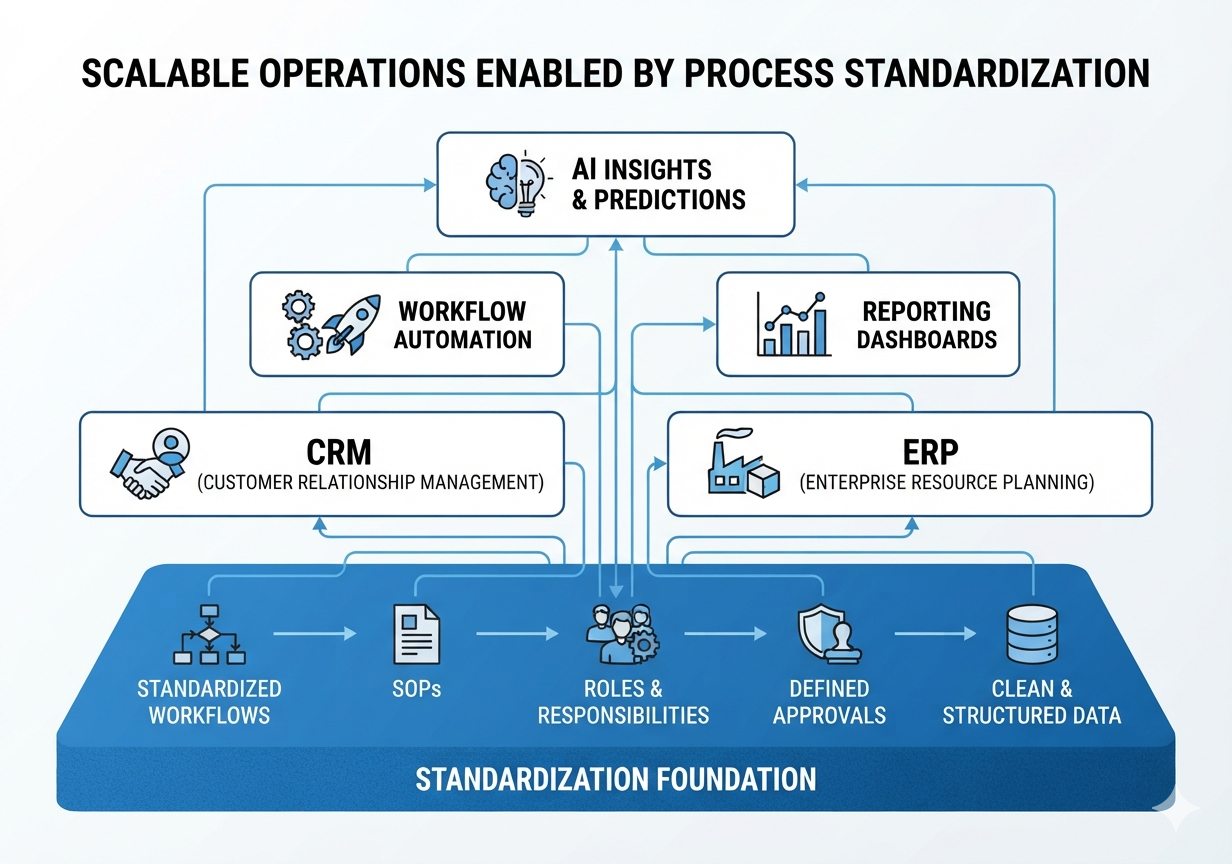
A useful rule: standardize first, automate second, optimize continuously.
If every salesperson follows a different pipeline, CRM automation will only make inconsistent behavior faster. If every warehouse team defines “available stock” differently, ERP reports will not solve inventory confusion.
Common Signs Your Company Needs Process Standardization
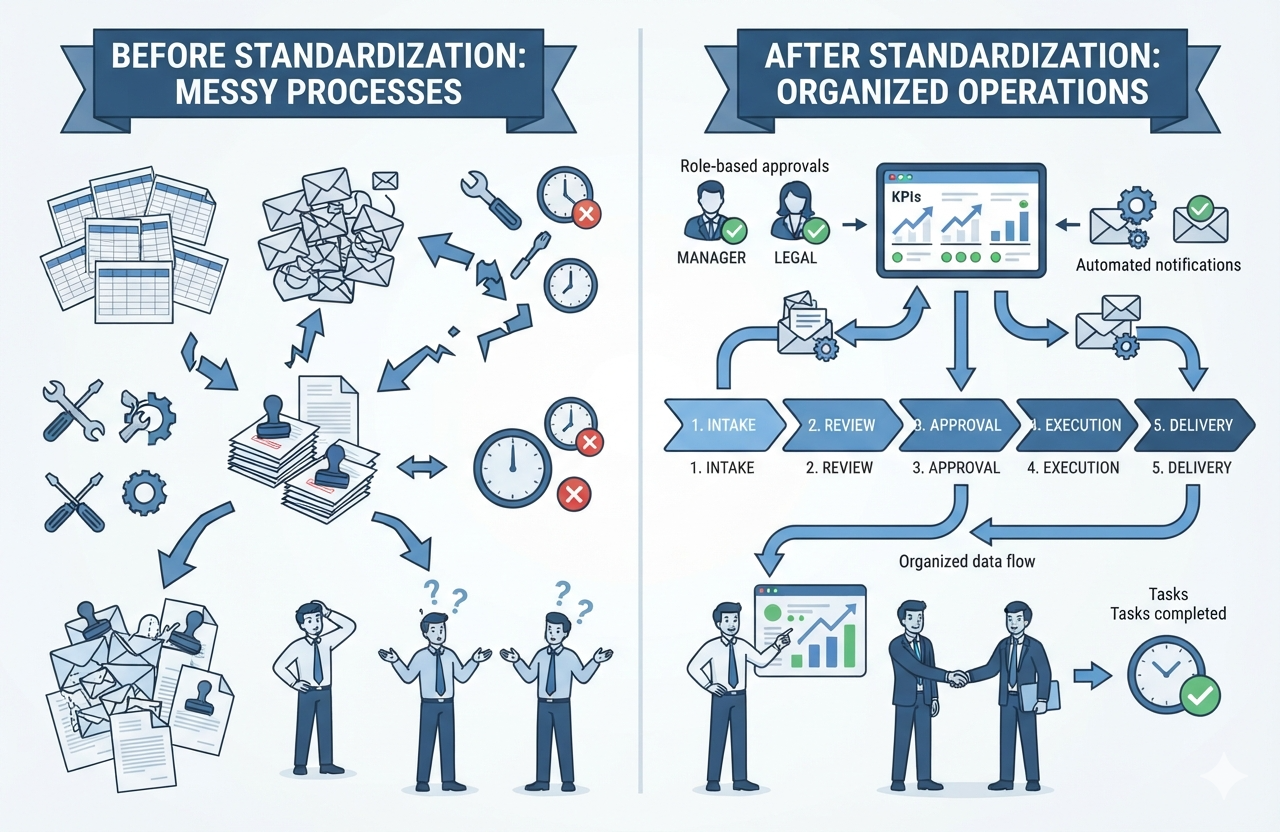
Growing companies usually need standardized business processes when they notice patterns like these:
- Managers repeatedly ask, “Who owns this?”
- Customers receive different answers from different team members.
- Work depends too much on one experienced employee.
- Reports take hours because data is scattered.
- Teams use spreadsheets as unofficial systems of record.
- Approvals happen through email, WhatsApp, or verbal confirmation.
- New employees need too much shadowing to become productive.
- Mistakes repeat even after team meetings.
- Software implementation is delayed because no one agrees on the process.
One or two of these issues may be manageable. Several together usually point to a process maturity gap.
A Practical Framework for Business Process Standardization
In practice, business process standardization should be practical. Over-documentation can slow people down. Under-documentation creates confusion.
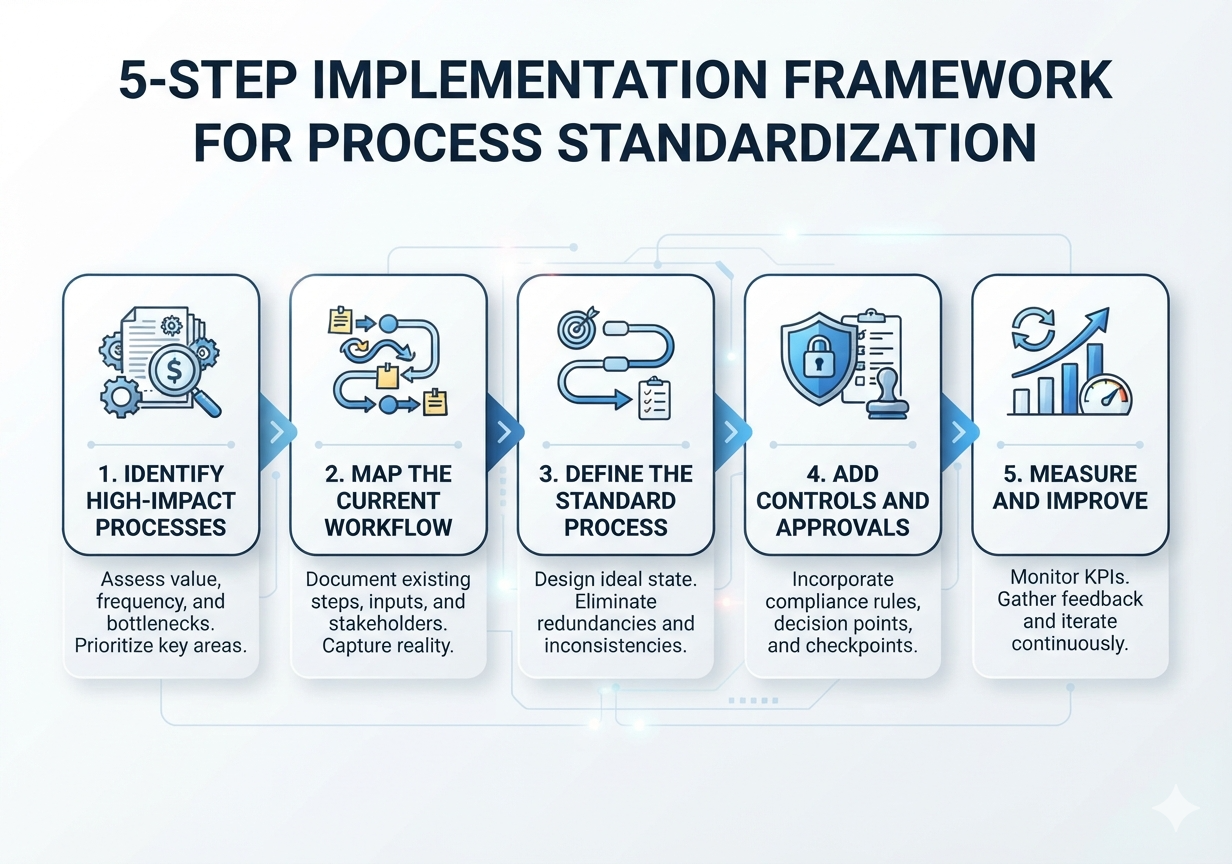
A balanced framework includes five steps.
1. Identify High-Impact Processes First
Do not standardize everything at once. Start with processes that affect revenue, customer experience, compliance, cost, or leadership visibility.
Good first candidates include sales pipeline management, quotation, procurement, inventory, service delivery, complaint management, billing, and reporting.
APQC explains that process frameworks list key organizational processes in a hierarchy and help companies benchmark, manage content, and define business processes. Its Process Classification Framework is designed as a taxonomy for comparing performance internally and externally.
2. Map the Current Process Honestly
Document how the process works today, not how leadership thinks it works.
Include:
- Entry point
- Responsible roles
- Systems used
- Data captured
- Approval points
- Exception handling
- Output
- Reporting needs
- Pain points
This step often reveals duplicate work, hidden spreadsheets, undocumented approvals, and unclear ownership.
3. Define the Future Standard Process
The future process should answer practical questions:
- What triggers the process?
- Who owns each step?
- What data is mandatory?
- What approvals are needed?
- What should happen when something is rejected?
- What notifications are required?
- What status values should be used?
- What reports should leadership see?
- What exceptions are allowed?
This is where standard operating procedures, workflow rules, templates, and system requirements start to connect.
4. Build Controls Without Creating Bottlenecks
A standardized process needs controls. However, too many controls slow teams down.
Examples of useful controls include:
- Required fields for important data
- Role-based permissions
- Approval thresholds
- Audit logs
- Version history
- Exception reasons
- Document attachment rules
- SLA-based reminders
- Escalation workflows
NIST’s Cybersecurity Framework is designed to help organizations understand and improve management of cybersecurity risk, which is relevant when standardized processes include access control, sensitive data, and governance responsibilities.
5. Measure and Improve
Instead, standardization is not a one-time documentation exercise. It needs measurement.
Track simple metrics such as:
- Cycle time
- Error rate
- Rework percentage
- Approval delay
- SLA breach rate
- Customer response time
- Manual effort
- Data completeness
- Process adoption
When the numbers improve, scale the standard. When they do not, revisit the process.
Best Choice by Situation
| Situation | Best Standardization Approach |
|---|---|
| Teams are using different spreadsheets | Create a common data structure and approval workflow before software migration |
| Sales follow-up is inconsistent | Standardize lead stages, task rules, reminders, and lost reasons |
| Inventory reports are unreliable | Standardize SKU data, stock movement rules, and reconciliation steps |
| Client delivery depends on senior employees | Create SOPs, checklists, project templates, and escalation rules |
| Compliance risk is increasing | Define audit trails, approval logs, document retention, and access permissions |
| Company is planning ERP or CRM | Standardize core workflows before configuration and development |
| Multi-location operations are growing | Create central governance with controlled local flexibility |
Benefits of Business Process Standardization
Better Operational Visibility
Standard processes create reliable data. Reliable data creates better dashboards. Better dashboards reduce guesswork.
Leaders can see what is pending, delayed, approved, rejected, won, lost, shipped, billed, or escalated.
Faster Employee Onboarding
When processes are documented and system-supported, new employees learn faster. They do not need to depend only on verbal explanations from seniors.
Fewer Errors and Less Rework
Standard templates, mandatory fields, validation rules, and approval flows reduce avoidable mistakes.
For example, if quotation terms are standardized, finance and delivery teams do not need to interpret each quote manually.
Easier Software Implementation
As a result, CRM, ERP, HRMS, and custom workflow software work better when the business process is already clear.
In Kanhasoft’s implementation work, fragmented operations across spreadsheets and disconnected tools were common starting points. In one manufacturing ERP case, a role-based system unified production, inventory, procurement, sales, and logistics, leading to better planning, inventory accuracy, and reduced inefficiencies.
Stronger Accountability
A good process defines ownership. It becomes clear who must act, approve, review, reject, or escalate.
That reduces blame and improves execution.
Limitations and Challenges
Business process standardization is powerful, but it can fail when handled poorly.
It Can Feel Restrictive
Teams may feel that standardization removes flexibility. This usually happens when processes are designed without input from the people who use them daily.
The answer is not unlimited freedom. It is controlled flexibility.
It Takes Time Before Results Show
Mapping, redesigning, training, and adoption take effort. Companies should expect a transition period.
Poorly Designed Standards Can Slow Work
A bad process can become worse when standardized. Therefore, process improvement should happen before final documentation.
Exceptions Still Need a Path
No growing company can eliminate every exception. The best approach is to define how exceptions are requested, approved, tracked, and reviewed.
Common Mistakes to Avoid
Mistake 1: Starting With Software Instead of Process
Buying software before defining workflows often leads to expensive customization and low adoption.
Mistake 2: Documenting Too Much
A 70-page SOP that nobody reads does not improve operations. Keep documentation practical, visual, and role-specific.
Mistake 3: Ignoring Frontline Teams
The people doing the work know where the real bottlenecks are. Excluding them creates theoretical processes.
Mistake 4: Standardizing Every Process at Once
This creates fatigue. Start with high-value workflows and expand gradually.
Mistake 5: Not Assigning Process Owners
Every important process needs an owner who reviews performance, handles feedback, and approves changes.
Compliance, Risk, Security, and Ethical Considerations
Standardization directly affects risk management.
For regulated or data-sensitive businesses, standardized workflows should include:
- Role-based access control
- Approval history
- Document retention rules
- Data privacy controls
- Secure integrations
- Audit logs
- Consent management where needed
- Segregation of duties
- Escalation and exception tracking
Companies in healthcare, finance, insurance, education, and legal-tech should consult qualified compliance, legal, or data privacy experts before finalizing sensitive workflows.
Security should not be added at the end. It should be part of the process design.
Need Help Standardizing Before You Automate?
If your teams are already using too many spreadsheets, disconnected tools, or informal approvals, it may be worth reviewing the process before investing in new software.
Kanhasoft can help assess your current workflows, identify standardization gaps, and define practical CRM, ERP, or custom workflow requirements. The goal is not to force software into your business. It is to create a clearer operating model that your people, processes, and systems can actually follow.
Final Words
Business process standardization is not about creating rigid bureaucracy. It is about giving a growing company a common operating language.
When teams follow clear workflows, data becomes reliable. This leads to better reporting. As a result, leaders can make better decisions. Stable processes also provide a much stronger foundation for automation, CRM, ERP, and AI.
For growing companies, business process standardization is often the step that turns daily operational chaos into scalable execution.