
When businesses ask for AI features in their software, the reasons are usually quite simple. They want to save time, reduce manual work, and stop chasing people for approvals. A purchase manager shouldn’t have to spend an entire morning checking orders. A salesperson shouldn’t need two hours to prepare a quotation. These are genuine problems that AI and custom ERP software can help solve. However, the EU AI Act 2027 brings another question into the discussion. How much responsibility should we give AI?
Think about the decisions people make at work every day. Someone approves an expense, offers a customer a discount, or checks an employee’s leave request.
What happens when software starts making those decisions?
For businesses selling software in Europe, this is something worth discussing before adding more AI features.
Quick Answer
The EU AI Act sets rules for how companies develop and use AI. From December 2, 2027, stricter rules will apply to certain uses of AI, including some employee management tools. Businesses can still automate everyday tasks, but they need to understand which rules apply and how to manage important decisions.
What Is Changing Under the EU AI Act 2027?
There has been quite a lot of confusion about the European AI law, particularly around its deadlines.
The law came into force in August 2024. Some rules started applying in 2025, including those about banned AI practices and helping employees understand the AI tools they use.
In July 2026, the EU changed several deadlines.
For many CRM, ERP, and SaaS companies, December 2, 2027, is a date worth remembering. This is when additional rules begin for certain high-risk AI applications, including specified uses in recruitment and employee management.
Some AI systems built into regulated products have until August 2, 2028.
You can find the updated dates on the European Commission’s website.
Does this mean every business needs to change its software before December 2027? No. It depends on what the software does, how it uses AI, and who could be affected by its decisions.
Let’s First Understand Where AI Is Actually Needed
Suppose your company has a simple rule. A department manager can approve purchases worth up to €500. Anything above that goes to the finance director.
Your existing ERP can handle this without AI.
But what if the purchasing team wants to compare several suppliers? One offers better prices, another has shorter delivery times, and a third provides better payment terms.
AI could help the team review those options.
The two tasks are quite different. One follows a company rule. The other involves looking at information and suggesting a possible choice.
| Business Process | What Regular Software Can Do | Where AI Can Help |
| Purchasing | Check budgets | Compare suppliers |
| Quotations | Calculate prices | Prepare draft quotations |
| Expenses | Check spending limits | Read receipts |
| Discounts | Apply approved rates | Suggest suitable offers |
| Employee leave | Calculate remaining days | Summarize staffing needs |
| Invoices | Check payment terms | Find unusual invoices |
Before investing in AI, ask yourself whether ordinary software can already solve the problem. There is no benefit in making a simple process more complicated.
How Will AI Change Everyday Business Approvals?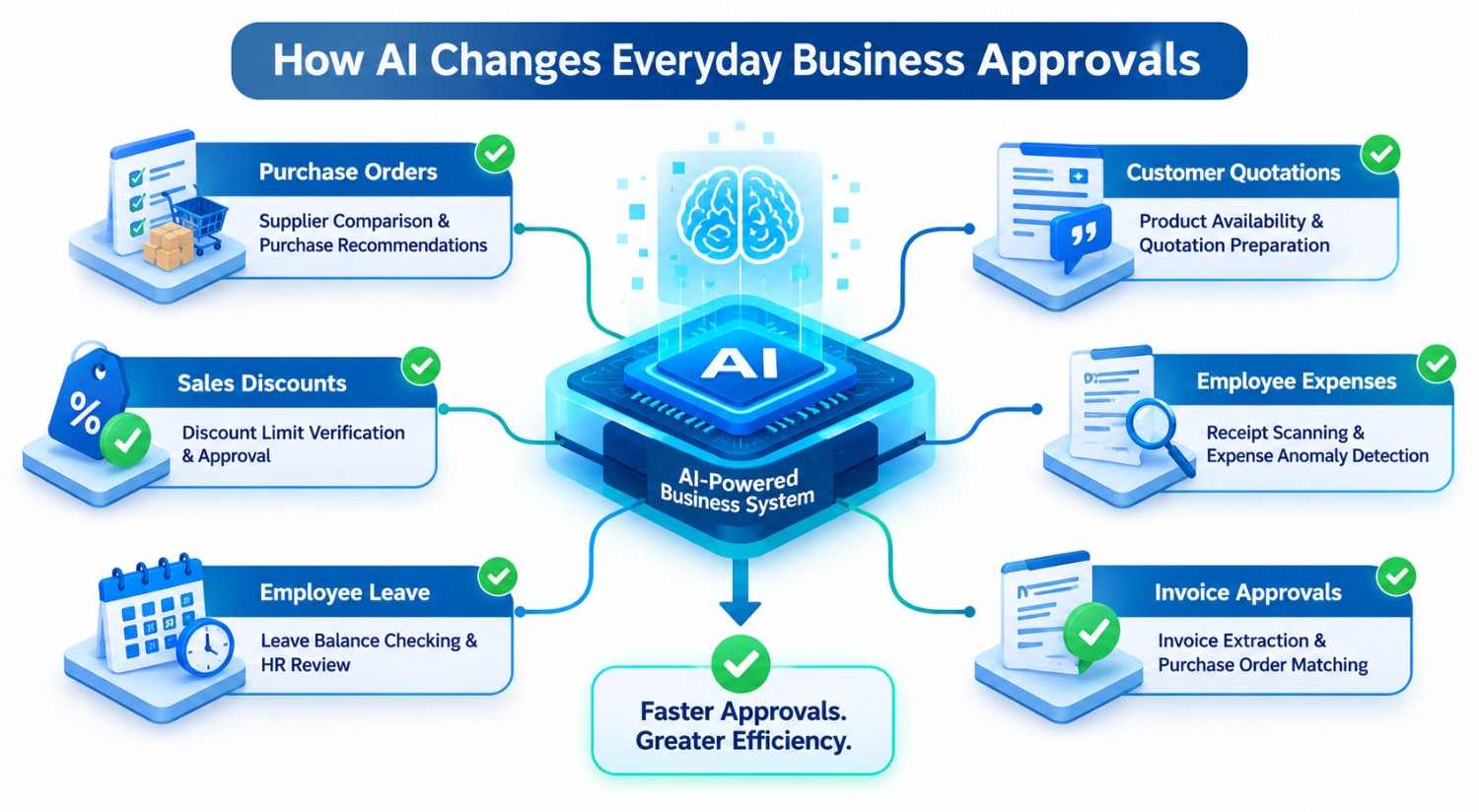
Let’s look at six common situations. These examples are hypothetical, but they reflect problems that businesses regularly face.
Purchase Orders
A manufacturer needs raw materials for an upcoming order. The purchasing manager has three supplier quotations to review.
AI could prepare a comparison using prices, delivery dates, and previous supplier records. This would save the manager some time.
However, the cheapest supplier might not always be the best choice. Perhaps the manager knows that the supplier is struggling with production delays. That information may not be available in the ERP.
This is why AI recommendations need to work alongside company policies and the knowledge of experienced employees.
Routine purchases can still follow automatic approval rules. Unusual orders can go to a manager.
Customer Quotations and Sales Discounts
Sales teams often need information from several departments before sending a quotation.
Is the product available? Has the price changed? Can we deliver it next week?
AI could gather these details and prepare a draft within seconds.
The trouble starts when the information is wrong. Imagine sending a quotation for 500 units when the warehouse only has 200. Your customer has already made plans based on the promised delivery date.
A good CRM system should check current stock and prices before sending the quotation.
Discounts need similar attention. If a salesperson can offer a maximum discount of 10%, an AI suggestion of 20% should go to the sales manager.
The business might decide that the larger discount is worthwhile. But that decision belongs within its existing approval process.
Employee Expenses
Imagine an employee travels to another city for a conference. The hotel costs €350 per night, although the company normally spends €150.
AI notices the difference and flags the expense.
From the software’s point of view, something looks unusual. However, hotels in the area might have increased their prices because of the conference.
The finance manager needs to hear that explanation before rejecting the claim.
AI is useful for reading receipts and finding duplicate claims. It can also help finance teams spot expenses worth checking. Automatically treating unusual spending as dishonest behavior is another matter.
Employee Leave
Of all the examples discussed here, employee leave deserves special care.
Checking whether someone has enough vacation days is easy. Most HR software can already do this.
Now consider an AI tool that examines previous absences and recommends rejecting a leave request.
What if the employee has been caring for a sick family member? What if those previous absences were legally protected?
The software may not have enough information to understand the situation.
Some AI tools that influence employment conditions fall under stricter European rules. Businesses should discuss such features with their HR and legal teams before putting them into use.
Invoice Approvals
Reading supplier invoices is a good example of where AI can remove boring, repetitive work.
Instead of manually entering invoice numbers, dates, and amounts, finance teams can use AI to extract those details. The ERP can then compare them with purchase orders and delivery records.
But receiving an invoice doesn’t mean the company should automatically pay it.
For example, a supplier’s bank details might have changed. Someone from finance should confirm the change through an existing, trusted contact.
AI can help prepare the payment. The business should decide how that payment gets authorized.
Which Decisions Should Still Involve People?
Businesses don’t need a manager to check every box of stationery they purchase. That would defeat the purpose of automation.
A reasonable approach is to consider what could happen if the software makes a mistake.
| Situation | Suggested Approach |
| Small purchases within budget | Automatic approval using company rules |
| Large purchases | Review by an authorized manager |
| Standard quotations | Automatic price and stock checks |
| Higher discounts | Sales manager approval |
| Unusual expenses | Ask the employee for details |
| Sensitive leave requests | HR review |
| Matching invoices | Automatic checks |
| Changes to bank details | Independent confirmation |
These are general business recommendations, not official legal categories. Every company has different policies, financial limits, and responsibilities.
What Does High-Risk AI Mean for Business Software?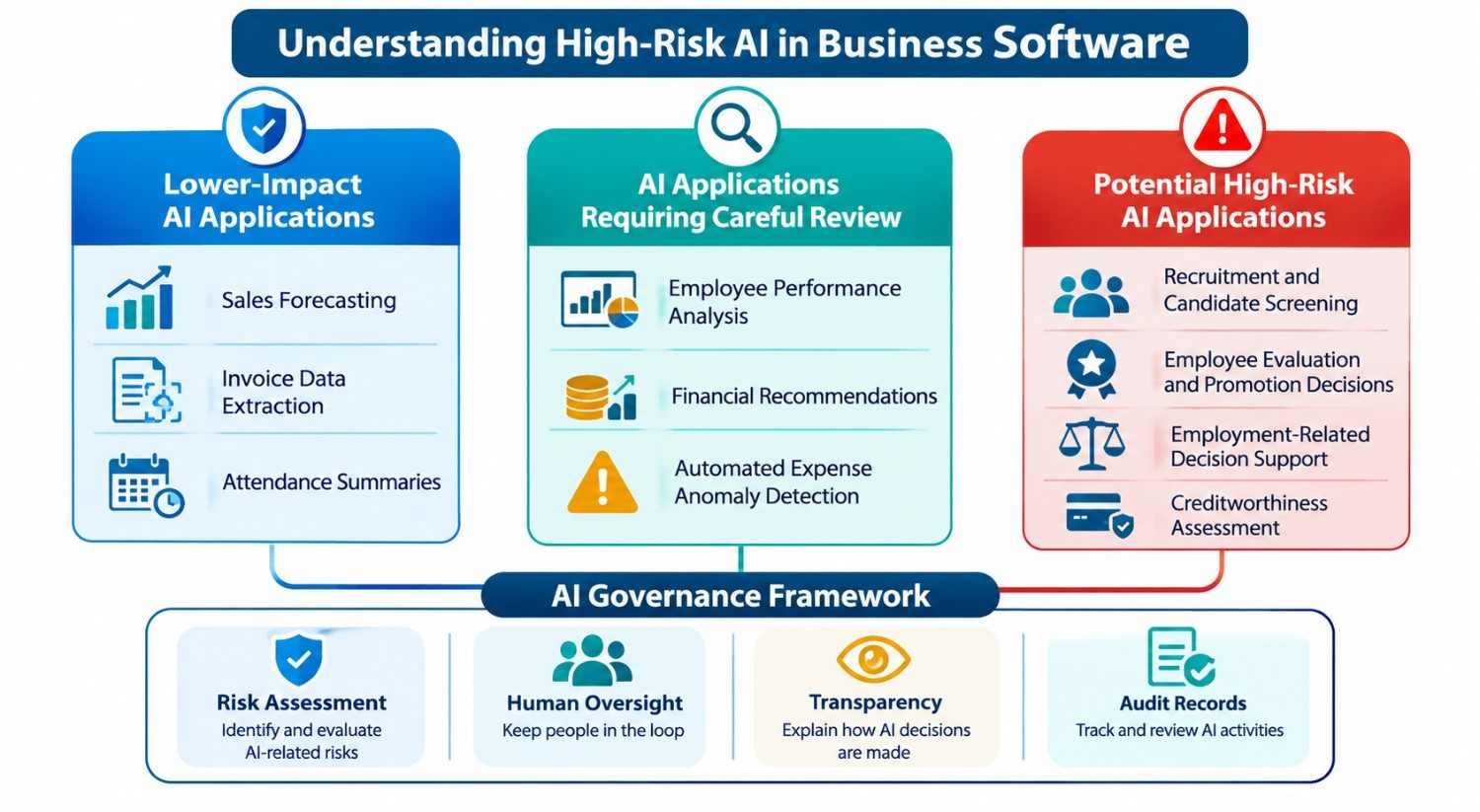
The EU uses the term high-risk for certain types of AI that could seriously affect people’s lives or rights.
A mistake in a sales forecast might cost a company money. However, software that influences whether someone gets a job or receives a promotion raises different concerns.
The law identifies particular uses in areas such as employment, education, and lending.
For ERP developers, the important point is that an entire ERP system does not automatically become high-risk because it contains AI. Individual features need to be examined according to their purpose.
A tool that summarizes attendance records is different from one that uses those records to recommend dismissing employees.
The EU’s list of high-risk AI applications provides more information about these categories.
A Practical Lesson From Our ERP Development Work
At Kanhasoft, we developed an ERP for a manufacturing business in the United States. The company was managing several activities through separate applications and spreadsheets.
Purchasing, stock management, production, and logistics needed to work together.
We built a central system that brought these departments together and gave employees access according to their responsibilities.
There is a lesson here for businesses planning to introduce AI.
Before asking AI to recommend a purchase, make sure the stock information is correct. Before automating an approval, agree on who has permission to approve it.
If the warehouse and purchasing department have different stock figures, AI won’t magically know which one is right.
Good business records and clear company policies make a better starting point.
What Should Software Developers Do Differently?
One thing we would suggest is making it easier for employees to understand what happened when something goes wrong.
Suppose an employee asks why an expense was rejected last month. Your finance team should be able to find the original request, the reason it was flagged, and the final decision.
Another issue is how managers review recommendations.
If someone has 40 requests waiting for approval, there’s a good chance they will start clicking the approval button without reading every detail. Give them useful information instead of just showing a green button.
They should be able to disagree with AI, change an incorrect suggestion, and ask for more information.
Access matters too. An AI assistant that prepares sales quotations has no reason to read employee salaries. Similarly, an invoice-reading tool does not need permission to change supplier bank details.
For SaaS companies, keeping each customer’s information separate is equally important.
These are also important considerations when designing AI agents for enterprise software.
How Can Your Business Prepare for 2027?
You don’t have to start by replacing your software or hiring a large compliance team.
Begin with the people who use your applications every day. Speak with finance, sales, purchasing, and HR.
Find out where AI is already being used and ask some straightforward questions:
- Can AI approve a request without asking anyone?
- Could a mistake affect someone’s job, pay, or leave?
- Who can correct a wrong decision?
- What information are we sharing with AI companies?
- Can we stop an AI feature if it causes problems?
- Are employees comfortable using the new tools?
The answers will help your development team decide what needs improvement.
If your business provides or uses high-risk AI, additional legal requirements may apply. These can include testing, written records, and regular checks.
Companies based outside Europe should also take this seriously if they sell AI-powered software to European customers.
Conclusion
The EU AI Act 2027 gives companies a reason to review how they use AI, but it shouldn’t stop them from improving their business software.
There is plenty of work that AI can help with. Reading invoices, preparing quotations, comparing supplier prices, and checking receipts are all useful examples.
The bigger question is what happens after the software makes a suggestion.
Can someone check it? Can they correct a mistake? Does the company’s existing policy still apply?
Businesses that answer these questions early will have a clearer idea of what they need to build and where they should be more careful.
Planning to Add AI to Your Business Software?
At Kanhasoft, we help businesses understand where AI and regular automation can make everyday work easier.
If you’re planning to add AI-powered approvals to your CRM, ERP, or SaaS application, we can review your current processes and suggest suitable software improvements.
Speak with our development team about your requirements. For specific legal questions, we recommend working with a qualified compliance adviser.