Scaling a scraper from a few thousand pages to 10 million pages per day is not mainly a coding challenge. It is a system-design and operations challenge.
At that volume, one slow website, duplicated URL pattern, oversized response, blocked worker, or database bottleneck can affect hundreds of thousands of jobs.
Scalable web scraping requires a distributed pipeline that separates URL scheduling, downloading, parsing, validation, storage, and delivery. It also needs domain-level rate controls, retry policies, duplicate prevention, data-quality checks, and monitoring that shows whether useful records; not merely pages; are being collected.
This article explains the architecture and decisions behind a high-volume scraping system without assuming that every page needs a browser or that adding more servers will solve every performance problem.
This article is especially useful for:
- CTOs and engineering leaders planning data collection platforms
- Ecommerce companies monitoring prices, products, and stock
- Market intelligence and analytics businesses
- Data teams collecting listings from many public sources
- SaaS companies building data extraction products
- Businesses evaluating a large-scale web scraping partner
Quick Answer
To scrape 10 million pages per day reliably, build a distributed and queue-driven pipeline.
The system should include:
- A URL frontier that prioritizes and deduplicates crawl jobs
- Domain-aware scheduling and rate limits
- Lightweight HTTP fetchers for most pages
- Browser workers only for pages that truly require JavaScript
- Independent parsing and validation services
- Durable queues with retry and dead-letter handling
- Raw and normalized storage
- Metrics for throughput, failure rates, freshness, and data accuracy
- Idempotent processing so duplicate messages do not create duplicate records
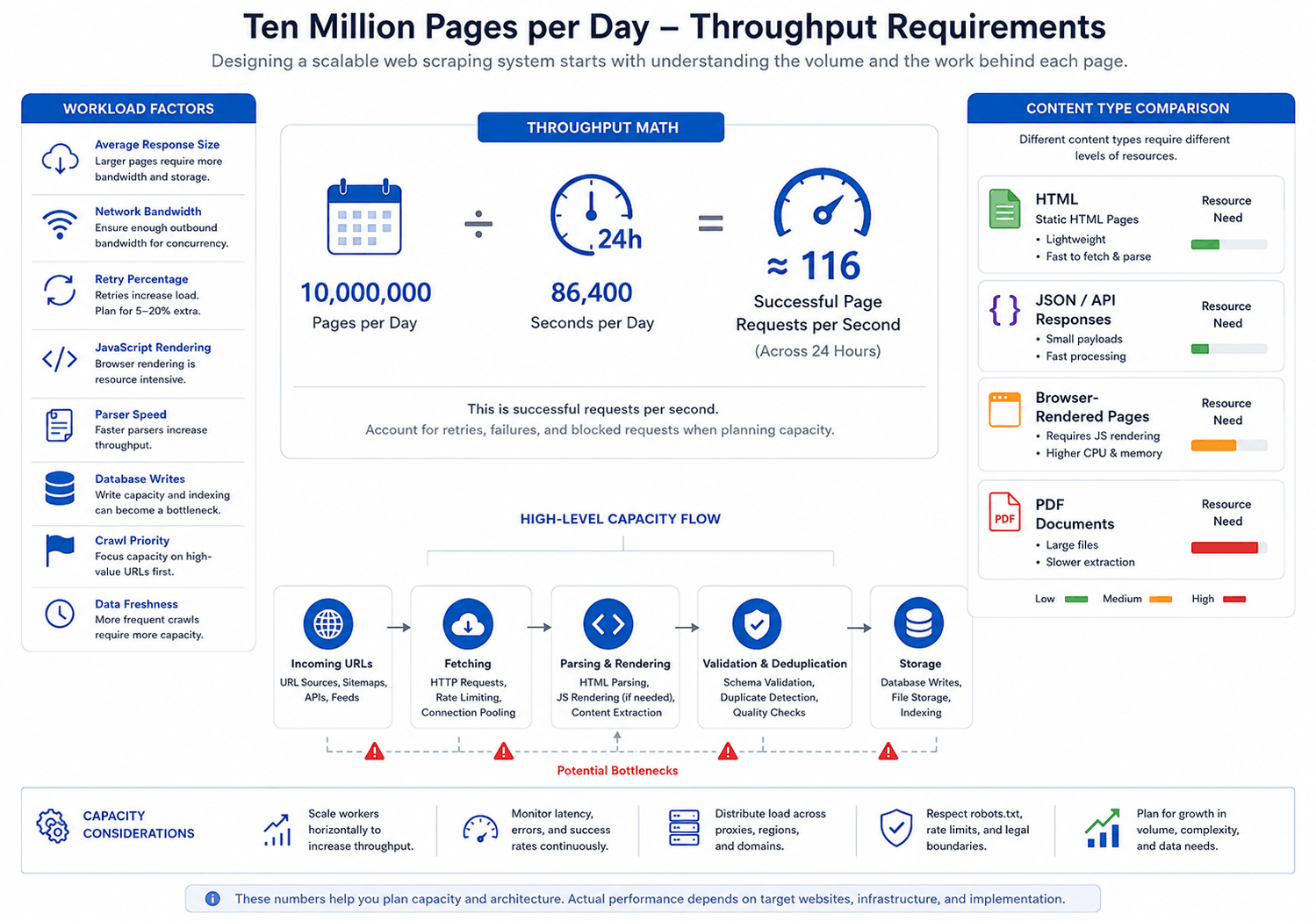
Ten million pages per day equals an average of about 116 successful page fetches per second.
However, production capacity should be higher than the average. Traffic is uneven, requests fail, jobs are retried, and some websites impose stricter limits. The correct capacity depends on response size, target diversity, JavaScript usage, extraction complexity, and permitted request rates.
Start With the Throughput Math
“Ten million pages” sounds like one requirement. In practice, it hides several different workloads.
A page may be:
- A 30 KB JSON response
- A 100 KB static HTML document
- A 2 MB product page with embedded data
- A JavaScript application that loads many assets
- A PDF that requires document parsing
- A page that takes five seconds before useful data appears
If an average response contains 75 KB, 10 million responses represent about 750 GB of downloaded content per day. At 500 KB per response, that rises to approximately 5 TB per day, before accounting for retries, headers, images, scripts, or browser assets.
Therefore, capacity planning should answer four questions:
- How many successful pages must be processed?
- What is the average response size?
- What percentage requires browser rendering?
- How quickly must the final data become available?
A daily batch completed within 24 hours has different requirements from an inventory-monitoring system that must update priority products every 15 minutes.
What Scalable Web Scraping Architecture Looks Like
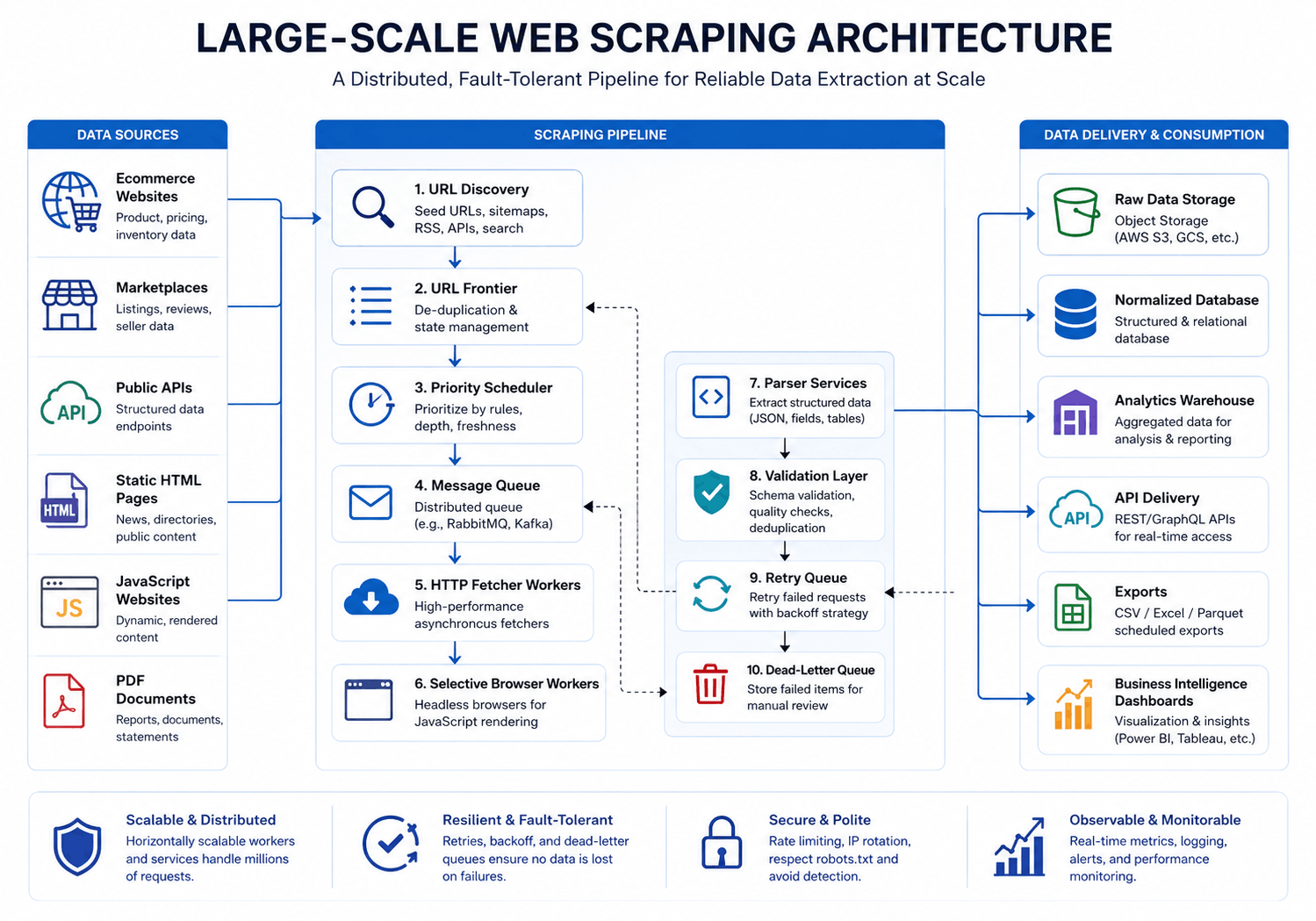
A high-volume crawler should not behave like one large script.
It should behave like a data platform with independent components.
|
Component |
Primary responsibility |
|---|---|
| URL discovery |
Finds or receives target URLs |
|
URL frontier |
Prioritizes, schedules, and deduplicates work |
|
Message queue |
Distributes jobs to available workers |
|
Fetcher workers |
Download HTML, JSON, files, or API responses |
|
Browser workers |
Render selected JavaScript-dependent pages |
|
Parser services |
Extract required fields |
|
Validation layer |
Checks completeness, types, and business rules |
|
Raw storage |
Preserves source responses for debugging or reprocessing |
|
Structured storage |
Holds normalized business data |
|
Delivery layer |
Exports data through files, databases, APIs, or dashboards |
|
Monitoring |
Tracks system health, crawl progress, and data quality |
Separating these stages prevents one slow operation from blocking the entire pipeline.
For example, a response can be downloaded once and stored. If the extraction rules later change, the parsing service can reprocess that saved response without requesting the page again.
Build a Domain-Aware URL Frontier
The URL frontier is the control center of a large-scale web scraping system.
It decides what should be crawled, when it should run, and which worker should receive it.
A useful frontier stores information such as:
- Canonical URL
- Target domain
- Page or record type
- Priority
- Last successful crawl
- Desired refresh frequency
- Retry count
- Expected parser
- Customer or dataset identifier
- Crawl status
Do not place every target in one undifferentiated queue.
A large marketplace should not consume all available workers while smaller websites wait. Likewise, one failing domain should not create millions of repeated retry jobs.
Partition work by domain, customer, geography, page type, or priority. Then apply concurrency and delay limits to each partition.
Use the Lightest Fetching Method That Works
One of the fastest ways to make large-scale web scraping expensive is to open a browser for every page.
A practical extraction order is:
- Official or permitted API
- JSON or GraphQL response used by the page
- Embedded structured data
- Static HTML request
- Headless browser rendering
- Document-specific extraction for PDFs or files
Scrapy uses a non-blocking asynchronous architecture, which makes it suitable for handling many network requests without assigning one operating-system thread to every request.
Browser tools such as Playwright remain valuable for JavaScript-rendered pages. However, browser workers consume more CPU and memory. They also download scripts, styles, fonts, and other assets that may not be needed.
A strong system routes only the necessary pages to the browser pool.
|
Page type |
Recommended approach |
|---|---|
|
Static product or listing page |
HTTP client or Scrapy |
|
Data available in page JSON |
Parse the structured response |
|
JavaScript required for content |
Playwright or another browser worker |
|
Login or multi-step workflow |
Controlled browser session, where authorized |
|
Text-based PDF |
PDF parser |
|
Scanned document |
OCR or document extraction workflow |
Control Concurrency Per Website
Global concurrency is not enough.
A crawler may be able to process 300 requests per second across 500 websites without placing heavy demand on any one source. Sending the same rate to one website would be very different.
Use per-domain controls for:
- Concurrent requests
- Minimum request delay
- Retry timing
- Daily request allowance
- Error-rate thresholds
- Temporary circuit breaking
Scrapy’s AutoThrottle can adjust crawling speed based on observed latency while respecting configured concurrency and delay settings.
However, automatic throttling is not a substitute for explicit policies. Priority commercial sources may have agreed API limits. Smaller websites may require much lower rates.
The goal is stable collection, not the highest possible request count.
Make Every Job Safe to Retry
Distributed systems deliver duplicate work.
A worker may complete a job but fail before acknowledging it. The queue then makes the message available again. Standard Amazon SQS queues, for example, provide at-least-once delivery, so consumers must be prepared to receive a message more than once.
Each crawl job should have a stable identifier based on fields such as:
- Dataset
- Canonical URL
- Crawl window
- Target record
- Parser version
Before writing a result, the pipeline should check whether that job has already been processed.
Use upserts, unique database constraints, content hashes, or idempotency keys. Also keep retries separate from new work so a failing source cannot overwhelm the main queue.
After a defined number of attempts, move the job to a dead-letter queue for investigation.
Apply Backpressure Before the System Overloads
Downloading can be faster than parsing. Parsing may be faster than database writes. Browser workers may also fall behind during peak periods.
Without backpressure, queues grow until storage, memory, or database connections become exhausted.
Monitor queue depth at every stage:
- Waiting to download
- Waiting for browser rendering
- Waiting to parse
- Waiting for validation
- Waiting to write
- Waiting for delivery
When one stage falls behind, reduce upstream production or add capacity to the constrained stage.
Container platforms can add worker replicas based on load. Kubernetes Horizontal Pod Autoscaler can adjust replica counts using observed metrics.
For scraping pipelines, useful scaling signals may include queue depth, oldest-job age, pages processed per minute, or parser latency. CPU alone does not show whether the pipeline is meeting its data-freshness target.
Keep Raw Data Separate From Business Data
Trying to store every raw response and every normalized record in one relational database creates avoidable pressure.
A practical storage design uses:
- Object storage for compressed HTML, JSON, PDFs, and screenshots
- PostgreSQL or another relational database for normalized records
- A search engine for full-text or faceted discovery
- An analytical warehouse for reporting and historical comparisons
- Redis or another fast store for short-lived locks and deduplication
Raw storage provides an audit trail and supports reprocessing. Structured storage serves the application.
Also define retention rules. Keeping every response forever may increase cost without increasing business value.
Web Scraping Performance Optimization Requires Better Parsers
Network speed is only one part of performance.
Slow selectors, repeated regular expressions, unnecessary HTML traversal, large in-memory objects, and row-by-row database inserts can become major bottlenecks.
Improve parser performance by:
- Extracting only required fields
- Parsing structured JSON before traversing HTML
- Compiling reusable patterns
- Avoiding repeated DOM searches
- Processing responses as streams where appropriate
- Writing records in batches
- Reusing database connections
- Compressing raw responses
- Separating CPU-heavy document extraction from HTTP workers
Measure each stage before optimizing it. A faster parser provides little value if 70% of the workload is waiting on browser rendering.
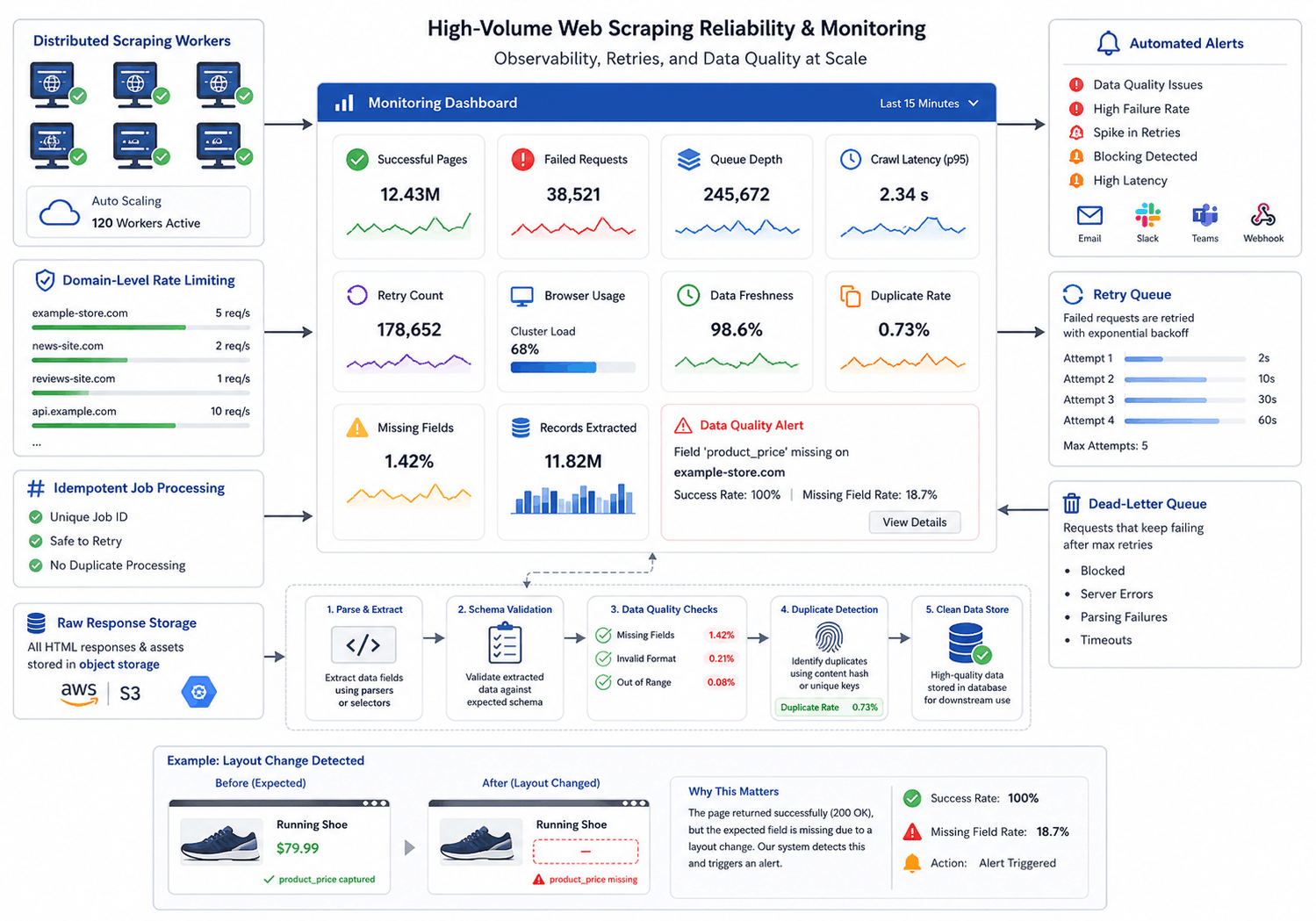
Monitor Data Quality, Not Just Page Counts
A dashboard that reports “10 million pages completed” can still hide a failed project.
Perhaps pages returned consent screens, empty templates, changed layouts, or incorrect currencies.
Track business-level metrics such as:
- Records extracted
- Required-field completion
- Product match rate
- Price and currency validity
- Duplicate-record rate
- Schema-change alerts
- Freshness by source
- Percentage of pages with zero useful records
- Differences from previous crawl values
Use automated validation, but keep sample-based human review for important datasets.
In practice, parser drift is often quiet. The crawler continues returning HTTP 200 responses while the useful data has moved to a different field.
Practical Example: Marketplace Rank Tracking at Scale
Kanhasoft developed a Walmart product-rank tracking system for a US ecommerce analytics company.
The system processed approximately 300,000 keywords daily, tracked organic and sponsored rankings across up to five pages per keyword, and stored millions of ranking records. Its architecture used a custom Python spider, Django, Celery, PostgreSQL, scheduled jobs, parallel task execution, and AWS infrastructure.
This project illustrates an important scaling lesson: divide the workload into repeatable jobs with clear identifiers.
The system did not treat the daily crawl as one enormous task. Keywords and pages could be scheduled, processed in parallel, retried, and stored independently. That design limits the effect of individual failures and makes crawl progress measurable.
Respect Access Rules, Privacy, and Legal Boundaries
Scale increases responsibility.
Review the source’s terms, permitted access methods, robots.txt instructions, privacy obligations, intellectual-property concerns, and contractual restrictions before collecting data.
RFC 9309 defines the Robots Exclusion Protocol used by service owners to communicate crawler access preferences.
Robots.txt is not a complete legal analysis. Public visibility does not automatically remove privacy, copyright, database, or contractual concerns.
Do not access private accounts, defeat authentication, collect restricted personal data, or ignore explicit legal limitations. For high-volume commercial collection, seek qualified legal and privacy advice for the relevant jurisdictions.
A Practical Scaling Roadmap
|
Current stage |
Recommended next step |
|---|---|
|
One script on one server |
Separate scheduling, fetching, and storage |
|
Several independent spiders |
Add a shared queue and job registry |
|
Growing retry failures |
Introduce idempotency and dead-letter queues |
|
Browser costs increasing |
Route only selected pages to browser workers |
|
Database slowing down |
Batch writes and separate raw storage |
|
Unclear data accuracy |
Add schema validation and quality sampling |
|
Uneven workload |
Partition by domain and priority |
|
Frequent operational incidents |
Add dashboards, alerts, and runbooks |
|
Approaching millions of pages |
Load-test each pipeline stage independently |
Move in measured stages. A complex microservices architecture is unnecessary for a small crawl. At 10 million pages per day, however, clear component boundaries become valuable.
Planning a High-Volume Web Scraping System?
Kanhasoft helps businesses evaluate crawl volume, target-site complexity, refresh frequency, browser requirements, data quality, delivery formats, and infrastructure cost before development begins.
Our custom web scraping services cover distributed crawlers, marketplace monitoring, product intelligence, API and JSON extraction, PDF processing, data validation, and automated delivery pipelines. Businesses can also review our web scraping and data extraction case studies to understand how similar systems have been structured.
A focused technical discovery can identify the real bottleneck before infrastructure is added unnecessarily.
Final Words
Scalable web scraping is not achieved by increasing concurrency until the crawler reaches 10 million requests.
It requires a controlled system that understands domains, priorities, retries, data ownership, storage, and quality. Lightweight requests should handle most pages. Browser workers should remain selective. Queues should absorb uneven demand, while idempotent jobs and dead-letter handling protect the pipeline from repeated failures.
Most importantly, measure useful data rather than raw page counts.
A system that collects 10 million pages but cannot explain missing records, duplicate results, unexpected costs, or delayed sources is not operating at scale. It is only operating at volume.