An ecommerce business may begin with a storefront, an email marketing tool, a payment gateway, and a few spreadsheets. That setup can work while order volumes are manageable. However, as the business expands across products, marketplaces, regions, and sales channels, customer information often becomes fragmented.
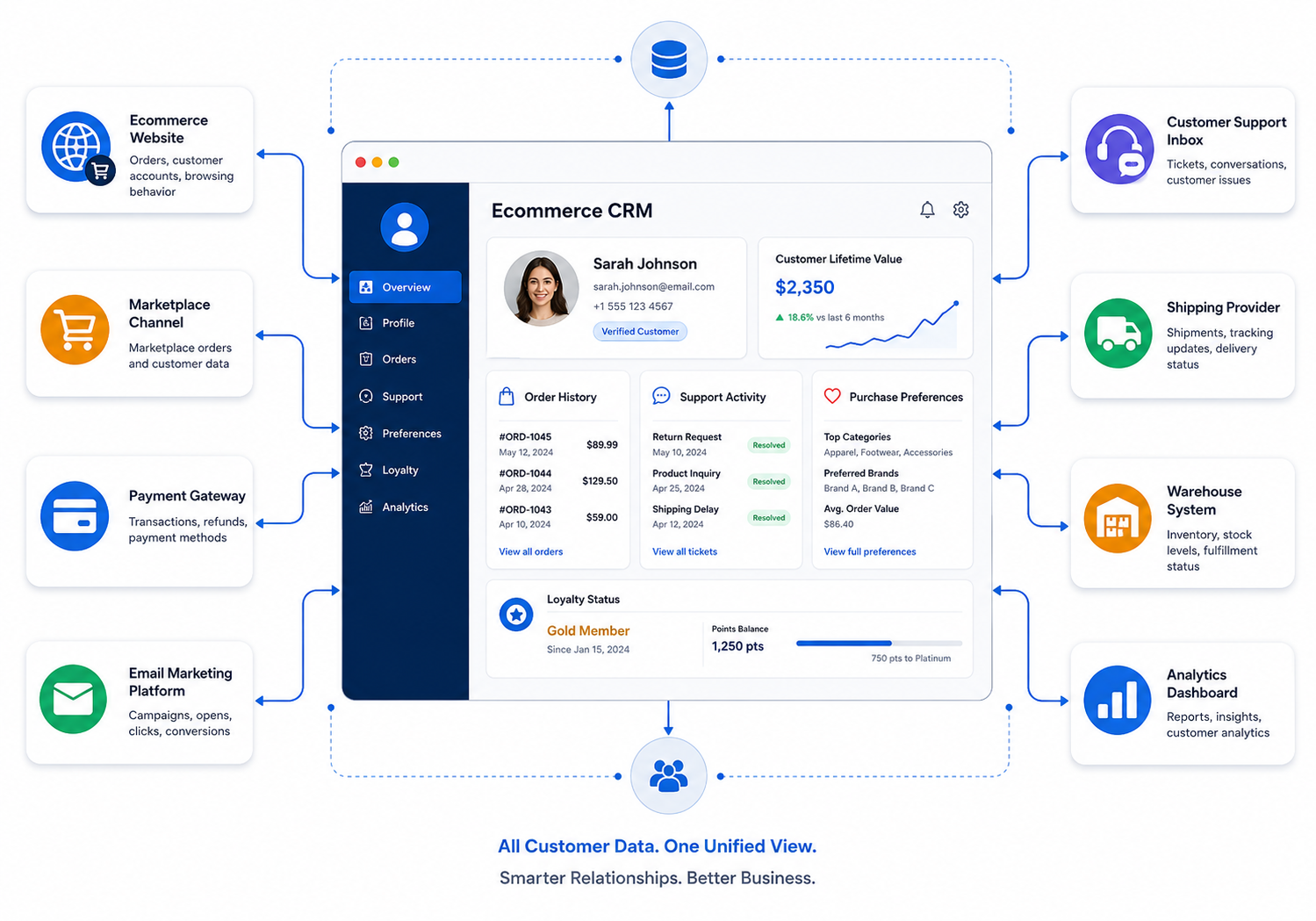
Ecommerce CRM development creates a centralized system that connects customer profiles, orders, support conversations, marketing activity, returns, loyalty data, and sales opportunities. Unlike a general-purpose CRM, a custom ecommerce CRM reflects how an online business actually acquires, serves, retains, and re-engages customers.
The goal is not to build another database. Instead, the CRM should provide marketing, sales, customer service, and operations teams with a reliable view of every customer and the next best actions to take.
Quick Answer
To develop a custom CRM for an ecommerce business, start by mapping customer journeys and operational pain points. Then define the customer data model, automation rules, required integrations, user roles, reporting needs, and security requirements.
A practical ecommerce CRM commonly includes:
- Unified customer profiles
- Order and purchase history
- Customer segmentation
- Email and SMS automation
- Support and complaint tracking
- Returns and refund visibility
- Loyalty and retention workflows
- Marketplace and storefront integrations
- Customer lifetime value reporting
- Role-based dashboards
Development should normally happen in phases. Begin with the workflows that create the clearest business value, such as customer data consolidation, support visibility, repeat-purchase campaigns, or abandoned-cart follow-up.
This Article Is Especially Useful For:
- Ecommerce founders planning a custom internal platform
- Operations leaders managing multiple sales channels
- Customer service managers handling fragmented customer records
- Marketing teams building more precise retention campaigns
- Online retailers that have outgrown spreadsheets or standard CRM tools
- Technology leaders evaluating ecommerce CRM development
What Is a Custom CRM for an Ecommerce Business?
A custom ecommerce CRM is a customer relationship management system designed around the workflows, channels, products, and customer lifecycle of a specific online business.
Traditional CRMs often focus on leads, sales pipelines, meetings, and account management. Those functions matter in B2B commerce, but consumer and marketplace-driven ecommerce businesses usually need a different structure.
An ecommerce CRM may need to understand:
- Which products a customer viewed or purchased
- Average order value and purchase frequency
- Preferred sales channel
- Returns, refunds, and support history
- Coupon and promotion usage
- Loyalty points or membership status
- Customer acquisition source
- Predicted churn or repeat-purchase potential
- Product category preferences
- Shipping location and delivery experience
This context helps teams move beyond basic contact management. It allows them to communicate with customers based on actual behavior rather than broad mailing lists.
CRM Versus ERP for Ecommerce Businesses
The phrase custom ERP software for ecommerce businesses is sometimes used interchangeably with ecommerce CRM. However, the two systems solve different primary problems.
|
Area |
Ecommerce CRM |
Ecommerce ERP |
|---|---|---|
|
Primary purpose |
Manage customer relationships and retention |
Manage business operations and resources |
|
Main data |
Customers, interactions, campaigns, support |
Inventory, procurement, finance, fulfillment |
|
Typical users |
Marketing, support, sales, customer success |
Operations, finance, warehouse, procurement |
| Core workflows | Segmentation, follow-ups, loyalty, service |
Stock control, accounting, purchasing, logistics |
|
Main business outcome |
Better customer engagement and repeat sales |
Better operational control and efficiency |
Some businesses eventually need both capabilities in one connected platform. However, combining every CRM and ERP function in the first release can create unnecessary complexity.
A better approach is to identify the immediate business problem. If customer data, support history, retention, and personalization are fragmented, CRM should lead the project. If inventory, purchasing, warehouse control, and financial processes are the main issue, ERP may deserve priority.
Also Read: Best CRM System Solutions for E-commerce Businesses
When Does an Online Store Need a Custom CRM?
A standard CRM may be enough for a small online retailer with simple products and one sales channel. Custom development becomes more relevant when business processes cannot fit cleanly into off-the-shelf software.
Common warning signs include:
- Customer records differ across Shopify, Amazon, Walmart, or other channels.
- Support teams cannot see full order and refund histories.
- Marketing lists require frequent spreadsheet exports and cleanup.
- Teams send the same follow-up messages manually.
- Customer segments are too complex for the existing platform.
- Wholesale, retail, and marketplace customers follow different workflows.
- Loyalty programs do not connect with order or support data.
- Management cannot measure retention or customer lifetime value accurately.
- Existing CRM subscription costs rise because of extensive add-ons.
- Important workflows depend on manual workarounds.
Most of us have seen the familiar version of this problem: one team trusts the ecommerce platform, another relies on a spreadsheet, and customer service keeps its own notes. Each system contains part of the truth, but none provides the complete picture.
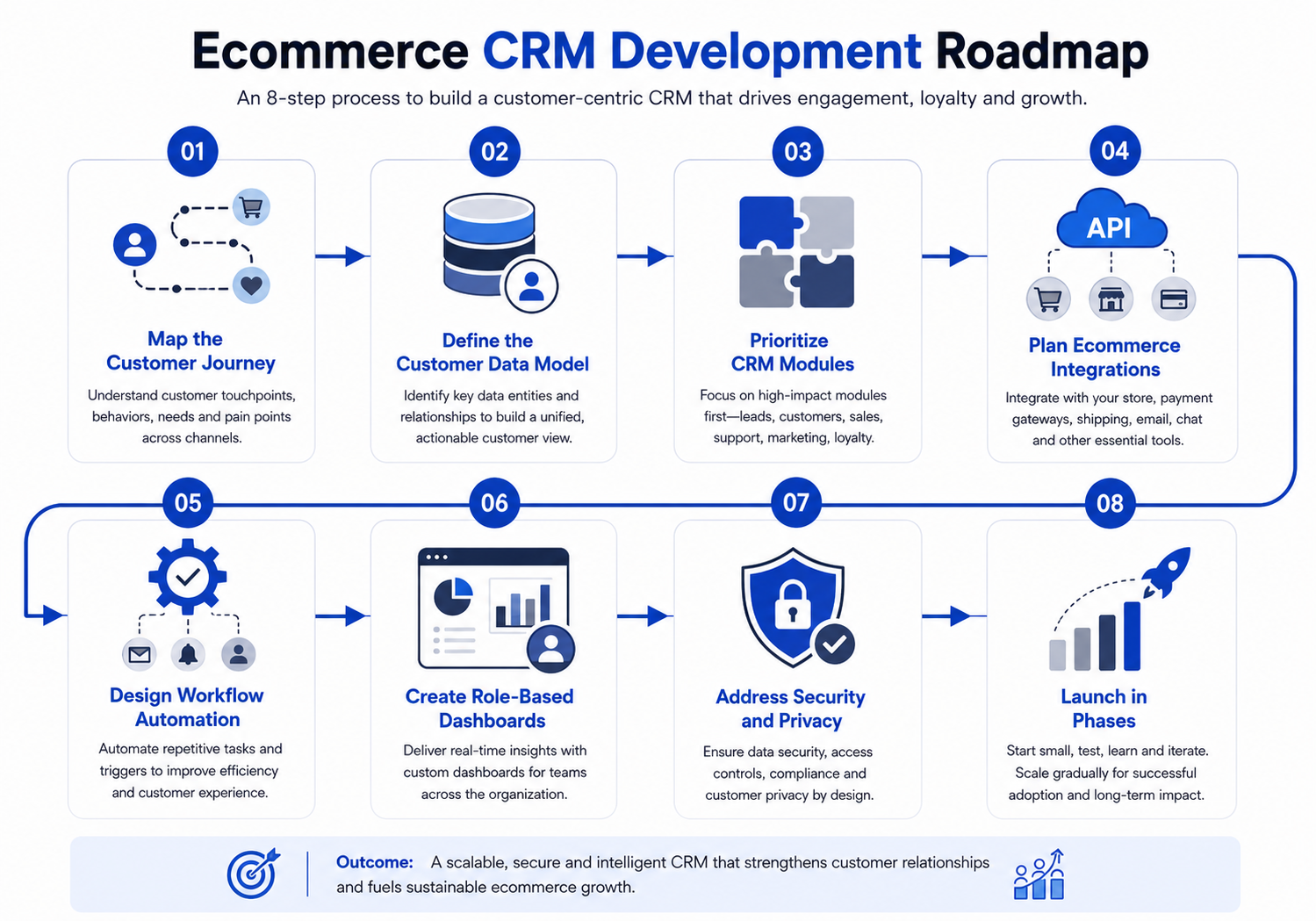
Step 1: Map the Ecommerce Customer Journey
Successful ecommerce CRM development starts with business discovery, not interface design.
Map the customer journey from the first interaction through repeat purchases and support. Typical stages include:
- Product or brand discovery
- Website visit or marketplace interaction
- Account creation or guest checkout
- Cart and checkout activity
- Order confirmation and fulfillment
- Delivery and post-purchase communication
- Support, exchange, return, or refund
- Review or feedback request
- Repeat purchase or loyalty engagement
- Customer inactivity or churn
For every stage, identify:
- Which system captures the data
- Which team owns the activity
- Which actions are manual
- Where customers experience delays
- Which events should trigger automation
- Which information decision-makers cannot currently see
This process prevents the CRM from becoming a generic collection of screens.
Step 2: Define the Customer Data Model
A customer data model determines how information will be structured and connected.
A basic contact record may include a name, email address, and phone number. An ecommerce CRM usually requires a richer profile.
Recommended customer profile data
- Contact details
- Billing and shipping addresses
- Customer type
- Order history
- Product and category preferences
- Acquisition source
- Website or app activity
- Support tickets
- Returns and refunds
- Loyalty status
- Marketing consent
- Coupon usage
- Average order value
- Lifetime value
- Last purchase date
- Risk or fraud indicators
- Custom tags and segments
The system should also handle duplicate profiles. Customers often use different email addresses, phone numbers, marketplace accounts, or guest checkout details.
Duplicate detection rules should be designed carefully. Incorrectly merging two customers can create privacy, service, and reporting problems.
Step 3: Prioritize the Right CRM Modules
Not every ecommerce business needs the same feature set. The initial release should solve the highest-value problems first.
|
Module |
Main purpose |
Typical priority |
|---|---|---|
|
Unified customer profiles |
Consolidate customer and order information |
High |
|
Order timeline |
Show purchases, delivery, refunds, and returns |
High |
|
Segmentation |
Group customers by value, behavior, or interest |
High |
|
Support management |
Connect tickets with customer and order data |
High |
|
Marketing automation |
Trigger targeted email and SMS campaigns |
High |
| Loyalty management | Track points, tiers, and rewards |
Medium |
|
Wholesale pipeline |
Manage B2B buyers and negotiated orders |
Depends on model |
|
Customer analytics |
Measure retention, value, and churn |
High |
|
AI recommendations |
Suggest actions, products, or segments |
Later phase |
|
Advanced forecasting |
Predict demand or purchase behavior |
Later phase |
The best first version is rarely the one with the most features. It is the one that replaces the most costly manual work and creates dependable customer visibility.
Step 4: Plan Essential Ecommerce CRM Integrations
CRM software for online stores becomes useful when it connects with the systems where customer activity already occurs.
Typical integrations include:
Ecommerce platforms
- Shopify
- Adobe Commerce or Magento
- WooCommerce
- BigCommerce
- Custom storefronts
Marketplaces
- Amazon
- Walmart
- eBay
- Etsy or industry-specific marketplaces
Payment and finance systems
- Stripe
- PayPal
- QuickBooks
- Xero
- Tax and invoicing platforms
Marketing and communication tools
- Mailchimp
- Klaviyo
- SendGrid
- Twilio
- WhatsApp Business
- Customer support platforms
Logistics and fulfillment systems
- Shipping carriers
- Third-party logistics providers
- Warehouse management systems
- Order management platforms
Each integration should define what data moves, how often it synchronizes, which platform remains the source of truth, and what happens when synchronization fails.
In practice, integration errors cause more operational disruption than most dashboard issues. Therefore, logging, retry mechanisms, monitoring, and manual exception handling should be part of the architecture.
Step 5: Design CRM Automation for Ecommerce
CRM automation for ecommerce should reduce repetitive work while preserving human control where judgment matters.
Useful automation examples include:
- Send a welcome sequence after a first purchase.
- Create a follow-up task after a high-value order.
- Notify support when a delivery delay affects a priority customer.
- Start a replenishment campaign based on expected product usage.
- Send a review request after confirmed delivery.
- Flag customers with repeated returns for manual review.
- Trigger a win-back campaign after a period of inactivity.
- Notify account managers when wholesale buyers reduce order volume.
- Assign support tickets based on product category or customer tier.
- Escalate unresolved complaints after a defined time.
Automation rules should include exceptions. For example, a customer with an unresolved complaint should not receive an enthusiastic promotional campaign immediately after requesting a refund.
Step 6: Build Role-Based Dashboards
Different teams need different views of the same customer data.
Customer service dashboard:
This dashboard typically includes:
- Recent orders
- Delivery status
- Open tickets
- Returns and refunds
- Communication history
- Customer tier
- Recommended next action
Marketing dashboard
Key metrics include:
- Customer segments
- Repeat-purchase rates
- Campaign engagement
- Churn indicators
- Revenue by acquisition source
- Coupon performance
- Customer lifetime value
Management dashboard
Executives typically monitor:
- New versus repeat customer revenue
- Retention trends
- Average order value
- Support resolution time
- Refund trends
- High-value customer activity
- Channel performance
Dashboards should help users make decisions. Large collections of charts may look impressive but often create more confusion than clarity.
Step 7: Address Security, Privacy, and Data Governance
An ecommerce CRM may store personal details, purchase records, addresses, communication history, and payment-related references. Security should therefore be designed from the beginning.
Important controls include:
- Role-based access
- Multi-factor authentication
- Encryption in transit and at rest
- Audit logs
- Secure API authentication
- Data backup and recovery procedures
- Consent and preference management
- Data retention rules
- Access reviews
- Incident monitoring
- Secure development and testing environments
Requirements may differ under regulations such as the GDPR, UK GDPR, California privacy laws, or regional consumer protection rules. Businesses should obtain qualified legal and privacy advice based on where they operate and where their customers live.
In addition , CRM platform should also avoid storing sensitive payment card data unless there is a justified need and an appropriate compliance framework. In many cases, payment providers should retain that information while the CRM stores secure references.
Step 8: Develop and Launch the CRM in Phases
A phased release lowers risk and creates faster feedback.
1: CRM foundation
- Customer profiles
- Order synchronization
- Search and filtering
- User roles
- Customer timeline
- Basic dashboards
2: Automation and support
- Email and SMS workflows
- Support ticket integration
- Return and refund visibility
- Customer segmentation
- Alerts and task assignment
3: Intelligence and optimization
- Customer lifetime value models
- Churn prediction
- Product recommendations
- Advanced forecasting
- AI-generated summaries
- Cross-channel analytics
Before each phase goes live, test data accuracy, access permissions, automation conditions, integrations, failure handling, and reporting logic.
Practical Ecommerce CRM Example
Consider an online retailer selling through its own website and Walmart.
Customer details exist in the storefront, marketplace account, shipping platform, email tool, and support inbox. When a customer contacts support, the agent must search several systems before answering a simple delivery question.
A custom CRM can create one customer timeline showing:
- Orders from both channels
- Shipment status
- Previous support conversations
- Refund history
- Product preferences
- Marketing consent
- Loyalty value
- Recommended next step
A related ecommerce analytics project centralized sales, advertising, keyword, and profitability information through Walmart API integrations, Python-based tracking, dashboards, PostgreSQL, and AWS infrastructure. The same implementation principle applies to CRM projects: fragmented operational data becomes more useful when it is normalized, connected, and presented around real business decisions.
Custom CRM Versus Off-the-Shelf CRM
|
Decision factor |
Off-the-shelf CRM |
Custom ecommerce CRM |
|---|---|---|
|
Initial setup |
Usually faster |
Requires discovery and development |
|
Upfront cost |
Usually lower |
Usually higher |
|
Workflow flexibility |
Limited by product structure |
Designed around business processes |
|
Integrations |
Prebuilt options may be available |
Custom integrations can be developed |
|
Ownership |
Vendor-controlled platform |
Greater control over system and roadmap |
|
Maintenance |
Managed mainly by vendor |
Requires an internal or external technical team |
|
Scalability |
Depends on plan and platform limits |
Can be designed for expected growth |
|
Differentiation |
Same capabilities available to competitors |
Can support unique operating models |
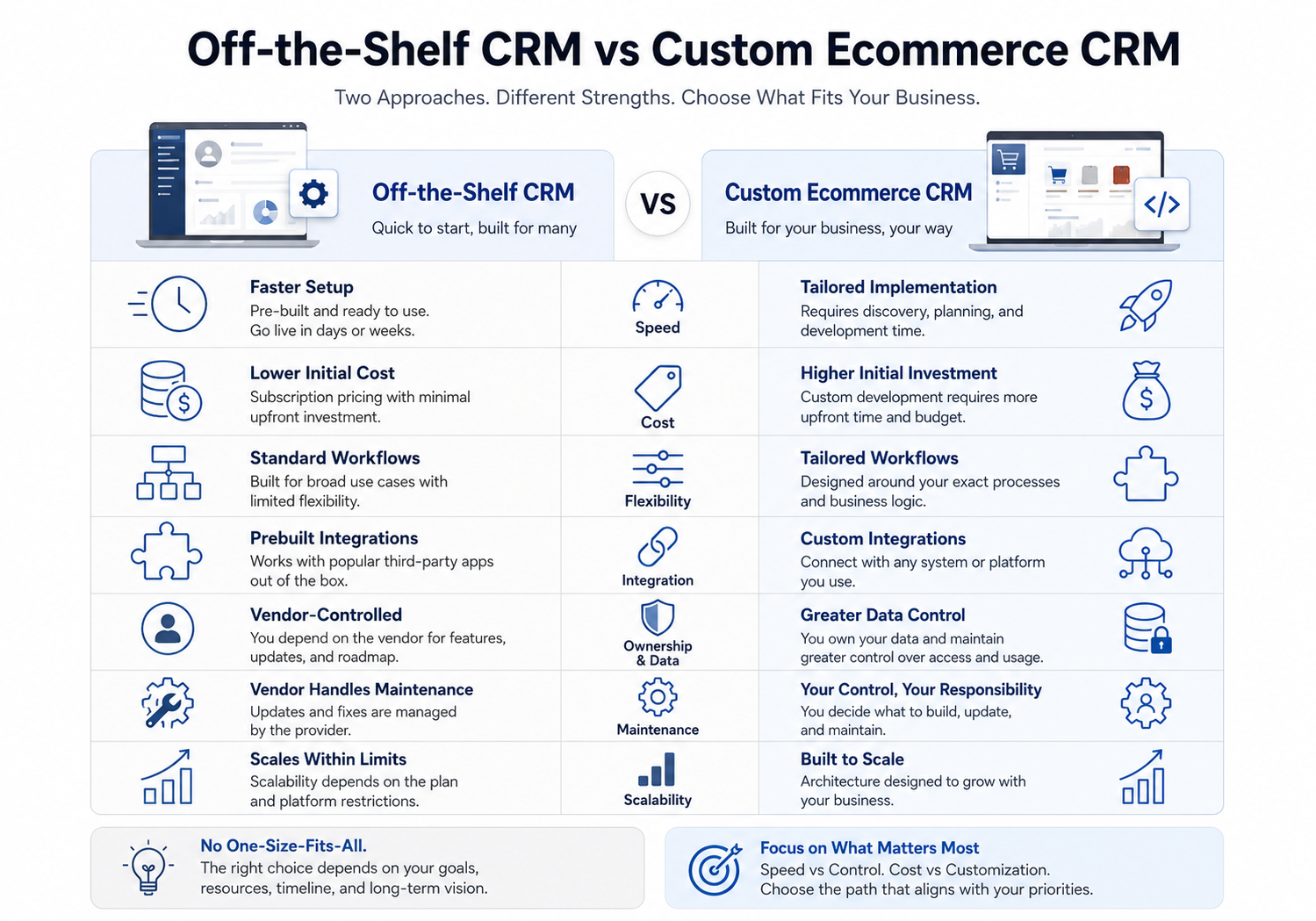
An off-the-shelf CRM is often the better choice when processes are standard and the team can adapt to the software. Custom development is more suitable when customer workflows, data requirements, channels, or automation rules provide meaningful competitive or operational value.
How to Select the Right Development Approach
Use the following decision criteria before approving development:
|
Question |
Why it matters |
|---|---|
|
What business problem must the CRM solve first? |
Keeps the project focused |
|
Which systems hold customer data today? |
Defines integration scope |
|
Who will use the CRM daily? |
Guides user experience and permissions |
|
Which workflows should be automated? |
Identifies measurable efficiency gains |
|
What data privacy rules apply? |
Influences architecture and governance |
|
What volume must the platform handle? |
Affects infrastructure design |
|
Which reports drive decisions? |
Prevents unnecessary dashboards |
|
Who will maintain the system? |
Clarifies long-term ownership and cost |
A technical discovery phase should produce a prioritized feature list, workflow maps, integration plan, architecture direction, delivery phases, and realistic cost assumptions.
A Practical Note from CRM Implementation Experience
The hardest part of ecommerce CRM development is usually not building customer screens. Rather, it involves agreeing on what each piece of customer data means across marketing, support, finance, and operations.
For example, one team may define an “active customer” as someone who purchased in the last 90 days. Another may use 180 days. Unless the business agrees on the definition, the CRM will produce conflicting reports even when the software works correctly.
Clear business rules are therefore as important as clean code.
Planning a Custom Ecommerce CRM with Kanhasoft
Kanhasoft helps businesses evaluate and develop custom CRM platforms, ecommerce integrations, workflow automation, and customer analytics systems.
A practical starting point is a discovery exercise that reviews current tools, data sources, customer journeys, integration requirements, and high-value automation opportunities. This helps determine whether a custom CRM, an existing platform with integrations, or a combined CRM and ERP approach is the most sensible investment.
The purpose is not to replace every tool. Instead, the focus is on creating a workable system plan that supports customer service, retention, reporting, and future growth without unnecessary complexity.
Conclusion
Ecommerce CRM development is most valuable when an online business has outgrown fragmented tools and needs a clearer view of its customers.
A successful CRM should connect customer data, orders, service activity, marketing actions, returns, and retention workflows without forcing teams into unnecessary complexity. It should also provide dependable data, sensible automation, secure access, and reports that support real decisions.
Businesses comparing a CRM with custom ERP software for ecommerce businesses should begin with the problem they need to solve. Customer engagement and retention point toward CRM. By comparison, inventory, fulfillment, procurement, and finance point toward ERP. Ultimately, many growing ecommerce companies benefit from a carefully integrated combination of both.