Sales promises Friday delivery, but the warehouse sees no stock. Purchasing says a shipment arrived yesterday. Three teams, three different numbers. ERP inventory management connects stock movements with purchasing, sales, warehouse operations, and finance. Businesses exploring custom ERP development can use shared data to replenish more carefully and make reliable delivery promises.
Quick Answer: How Does ERP Improve Inventory Management?
ERP software improves inventory management by recording stock transactions in one connected system. It tracks quantities across locations, links purchase orders to goods received, monitors reserved and incoming stock, triggers reorder alerts, and produces operational reports. The benefit is knowing what is available, where it is, and what action comes next.
This article is especially useful for operations directors, purchasing managers, warehouse leaders, distributors, manufacturers, and growing multichannel retailers.
Why Inventory Becomes Difficult to Control
Inventory data can drift apart even when employees follow their own procedures. Sales records an order, but the warehouse spreadsheet changes hours later. A buyer raises a purchase order without seeing stock at another location. Returned goods appear available before quality inspection.
These gaps cause stockouts, duplicate purchases, and excess inventory. ERP connects transactions but cannot correct poor item codes or unrecorded movements automatically.
How ERP Inventory Management Connects Daily Work
An ERP system maintains a transaction history for each stock keeping unit (SKU). Depending on configuration, a sale reserves stock, a receipt increases on-hand quantity, and a warehouse transfer moves inventory between locations. Teams then work from linked records.
| Business event | ERP record or action | Why it matters |
| Customer order confirmed | Allocate or reserve stock | Prevent double-promising |
| Supplier delivery accepted | Post goods receipt | Update physical quantity |
| Goods moved between sites | Record transfer and receipt | Show stock in the right place |
| Stock drops near threshold | Create alert or purchase request | Start replenishment earlier |
Five Ways ERP Software Improves Inventory Control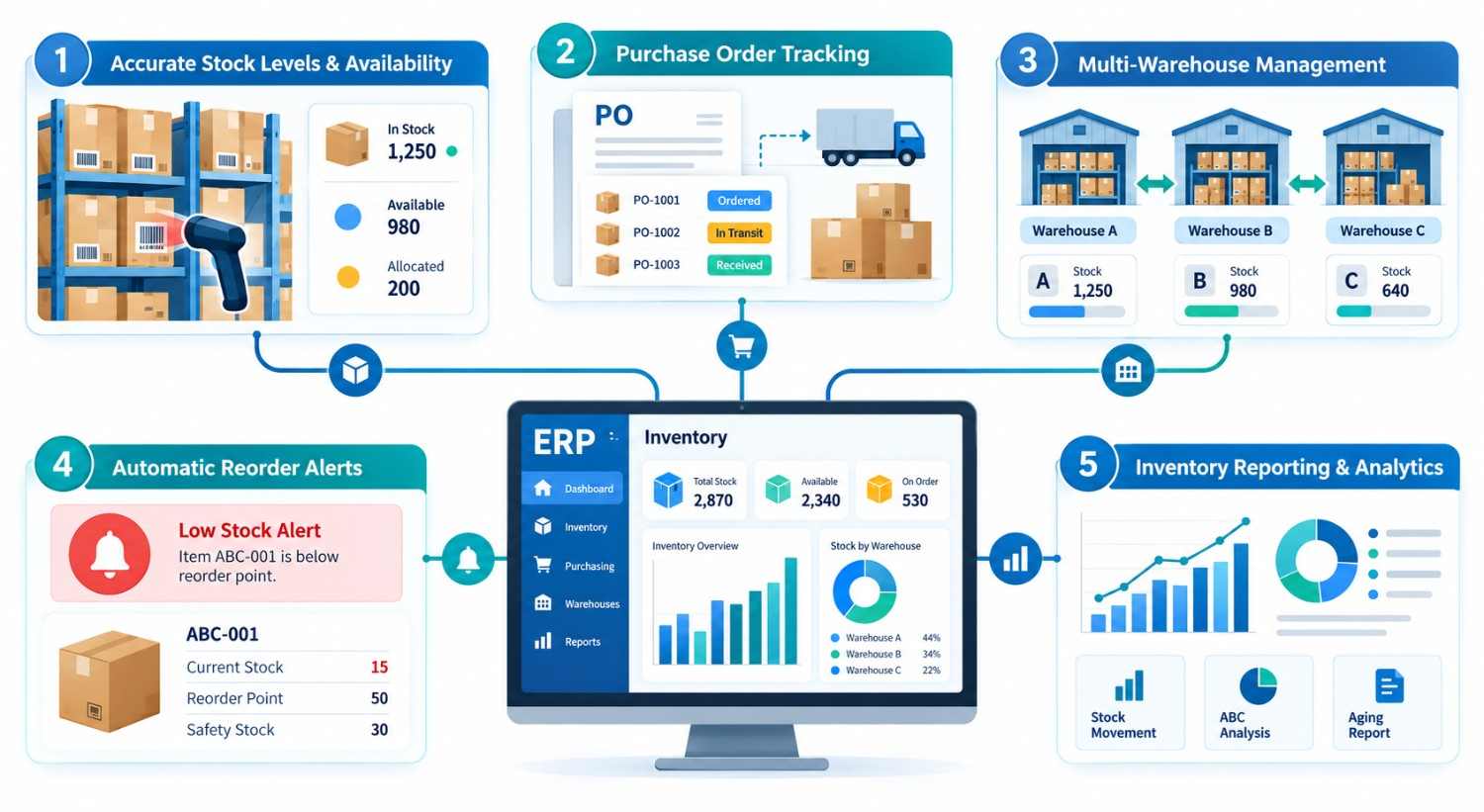
1. More Accurate Stock Levels and Availability
An inventory dashboard should distinguish on-hand stock (physically present), reserved stock (committed to orders), available stock (eligible for new demand), and incoming stock (expected from suppliers). Each number answers a different question.
Suppose 200 units sit in a warehouse, but 75 are reserved for confirmed orders. Showing “200 available” could lead to another promise the business cannot fulfill. A properly configured ERP can show 125 units available before other restrictions, such as quality holds, are considered.
Barcode scanning and cycle counts help, but staff must record movements promptly.
2. Purchase Orders Linked to Actual Demand
ERP purchasing connects replenishment requests, supplier quotations, approvals, purchase orders, and goods receipts. Buyers can check open orders and supplier lead times before buying more stock.
Receiving records actual deliveries, including shortages or damage. Finance can compare orders, receipts, and invoices through three-way matching.
Linked records clarify order status and expose supplier delays.
3. Better Control Across Warehouses
A multi-warehouse business needs visibility by site, storage bin, and sometimes batch, serial number, or expiration date. ERP can track stock transfers from dispatch through receipt instead of treating inventory as one company-wide total.
That matters when Warehouse A has a shortage but Warehouse B has surplus stock. An internal transfer may be faster or cheaper than a fresh purchase. For perishable goods, configurable first-expiring-first-out (FEFO) rules can support appropriate picking, provided batch and date data are reliable.
High-volume operations may still need a specialized warehouse management system.
4. Reorder Alerts Before Stock Runs Out
ERP reorder alerts compare expected inventory against defined rules. A basic starting point is:
Reorder point = average daily demand × supplier lead time + safety stock.
For example, a product selling 30 units daily, with a 10-day replenishment lead time and 90 units of safety stock, has an illustrative reorder point of 390 units. Rules must also consider incoming stock, reserved demand, seasonality, and supplier reliability.
Some systems recommend a purchase; others can create a draft order automatically. Odoo’s official replenishment documentation distinguishes manual suggestions from automatic rules. Businesses should retain approval controls for expensive, seasonal, or volatile items.
5. Reporting That Supports Better Decisions
ERP inventory reports connect quantity movements with purchasing and fulfillment activity. Managers can monitor stock aging, inventory turnover, days of supply, stock adjustment rates, late receipts, and order fill rates.
A useful dashboard also shows exceptions: items with demand but no available stock, goods sitting idle for months, and suppliers repeatedly missing delivery dates. Reports become actionable when each metric has a defined owner and review schedule.
Forecasts still depend on reliable data and assumptions.
Example: A Distributor Avoids an Unnecessary Purchase
Consider a hypothetical parts distributor with two warehouses. A customer requests 80 units for immediate delivery. Warehouse A has 20 available, while Warehouse B has 140.
Without shared visibility, purchasing may order 60 more units. With ERP, the team can compare shipping costs and transfer times, reserve 80 units across locations, and arrange an internal transfer or split shipment. The ERP updates availability.
The improvement comes from a better decision, not from automatically purchasing more inventory.
Spreadsheets vs. Inventory Tools vs. ERP
| Option | Best fit | Main limitation |
| Spreadsheets | Small catalogs and simple workflows | Updates depend heavily on manual discipline |
| Standalone inventory software | Businesses focused mainly on stock and fulfillment | Purchasing, accounting, and operations may need separate integrations |
| ERP with inventory modules | Multiple departments, locations, or approval workflows | Higher setup, training, and governance effort |
ERP is not always necessary. A retailer with one location and straightforward purchasing may do well with a focused inventory application. ERP becomes valuable when stock, purchasing, and reporting disconnect. For broader operational context, see how supply chain ERP supports business operations.
What to Check Before Selecting an ERP Inventory System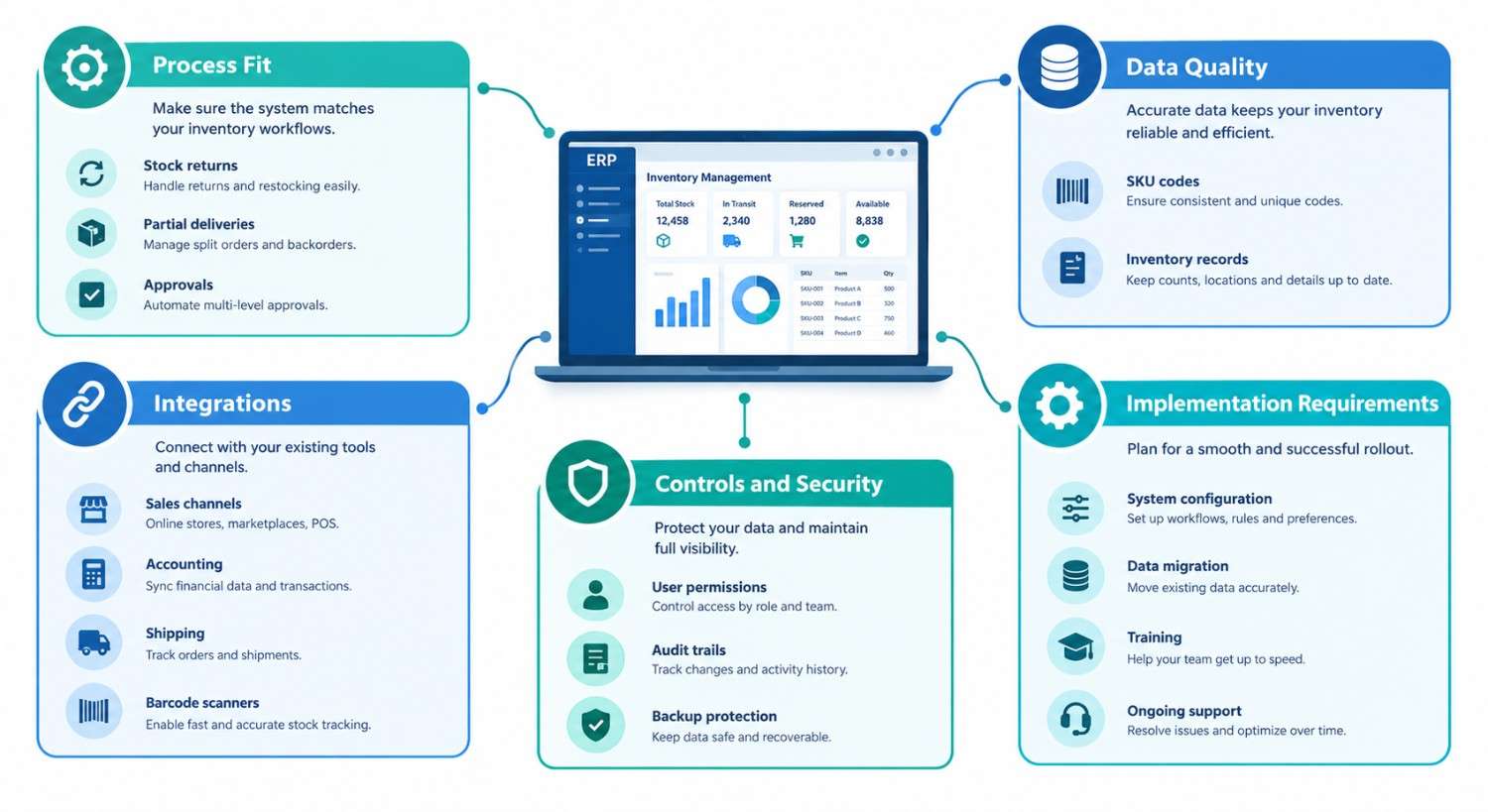
Start with the decisions your team struggles to make, not a long feature wish list:
- Process fit: Can users handle partial receipts, returns, damaged goods, transfers, and approvals?
- Data quality: Are SKU codes, units of measure, supplier records, and opening balances consistent?
- Integrations: Will sales channels, accounting, shipping, and barcode devices exchange data reliably?
- Controls: Are permissions, adjustment reasons, audit trails, and backup procedures appropriate?
- Total cost: Include implementation, migration, licenses, training, support, and future changes.
Standard ERP modules suit common processes. Custom ERP development may make sense when manufacturing rules, unusual stock allocations, or cross-company workflows cannot be handled economically through configuration.
A Practical Implementation Roadmap
Begin with a physical stock count and clean item master data. Then document how stock enters, moves, gets reserved, and leaves the business. Assign an owner to each transaction.
Pilot one warehouse. Test partial deliveries, returns, approvals, and transfers. Reconcile physical and accounting balances before launch.
After launch, review discrepancies weekly. Automate purchasing only after stock data and approval rules stabilize.
Experience-Based Insight: Start With Inventory Transactions, Not Dashboards
A Kanhasoft production and logistics ERP project included stock-in and stock-out records, batch and serial tracking, warehouse transfers, purchase orders, goods receipt notes, and operational reporting. Inventory, procurement, and production shared linked processes.
The practical lesson is that attractive dashboards cannot compensate for missing transactions. Define how every receipt, reservation, transfer, and adjustment is recorded before investing in advanced forecasts or automation.
How to Measure Whether ERP Is Working
Compare a baseline against results after rollout. Useful measures include physical-to-system stock accuracy, stockout frequency, purchase-order processing time, inventory aging, and on-time order fulfillment.
Track these at the same sites and with consistent definitions. A lower inventory value is not automatically a success if service levels fall or emergency purchasing increases.
Conclusion
ERP inventory management helps businesses manage stock by connecting purchasing, warehouse movements, reorder decisions, and reporting. Its strongest value appears when teams need one reliable view of supply and demand. Success requires accurate data, clear workflows, and measurable goals.
How Kanhasoft Can Help
If your business is facing inventory discrepancies, disconnected purchase orders, or poor warehouse visibility, Kanhasoft can help assess existing workflows and explore suitable ERP options. We can map integrations and recommend standard configuration or targeted custom development. Start with an ERP requirements discussion, not a predetermined technology choice.