Agriculture businesses manage far more than crops, livestock, or equipment. They also manage growers, buyers, distributors, suppliers, field representatives, seasonal demand, service requests, contracts, payments, and long-term business relationships.
When this information sits across spreadsheets, messaging apps, paper records, and individual employees’ inboxes, routine work becomes harder than it should be. A CRM for agriculture brings these commercial relationships and related activities into one organized system.
The result is not automatic success. However, a well-designed agriculture CRM can reduce administrative work, improve follow-ups, strengthen coordination, and give decision-makers a clearer view of sales and customer activity.
Quick Answer
A CRM for agriculture helps farms, agribusinesses, input suppliers, produce traders, cooperatives, and agricultural service providers centralize customer information, track sales opportunities, automate seasonal communication, coordinate field teams, manage complaints, and connect customer demand with inventory and operations.
It works best when it integrates with existing accounting, inventory, logistics, ecommerce, and farm management systems.
This article is especially useful for:
- Agricultural input manufacturers and distributors
- Commercial farms and producer organizations
- Food processors and produce aggregators
- Equipment dealers and irrigation companies
- Agricultural consultants and field-service businesses
- Agritech companies developing digital platforms
What Is CRM for Agriculture?
Customer relationship management, or CRM, is a system for managing interactions with current and potential customers. It commonly organizes contact information, communications, sales opportunities, support requests, and follow-up activities.
An agriculture CRM adapts those capabilities to agricultural sales cycles and operating conditions.
Depending on the organization, the CRM may manage relationships with:
- Farmers and growers
- Dealers and distributors
- Retailers and wholesalers
- Food processors
- Institutional buyers
- Equipment customers
- Suppliers and vendors
- Agronomists and field representatives
The term should not be confused with a farm management system. Digital farm management platforms often focus on field mapping, crop health, weather information, production activities, and data-driven farm decisions.
A CRM focuses primarily on relationships, communication, sales, and service. Some agriculture businesses need both systems connected through APIs or a wider agriculture operations management platform.
How CRM for Agriculture Improves Business Efficiency
1. It Creates One Reliable Customer Record
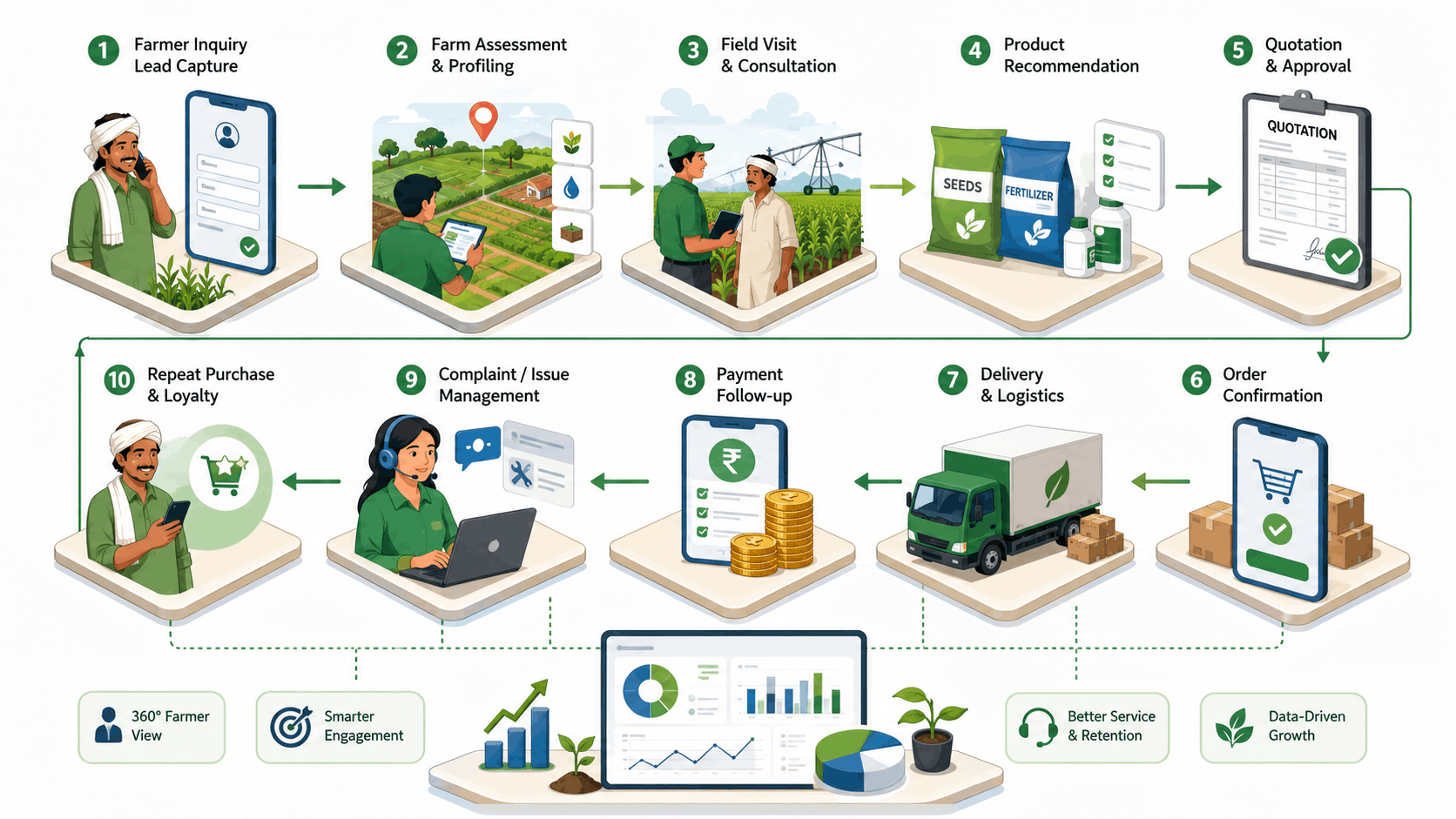
Agricultural customer data often exists in several places. A salesperson may keep contact details on a phone. Order history may remain in accounting software. Field-visit notes may live in a notebook. Complaints may arrive through email or WhatsApp.
Agriculture CRM software can combine this information into one customer profile.
A team member could see:
- Farm location and acreage
- Crops or livestock categories
- Previous purchases
- Dealer or territory assignment
- Communication history
- Pending quotations
- Service requests
- Payment status
- Next recommended action
This reduces repeated questions and helps employees respond with better context.
2. It Brings Structure to Seasonal Sales
Agricultural sales rarely follow a simple monthly pattern. Demand can depend on planting seasons, harvest schedules, weather conditions, commodity markets, regional practices, and product availability.
A CRM can organize leads and opportunities by crop, geography, season, product category, expected volume, and sales stage.
For example, a seed distributor could create a pipeline such as:
Inquiry → Farm Assessment → Product Recommendation → Trial Order → Commercial Order → Repeat Purchase
Managers can then identify stalled opportunities and forecast likely demand by territory.
3. It Automates Follow-Ups Without Making Them Impersonal
Sales representatives frequently manage hundreds of growers, dealers, or buyers. Remembering every renewal, demonstration, payment reminder, and seasonal conversation becomes difficult.
CRM automation can trigger:
- Follow-up tasks after field visits
- Reminders before planting periods
- Notifications for expiring agreements
- Payment follow-ups
- Dealer onboarding steps
- Customer satisfaction surveys
- Service reminders for agricultural equipment
Automation should support the relationship, not replace it. A personalized call based on accurate CRM information is often more useful than sending the same bulk message to every contact.
4. It Improves Field-Team Coordination
Agricultural businesses often employ sales officers, agronomists, technicians, inspectors, or service engineers who spend much of their time away from the office.
A mobile-friendly CRM can help these employees:
- View assigned customers
- Plan routes and visits
- Record meeting notes
- Capture photographs or documents
- Update opportunity stages
- Log product demonstrations
- Create service requests
- Schedule the next visit
Managers gain visibility without calling every employee for a status update. Field teams also avoid entering the same information again after returning to the office.
5. It Connects Customer Demand With Operations
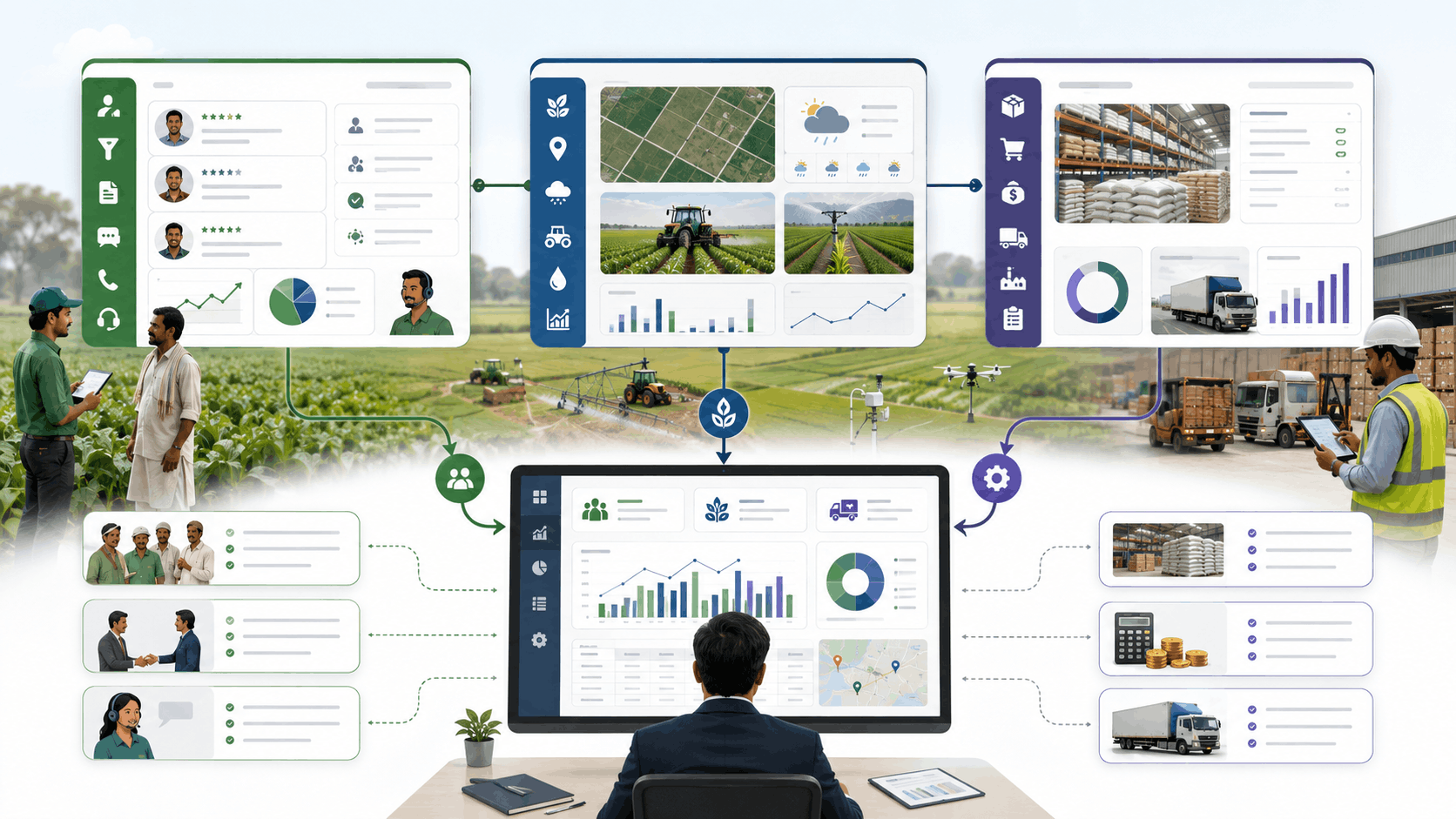
A CRM alone should not replace inventory, finance, or production software. However, integrations can connect customer-facing activity with operational data.
For example, a fertilizer distributor’s CRM may show strong demand for a particular product in one region. An inventory integration can reveal whether enough stock is available. The operations team can then plan replenishment before sales representatives make commitments they cannot fulfill.
A connected system may exchange data with:
- Inventory and warehouse software
- Accounting platforms
- Order management systems
- Ecommerce portals
- Logistics providers
- Weather or mapping services
- Farm management software
- Business intelligence dashboards
Businesses evaluating this model can explore how custom CRM development supports workflow automation and third-party integrations.
6. It Strengthens Complaint and Service Management
Agricultural products and equipment may generate complaints related to quality, delivery, packaging, application, performance, installation, or maintenance.
A CRM can register each case, assign ownership, define response deadlines, attach photographs, track investigation steps, and document the final resolution.
This creates accountability. It also helps management identify recurring issues by product, region, distributor, or supplier.
7. It Gives Management More Useful Reports
CRM dashboards can help leaders answer practical questions:
- Which regions generate the most qualified opportunities?
- Which dealers are active or inactive?
- How many field visits result in quotations?
- Which products receive the most complaints?
- Which customers have not purchased this season?
- Where are sales cycles slowing down?
- Which representatives need additional support?
Reliable reporting depends on consistent data entry. A beautiful dashboard cannot rescue incomplete, outdated, or duplicated records.
A Practical Agriculture CRM Workflow
Consider an irrigation equipment business serving commercial farms.
A website inquiry enters the CRM and is assigned according to location. A sales engineer contacts the prospect and records the farm size, water source, crop type, budget, and expected installation date.
The engineer schedules a site survey through the CRM. After the visit, photographs and technical notes are uploaded. The quotation moves through an approval workflow before being sent to the customer.
Once accepted, the opportunity connects with inventory, installation scheduling, invoicing, and after-sales service. Everyone works from the same customer record instead of searching through separate messages and spreadsheets.
Agriculture CRM vs. Farm Management System vs. ERP
|
System |
Primary Purpose | Typical Information Managed |
Best Suited For |
|---|---|---|---|
|
Agriculture CRM |
Customer, dealer, sales, and service relationships | Leads, contacts, visits, quotations, communications, complaints |
Sales and customer-facing teams |
|
Farm management system |
Planning and monitoring agricultural production | Fields, crops, inputs, activities, yields, weather, machinery |
Farm owners, managers, and agronomists |
|
Agriculture ERP |
Managing wider business operations | Procurement, inventory, production, finance, payroll, orders |
Multi-department agribusinesses |
|
Integrated platform |
Connecting commercial and operational workflows | CRM, farm data, inventory, finance, logistics, reporting |
Complex or multi-location organizations |
An agriculture business does not always need all four options. A small farm selling directly to a limited number of buyers may only need a simple CRM and accounting tool. A large input distributor may need CRM, inventory, finance, logistics, and dealer-management modules connected together.
Businesses with broader operational requirements can also review custom ERP development.
Important Features in Agriculture CRM Software
|
Feature |
Practical Business Value |
|---|---|
|
Customer and grower profiles |
Maintains complete relationship and activity records |
|
Territory management |
Assigns customers by region, representative, or dealer |
|
Seasonal sales pipelines |
Tracks opportunities around crop and purchasing cycles |
|
Visit scheduling |
Coordinates field meetings, surveys, and demonstrations |
|
Mobile data entry |
Allows updates from farms, warehouses, and customer sites |
|
Quotation workflows |
Standardizes pricing, approvals, and proposal tracking |
|
Complaint management |
Records, assigns, escalates, and resolves customer issues |
|
Document management |
Stores agreements, photographs, reports, and certificates |
|
Dashboards |
Shows pipeline, field activity, sales, and service performance |
|
Integration APIs |
Connects CRM with ERP, inventory, accounting, and other systems |
The right feature list depends on the business model. Adding every possible module at launch usually increases cost and makes adoption harder.
Off-the-Shelf or Custom CRM Software for Agriculture Business?
|
Choose Off-the-Shelf CRM When |
Consider Custom CRM When |
|---|---|
|
Sales processes are mostly standard |
Agricultural workflows are highly specialized |
|
The team needs a quick implementation |
Several departments and systems must be connected |
|
Few custom reports are required |
Reporting depends on crop, territory, season, or dealer logic |
|
Existing integrations meet the need |
Legacy, farm, sensor, logistics, or proprietary systems need integration |
|
Subscription pricing remains manageable |
Per-user pricing becomes costly at scale |
|
The business can adapt its workflow |
The software must follow established operating processes |
An off-the-shelf platform may be the sensible starting point for a smaller organization. Custom development becomes more practical when workarounds, plugins, duplicate entry, and manual reconciliation start affecting daily operations.
For a broader evaluation framework, see custom CRM versus off-the-shelf CRM.
How to Implement an Agriculture CRM Successfully
Start With Workflow Discovery
Document how leads, customer visits, quotations, orders, complaints, and renewals currently move through the business. Identify who enters information, who approves decisions, and where delays occur.
Define the Minimum Useful Scope
Begin with the workflows that create the greatest operational burden. These may include customer records, lead pipelines, field visits, quotations, complaints, and basic reports.
Additional modules can follow in later phases.
Clean Existing Data
Customer names, phone numbers, locations, dealer assignments, and transaction references should be standardized before migration. Otherwise, the new CRM will inherit old problems.
Plan Integrations Early
Confirm which systems provide inventory, invoices, payments, logistics, weather, mapping, or farm data. Review their API capabilities before finalizing the CRM architecture.
Design for Field Conditions
Mobile screens should be simple and fast. When users work in areas with weak connectivity, offline data capture and delayed synchronization may be necessary.
Introduce the System Gradually
Pilot the CRM with one region or team. Collect feedback, improve the workflow, and then expand. Training should use real business scenarios rather than generic software demonstrations.

Risks and Limitations to Consider
CRM software does not solve unclear processes by itself. Poor adoption, inconsistent data, excessive customization, and weak integrations can reduce its value.
Agriculture businesses should also consider:
- Data ownership and portability
- Role-based access permissions
- Customer and farm-data privacy
- Offline access requirements
- Backup and recovery procedures
- Integration reliability
- Long-term maintenance responsibilities
Agricultural operations also face production, market, financial, institutional, and human risks. CRM reporting can improve visibility, but it cannot remove the uncertainty created by weather, prices, policy changes, or biological conditions.
Qualified legal, privacy, security, or compliance professionals should review requirements involving regulated information or cross-border data processing.
Practical implementation note: Define the data model before designing dozens of screens. Agree on what a grower, farm, field, dealer, product, visit, opportunity, and order mean within the business. Clear definitions prevent duplicate records and reporting disputes later.
A related Kanhasoft implementation centralized soil sampling, laboratory analysis, map-based visualization, reporting, data exchange, and role-based access in a multi-tenant platform. Although it was not positioned as an agriculture CRM, the project demonstrates how structured field data and multi-organization workflows can be managed within one system.
Conclusion
A CRM for agriculture can improve efficiency by connecting customer relationships, seasonal sales, field activities, quotations, complaints, and management reporting.
However, the right system is not simply the one with the longest feature list. It should reflect how the agriculture business sells, serves customers, manages territories, and coordinates with operational systems.
For smaller teams, a configurable CRM may be enough. For businesses with specialized agricultural workflows, complex dealer networks, or several disconnected systems, a custom platform may provide a better long-term fit.
Planning an Agriculture CRM?
Kanhasoft can help agriculture and agribusiness teams examine existing workflows, define the right CRM scope, evaluate integrations, and create a practical implementation roadmap.
The goal is not to replace every system at once. It is to identify where better customer information, workflow automation, field coordination, and reporting can make the greatest difference. Kanhasoft’s CRM services include workflow analysis, custom development, integrations, data migration, testing, deployment, and ongoing enhancement.
Schedule a CRM consultation to discuss the requirements before choosing a platform or development approach.