
A new CRM can improve sales visibility, customer service, and reporting. However, those benefits depend on the data inside it. Importing duplicate contacts, outdated accounts, missing deal history, and inconsistent fields simply gives old problems a new address.
Successful CRM data migration is not a file-upload task. It is a controlled business process covering discovery, cleanup, mapping, testing, security, user validation, and post-launch governance.
Quick Answer: What Makes CRM Data Migration Successful?
A successful migration moves only useful, approved data into a well-designed CRM. The team cleans duplicates, standardizes formats, maps fields and relationships, tests sample imports, reconciles results, protects sensitive information, and prepares a rollback path. Business users validate the records before the old system is retired.
Microsoft’s implementation guidance also treats migration as a planned project involving source analysis, transformation, ETL, testing, cutover, validation, and assigned responsibilities.
What Is CRM Data Migration?
CRM data migration is the process of moving customer and business information from spreadsheets, legacy CRM platforms, databases, marketing tools, support systems, or other applications into a new CRM development.
The scope can include contacts, companies, leads, opportunities, activities, emails, support tickets, products, attachments, consent records, custom objects, owners, and permissions.
Migration is complete only when the information remains accurate, usable, and connected in the target system. Moving every row means little if contacts are linked to the wrong companies or open deals lose their owners.
Why CRM Data Cleanup Must Happen Before Import
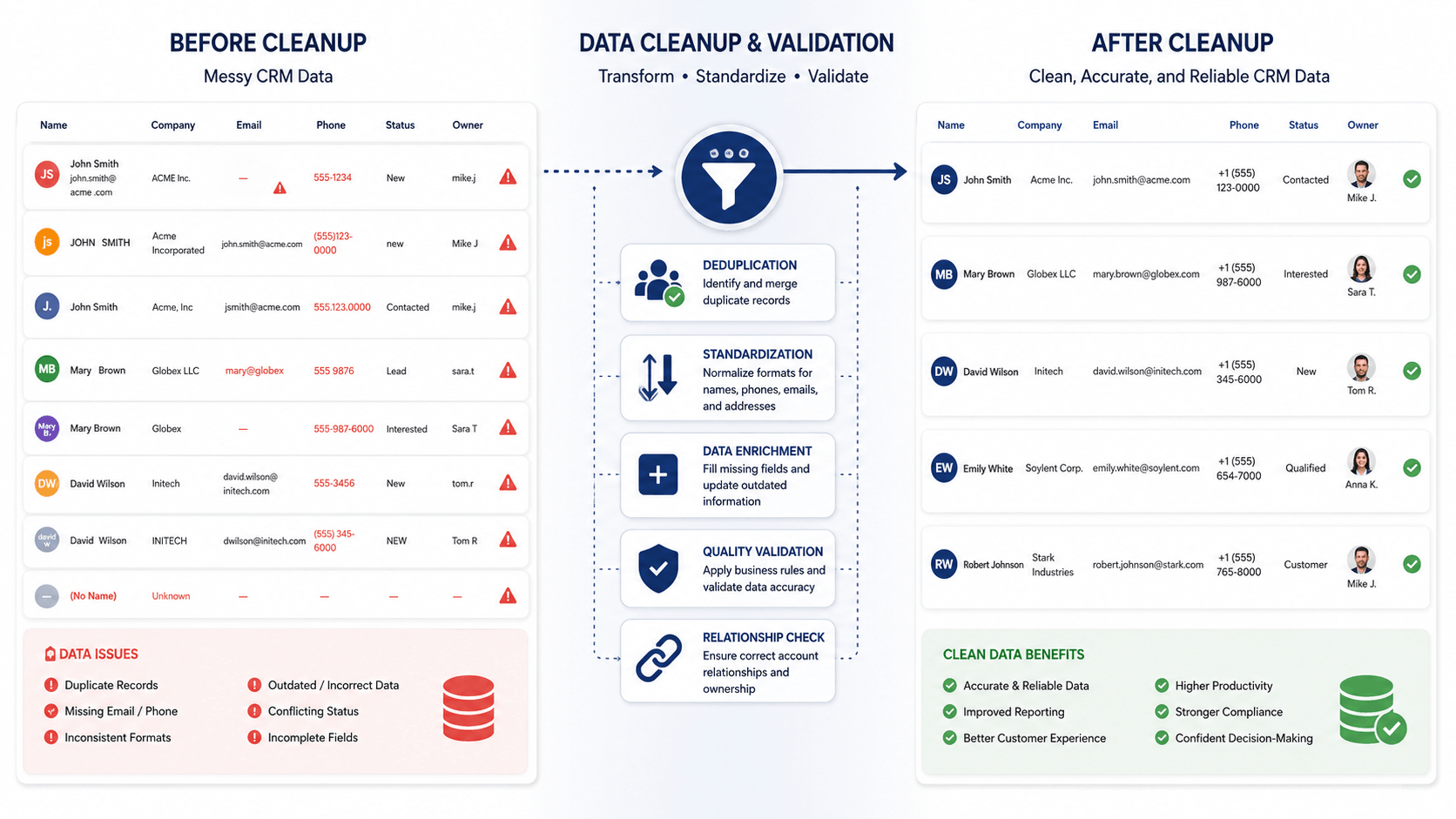
CRM data cleanup removes or corrects records that should not enter the new system. Typical problems include duplicate contacts, invalid email addresses, obsolete companies, inconsistent country names, missing owners, and conflicting status labels.
For example, one team may use “Qualified,” another “Sales Ready,” and a third “Hot.” Importing all three without a common rule creates unreliable reports from day one.
Review data for accuracy, completeness, consistency, and business relevance. Do not delete uncertain records without approval. Archive them, flag them for review, or document why they were excluded. Legal or privacy specialists should review retention, deletion, and consent decisions where personal or regulated data is involved.
CRM Migration Approaches: Which One Fits?
|
Approach |
Best for | Main advantage |
Main risk |
|---|---|---|---|
|
Big-bang |
Smaller, simpler databases | Fast move to one system |
High cutover pressure |
|
Phased |
Multiple teams or complex workflows | Lower operational risk |
Temporary use of two systems |
|
Parallel |
High-risk operations | Strong comparison before retirement |
More work and possible divergence |
|
Selective |
Large amounts of outdated history | Cleaner CRM and lower effort |
Users may need an archive |
The choice depends on data volume, relationship complexity, integrations, downtime tolerance, and reporting needs. Microsoft recommends matching the migration approach to the size and complexity of the data.
The CRM Migration Process: Eight Practical Steps
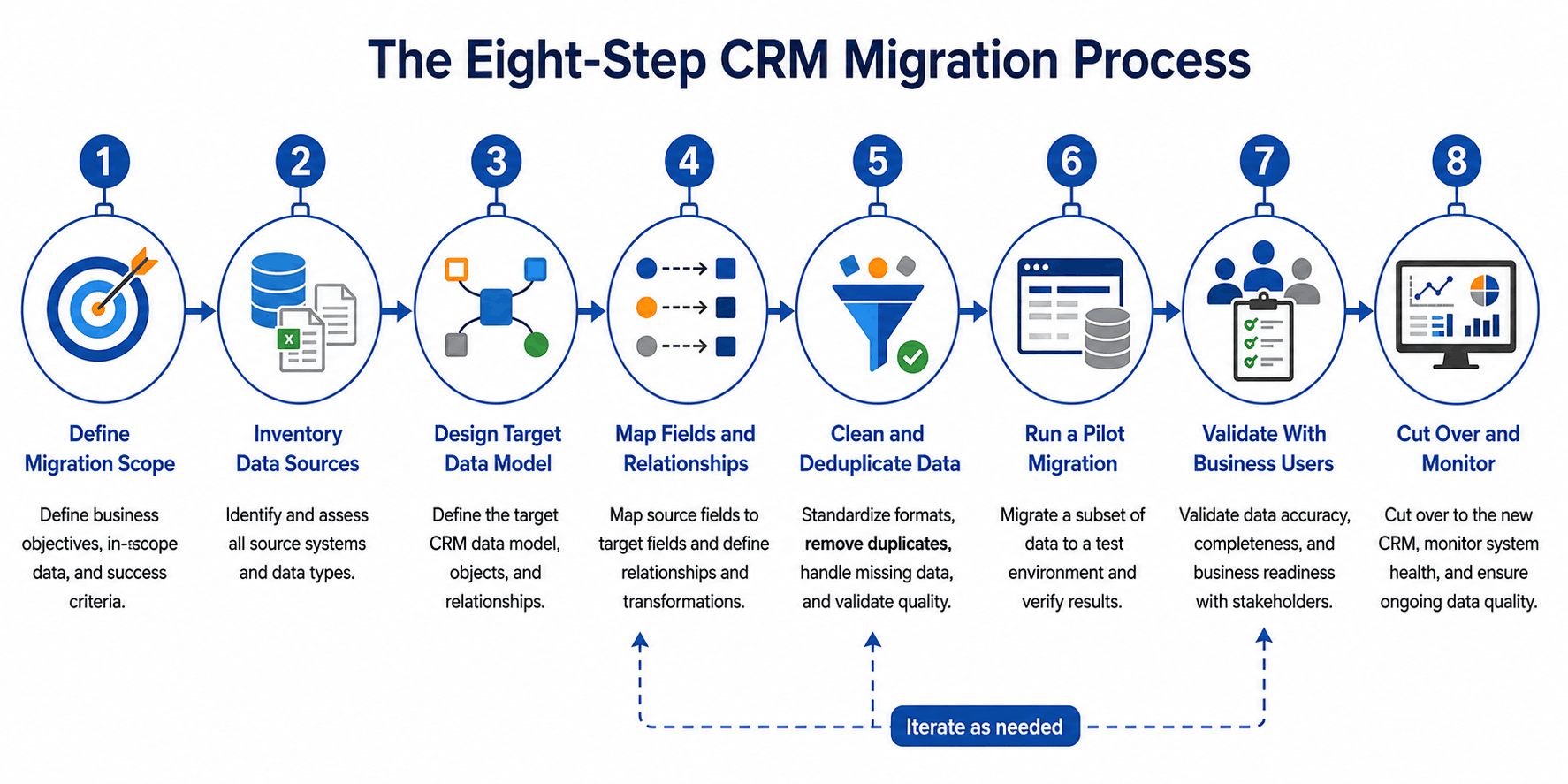
1. Define the Scope
Decide what the new CRM must support. List the teams, processes, reports, integrations, and customer journeys that depend on migrated data.
Classify records as required, cleanup needed, archive only, or approved for deletion. This prevents “move everything” from becoming the default.
2. Inventory Every Data Source
Create a source register covering old CRM systems, spreadsheets, ERP software, marketing platforms, support tools, email systems, shared drives, and custom databases.
For each source, record its owner, volume, export method, sensitive fields, known quality issues, unique identifiers, and relationship dependencies.
3. Design the Target Data Model
Define objects, fields, data types, validation rules, ownership, permissions, and relationships before preparing import files.
A deal may link to a contact, company, product, territory, and salesperson. If those relationships are not designed first, the migration may create valid records that cannot support real work. Salesforce likewise recommends designing the target schema before extracting, transforming, and loading data.
4. Create a Field-Mapping Document
A field map connects every source field to a target field and transformation rule.
|
Source value |
Target field | Transformation |
Validation |
|---|---|---|---|
|
US, USA, United States |
Country | Convert to “United States” |
Approved list |
|
Hot, A1, Priority |
Lead rating | Convert to one rating scale |
Allowed values |
|
Legacy account number |
External ID | Preserve unchanged |
Must be unique |
Document default values, rejected values, relationship keys, and the person who approved each rule. This becomes the shared reference for business, development, and QA teams.
5. Standardize and Deduplicate
Normalize dates, phone numbers, currencies, addresses, status values, and text encoding. Resolve duplicates with stable identifiers such as email, company domain, account number, or legacy record ID.
The target CRM’s matching logic matters. HubSpot, for example, uses email addresses, company domains, record IDs, and custom unique properties in different import scenarios.
6. Run a Pilot Migration
Never make the first full import the go-live import.
Test a representative sample containing clean records, duplicates, incomplete fields, special characters, attachments, and complex relationships. Confirm that owners, activities, permissions, reports, and integration identifiers behave correctly.
7. Validate With Business Users
Technical reconciliation should compare record counts, failed rows, totals, field completeness, and relationships. Business validation asks whether users can perform actual work.
Sales representatives should review active deals. Account managers should inspect customer history. Service teams should open ongoing cases. Managers should run critical reports.
One Kanhasoft case study describes a US CRM connecting pipelines, project tracking, reporting, Gmail, Google Drive, Dropbox, and Mailchimp. In that type of migration, preserving ownership, associations, activity context, and integration keys is as important as moving contact fields.
8. Plan Cutover and Monitoring
Define the data freeze, final export, import sequence, validation window, go-live decision, and rollback process.
After launch, monitor duplicates, missing owners, failed integrations, broken workflows, access problems, record-count differences, and report discrepancies. Keep the source system read-only for an agreed period when practical.
CRM Migration Checklist
Before go-live, confirm that:
- Scope, success criteria, and data owners are approved
- Every source system is documented
- Required history and archive rules are clear
- The target data model is final
- Field mapping and transformation rules are approved
- Duplicate and survivorship rules are tested
- Sensitive data requirements are reviewed
- Pilot migrations and reconciliation are complete
- Business users have signed off
- Cutover, backup, rollback, and monitoring plans exist

Common CRM Data Migration Mistakes
Migrating everything: Outdated records and unused fields increase cost and clutter.
Cleaning after import: Cleanup becomes harder when reports and automations already depend on bad data.
Ignoring relationships: Contacts without accounts and deals without owners may import successfully but fail operationally.
Using names as IDs: Names repeat and change. Stable external identifiers are safer.
Skipping user validation: A technically correct database can still be impractical for sales or service teams.
Treating migration as IT-only: Business owners must define what the data means and which value should survive.
For related planning, see Kanhasoft’s guidance on CRM development cost factors, moving from Excel to a CRM, and CRM integration challenges.
Expert Observation: Data Quality Is a Management Decision
Migration software can transform formats and move records. It cannot decide whether two similar accounts represent one customer, which status should survive, or whether old leads still have business value.
Assign named data owners. Sales may own pipeline definitions, finance may approve account identifiers, marketing may control consent fields, and IT may manage integration keys. Clear ownership gives the migration team rules it can test.
Planning a CRM Implementation and Migration?
Kanhasoft can help assess source systems, data quality, field mappings, integrations, security requirements, and cutover risks. Our custom CRM development services cover workflow analysis, migration planning, API integration, testing, deployment, and post-launch support. A migration-readiness review is often more useful than a rushed import.
Final Thoughts
Strong CRM data migration best practices focus on business meaning, not only technical transfer. Clean the source, define the target model, preserve relationships, test realistic samples, reconcile the results, involve users, and maintain quality after launch.
The goal is not to copy the old database perfectly. It is to create a trusted CRM database that supports accurate work, useful reporting, responsible data handling, and future growth.