A CRM can store every lead, email, task, and deal and still leave people doing the real work manually. For businesses evaluating custom CRM development, the more useful question is whether the CRM can safely act on that information. An agentic CRM uses AI agents to interpret goals, gather context, use approved tools, and move sales or service workflows forward while people retain control over sensitive decisions.
Quick Answer: What Is an Agentic CRM?
An agentic CRM is a customer relationship management system where AI agents do more than answer questions. They can inspect CRM data, reason about an objective, call approved tools, complete multi-step tasks, and request human approval when needed. Next.js can power the user experience, while Node.js handles business logic, integrations, events, and agent orchestration.
This article is especially useful for founders, CTOs, revenue operations leaders, CRM product owners, and sales teams planning an AI-powered CRM.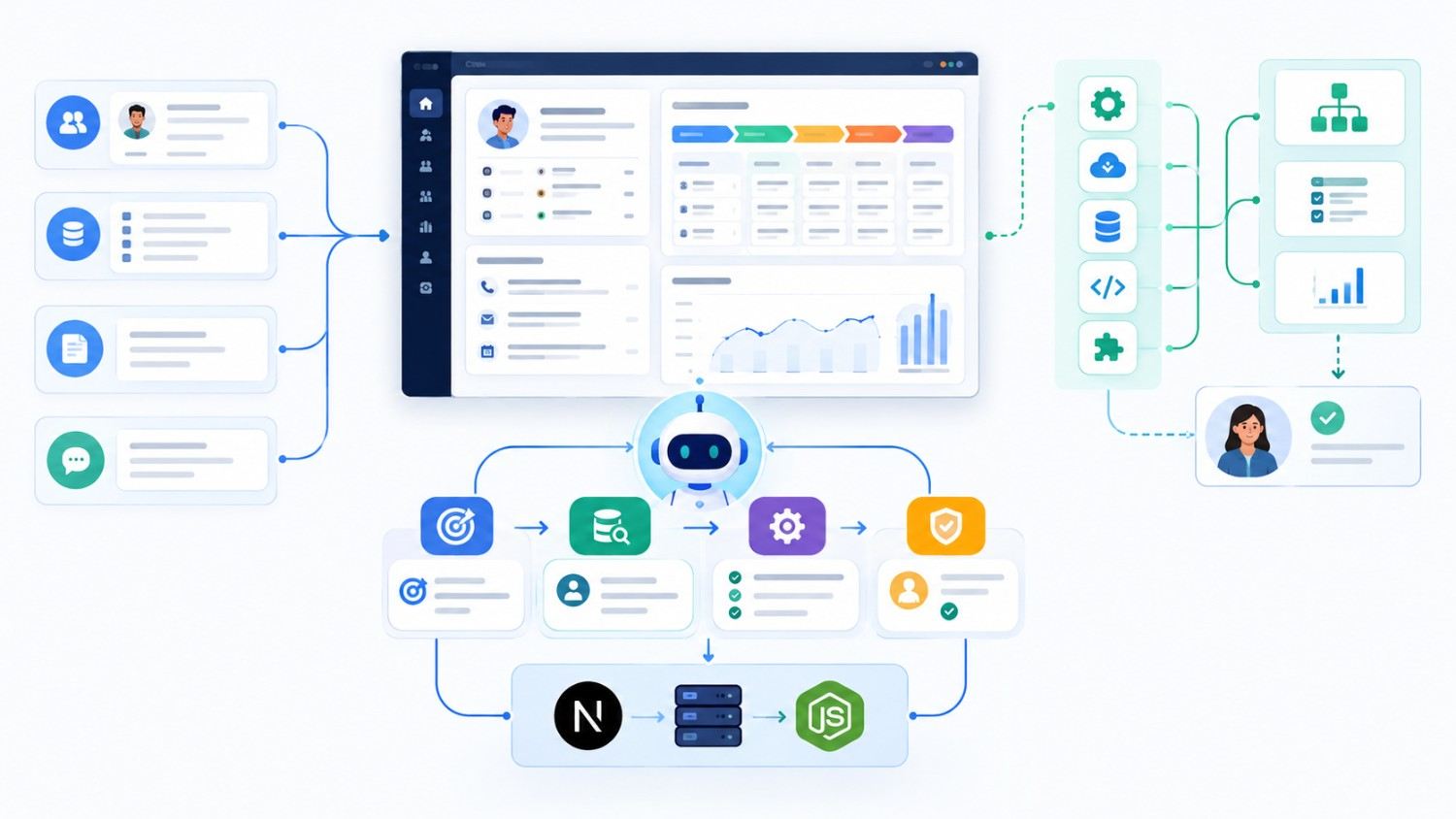
Agentic CRM vs. Traditional CRM vs. AI-Powered CRM
A traditional CRM records contacts, opportunities, activities, and pipeline stages. Rule-based automation can create tasks or send emails when predefined conditions are met.
An AI-powered CRM adds capabilities such as summarization, lead scoring, forecasting, sentiment analysis, or content generation. An agentic CRM goes further by selecting approved actions and coordinating several steps toward a business outcome.
| Capability | Traditional CRM | AI-Powered CRM | Agentic CRM |
| Stores CRM data | Yes | Yes | Yes |
| Rule-based automation | Yes | Yes | Yes |
| Predictions and summaries | Limited | Strong | Strong |
| Multi-step reasoning | No | Limited | Yes |
| Tool and API use | Predefined | Sometimes | Core capability |
| Context-based action | No | Limited | Yes |
| Human approval controls | Workflow-based | Sometimes | Essential |
“Agentic” should not mean “unrestricted.” Production systems still need roles, permissions, approval rules, and auditability.
That difference matters. A sales chatbot might explain how to follow up with an inactive prospect. An AI agent could review the account history, identify the last meaningful interaction, create a follow-up task, prepare a personalized draft, and ask the salesperson to approve it.
The CRM moves from explaining work to helping coordinate it.
Why Next.js and Node.js Work Well Together
Next.js is well suited to CRM dashboards, contact views, activity feeds, approval screens, customer portals, and agent conversations.
The current Next.js App Router supports React Server Components and modern server-side application patterns. Route Handlers can also provide request-handling capabilities when a lightweight backend-for-frontend layer makes sense.
That matters because an agentic CRM needs more than another chat window floating in the corner.
Users should be able to see what the agent plans to do, which customer records it considered, what needs approval, and what changed after the action finished.
If you are still evaluating the underlying stack, Kanhasoft’s guide to choosing technology for custom CRM development covers the broader Next.js, Node.js, Django, PostgreSQL, caching, and cloud decision.
Where Node.js Fits
Node.js works particularly well for API-heavy CRM applications.
Its event-driven architecture is suitable for network-heavy operations such as CRM database queries, email APIs, calendar services, enrichment providers, LLM requests, webhooks, and third-party integrations.
However, avoid placing every business rule inside one giant “AI agent” service.
Keep important CRM logic in explicit backend services. Then expose narrow tools that an agent is permitted to use.
Long-running operations such as bulk lead enrichment, pipeline analysis, document processing, or scheduled account reviews should usually run through queues or background workers.
A Practical Agentic CRM Architecture
A production-ready architecture normally has several distinct layers:
- js application layer: Dashboards, forms, search, approvals, pipeline views, and the agent interface.
- js domain and API layer: Leads, contacts, opportunities, tasks, permissions, validation, and core business rules.
- Data layer: A transactional database such as PostgreSQL, with search or vector storage added only when the use case needs it.
- Agent orchestration layer: Interprets goals, selects approved tools, tracks task state, and decides when to stop or escalate.
- Tool layer: Narrow functions such as getLead, createTask, draftEmail, updateOpportunity, or scheduleMeeting.
- Integration layer: Email, calendars, ERP, telephony, marketing platforms, support tools, document systems, and data providers.
- Governance layer: Authentication, permissions, approvals, logging, monitoring, rate limits, and evaluation.
The most important principle is surprisingly simple:
Separate reasoning from authority.
The AI model may decide that changing a deal stage makes sense. The backend still decides whether that agent has permission to make the change.
That separation turns a clever prototype into something a business can actually govern.
Three CRM Workflows Where AI Agents Add Real Value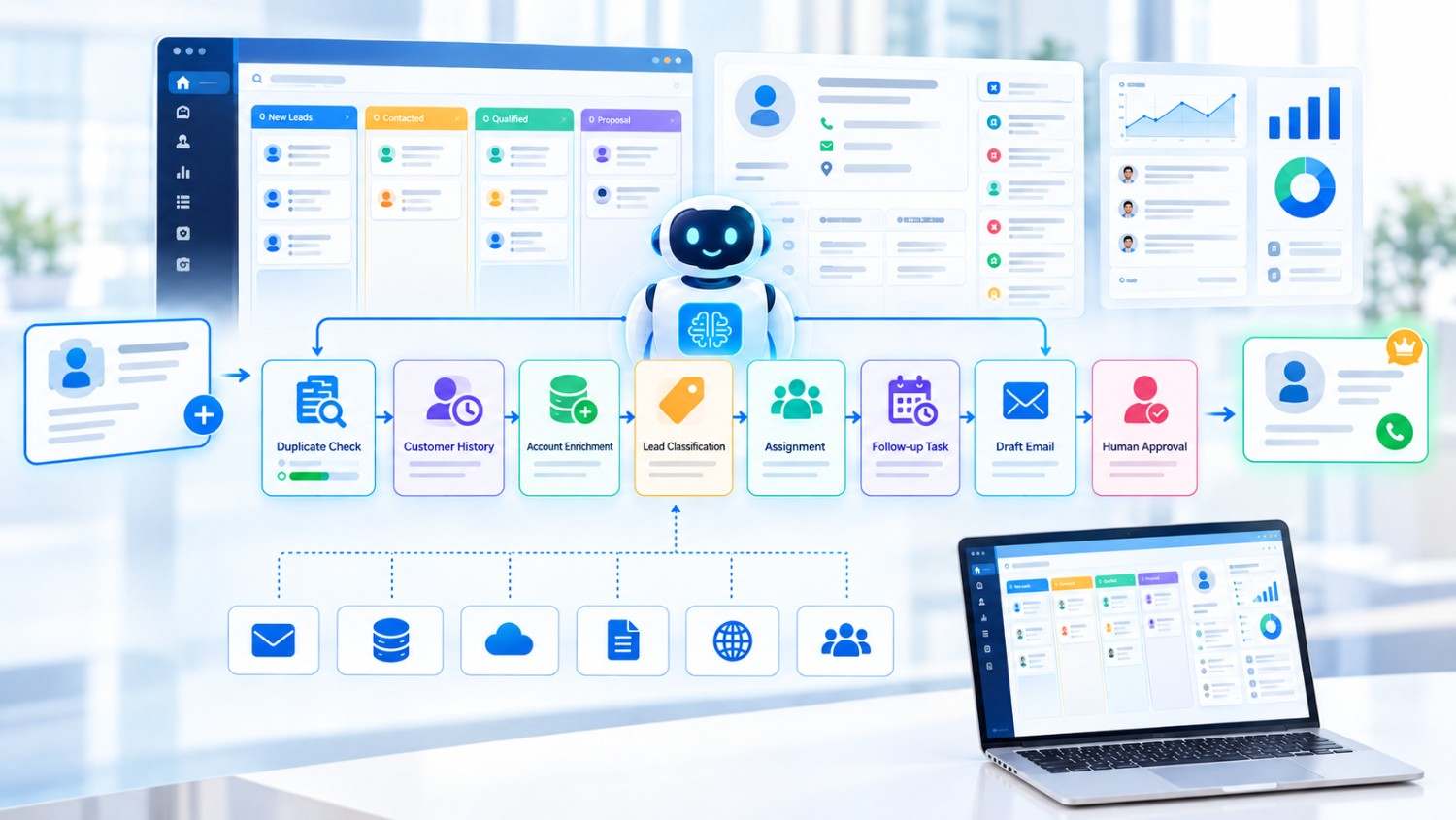
1. Inbound Lead Qualification and Routing
Imagine a new website inquiry arrives with a name, company, email address, and two lines explaining the requirement.
Today, a salesperson may manually search the CRM, check whether the company already exists, research the account, decide who owns it, and prepare the first response.
An agent could help coordinate those steps.
It might:
- Check for duplicate contacts and companies.
- Retrieve previous conversations.
- Enrich the account through an approved data source.
- Classify the inquiry.
- Match the lead to a territory or salesperson.
- Create a follow-up task.
- Draft an initial response.
For high-value or unusual opportunities, the agent could stop and request manager approval before contacting the prospect.
The objective is not maximum automation. It is fewer unnecessary handoffs.
2. Deal Risk and Next-Best Action
Sales managers rarely need another dashboard telling them that a deal is “yellow.”
They need to know why.
An agent can review recent emails, meetings, stage duration, open tasks, proposal history, close-date changes, and other CRM activity. It can then explain the risk and recommend a concrete action.
For example:
“Decision-maker involvement has dropped, the expected close date moved twice, and no customer activity has been recorded for 14 days. Confirm procurement status before keeping this deal in the current forecast.”
When the requirement is mainly prediction rather than action, AI sales forecasting integrated with CRM may be the more appropriate starting point.
Agentic behavior becomes useful when the system needs to coordinate what happens after a signal appears.
3. Customer Renewal and Expansion
A renewal agent could combine CRM information with customer-support tickets, payment status, product usage, feedback, contract dates, and account activity.
It may identify a risky renewal, summarize the account, assign internal actions to customer success and finance, and prepare an outreach email.
However, a discount, contract amendment, payment decision, or commercial commitment should still follow the company’s formal approval process.
This is where good agent design becomes less exciting-and much more useful.
Build the CRM Foundation Before the Agent Layer
Agentic features depend on structured data and dependable workflows.
A documented Kanhasoft franchise CRM project used React/Next.js, Node.js, PostgreSQL, AWS Lambda, Twilio, HubSpot, and REST APIs. The platform centralized lead handling, deal views, messaging templates, and automated SMS workflows across multiple locations.
The project itself was not described as an agentic CRM, so it should not be presented as one.
However, it demonstrates an important implementation principle: AI agents need reliable records, defined workflows, APIs, permissions, and integration points underneath them.
Adding an agent to fragmented data does not remove the fragmentation. In many cases, it simply makes the problem harder to diagnose.
What Should Stay Deterministic Instead of Agentic?
Not every CRM feature needs an AI agent.
Use conventional, deterministic software for processes that must behave predictably every time.
Examples include:
- Permission enforcement
- Required-field validation
- Pricing formulas
- Billing calculations
- Compliance rules
- Record ownership
- Irreversible system states
Use an agent where context matters and several reasonable paths may exist.
That could include account research, activity summarization, selecting between approved follow-up actions, coordinating information across systems, or preparing a recommendation from several signals.
A useful architecture rule is:
Use code for policy. Use agents for judgment inside policy.
That approach also makes testing easier.
Security and Governance Come First
An agentic CRM may access commercially sensitive information such as customer records, emails, call notes, pricing, contracts, forecasts, and financial data.
Security therefore belongs in the architecture, not in the “we will add that later” column.
OWASP’s AI Agent Security guidance recommends least-privilege tool access and explicit authorization for sensitive operations. It also highlights risks including excessive autonomy, high-impact action abuse, sensitive-data exposure, and attacks that can spread across connected agents or tools.
Practical controls should include:
- Give each agent only the tools required for its role.
- Separate read permissions from write permissions.
- Validate every tool input on the backend.
- Require approval for discounts, deletions, payments, bulk messaging, or contractual commitments.
- Keep customer and tenant data isolated.
- Log retrieved context, tool calls, results, approvals, and final changes.
- Limit loops, API calls, tokens, and task duration.
- Treat external emails, web pages, and uploaded documents as untrusted input.
For businesses handling regulated or highly sensitive customer information, qualified security, privacy, compliance, and legal specialists should be involved when defining access, consent, retention, and audit requirements.
Build a New Agentic CRM or Extend an Existing CRM?
A new CRM is not always necessary.
|
Business Situation |
Better Starting Point |
|
Existing CRM has clean APIs and reliable workflows |
Add a focused agent layer |
|
Team mainly needs summaries or forecasting |
Add targeted AI features |
|
Critical work still happens in spreadsheets |
Fix processes and data first |
|
Standard CRM already supports most workflows |
Extend the existing CRM |
|
Roles, approvals, and workflows are highly specialized |
Consider a custom agentic CRM |
| Several systems must coordinate one customer process |
Consider custom orchestration |
This is the same reason custom CRM vs. HubSpot does not have one universal winner.
HubSpot, Salesforce, or another established CRM may remain the better choice when processes are fairly standard and fast deployment is the priority.
A custom agentic CRM becomes more interesting when the workflow itself is differentiated, integrations are complex, or employees repeatedly leave the CRM to finish the real process somewhere else.
A Safer Agentic CRM Implementation Roadmap
Start with one workflow that has a measurable business outcome.
“Reduce the time from qualified lead to meaningful follow-up” is a much better objective than “deploy an AI sales agent.”
Then follow a controlled rollout:
- Map the current workflow and its failure points.
- Identify the minimum data the agent actually needs.
- Define narrow backend tools for allowed actions.
- Separate low-risk actions from high-risk actions.
- Add human approval where consequences matter.
- Test normal, incomplete, conflicting, and malicious inputs.
- Measure completion rates, errors, overrides, time saved, and adoption.
- Expand only after the first workflow works reliably.
One practical observation deserves emphasis: do not judge an agent by how impressive its answers sound.
Judge whether it chooses the right tool.
Check whether it respects permissions.
See whether it stops when required information is missing.
And make sure another person can understand the audit trail afterward.
Those are much stronger indicators of production readiness than a polished demo conversation.
Conclusion: Build the Workflow Before You Build the Agent
Building an agentic CRM with Next.js, Node.js and AI agents can move CRM software from simply recording work toward helping coordinate it.
Next.js provides a strong user experience for CRM workflows, dashboards, and approvals. Node.js can manage APIs, business rules, integrations, events, and agent tools. AI agents become valuable when they have a clear objective, reliable context, limited authority, and well-defined escalation points.
The best starting point is rarely an autonomous sales department.
Start with one repetitive, high-friction workflow where the CRM already contains enough trustworthy information for the agent to help safely.
From there, let measured business results-not the novelty of the technology-decide what becomes agentic next.
Planning an Agentic CRM Roadmap?
Kanhasoft can help evaluate whether your business case needs a custom CRM, an AI agent layer on top of an existing platform, or simpler workflow automation first.
A focused discovery process can map your CRM data, user roles, integrations, agent tools, approval checkpoints, and security requirements before development starts.
The objective is not to put AI into every CRM screen. It is to find the workflows where an agent can remove genuine operational friction without introducing unnecessary complexity or risk.