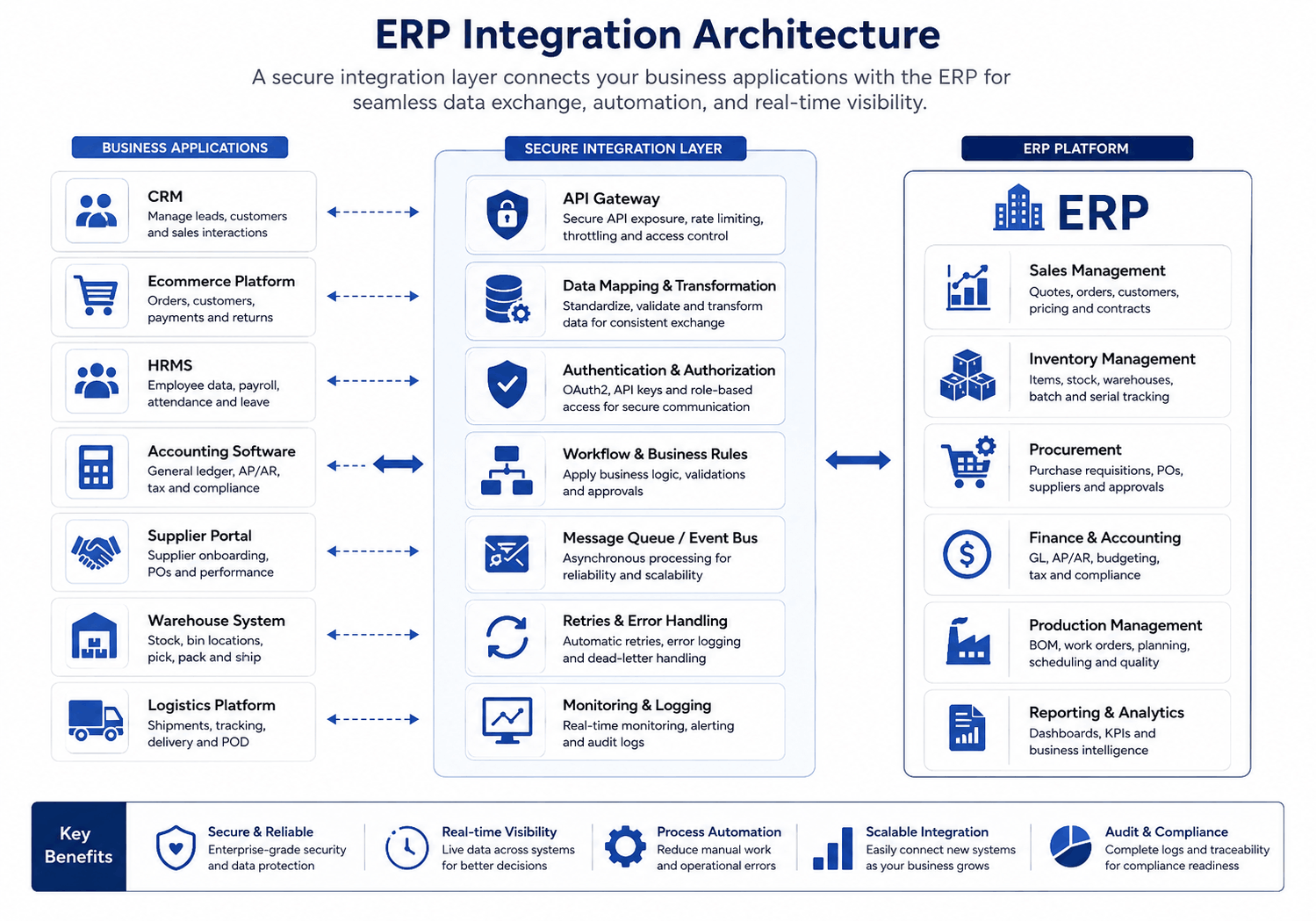
ERP API integration connects an enterprise resource planning system with the applications a business already uses. These may include CRM software, ecommerce platforms, accounting tools, warehouse systems, payment gateways, supplier portals, and shipping services.
The technical connection is only one part of the job.
A dependable integration must also decide which system owns each record, how updates move, what happens during a failure, and who receives an alert when something goes wrong. Without those decisions, an API can move incorrect data faster than a person ever could.
This guide focuses on the practical side of ERP integration: architecture, data governance, security, monitoring, testing, and long-term support.
This article is especially useful for:
- Business owners replacing disconnected applications
- Operations leaders trying to reduce repeated data entry
- CIOs and CTOs planning ERP modernization
- Product managers designing enterprise workflows
- Companies evaluating an ERP integration service
- Development teams working on custom ERP integration
Quick Answer
ERP API integration allows an ERP system and other business applications to exchange data through defined software interfaces.
A reliable integration should have a clear system of record, documented API contracts, secure access, duplicate protection, error recovery, transaction monitoring, and reconciliation controls.
The right integration method depends on the workflow. Direct APIs may suit a simple connection. Middleware can manage several standard applications. Event-driven architecture works well for high-volume operational updates. Custom integration layers are often better when business rules are complex.
The goal is not to connect every application in real time. The goal is to move the right data, at the right time, without losing control of it.
What Does ERP API Integration Actually Connect?
An ERP often sits at the center of a wider business software environment.
Sales teams may work in a CRM. Customers place orders through an ecommerce store. Warehouse staff use a dedicated inventory or barcode system. Finance may rely on accounting software. Meanwhile, management expects one report that brings everything together.
ERP APIs can connect these applications and support workflows such as:
- Sending approved CRM customers to the ERP
- Creating ERP sales orders from ecommerce purchases
- Returning stock availability to an online store
- Transferring invoices to an accounting platform
- Sending purchase orders to supplier portals
- Sharing fulfillment requests with warehouse software
- Receiving delivery updates from logistics providers
- Sending operational data to reporting dashboards
This broader discipline is often called enterprise application integration. It includes APIs, webhooks, scheduled data transfers, message queues, middleware, and other methods used to coordinate separate systems.
However, APIs are not business rules. They are messengers.
They can transfer a customer address, but they cannot decide whether the CRM or ERP owns that address unless the project team defines the rule first.
Why ERP Integrations Fail Even When the API Works
We have all seen a version of this problem.
A customer changes an address in the CRM. The ERP sends an older address back during its next scheduled update. The CRM accepts it. Nobody notices until an invoice reaches the wrong location.
Technically, both integrations worked.
Operationally, the process failed.
Most ERP integration problems come from one of five areas:
- No clear owner for shared data
- Weak mapping between different data structures
- Missing controls for failures and duplicate requests
- Poor visibility into delayed or rejected transactions
- No plan for future application or API changes
That is why ERP integration discovery should begin with workflows and responsibilities. Endpoint development comes later.
ERP API Integration Architecture Options
There is no single architecture that fits every business. In fact, one ERP environment may use several integration methods.
|
Integration approach |
Suitable situation | Main advantage |
Main concern |
|---|---|---|---|
| Direct API connection | Two stable systems with a simple workflow | Fast and straightforward |
Difficult to scale across many systems |
|
Middleware or iPaaS |
Several common SaaS applications | Centralized mapping and monitoring |
Subscription costs and platform dependency |
|
Custom integration layer |
Complex workflows or proprietary systems | Flexible business rules and greater control |
Requires ongoing technical ownership |
|
Event-driven integration |
Frequent order, stock, payment, or shipment updates | Responsive and less tightly coupled |
Needs queue management and failure recovery |
| Batch integration | Payroll, reporting, historical data, or large exports | Efficient for scheduled processing |
Data is not immediately current |
|
Webhooks |
Notifications about specific application events | Reduces constant API polling |
Duplicate and missed events need controls |
 Direct integrations are useful—but only up to a point
A direct API connection can be sensible when the workflow is small.
For example, an ERP may send a completed invoice summary to a reporting platform each night. Adding a large middleware platform would probably create more work than value.
The picture changes once several applications connect directly to the ERP. A field change in the ERP may then affect the CRM, ecommerce store, warehouse tool, and reporting system.
That point-to-point structure slowly turns into a web of dependencies.
An integration layer gives the ERP some breathing room
An integration layer sits between the ERP and connected applications. It can handle routing, data transformation, authentication, retries, and logs.
This approach also limits the number of external applications that connect directly to the ERP.
A custom layer is often appropriate when workflows contain approval rules, industry-specific logic, or older systems that use unusual data formats. Middleware may be more practical when most applications already have supported connectors.
ERP API Integration Best Practices
1. Map the full workflow before creating endpoints
Do not begin with a list of fields.
Begin with what the business is trying to complete.
For an ecommerce order, the workflow may include payment confirmation, customer validation, stock reservation, fulfillment, shipment creation, invoicing, and returns.
A field-level discussion might only ask, “Where should the order number go?”
A workflow discussion asks better questions:
- Can an unpaid order enter the ERP?
- When should stock be reserved?
- Which system approves cancellation?
- What happens during a partial shipment?
- How should refunds update finance?
- Can the warehouse modify an order?
These answers shape the integration far more than the API technology.
2. Assign a system of record for each entity
A system of record is the authoritative source for a particular type of information.
|
Business data |
Likely system of record |
|---|---|
|
Leads and sales activities |
CRM |
|
Product master |
ERP or product information system |
|
Available inventory |
ERP or warehouse management system |
|
Financial ledger |
ERP finance module or accounting software |
|
Shipping status |
Logistics platform |
|
Employee data |
HRMS |
|
Website order before approval |
Ecommerce platform |
|
Approved order |
ERP |
The exact ownership will vary. What matters is that the team documents it.
Without ownership rules, two applications may repeatedly overwrite each other. It is surprisingly easy to build an endless synchronization loop with perfectly valid API calls.
3. Separate integration logic from core ERP logic
Avoid placing every external mapping and vendor-specific rule inside the ERP.
Suppose a shipping provider changes its status codes. If those codes are deeply embedded in order, warehouse, and invoice modules, a small vendor update may require changes across the ERP.
An integration layer can translate external statuses into stable internal values. For example:
- label_created
- in_transit
- delivery_attempted
- delivered
- returned
The ERP then works with its own consistent terms, even when the carrier changes.
This separation makes future replacement easier as well.
4. Document and version the API contract
An API contract should define:
- Supported endpoints
- Required and optional fields
- Data formats
- Validation rules
- Authentication requirements
- Response structures
- Error codes
- Pagination rules
- Rate limits
- Versioning policies
- Deprecation timelines
The OpenAPI Specification provides a language-independent way to describe HTTP APIs. It helps developers and consuming systems understand an API without inspecting its source code.
Documentation should reflect the production API, not an older version that nobody remembered to update.
5. Do not make everything real time
Real-time synchronization sounds attractive. It is not always necessary.
Use real-time or event-driven integration when a delay can affect customers or operations. Examples include:
- Stock availability
- Payment confirmation
- Order status
- Shipment tracking
- Production alerts
- Credit approval
Use scheduled processing when a delay is acceptable. Payroll exports, historical migration, monthly reports, and large analytical datasets often work well in batches.
Real-time connections add more infrastructure, monitoring, and failure scenarios. Therefore, they should solve a real business need.
6. Protect APIs according to the data they expose
An ERP may contain financial details, pricing rules, customer records, employee data, supplier agreements, and inventory information.
Security controls should include:
- Encrypted connections
- Short-lived access tokens
- Least-privilege permissions
- Role- and scope-based authorization
- Secure secret storage
- Credential rotation
- Input validation
- Rate limiting
- Audit logs
- Network restrictions where appropriate
OAuth 2.0 remains widely used for delegated API access. However, implementations should follow current security guidance rather than relying only on the original 2012 framework. RFC 9700 updates OAuth 2.0 security recommendations based on later threats and implementation experience.
Technical teams should also review the OWASP API Security Top 10. It covers risks such as broken object-level authorization, broken authentication, and unsafe handling of third-party APIs.
Businesses handling regulated or sensitive information should involve qualified security, privacy, and compliance professionals.
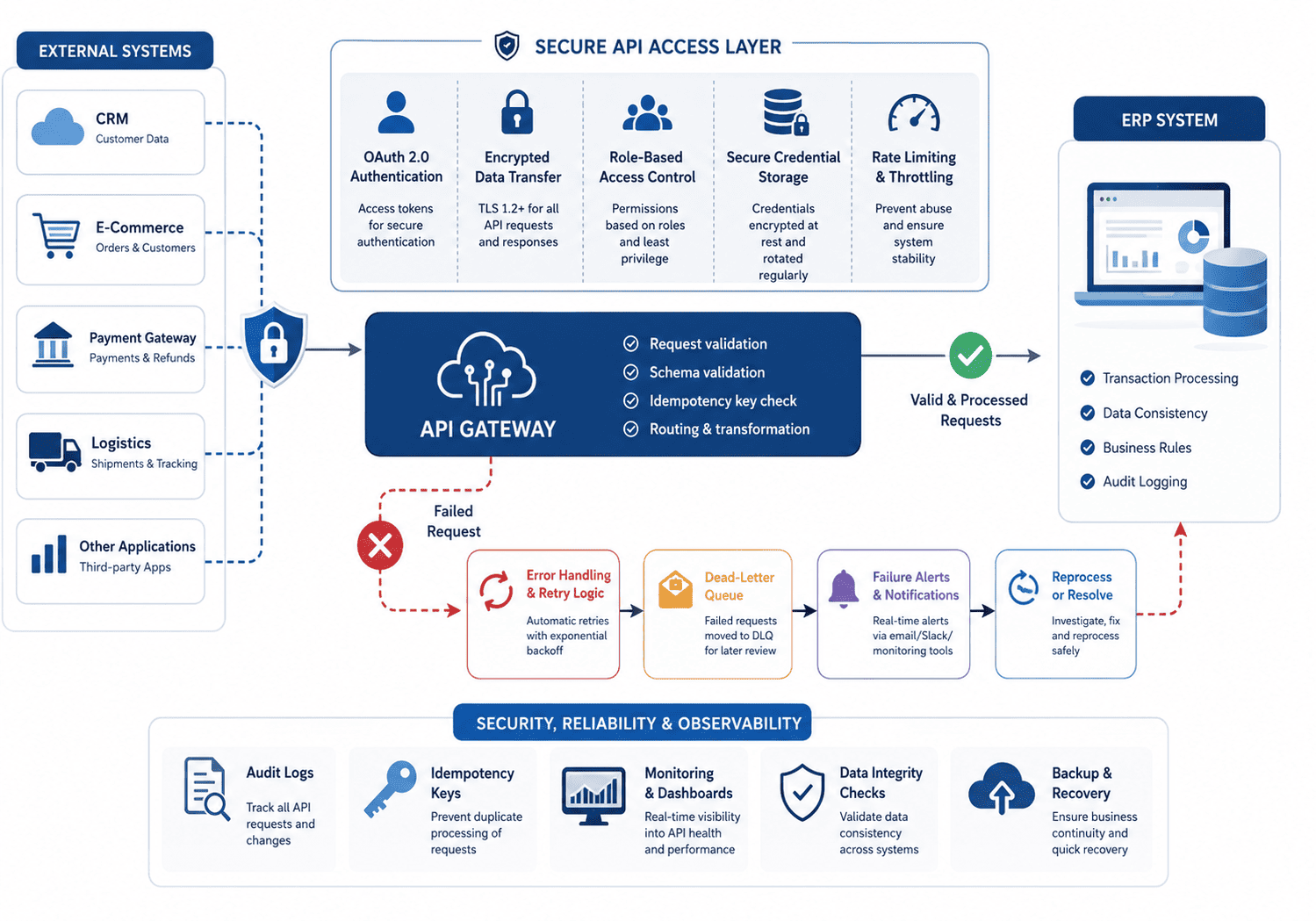
7. Assume that requests will fail
A network timeout does not always mean the receiving system rejected a request.
Imagine that an ecommerce platform sends an order to the ERP. The ERP creates it, but the response never reaches the ecommerce platform. The ecommerce platform retries.
Now the ERP has two orders.
Important write operations should use unique request identifiers or idempotency keys. The receiving system can then recognize a repeated request and return the original result instead of creating another transaction.
The failure design should also define:
- Which errors can be retried
- How long retries should continue
- Where rejected messages are stored
- Who receives an alert
- How staff can correct bad data
- Whether a failed transaction can be replayed safely
A retry is suitable for temporary downtime. It will not fix a missing product code or invalid tax value.
8. Monitor business outcomes, not only server health
A green server status does not prove that orders are moving correctly.
Technical monitoring should track response time, error rate, queue depth, expired credentials, and rate-limit events.
Business monitoring should answer different questions:
- How many approved orders failed to enter the ERP?
- Are shipments missing tracking numbers?
- Which products could not be matched?
- Are any invoices missing their source orders?
- Is stock different across the ERP and warehouse system?
- How long are transactions waiting in the queue?
Use a correlation ID across connected systems. It gives support teams one reference for tracing a transaction from the first application to the last.
9. Test awkward situations, not only the happy path
A basic test may create one customer and one order. Real operations are rarely that polite.
Test scenarios should include:
- Partial shipment
- Backorder
- Duplicate request
- Product return
- Order cancellation
- Invalid customer record
- Expired authentication token
- Vendor downtime
- High transaction volume
- Multi-currency order
- Missing product mapping
- Delayed webhook delivery
Also test what employees see when something fails. A detailed server log is useful to developers, but an operations employee may need a plain message such as, “The order could not be transferred because the ERP product code is missing.”
A Practical ERP Integration Example
A mid-sized manufacturer was managing production, inventory, procurement, sales, and logistics through disconnected tools.
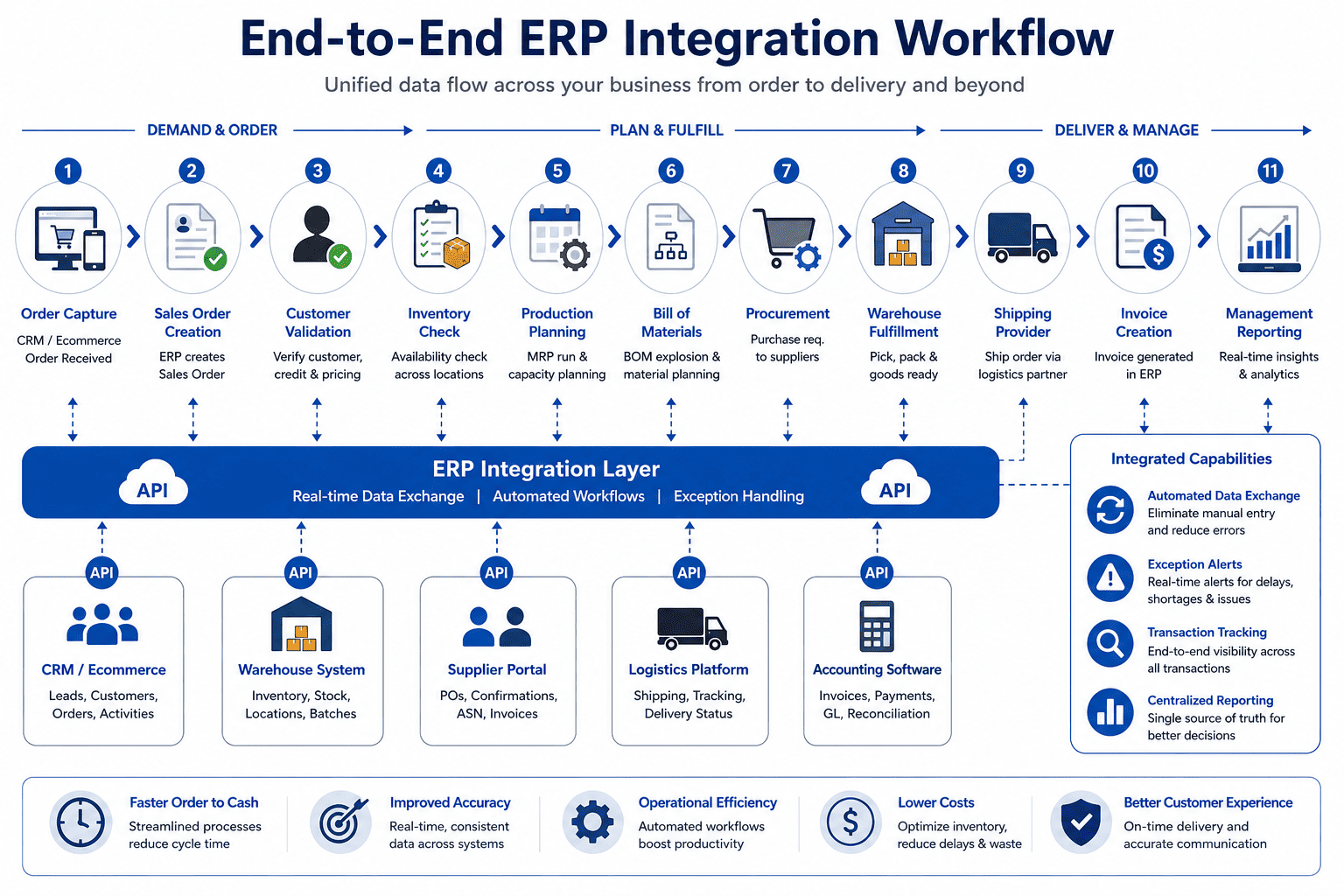
Kanhasoft developed a role-based ERP that brought these workflows into one system. The solution included bill-of-material-driven production planning, real-time inventory tracking, procurement workflows, REST APIs, and sales-to-logistics integration.
The main lesson is not that every manufacturer needs the same architecture.
It is that useful integration follows the business transaction from beginning to end. Connecting a sales order while ignoring stock reservation, procurement, dispatch, and delivery updates would leave the process only partly connected.
How to Select the Right Integration Approach
Use business complexity—not technology preference—to guide the decision.
|
Situation |
Practical starting point |
|---|---|
|
One simple connection between two stable applications |
Direct API |
|
Several standard cloud tools |
Middleware or iPaaS |
|
Custom workflows and business rules |
Custom integration layer |
|
High-volume operational events |
Event-driven architecture |
|
Legacy system without a modern API |
Adapter or controlled file exchange |
|
Large scheduled reporting transfer |
Batch integration |
|
Applications are likely to change |
Integration layer with a common data model |
An ERP integration service should be able to explain why it recommends an approach. “This is our preferred technology” is not enough.
The team should also compare long-term ownership costs. Include infrastructure, licenses, API fees, monitoring, vendor updates, support, and future system changes.
Need Help Planning a Custom ERP Integration?
Kanhasoft helps businesses assess ERP workflows, application dependencies, data ownership, API requirements, and integration risks before implementation.
Our custom ERP development services include custom ERP integration, workflow automation, modernization, reporting, and connections with CRM, ecommerce, inventory, finance, and operational platforms.
Businesses connecting customer and sales workflows can also review our custom CRM development services.
A focused discovery session can help determine whether a direct API, middleware platform, event-driven design, or custom integration layer is the better fit.
Final Words
ERP API integration works best when it is treated as an operational design project, not just a development task.
Start with the workflow. Decide which application owns each record. Then select an architecture that matches the transaction volume, timing, security needs, and future plans.
A reliable integration should survive retries, invalid data, vendor downtime, and application changes. It should also tell the team when something has failed.
That is the real standard for a successful connection: not that data moved once, but that the business can trust it to keep moving correctly.