
AR and VR app development involves building applications that create interactive experiences by combining digital content with the physical environment or placing users inside computer-generated environments.
Augmented Reality (AR) adds digital elements to the real world through smartphones, tablets, or smart glasses. Virtual Reality (VR) creates simulated environments that users explore through compatible headsets.
Businesses use these technologies for virtual product demonstrations, employee training, healthcare simulations, education, retail experiences, and real estate tours.
The cost of development depends on the application type, platform, 3D assets, integrations, device compatibility, and functionality. A relatively simple mobile AR application may require a smaller investment than a sophisticated multi-user VR training platform.
What Is AR & VR App Development?
AR and VR are immersive technologies that change how people interact with digital information. Instead of relying entirely on conventional screens, they allow users to explore digital objects, environments, and information through spatial experiences.
Although AR and VR are often discussed together, they solve different problems.
Augmented Reality (AR) enhances the physical environment by placing digital elements over a live camera view or compatible display. For example, a furniture retailer can allow customers to visualize a virtual sofa inside their living room before purchasing it.
Virtual Reality (VR) replaces the user’s physical surroundings with a computer-generated environment. For example, a manufacturing company can train employees to operate complex machinery inside a simulated factory without exposing them to operational risks.
AR & VR app development combines software engineering, 3D modeling, user experience design, device integration, and real-time rendering to deliver these experiences.
The objective is not simply to create visually impressive applications. It is to solve a specific user or business problem through meaningful interaction.
AR and VR create more immersive, interactive experiences in custom software. Explore how AR and VR are reshaping user interaction in custom software.
AR vs. VR vs. Mixed Reality: What Is the Difference?
AR, VR, and Mixed Reality (MR) are related technologies, but their interaction models differ.
| Technology | How It Works | Practical Example |
| Augmented Reality (AR) | Adds digital content to the physical environment | Visualizing furniture in a room |
| Virtual Reality (VR) | Places users inside a simulated environment | Virtual employee training |
| Mixed Reality (MR) | Combines physical and digital environments with interactive spatial elements | Interacting with virtual machinery positioned in a real workspace |
Mixed Reality goes beyond displaying digital objects over a camera feed. It allows virtual content to interact with an understanding of the physical environment.
For businesses, the right choice depends on the experience they want to deliver, the devices available to users, and the level of interaction required.
For example, a furniture visualization application may only need AR, while an industrial equipment training simulator may benefit more from VR.
What Are the Different Types of AR & VR Applications?
AR and VR applications can be classified by their technology, interaction methods, and intended business purpose.
Understanding these categories helps businesses select the right development approach.
1. Marker-Based AR Applications
Marker-based AR applications recognize predefined visual markers, such as images, QR codes, or printed patterns, through a device camera.
After recognizing a marker, the application displays associated digital content.
Business applications include:
- Interactive product catalogs.
- Educational flashcards.
- Product packaging experiences.
- Museum information displays.
- Printed marketing campaigns.
For example, a manufacturer can place QR codes on equipment manuals. Technicians can scan them to access 3D assembly instructions or maintenance information.
2. Markerless AR Applications
Markerless AR applications place digital objects in the physical environment without requiring predefined visual markers.
They use device sensors, motion tracking, and environmental understanding to identify surfaces and position virtual content.
Common applications include:
- Furniture and interior visualization.
- Virtual product placement.
- Indoor navigation.
- Retail product demonstrations.
- Interactive property visualization.
This approach is particularly useful for businesses that want customers to interact with products in their own surroundings.
3. Location-Based AR Applications
Location-based AR applications use GPS, device sensors, and geographical information to deliver location-specific digital experiences.
For example, a tourism application can display information about nearby landmarks when visitors point their smartphones toward a particular location.
Other applications include:
- Location-based marketing.
- Outdoor navigation.
- Tourism and heritage experiences.
- Interactive city guides.
- Location-based entertainment.
4. Virtual Reality Training Applications
VR training applications create simulated environments where employees can practice tasks and procedures.
These applications are particularly useful when conventional training involves expensive equipment, operational risks, or complex procedures.
Examples include:
- Industrial equipment training.
- Safety and emergency simulations.
- Healthcare training environments.
- Technical maintenance exercises.
- Employee onboarding.
Organizations can use these applications to provide repeatable training experiences without requiring every exercise to take place in a physical facility.
5. Virtual Reality Gaming and Entertainment Applications
VR gaming applications allow users to interact with computer-generated environments using headsets, controllers, hand tracking, and spatial audio.
Development requirements may include:
- Real-time 3D rendering.
- Physics-based interactions.
- Multiplayer functionality.
- Spatial audio.
- Interactive environments.
- Motion tracking.
The experience must maintain responsive interactions and comfortable movement to prevent unnecessary user fatigue.
6. Mixed Reality Applications
Mixed Reality applications combine digital objects with an understanding of the physical environment.
For example, an engineering team can examine a virtual machine model positioned within an actual workspace and interact with its components.
Common applications include industrial design, collaborative visualization, product prototyping, and technical assistance.
Key Benefits of AR & VR App Development for Businesses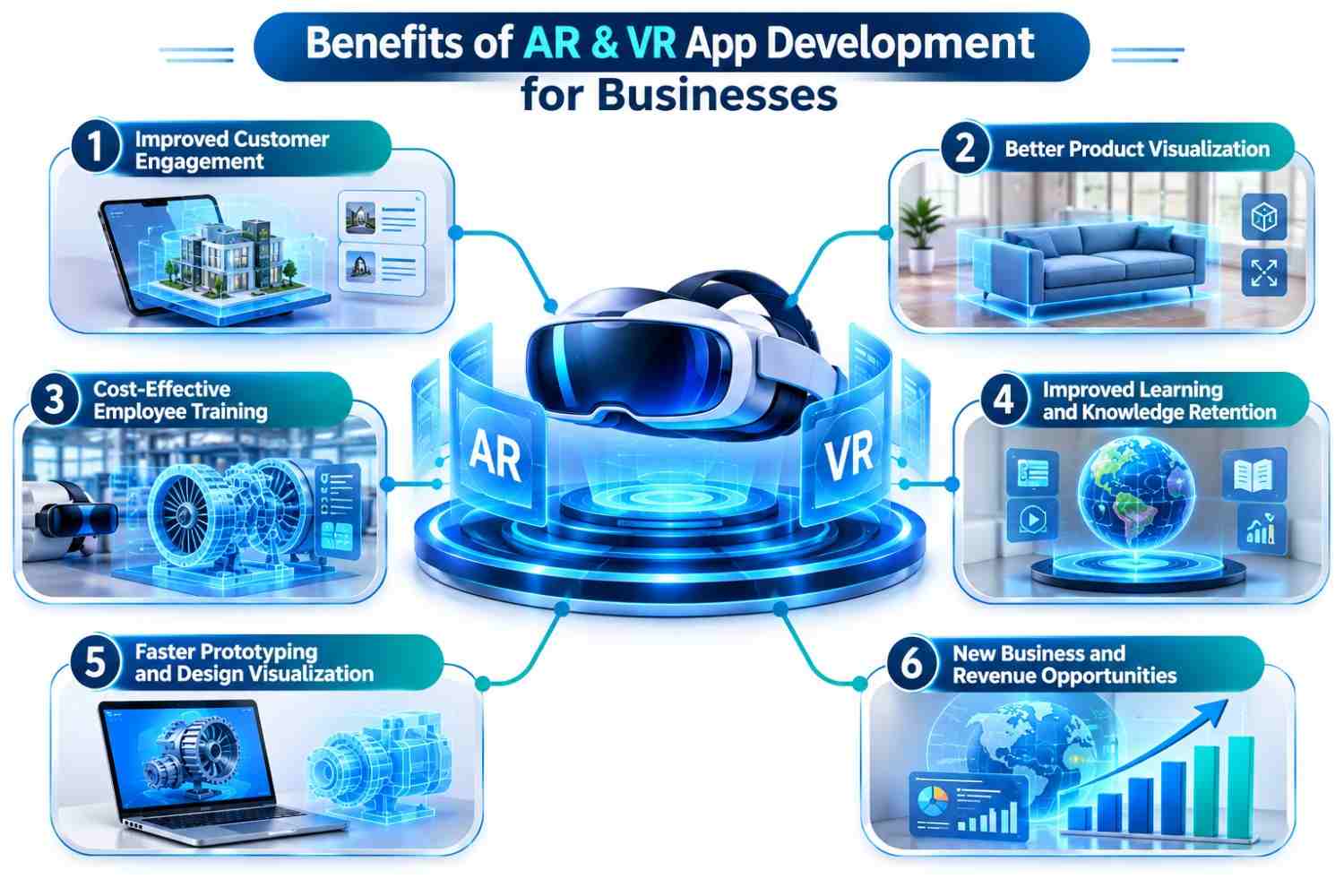
The value of immersive applications depends on whether they improve an existing process, address a customer problem, or create a useful new service.
Here are the main business benefits.
1. Improved Customer Engagement
Interactive experiences encourage customers to explore products instead of relying entirely on static images or written descriptions.
For example, an online furniture store can introduce AR visualization so customers can examine how different products look in their homes.
This gives customers additional information during the purchasing process and helps them make more informed decisions.
2. Better Product Visualization
Traditional product photography cannot always communicate a product’s dimensions, appearance, or functionality.
AR applications allow customers to examine 3D product models from different angles and visualize them in real-world environments.
This is useful for furniture, home appliances, automobiles, fashion, and industrial equipment.
3. Cost-Effective Employee Training
VR training environments allow employees to practice specific tasks repeatedly without using physical equipment for every training session.
For example, manufacturing companies can simulate machinery operations, maintenance procedures, and emergency situations.
Businesses may reduce travel requirements, equipment usage, and interruptions to operational activities.
However, the actual savings depend on the cost of creating and maintaining the simulation compared with the existing training process.
4. Improved Learning and Knowledge Retention
AR and VR applications can make complex subjects easier to understand through interactive demonstrations.
Educational institutions can use AR models to explain scientific concepts, while VR environments can help learners explore historical locations or simulated laboratories.
These experiences provide an alternative to conventional learning materials when visual interaction adds meaningful value.
5. Faster Prototyping and Design Visualization
Product designers and engineering teams can use immersive environments to examine digital models before manufacturing physical prototypes.
They can review dimensions, explore design alternatives, and identify potential usability issues earlier in the development process.
This can support better collaboration between design, engineering, and business teams.
6. New Business and Revenue Opportunities
Businesses can introduce immersive applications as part of their existing services or develop entirely new digital products.
Examples include:
- Virtual product showrooms.
- Subscription-based VR training platforms.
- Interactive property tours.
- AR-powered shopping applications.
- Digital product configurators.
The commercial value depends on user adoption, pricing models, and whether the experience solves a genuine customer need.
How Different Industries Use AR & VR Applications
AR and VR are not limited to gaming and entertainment. Their practical applications extend across industries where visualization, simulation, and interactive learning provide business value.
Healthcare
Healthcare organizations can use VR for medical education, clinical simulations, and procedural training. AR can support anatomical visualization and interactive medical learning.
Applications must be designed with appropriate privacy, security, and clinical validation requirements. Immersive software should not be presented as a replacement for qualified medical judgment.
Retail and eCommerce
Retailers can use AR to provide virtual product try-ons, furniture placement, and interactive product demonstrations.
For example, customers can visualize a sofa, table, or decorative item in their own environment before making a purchase.
Real Estate
Real estate companies can use VR to provide virtual property tours and immersive building walkthroughs.
AR can help prospective buyers visualize interior layouts, furniture arrangements, and proposed renovations.
Manufacturing
Manufacturing companies can use VR simulations for equipment training and workplace safety exercises.
AR applications can provide visual maintenance instructions, equipment information, and step-by-step guidance to technicians.
Education
Educational institutions can create interactive learning experiences through 3D models, virtual laboratories, and simulated environments.
These applications can make complex concepts more accessible when traditional teaching methods are insufficient.
Tourism and Hospitality
Tourism businesses can use AR to provide location-based information, interactive destination guides, and historical visualizations.
VR can provide virtual destination previews, allowing travelers to explore locations before planning a visit.
Technologies Used in AR & VR App Development
The technology stack influences application performance, device compatibility, development complexity, and long-term maintenance.
The right tools should be selected according to the application’s requirements rather than popularity alone.
1. Unity
Unity is a real-time development platform widely used for interactive 3D applications, games, simulations, and immersive experiences.
It supports multiple deployment environments and offers tools for building AR and VR applications.
Unity can be suitable for businesses that need cross-platform experiences and interactive 3D functionality.
2. Unreal Engine
Unreal Engine is commonly used for applications requiring advanced rendering, realistic environments, and detailed visual simulations.
It can be appropriate for:
- Architectural visualization.
- High-quality VR experiences.
- Industrial simulations.
- Interactive product demonstrations.
- Realistic virtual environments.
The choice between Unity and Unreal Engine depends on performance targets, content requirements, developer expertise, and deployment platforms.
3. ARKit
ARKit is Apple’s framework for developing augmented reality experiences on supported Apple devices.
It provides capabilities such as motion tracking, world tracking, scene understanding, and camera integration.
Developers can use these capabilities to position digital objects within the physical environment.
4. ARCore
ARCore is Google’s platform for developing augmented reality experiences on supported Android devices and other development environments.
Its capabilities include motion tracking, environmental understanding, and light estimation.
Developers can use ARCore to create experiences involving virtual object placement, environmental interaction, and spatial visualization.
5. WebXR
WebXR enables compatible browsers to provide immersive AR and VR experiences.
It can be useful when businesses want to make certain experiences accessible through a browser instead of requiring users to install a dedicated application.
However, browser and device support must be evaluated before selecting this approach.
6. Backend and Cloud Technologies
AR and VR applications may require backend services to manage user accounts, application content, analytics, cloud synchronization, and real-time communication.
Depending on the project, the architecture may include:
- Cloud hosting and storage.
- Authentication and access management.
- APIs and database services.
- Content management systems.
- Analytics and reporting.
- Third-party application integrations.
For enterprise applications, backend architecture is especially important when immersive experiences must connect with existing business systems.
Mobile AR VR Development: Choosing the Right Platform
Mobile AR VR development makes immersive experiences accessible through smartphones and tablets, reducing the need for dedicated hardware in certain use cases.
However, AR and VR have different hardware requirements.
Mobile AR commonly uses a device camera, sensors, and supported AR frameworks to place digital objects within the physical environment.
Mobile VR may use a smartphone-based headset or a compatible mobile device experience, although dedicated standalone VR headsets are generally better suited to more advanced immersive applications.
When selecting a platform, businesses should evaluate:
- Device compatibility: Whether the application supports the intended smartphone models, operating systems, or headsets.
- Performance: Whether the hardware can render 3D content smoothly.
- User interaction: Whether users need touch controls, gestures, controllers, or hand tracking.
- Accessibility: Whether the target audience already owns compatible devices.
- Maintenance: Whether platform updates and hardware changes can be supported over time.
For iOS applications, developers can evaluate ARKit. For Android applications, ARCore is an important option.
Google also maintains a list of ARCore-supported devices, which should be reviewed when defining Android compatibility.
A practical development strategy is to begin with the devices most relevant to the target audience rather than attempting to support every available platform immediately.
Custom AR & VR Applications vs. Ready-Made Solutions
Businesses generally have two development approaches: using an existing solution or investing in a custom application.
The right option depends on the required functionality, budget, integrations, and long-term product strategy.
| Evaluation Factor | Ready-Made Solution | Custom Application |
| Initial investment | Generally lower | Generally higher |
| Development time | Usually shorter | Depends on requirements |
| Customization | Limited by available features | Designed around business needs |
| Integrations | Depends on provider support | Can be developed for specific systems |
| Scalability | Depends on the platform | Can be planned around future requirements |
| Ownership | Usually governed by licensing | Depends on the development agreement |
A ready-made solution can work when standard functionality meets business requirements.
Custom development becomes more relevant when an organization needs specialized workflows, proprietary product experiences, advanced integrations, or greater control over its application architecture.
Before selecting either approach, businesses should compare the total cost of ownership rather than focusing only on the initial development expense.
How Does the AR & VR App Development Process Work?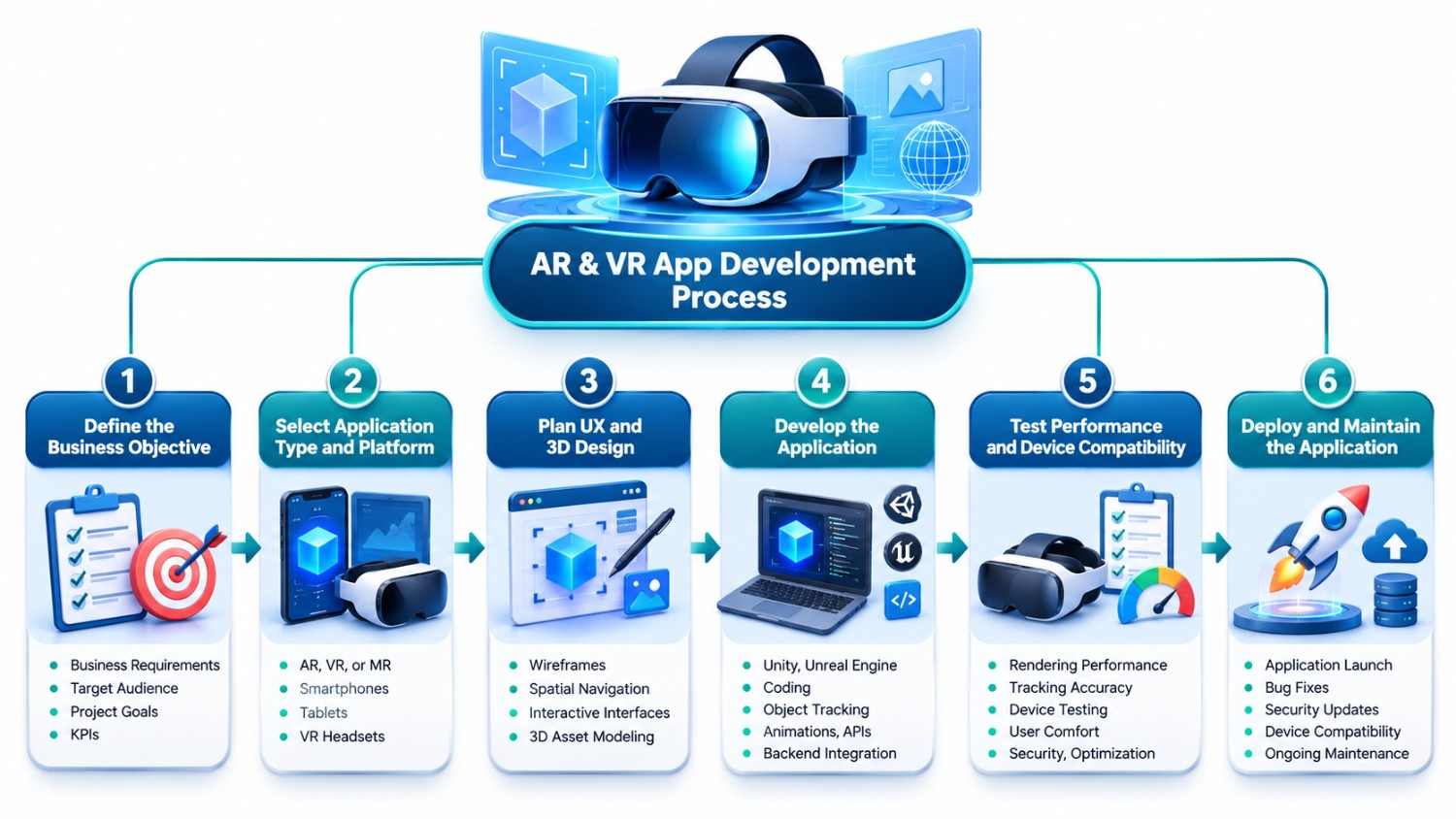
Developing an immersive application requires more than programming and 3D design. The development team must understand the intended environment, user interactions, technical limitations, and performance requirements.
A structured process helps reduce rework and keeps the project aligned with business objectives.
Step 1: Define the Business Objective
Start by identifying the problem the application needs to solve.
For example, does the business want to improve product visualization, train employees, provide virtual property tours, or create an interactive learning experience?
Define the target audience, expected outcomes, and key performance indicators before selecting technologies.
Step 2: Select the Application Type and Platform
Choose between AR, VR, or MR based on the intended experience.
Next, identify the target devices, operating systems, and hardware requirements.
This decision affects development tools, user interface design, testing requirements, and project costs.
Step 3: Plan UX and 3D Design
Immersive applications require interaction models that differ from conventional mobile and web applications.
The design stage should address:
- Spatial navigation.
- Object placement and interaction.
- Gesture and controller inputs.
- Visual clarity.
- User comfort.
Create wireframes, interactive prototypes, and 3D asset specifications before beginning full development.
Step 4: Develop the Application
Developers implement the application using the selected engine, SDKs, APIs, and supporting technologies.
This stage may include:
- 3D environment development.
- Object recognition and tracking.
- Animation and interaction programming.
- Backend integration.
- User authentication.
- Real-time communication.
Development requirements vary significantly between a simple AR product viewer and a complex multi-user VR simulation.
Step 5: Test Performance and Device Compatibility
Testing should cover more than functional correctness.
The team should evaluate:
- Rendering performance and frame stability.
- Tracking accuracy.
- Device compatibility.
- Interaction responsiveness.
- Motion comfort.
- Battery and resource consumption.
- Security and privacy.
- Performance under real-world conditions.
For AR applications, testing across different lighting conditions and physical environments is particularly important.
For VR applications, movement, navigation, and interaction design should be evaluated carefully to minimize discomfort.
Step 6: Deploy and Maintain the Application
After testing, the application can be prepared for the relevant app stores, enterprise distribution channels, or compatible web environments.
Post-launch work includes:
- Bug fixes.
- Device and operating system compatibility updates.
- Performance improvements.
- Security patches.
- New features.
- User feedback analysis.
Maintenance should be included in the project plan rather than treated as an optional activity after launch.
How Much Does AR & VR App Development Cost?
The cost of AR & VR app development depends on the application’s complexity, development platform, 3D content requirements, integrations, and testing scope.
A basic mobile AR application with limited interactions requires a different investment from a sophisticated VR training platform with realistic environments and multi-user functionality.
For initial budget planning, the following are illustrative development ranges in USD, not fixed quotations:
| Application Type | Indicative Development Cost |
| Basic mobile AR application | $15,000–$30,000 |
| Intermediate AR application | $30,000–$60,000 |
| Advanced AR application | $60,000–$100,000+ |
| Basic VR application | $25,000–$50,000 |
| Advanced VR training or simulation platform | $50,000–$150,000+ |
| Enterprise AR/VR solution | $100,000–$200,000+ |
These figures are broad planning estimates. Actual project quotations may fall outside these ranges depending on the scope, development location, technology choices, and commercial requirements.
What Factors Influence Development Costs?
- Application Complexity
A simple 3D product viewer requires fewer development resources than an application involving real-time interactions, multiplayer functionality, and complex simulations.
- 3D Modeling and Animation
Custom 3D models, realistic textures, character animation, and detailed environments require specialized design and development work.
- Platform and Device Support
Supporting multiple operating systems, smartphones, tablets, and VR headsets increases development and testing requirements.
- Backend Development and Integrations
Applications involving user accounts, cloud synchronization, analytics, payment processing, or enterprise system integrations require additional backend work.
- Testing and Optimization
AR and VR applications require testing across supported hardware and real-world environments. Performance optimization can become a significant part of development.
- Maintenance and Updates
Operating system updates, SDK changes, security improvements, and new device support create ongoing maintenance requirements.
How Can Businesses Control AR & VR Development Costs?
Businesses can manage their investment through a phased development approach.
- Start with a clearly defined business use case.
- Develop a proof of concept to validate technical feasibility.
- Prioritize essential features for the first release.
- Use reusable 3D assets where appropriate.
- Limit initial device support to the target audience.
- Plan integrations before development begins.
- Include maintenance and infrastructure expenses in the budget.
An MVP can help businesses validate user interest and technical feasibility before committing to a full-scale application.
How to Choose the Right AR VR App Developer?
Selecting the right development partner is an important decision because immersive applications require a combination of software engineering, 3D development, platform knowledge, and user experience expertise.
Before hiring an AR VR app developer, evaluate the following areas.
Technical capabilities: Look for experience with relevant technologies such as Unity, Unreal Engine, ARKit, ARCore, and WebXR.
3D development expertise: Evaluate the team’s ability to develop optimized models, environments, animations, and interactive objects.
Platform knowledge: Confirm whether the team understands the devices and operating systems required for your project.
Integration capabilities: Check whether developers can connect the application with APIs, cloud services, databases, and existing business software.
Testing approach: Ask how the team handles tracking accuracy, performance, compatibility, and user comfort.
Communication and maintenance: Choose a partner that provides transparent project communication, clear deliverables, and post-launch support.
A development portfolio should demonstrate the team’s actual contribution to completed projects. Screenshots alone may not reveal whether the team handled architecture, programming, integrations, or testing.
Why Consider KanhaSoft for Custom Application Development?
Building an immersive application requires a clear understanding of business requirements, software architecture, user experience, and long-term scalability.
KanhaSoft provides custom software, web application, and mobile application development services for startups and established businesses.
Our development approach focuses on understanding the intended application, identifying appropriate technologies, planning integrations, and creating maintainable software solutions.
For businesses exploring an AR or VR product, the initial discussion should establish:
- The business problem and target users.
- Whether AR, VR, or MR is the appropriate approach.
- Required devices and development platforms.
- Essential features and integrations.
- Budget, delivery expectations, and maintenance needs.
Depending on the project scope, KanhaSoft can help evaluate the broader application architecture and development requirements.
Explore our mobile application development services and custom software development services to understand our development capabilities.
Future of AR & VR App Development
AR and VR development continues to evolve as devices, spatial computing platforms, rendering technologies, and interaction methods improve.
Several developments are influencing the direction of immersive applications.
1. Spatial Computing
Spatial computing allows applications to understand and interact with digital content in relation to physical surroundings.
This creates opportunities for interactive workspaces, product visualization, industrial assistance, and collaborative environments.
2. AI-Powered Immersive Experiences
Artificial Intelligence can make immersive applications more interactive through intelligent virtual assistants, adaptive training scenarios, and personalized content.
For example, a VR training application could adjust the difficulty of a simulation based on a learner’s performance.
3. More Accessible Mobile AR
Smartphone-based AR remains a practical entry point for businesses because users can access many experiences through compatible devices they already own.
Improvements in device sensors, cameras, and software frameworks can support more useful everyday applications.
4. Enterprise Training and Collaboration
Organizations can use immersive environments for remote collaboration, employee training, product demonstrations, and technical assistance.
The greatest opportunities will come from applications that integrate with existing business workflows rather than operating as isolated experiences.
5. Improved Real-Time 3D Experiences
Advances in rendering, graphics processing, and device capabilities are supporting more detailed and interactive environments.
However, developers must continue balancing visual quality with performance, accessibility, and hardware limitations.
Conclusion: Is Investing in AR & VR App Development Worth It?
AR and VR technologies offer businesses new ways to present products, train employees, visualize information, and improve digital interactions.
However, successful applications begin with a clearly defined business requirement rather than the technology itself.
A retailer may benefit from mobile AR product visualization, while a manufacturer may gain more value from VR-based equipment training. Similarly, an educational platform may use interactive 3D environments to make complex subjects easier to understand.
The right development approach depends on the target audience, intended experience, platform, budget, and expected business outcomes.
KanhaSoft helps businesses evaluate and develop custom software and mobile application solutions aligned with their operational requirements.