
Choosing a CRM for real estate is less about finding the product with the longest feature list and more about finding a system that matches how your team captures, qualifies, nurtures, and converts opportunities.
A residential agent, a commercial brokerage, a property developer, and a property management company may all use the term “real estate CRM.” Their workflows, however, are quite different.
The right solution should give your team one reliable view of contacts, properties, communications, appointments, documents, and deal progress. It should also reduce administrative work without forcing agents to follow a process that does not fit the business.
This buyer’s guide explains what to evaluate, which features matter, when an off-the-shelf platform is enough, and when custom development becomes a practical option.
This article is especially useful for:
- Independent real estate agents
- Residential and commercial brokerages
- Property developers and sales teams
- Real estate investment firms
- Leasing and property management companies
- Business leaders replacing spreadsheets or disconnected tools
Quick Answer
The best real estate CRM is the one that fits your lead sources, sales stages, property workflows, team structure, reporting needs, and integration requirements.
At minimum, it should support:
- Centralized contact and inquiry management
- Lead-source tracking
- Custom pipelines
- Email, calling, SMS, and activity history
- Task and follow-up automation
- Property and listing relationships
- Appointment and site-visit scheduling
- Mobile access
- Role-based permissions
- Reporting and conversion visibility
- Integrations with websites, portals, calendars, MLS data, and marketing tools
Before buying, test the system with real workflows rather than a polished vendor demonstration.
What Is a Real Estate CRM?
A real estate CRM is software used to manage relationships and activities involving buyers, sellers, landlords, tenants, investors, referral partners, properties, and transactions.
It records more than names and phone numbers. A useful platform should help a team understand:
- Where an inquiry came from
- Which property or service interested the person
- Who owns the relationship
- What communication has already happened
- What action should happen next
- How the opportunity is progressing
- Why a deal moved forward or was lost
A 2025 National Association of REALTORS® technology survey identified CRM, social media, and local MLS systems among the tools producing the highest number of quality leads for respondents. That finding reflects an important point: a CRM is most useful when it connects lead generation with consistent follow-up.
Start With Your Real Estate Business Model
A common purchasing mistake is selecting software before documenting the business process.
A simple agent-focused CRM may work well for an individual handling residential buyers. It may struggle inside a multi-office brokerage that needs territory assignment, shared listings, approval rules, referral tracking, and management reporting.
|
Business type |
Typical CRM priorities |
|---|---|
|
Independent agent |
Simple follow-ups, mobile access, reminders and email |
|
Residential brokerage |
Lead distribution, agent accountability and pipeline reporting |
|
Commercial brokerage |
Long deal cycles, property-owner relationships and document tracking |
|
Property developer |
Project inventory, unit availability, channel partners and booking workflows |
|
Property management company |
Owners, tenants, maintenance requests, renewals and communications |
|
Real estate investor |
Deal analysis, seller outreach, acquisitions and follow-up sequences |
|
Multi-location company |
Central control, branch permissions, shared data and performance comparisons |
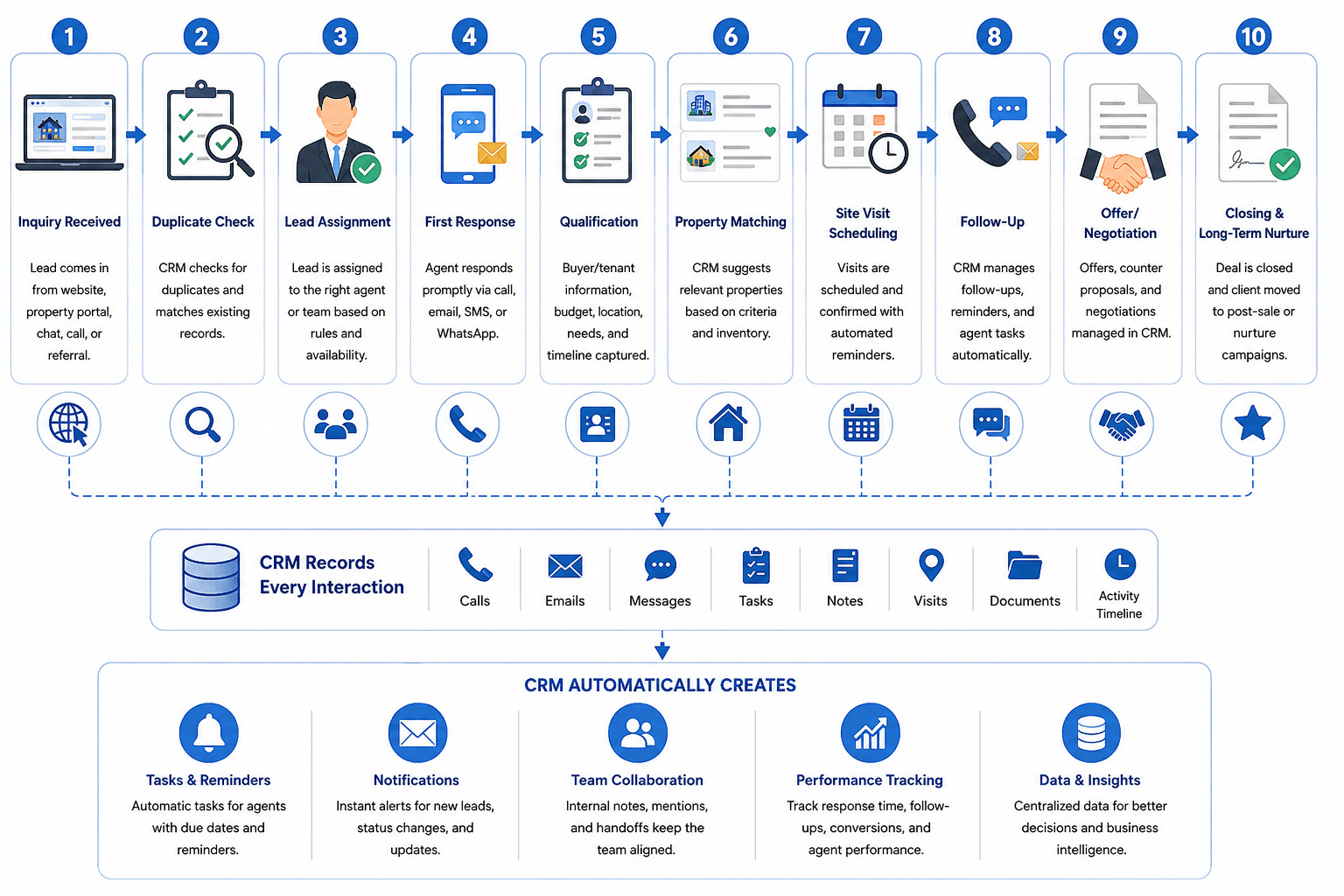
Write down the actual journey of a new inquiry.
For example:
- A lead enters from the website.
- The system checks for duplicates.
- The lead is assigned by location and property type.
- An agent receives a notification.
- The first response is recorded.
- The agent qualifies budget, timing and requirements.
- A property shortlist is shared.
- A site visit is scheduled.
- Follow-up tasks are created.
- The opportunity moves to negotiation, booking, closing or nurture.
A suitable CRM should support that flow with limited manual work.
Essential Features in a CRM for Real Estate
Lead capture and source attribution
Your CRM should capture inquiries from the channels that matter to your business. These may include:
- Website forms
- Landing pages
- Property portals
- Referral partners
- Advertising campaigns
- Phone calls
- Walk-ins
- Events
- Social platforms
Source attribution should remain attached to the lead throughout the sales process. Without it, management cannot reliably compare channels or identify which campaigns create qualified opportunities.
Lead assignment and response management
Real estate inquiries lose value when nobody knows who should respond.
Look for assignment rules based on criteria such as:
- Location
- Project
- Property type
- Language
- Agent availability
- Lead source
- Price range
- Existing relationship
- Round-robin distribution
Managers should also be able to see unassigned leads, overdue first responses, and opportunities with no recent activity.
Flexible pipelines
A generic pipeline with stages such as “new,” “qualified,” and “won” may be enough for a small team.
A larger business may need separate pipelines for:
- Buyers
- Sellers
- Rentals
- Commercial leasing
- New developments
- Investor relationships
- Referral partnerships
- Property acquisitions
The CRM should allow different stages, required fields, activities, and automations for each process.
Property and listing relationships
Traditional CRMs usually organize data around companies, contacts, and deals. Real estate workflows also revolve around properties.
A practical real estate CRM software platform should connect:
- One contact to several properties
- Several contacts to one property
- Owners to listings
- Buyers to saved preferences
- Agents to assigned inventory
- Site visits to properties and opportunities
- Offers to specific units or listings
Without this relationship model, teams often return to spreadsheets.
Communication history
Agents should see emails, calls, messages, notes, appointments, and documents in one timeline.
The purpose is not to monitor every word an agent writes. It is to make the relationship understandable when a colleague, manager, or support employee needs context.
Check whether the platform supports:
- Email synchronization
- Click-to-call or call logging
- SMS integration
- Templates
- Shared inboxes
- Appointment reminders
- Consent and opt-out records
Real estate workflow automation
Useful real estate workflow automation removes routine coordination.
Examples include:
- Sending an acknowledgement when an inquiry arrives
- Alerting an agent when a new lead is assigned
- Creating a follow-up after a property visit
- Notifying a manager when no response is recorded
- Moving inactive leads into a nurture sequence
- Reminding an agent about an expiring listing agreement
- Requesting documents when a deal reaches a certain stage
- Sending post-transaction relationship reminders
Automation should support human judgment rather than replace it. A high-value commercial inquiry may require a personal response, even when the CRM can send an automated template.
Integrations That Deserve Close Attention
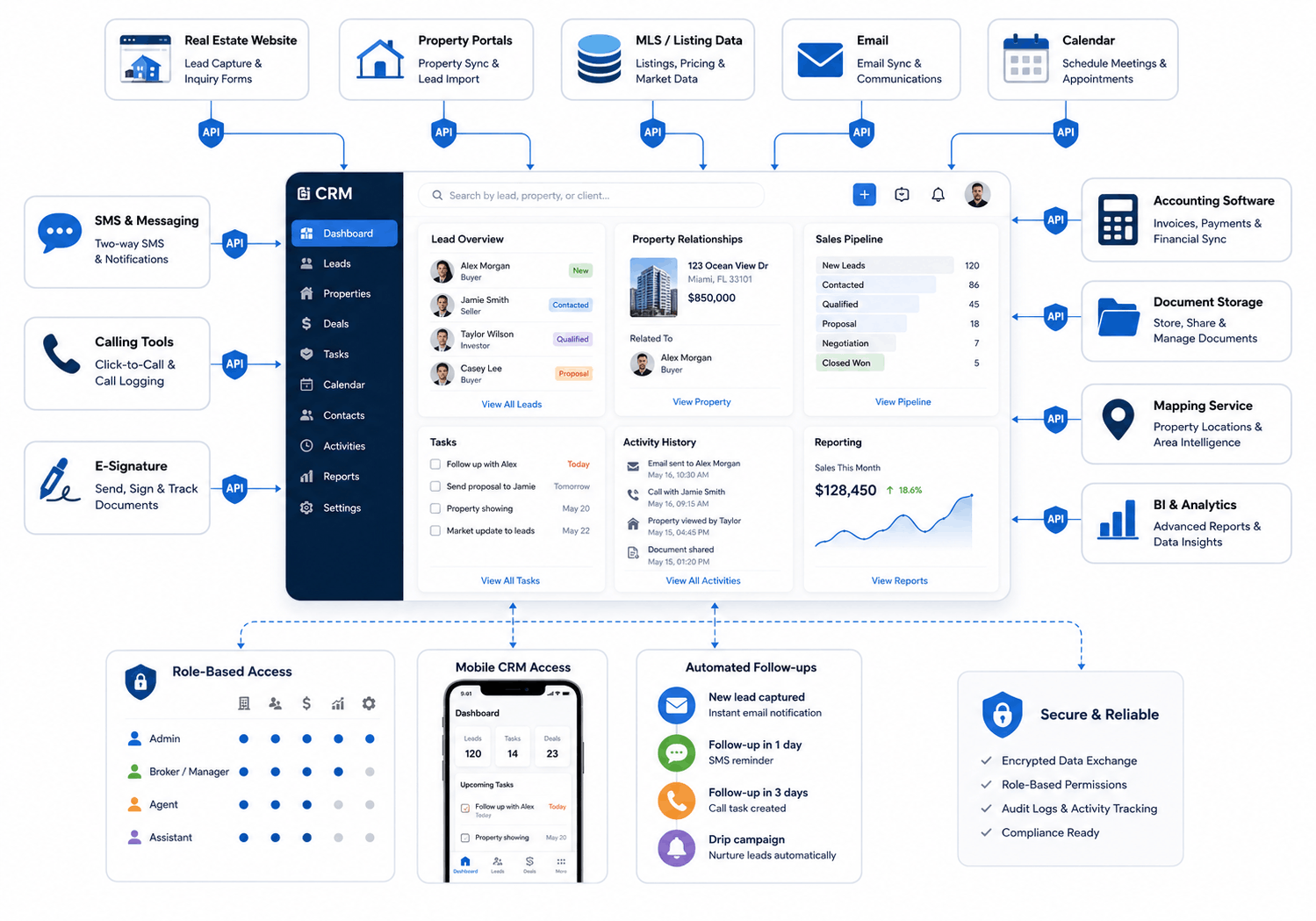
A CRM becomes more useful when information can move without repeated entry.
Common integrations include:
- Website and landing-page forms
- Email and calendar platforms
- Calling and SMS providers
- Accounting software
- Document storage
- Electronic signatures
- Marketing automation
- Property portals
- Mapping and location services
- Transaction management systems
- Business intelligence tools
MLS and listing-data integrations need specific review. The Real Estate Standards Organization develops data standards intended to improve the consistency and transport of real estate information between systems. Ask vendors whether their listing integrations use supported RESO standards, what data is available through the relevant MLS, and who is responsible for certification or feed approval.
Do not accept “MLS integration available” as a complete answer. Availability, field coverage, update frequency, permissions, and local MLS rules may vary.
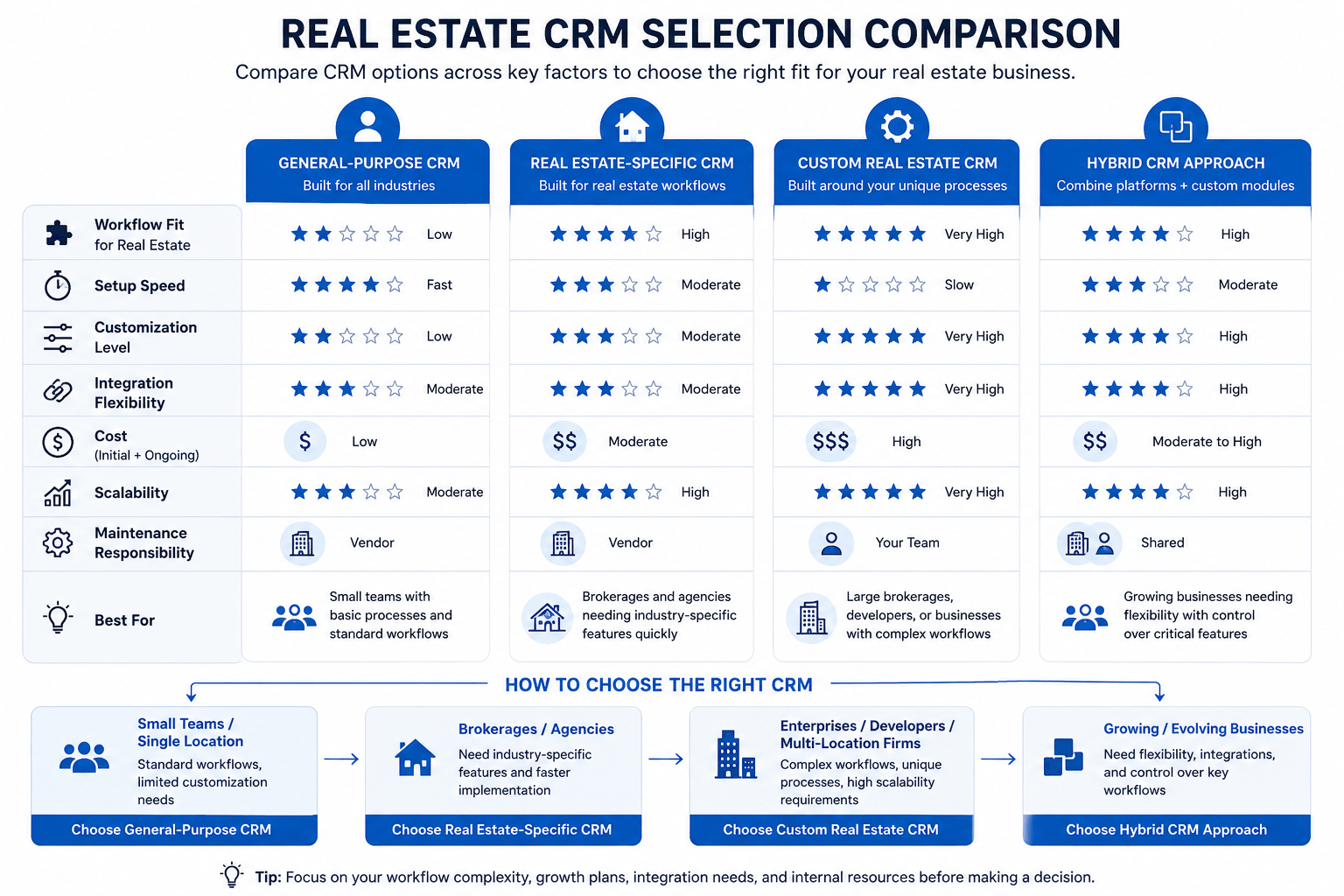
Off-the-Shelf vs Custom Real Estate CRM
|
Option |
Best for | Advantages |
Limitations |
|---|---|---|---|
|
General-purpose CRM |
Teams with standard sales processes | Mature tools and broad integrations |
Property workflows may require customization |
|
Real estate-specific CRM |
Agents and brokerages with common industry needs | Faster setup and relevant templates |
May not fit unusual operations |
|
Custom real estate CRM |
Businesses with specialized or multi-department workflows | Tailored processes, data models and integrations |
Higher initial investment and ownership responsibility |
|
Hybrid approach |
Companies needing speed plus selected custom functions | Balances existing software with custom extensions |
Integration complexity must be managed |
Choose an off-the-shelf CRM when:
- Your workflow follows common industry patterns.
- Required integrations already exist.
- The team can adapt to the product’s process.
- Fast deployment matters more than extensive customization.
- Standard reporting is sufficient.
Consider custom development when:
- Properties, units, investors, channel partners, or projects need complex relationships.
- Teams rely on several spreadsheets around the existing CRM.
- Lead assignment follows unique territory or approval rules.
- Standard systems cannot support your reporting.
- You need a client, owner, tenant, or partner portal.
- You are building a real estate technology product rather than an internal contact database.
- Several business units need one connected platform.
Custom software is not automatically better. It creates responsibility for product decisions, testing, hosting, security, upgrades, and support. The business case should come from measurable workflow gaps—not frustration with a few inconvenient screens.
How to Evaluate Real Estate CRM Software
Build a requirements scorecard
Score each platform against weighted business needs.
|
Evaluation area |
Suggested weight |
|---|---|
|
Workflow fit |
20% |
|
Lead management |
15% |
|
Integrations |
15% |
|
Ease of use |
15% |
|
Reporting |
10% |
|
Mobile experience |
10% |
|
Security and permissions |
5% |
|
Implementation support |
5% |
|
Total cost of ownership |
5% |
Adjust the weights. A field-heavy brokerage may prioritize mobile access. A property developer may assign more weight to project inventory and channel-partner management.
Test real scenarios
Ask shortlisted vendors to demonstrate your workflow using sample data.
A useful test might include:
- Importing a duplicate contact
- Capturing an inquiry from a website
- Assigning the lead to an agent
- Matching several properties
- Scheduling a visit
- Recording an offer
- Reassigning the opportunity
- Generating a source-level report
- Exporting the complete customer record
This reveals more than a standard product tour.
Ask what requires paid customization
A feature may appear in a demonstration but require a higher plan, marketplace application, implementation partner, or custom development.
Request written clarification for:
- Setup fees
- Per-user charges
- Messaging and calling costs
- Data storage limits
- Integration fees
- API access
- Workflow limits
- Reporting add-ons
- Migration
- Training
- Support
- Contract terms
The lowest monthly license is not always the lowest-cost solution.
Data Security, Privacy and Fair Housing Considerations
A real estate CRM may contain identity details, financial information, preferences, communications, documents, and transaction records.
Evaluate:
- Role-based access
- Multi-factor authentication
- Audit logs
- Encryption
- Backup and recovery
- Data export
- Retention controls
- Vendor access
- Security incident procedures
- Regional data-hosting needs
Automated segmentation and lead scoring also need human oversight. In the United States, the Fair Housing Act protects people from discrimination in housing-related activities. CRM rules, marketing audiences, property recommendations, and automated decisions should be reviewed for unfair or discriminatory outcomes.
Commercial email workflows should also follow applicable marketing laws. FTC guidance for CAN-SPAM requires accurate sender information, non-deceptive subject lines, a valid postal address, and a working opt-out method for covered commercial email.
Legal, privacy, and fair housing requirements can vary by jurisdiction and business activity. Obtain qualified advice rather than relying only on software defaults.
Practical Example: Connecting Listings, Leads and Visits
A US property technology business needed one platform for listings, inquiries, site visits, communications, and lead tracking.
Kanhasoft developed an end-to-end real estate system combining property discovery, an agent CRM, lead management, scheduling, automated notifications, contact management, and pipeline dashboards. The uploaded case study reports faster lead tracking, better property visibiity, and less manual follow-up after implementation. Results from one project should not be treated as guaranteed outcomes, but the case illustrates why workflow fit matters.
The useful lesson is simple: the CRM worked as part of the property journey. It did not treat lead management, property search, and appointment scheduling as unrelated tools.
Need Help Evaluating a Real Estate CRM?
Kanhasoft helps real estate businesses document workflows, compare platform options, plan integrations, and identify where standard software may need configuration or custom development.
Our custom CRM development services cover lead management, property workflows, automation, reporting, portals, and third-party integrations. You can also review our software development case studies for examples of CRM and real estate platforms.
A short discovery exercise can help separate essential requirements from features that look impressive but may add little practical value.
Final Words
Choosing a CRM for real estate is a business-process decision supported by technology.
Begin with your lead journey, property relationships, communication process, team roles, and reporting needs. Then evaluate products against those requirements. Test real scenarios, understand the complete cost, and involve the people who will use the system every day.
The best solution is rarely the one with the most automation or the most attractive dashboard. It is the one your team can use consistently while giving the business accurate, timely, and secure information.