AI Project Knowledge base & Handover Platform for IT Companies
A software project can generate hundreds of Jira tickets, Git commits, pull requests, Slack discussions, emails, documents, and status updates. The information exists, but it is often scattered across tools and people, making it difficult to see the complete picture.
We developed an AI Project Knowledge Base and Handover Platform for IT companies to bring this project knowledge into one connected system.
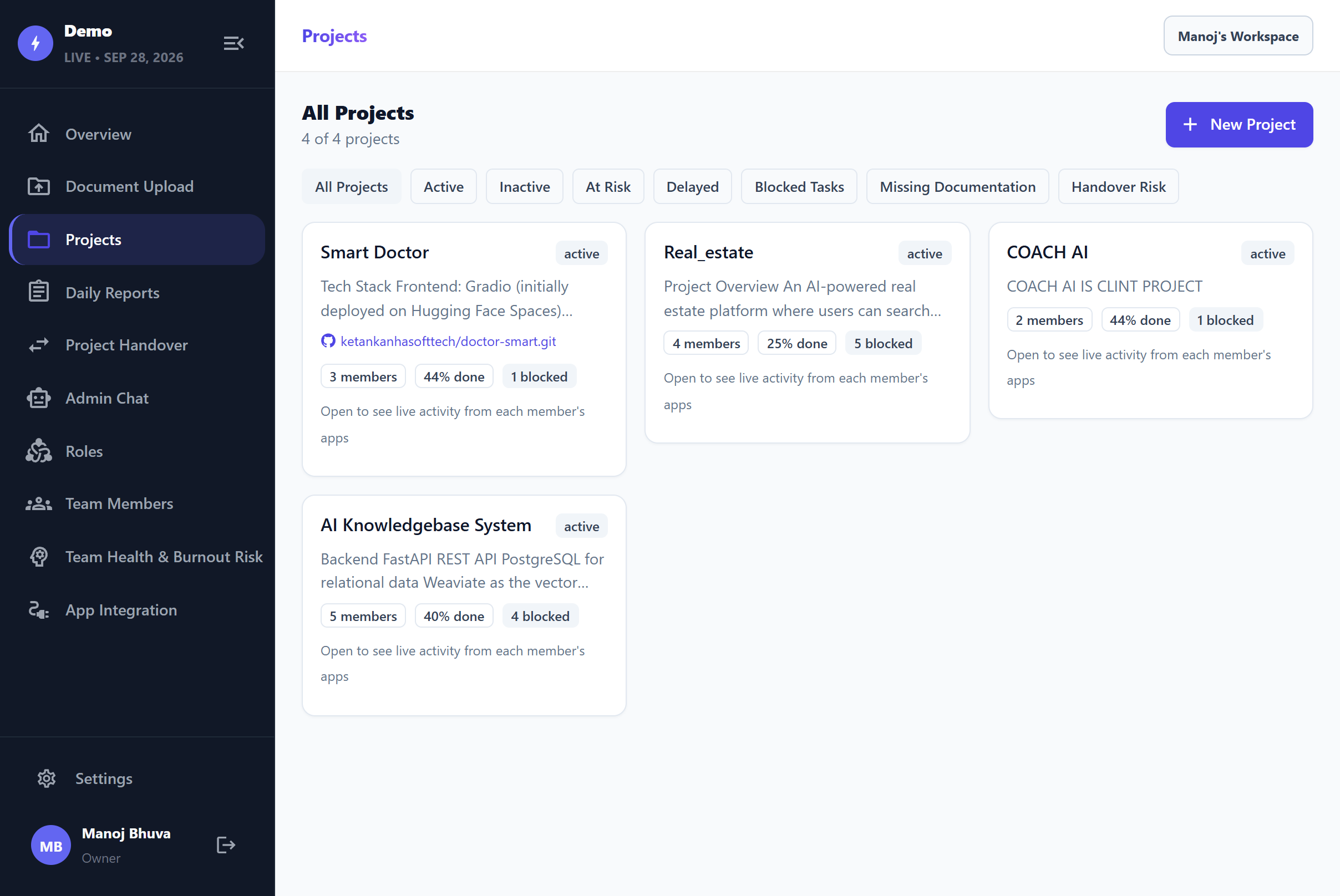
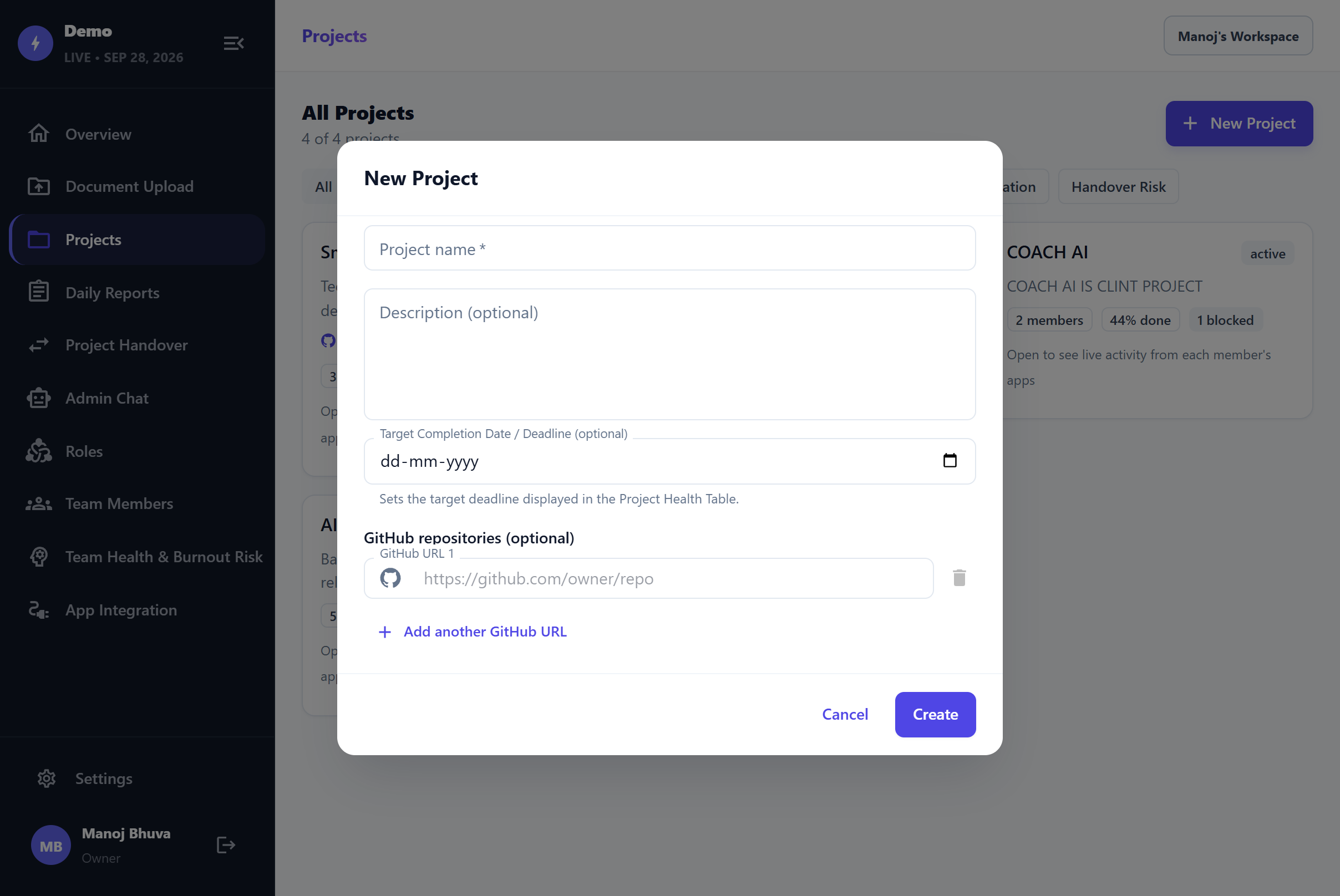
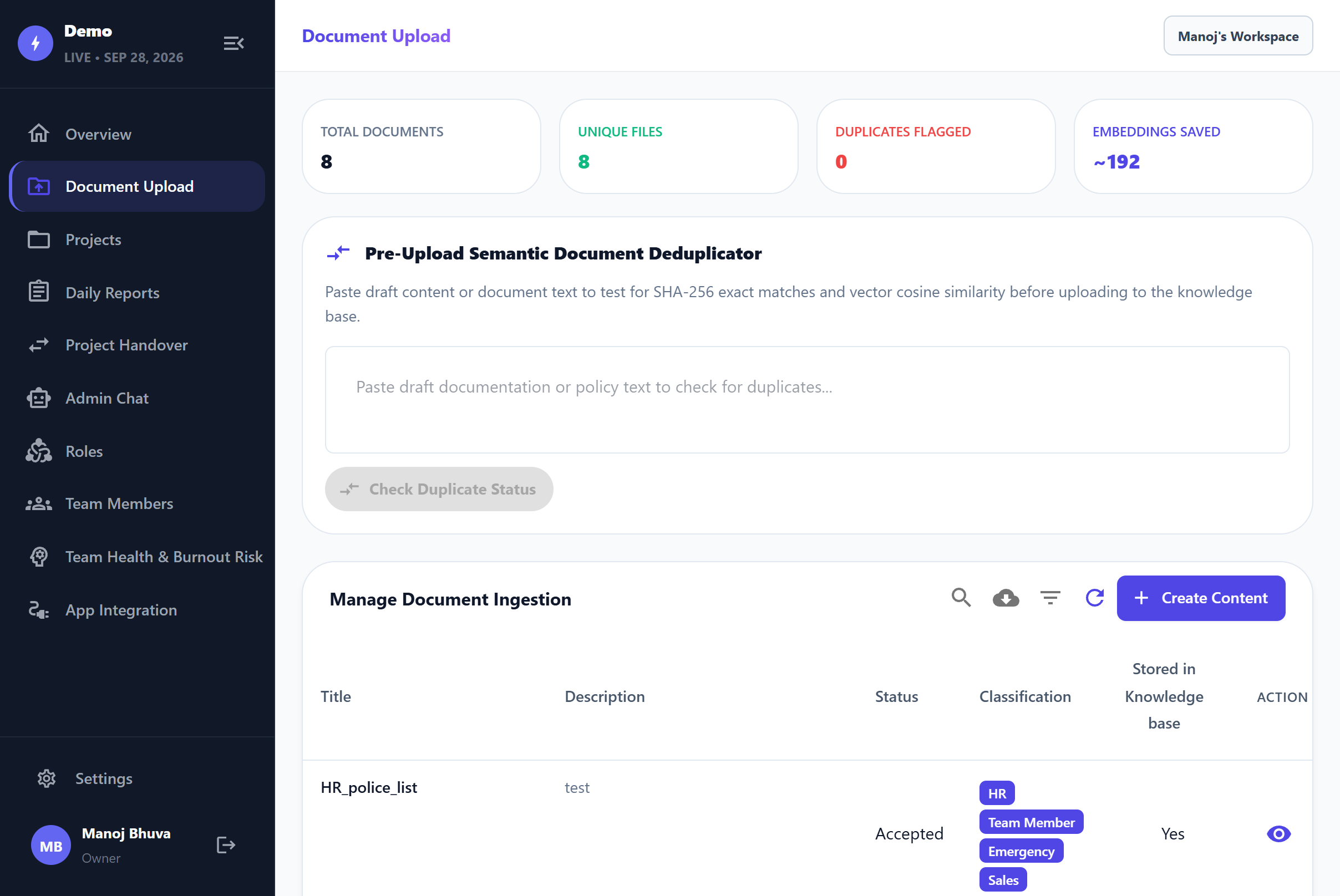
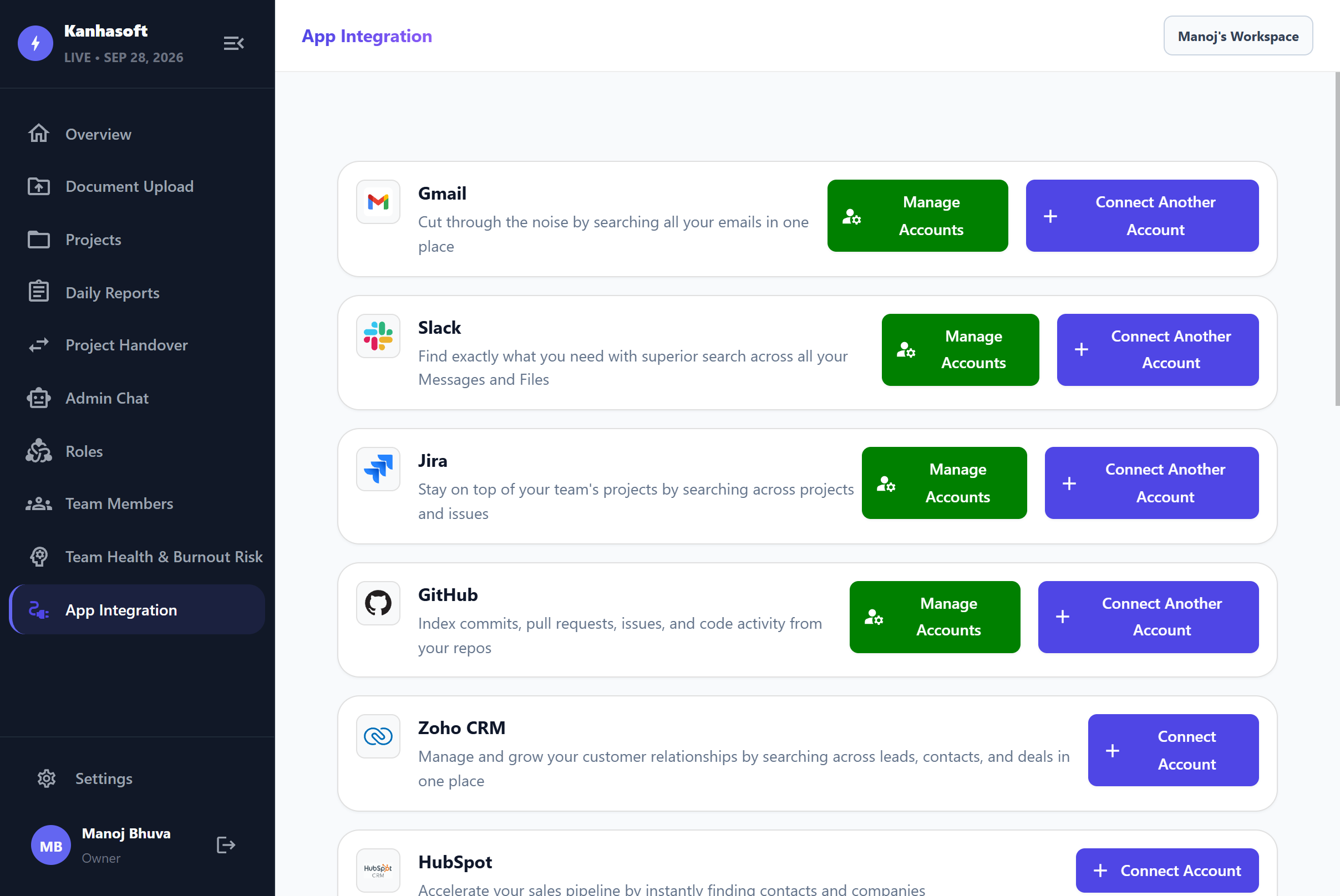
The platform collects information from connected tools and internal documents, organizes it into searchable knowledge, and makes it available through role-aware AI chat, dashboards, project analytics, automated updates, and structured handovers.
Leadership can see what is happening across projects, Project Managers can identify blockers, Team Leads can understand ownership and knowledge gaps, and Developers can quickly search project history.
When someone leaves a project or responsibility changes hands, the accumulated knowledge becomes part of a structured, manager-approved handover instead of being lost during the transition.

12 Months

USA
What Is an AI Project Knowledge Base & Handover Platform?
An AI project knowledge base brings project information from tools such as Jira, Git, Slack, email, reports, and internal documents into one searchable system.
Users can ask questions about project status, tasks, ownership, documentation, or past decisions and receive answers based on authorized project knowledge.
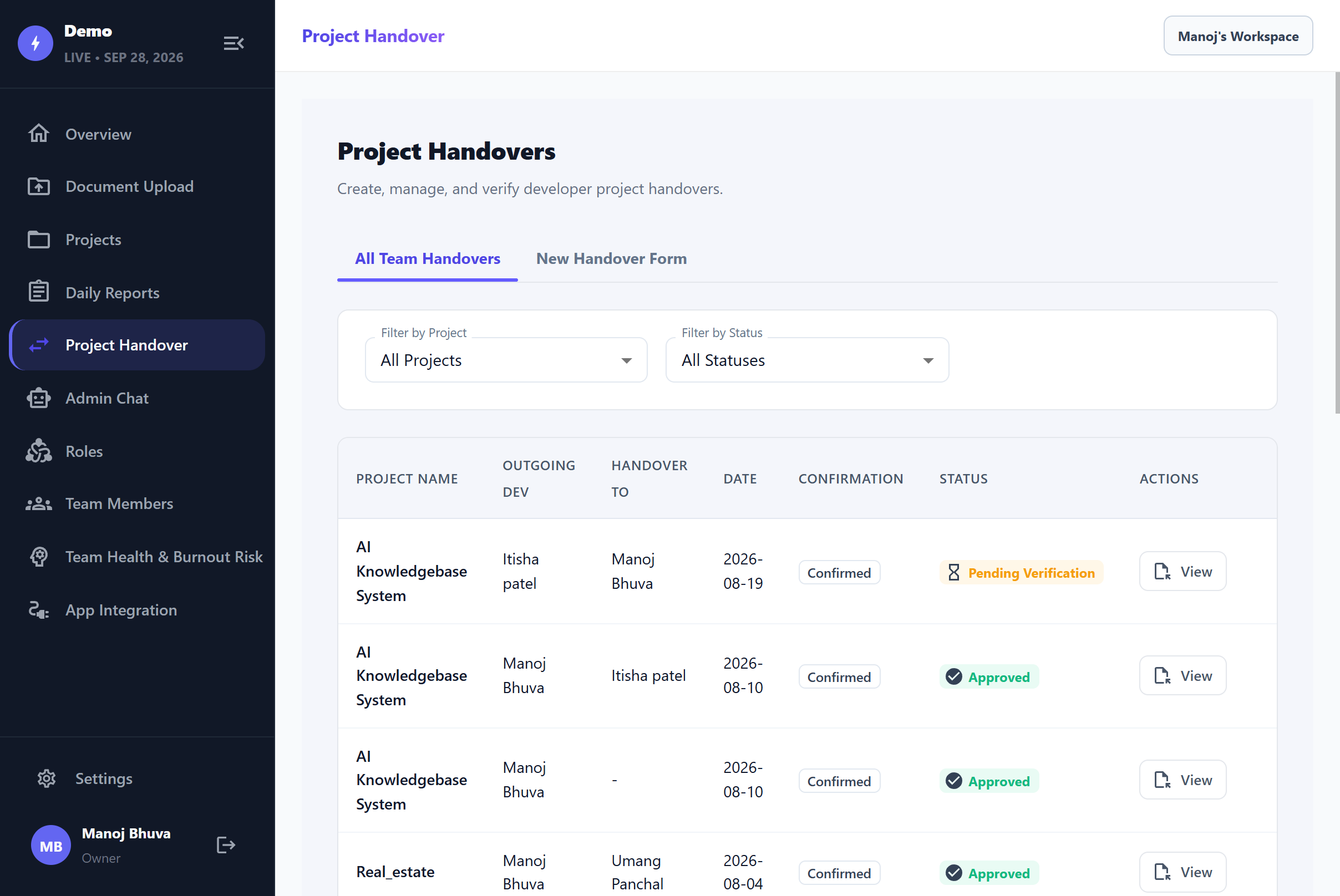
The same knowledge also supports structured handover. When an employee changes projects or leaves, key status, tasks, responsibilities, and project information can be documented, reviewed by a manager, and transferred to the next person.
The goal is simple: keep important project knowledge with the organization, not with individual employees.
Project Brief
The platform was designed for IT companies managing multiple projects and teams where project information is spread across different systems.
It brings day-to-day project knowledge into one connected environment with:
- AI project chatbot
- Project knowledge search
- Automated daily updates
- Project and sprint visibility
- Risk and delay alerts
- Resource and workload visibility
- Knowledge-gap tracking
- AI-assisted forecasting
- Role-based access
- Structured project handover
- Manager approval
- Cross-project visibility
This gives authorized users a more current view of project activity without waiting for manually prepared status reports.
Technologies
-

Vite
-

Python
-

FastAPI
-

OpenAI GPT-4o-mini
-
OpenAI text-embedding-3-small
-

Weaviate
-

PostgreSQL
-

Redis
-

Background Job Processing
-

BM25 Search
-

Dense Vector Retrieval
-

Reciprocal Rank Fusion (RRF)
-

Retrieval-Augmented Generation (RAG)
-

Query Rewriting
-

Reranking
-

Context Compression
-

Citation Validation
-

Response Validation
The broader project concept also works with development and business sources such as Jira, Git, Slack, email, internal documents, and other connected project systems.
Client’s Need
The platform was created around a problem that becomes more visible as an IT company grows: management needs project information without turning every project manager into a full-time report writer.
One View Across Projects
Management needed a consolidated picture of active projects instead of requesting separate updates from every team.Project Knowledge Search
Employees needed a faster way to find decisions, tasks, documentation, discussions, and historical context.AI Project Chatbot
Users needed to ask normal questions about projects rather than manually searching several tools.Reliable Project Status
Leadership needed status based on actual project activity and connected information, not only manually prepared updates.Earlier Risk Visibility
Delays, blockers, and project drift needed to become visible while there was still time to respond.Automated Daily Updates
Developers and project teams needed a way to reduce repetitive status-reporting work.Project Handover
Knowledge needed to survive employee exits, internal transfers, and changes in project responsibility.Knowledge Ownership
Managers needed to understand who knew which parts of a project and where knowledge was concentrated too heavily in one person.Workload Visibility
Project and delivery managers needed a clearer view of who was overloaded and where capacity might be available.Performance Evidence
Employee contributions needed to be easier to review using project activity rather than relying entirely on self-reported information.Forecasting
Management needed a forward-looking view of delivery rather than only historical project reporting.Role-Based Access
A CEO, Project Manager, Team Lead, and Developer should not automatically receive the same information.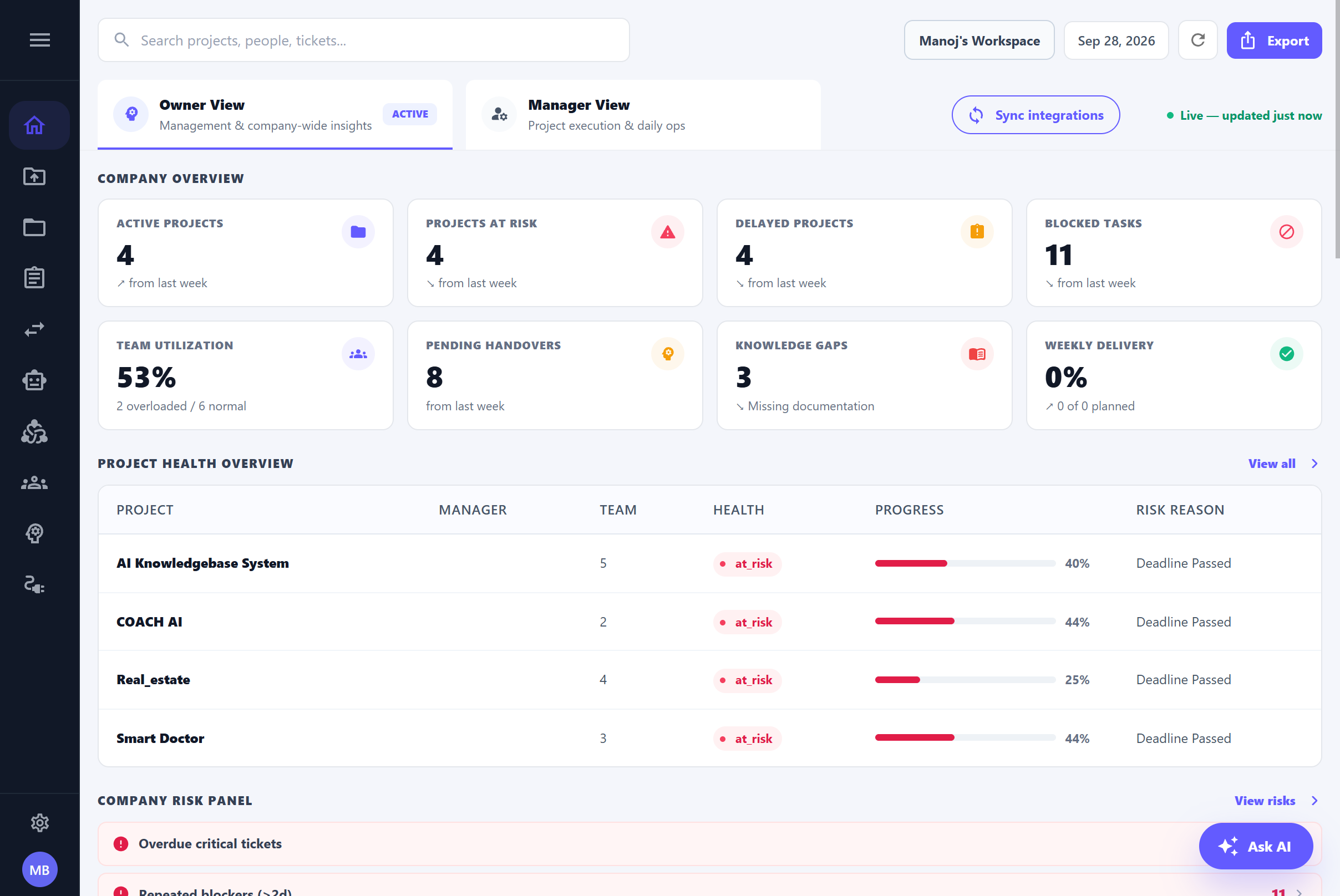
Build a Project Knowledge System That Stays With the Company
An IT company’s most valuable project knowledge is rarely stored in one place.
It develops gradually through tickets, commits, code reviews, documents, emails, conversations, project reports, and the experience of the people doing the work.
The problem begins when that information stays fragmented—or walks out of the project when an employee moves on.
An AI Project Knowledge Base and Handover Platform gives companies a way to keep that knowledge connected.
Management gets a clearer view of project health. Project Managers spend less time assembling status information. Team Leads gain stronger visibility into technical ownership. Developers can search project history without starting from scratch. And when responsibility changes hands, the next person receives a structured, approved starting point.
Kanhasoft can help organizations build AI Knowledge Base platforms, AI-powered software solutions, custom software applications, project intelligence systems, RAG applications, and integrations around existing development and business tools.
Discuss your AI Project Knowledge Base requirements with Kanhasoft.

Challenges
Project Status Was Spread Across Too Many Tools
Jira might show tasks, Git showed code activity, Slack contained discussions, while important decisions remained in email or documents.
Status Reporting Took Time
Project managers and team members repeatedly gathered information that already existed somewhere in the project ecosystem.
Leadership Saw the Project Late
By the time a traditional weekly report highlighted a problem, the underlying issue may already have been developing for days.
Critical Knowledge Stayed With Individuals
A senior developer could understand a module better than anyone else, but that knowledge might not exist in a form another employee could quickly use.
Handover Started Too Late
Teams often think seriously about handover only when someone is already leaving the project.
Searching Did Not Equal Understanding
Finding ten matching tickets or documents still left the user responsible for reading them and working out the answer.
Different Roles Needed Different Depth
Management needed portfolio-level information, while developers needed detailed technical and task context.
Project Data Could Be Sensitive
Cross-project knowledge search could not expose information simply because it was relevant.
Workload Was Difficult to Judge
Without one view of assignments and activity, overloaded employees and idle capacity could be harder to identify.
Historical Data Was Underused
Past project progress and employee efficiency could provide planning context, but only if that information was structured and accessible.
The challenge was therefore broader than building a document chatbot.
The system needed to turn day-to-day project activity into usable organizational knowledge, timely project visibility, and continuity when people or responsibilities changed.
Solutions
Connected Project Knowledge
Information from project-management, development, communication, and internal knowledge sources can be brought into one searchable environment.
AI Project Chatbot
Authorized users can ask questions about projects, tasks, documentation, ownership, status, and historical decisions in natural language.
Automated Daily Updates
Project activity can be used to help draft regular status updates instead of asking employees to recreate their day manually.
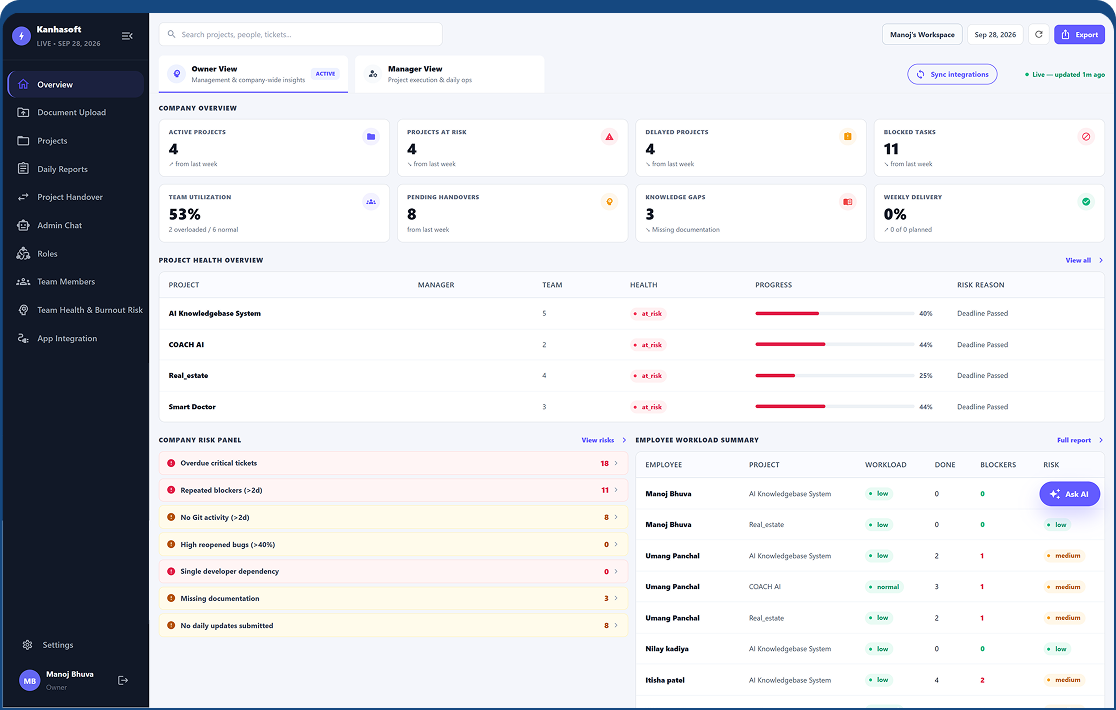
Executive Project Dashboard
Leadership can view project health, progress, priorities, and risks across the portfolio.
Sprint Tracking
Deliverables can be viewed against plan so teams can identify work that is on track, at risk, or delayed.
Risk & Delay Alerts
Emerging blockers and project slippage can be surfaced earlier.
Resource Visibility
Managers can see who is working on what and identify overloaded or underutilized capacity.
Knowledge-Gap Identification
Project ownership information can help highlight modules or areas where important knowledge is concentrated.
Performance Evidence
Project activity can provide supporting evidence for employee reviews and scorecards.
Project Forecasting
Historical progress can support a forward-looking view of likely project direction and planning needs.
Role-Based Chat
Admin and employee chat experiences use the same knowledge infrastructure but apply different access scopes.
Structured Handover
Employees complete a defined handover when leaving or switching projects.
Manager Approval
The handover is reviewed before being finalized.
Searchable Project History
The incoming employee can work from accumulated project knowledge instead of beginning with an empty context.
AI Project Knowledge, Visibility, Forecasting & Automated Handover
The platform brings project knowledge, AI search, reporting, visibility, planning, and handover into one connected workflow. The idea is simple: project knowledge should build continuously as the work happens instead of being recreated whenever someone needs an update.
AI Project Chatbot
Authorized users can ask natural-language questions about projects rather than searching several applications separately. Management can ask which projects have critical blockers, Project Managers can check overdue tasks, Team Leads can find module ownership, and Developers can search documentation or previous project decisions.
Multi-Source Project Knowledge
Useful information can come from Jira, Git repositories, commits, pull requests, code reviews, Slack, email, CRM systems, internal documents, project reports, and status updates. This information is processed and organized into searchable project knowledge instead of remaining isolated inside individual tools.
RAG-Based Project Answers
The platform retrieves relevant company information before generating an answer. Semantic vector search helps understand conversational questions, while BM25 keyword search supports exact terms such as ticket numbers, project names, technical identifiers, and module references.
Admin & Employee AI Chatbots
Both experiences use the same AI and RAG foundation but serve different needs. The Admin Chatbot can answer broader questions about project health, risks, teams, workload, blockers, and portfolio status. The Employee Chatbot focuses on assigned tasks, documentation, project history, processes, decisions, and team knowledge.
Automated Daily Updates
Connected project activity can help prepare daily updates without asking Developers or Project Managers to rebuild the same status information manually. Git activity, Jira updates, and other connected project evidence can contribute to the daily picture.
Project & Sprint Visibility
Leadership can view project health, priorities, progress, sprint status, risks, delays, workload, and trends from a consolidated dashboard. Deliverables can be identified as on track, at risk, or delayed, giving Project Managers a clearer starting point for action.
Risk & Critical Alerts
Blockers, project drift, and delivery risks can be surfaced earlier instead of waiting for the next formal status meeting or manually prepared report.
Resource & Workload Visibility
Managers can see who is assigned to each project, where workload is becoming heavy, where capacity may be available, and which employees are spread across several engagements.
Knowledge Gaps & Ownership
The platform helps identify who understands particular modules or areas of a project and where important knowledge may be concentrated in too few people. This becomes especially valuable when an employee changes projects or responsibilities.
Performance Evidence
Relevant work activity such as commits, pull requests, reviews, and task progress can provide additional evidence for employee performance discussions. The aim is to give managers better context, not replace managerial review.
AI Forecasting & Planning
Historical project progress and employee-efficiency context can support a more forward-looking view of delivery. Management can use trends to understand project trajectory, possible slippage, resource requirements, workload, and upcoming planning needs.
Automated Project Handover
Handover begins with knowledge accumulated during the employee's time on the project rather than starting from zero on the last day. When someone leaves or switches projects, they complete a structured handover covering current status, responsibilities, tasks, and key information. The manager reviews and approves it before the replacement employee receives the handover together with the wider searchable project history.
Together, these capabilities help IT companies preserve project knowledge, improve visibility, identify risks earlier, and reduce the disruption that often comes when people or responsibilities change
Key Features
AI Project Knowledge Base
Natural-language project search
Multi-project knowledge search
Email knowledge
Continuous knowledge synchronization
Portfolio-level project health
Critical blocker visibility
Knowledge-gap identification
Performance evidence
Project delivery trajectory
Project continuity
Semantic retrieval
Knowledge summarization
AI Project Chatbot
Retrieval-Augmented Generation
Jira knowledge integration
CRM information
Automated daily updates
Sprint tracking
Resource visibility
Project history search
Employee scorecard support
Structured project handover
Searchable handover knowledge
Keyword retrieval
Admin AI Chatbot
Role-aware project answers
Git and repository activity
Internal document ingestion
Executive project dashboard
Project status monitoring
Employee workload visibility
Module ownership visibility
AI forecasting and planning
Approval-based handover
Role-based access control
Citation-supported AI responses
Employee AI Chatbot
Permission-aware retrieval
Slack and communication context
Project-report ingestion
Company-wide project visibility
Risk and delay alerts
Knowledge ownership tracking
Commit and pull-request context
Historical trend analysis
Employee transition management
Hybrid search
Cross-source project analysis
Architecture & Scalability
At a high level, the knowledge workflow follows:
Project Data Sources → Knowledge Ingestion → Knowledge Processing → Knowledge Base → Search & RAG → AI Chatbot Response
Authorization applies throughout the request so users receive only the project information they are allowed to access.
The underlying RAG architecture uses a Python and FastAPI backend with GPT-4o-mini for language generation.
OpenAI text-embedding-3-small generates embeddings, while Weaviate provides vector search. PostgreSQL manages relational application information, and Redis plus background processing support workloads that do not need to happen inside the user’s live request.
Search combines BM25 and dense-vector retrieval. Reciprocal Rank Fusion can merge results before reranking and context preparation.
This matters for project knowledge because different searches behave differently.
A natural question such as:
“Why is the mobile release delayed?”
benefits from semantic retrieval.
An exact search for:
“PROJ-1842”
benefits from lexical matching.
Using both gives the knowledge workflow a stronger basis before the final context reaches the language model.
The architecture also supports organization, workspace, user, role, and project-aware retrieval. This allows the same underlying system to support both company-wide management views and tightly scoped employee access.
User Roles
- Owner / CEO / Management: Gets company-wide project visibility without manually chasing every team for status. Management can focus on health, risk, workload, trends, and portfolio-level information.
- Delivery / Operations Head: Reviews active engagements across teams, identifies delivery risk, and works with consolidated project information.
- Project Manager: Uses connected Jira, Git, communication, and project information to understand day-to-day progress, overdue tasks, blockers, sprint status, and client-reporting context.
- Team Lead / Tech Lead: Reviews technical progress, code activity, ticket relationships, module ownership, reviews, and knowledge gaps.
- Developer / Team Member: Searches project history and documentation, reviews assigned tasks, receives assistance with daily updates, and has a clearer evidence trail of project contribution.
- Platform Administrator: Manages connected sources, access rules, users, workspaces, project scopes, and knowledge-processing configuration.
The PPT specifically positions the system differently for management, Project Managers, Team Leads, and Developers rather than giving every user the same project view.
Results & Business Impact
The platform is designed to reduce the gap between what is happening inside projects and what management currently knows.
Key business benefits include:
- One view across multiple active projects
- Less dependence on manually assembled status reports
- Faster access to project history and knowledge
- Fewer searches across disconnected tools
- Natural-language answers instead of lists of matching documents
- Earlier visibility into risks and blockers
- Better understanding of sprint health
- More structured workload visibility
- Clearer project and module ownership
- Better visibility into knowledge gaps
- Reduced dependence on individual employees for project history
- More structured employee transitions
- Manager-approved project handovers
- Faster onboarding of replacement team members
- Better continuity when employees switch projects
- Less repetitive daily status administration
- Project activity that can support performance discussions
- Portfolio-level visibility for leadership
- Role-specific project information
- A forward-looking view of project direction
- More timely management decisions based on current project evidence
The presentation does not provide measured percentages for time saved, project-delay reduction, or productivity improvement. Those outcomes should therefore be measured through actual organizational usage rather than presented as guaranteed figures.
The practical difference is that project knowledge becomes something the organization can reuse rather than information that has to be rediscovered every time someone asks a question.
Use Cases
This type of AI project knowledge and handover platform is particularly relevant for:
- Software development companies
- IT services companies
- Digital agencies
- SaaS development teams
- Product engineering companies
- Offshore development centers
- Staff augmentation companies
- Managed development teams
- Enterprises running several IT projects
- Distributed engineering teams
- Remote software teams
- PMO-driven organizations
- Companies with frequent internal project transfers
- Businesses with long-running software projects
- Companies managing large development teams
- Organizations where knowledge is spread across Jira, Git, Slack, email, and documents
- IT businesses that need stronger project continuity
- Companies using RAG for private project knowledge
Kanhasoft’s AI Knowledge Base solutions follow the same principle of connecting business information and making it easier to retrieve through secure AI search.
Where project knowledge also depends on customer or operational information, the approach can complement an existing custom CRM platform or ERP software environment rather than replacing those systems.
Frequently Asked Questions
Its role is to connect knowledge already spread across those systems, make it searchable, summarize it for different roles, and preserve that information for future project decisions and handovers.
Talk To Us
About Your Project