
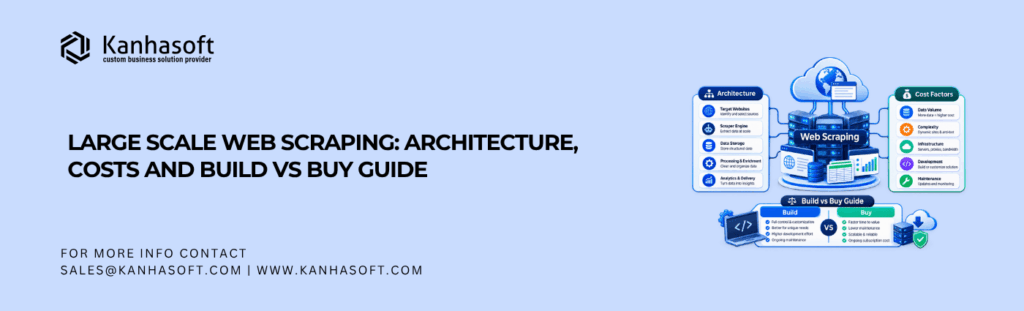
Large scale web scraping means collecting data from thousands or millions of web pages on a steady schedule. It must stay fast, accurate, and unblocked while it runs. A simple script can fetch a few hundred pages. However, that same script usually fails when you need fresh data from dozens of sources every day.
So the real challenge is not writing a scraper. Instead, it is running a data pipeline that keeps working when sites change, traffic grows, and rules tighten.
This guide explains everything about large scale web scraping. First, you will see how the architecture fits together. Next, you will learn what drives cost and how to stay compliant. Finally, you will get a simple way to decide whether to build, buy, or share the work with a partner.
Key Takeaways
- Large scale web scraping is a pipeline problem, not a script problem.
- Five layers matter most: scheduler, workers, rendering, proxies, and storage with validation.
- Monitoring and data checks protect you more than extra servers do.
- Compliance work should start on day one, not after launch.
- A hybrid model often wins, because you own the data logic while a partner runs the heavy infrastructure.
What Is Large Scale Web Scraping?
Large scale web scraping is the automated collection of web data at a volume, speed or complexity that one machine and one IP address cannot handle. It usually involves many pages, many sources, and a repeating schedule. Because of that, it needs queues, distributed workers, proxy management, and automatic checks.
The jump from small to large is not only about size. For example, a script that reads 500 product pages once a week is easy to maintain. In contrast, a system that reads 5 million pages every day must handle failures, blocks, duplicates and site changes without a person watching it.
Here is a rule of thumb to see where your project sits:
| Scale | Typical volume | What breaks first | Common setup |
| Small | Up to about 100,000 pages a month | Selectors after a site redesign | One script on one server |
| Medium | About 100,000 to 5 million pages a month | IP blocks and slow runs | Queue, several workers, proxy pool |
| Large | Over 5 million pages a month, or 50+ sources | Maintenance and data quality | Distributed crawlers, monitoring and a validation layer |
The exact numbers vary by site and data type. Still, the pattern holds. As you move down the table, the hard part shifts from getting the data to keeping the data right.
Also, note what this work is not. It is not hacking, and it does not mean ignoring site rules. Done well, it collects public information at a respectful pace and delivers it in a clean, usable format.
Signs You Need Large Scale Web Scraping, Not a Simple Script
Many teams cross the line without noticing. Watch for these signs:
- Your scripts break every week after small site changes.
- Runs take so long that the data is stale when it arrives.
- Sites block your IP addresses more and more often.
- Several teams need the same data in different formats.
- You track more than ten sources, and each one behaves differently.
- Nobody knows whether yesterday’s numbers are correct.
If three or more of these sound familiar, a script is no longer enough. Instead, you need a pipeline with clear parts, clear owners, and automatic alerts.
The Core Architecture of Large Scale Web Scraping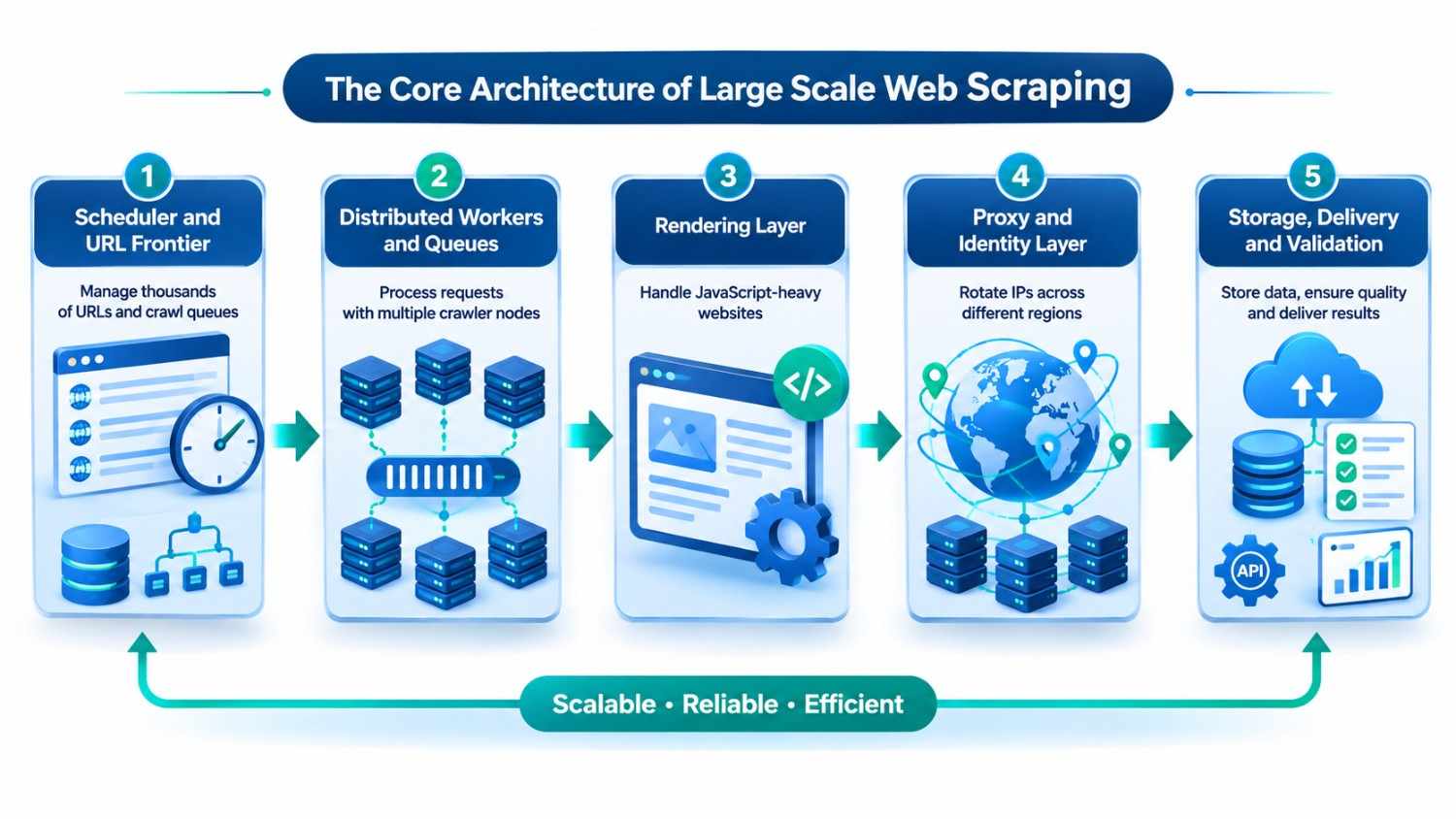
A reliable pipeline has five layers. Each layer does one job, so you can fix or scale it without touching the rest. Let’s walk through them in order.
1. Scheduler and URL Frontier
The scheduler decides what to fetch and when. The URL frontier is the list of pages waiting in line. At scale, keep this list outside worker memory, for example in Redis or a database. As a result, a crashed worker never loses the queue.
In addition, store every URL you have already visited. Duplicates waste money quickly. For instance, a 5% duplicate rate on one million pages means 50,000 pointless requests.
2. Distributed Workers and Queues
Workers fetch pages and parse them. Put them behind a message queue such as RabbitMQ, Kafka, or Celery with Redis. Then you can add or remove workers as the load changes.
Frameworks like Scrapy handle crawl logic well. Moreover, they scale across many machines when you pair them with a shared queue. Also, keep every worker stateless. That way, you scale simply by starting more of them.
3. The Rendering Layer
Many pages load their data with JavaScript. Browsers such as Playwright or Puppeteer can render those pages. However, they use far more CPU and memory than plain HTTP calls. Therefore, use them only when you must.
First, check whether the page calls a hidden JSON endpoint. If it does, call that endpoint directly. It is faster, cheaper, and more stable. For a deeper look at handling JavaScript-heavy pages, sessions and CAPTCHAs, read our technical guide.
4. The Proxy and Identity Layer
Sites watch for too many requests from one address. A proxy layer spreads requests across many IP addresses and regions. Datacenter proxies are fast and cheap. Residential proxies look more like real visitors, but they cost more.
So mix them. Start with cheap proxies, and switch to costly ones only for sources that block you. Above all, keep a polite pace, because speed is the quickest way to get blocked. Use adaptive throttling that slows down when a site responds slowly.
5. Storage, Delivery and Validation
Raw HTML belongs in cheap object storage such as Amazon S3. Because of this, you can reprocess pages later without fetching them again. Clean records then go into a database or warehouse, such as PostgreSQL, BigQuery, or Snowflake.
Finally, deliver the data through an API, a CSV or JSON feed, or direct database access. Pick whatever fits how your team works. Between raw and clean data, add a validation step. We cover that next.
Keeping a Large Scale Web Scraping Pipeline Reliable
A pipeline that works on day one is easy to build. A pipeline that still works on day 300 is the real goal. Three habits make the difference.
Retry Without Making Things Worse
Retries help, but blind retries can flood a struggling site and get you blocked. Therefore, use exponential backoff, which means waiting longer after each failure. Also, cap the number of retries.
Separate temporary errors, such as timeouts, from permanent ones, such as a 404 page. Then send permanent failures to a review list instead of retrying them forever.
Catch Site Changes Early
Sites change their layout without warning. As a result, selectors break quietly, and you receive empty or wrong data. To prevent this, run small canary jobs every few hours on a sample of pages. If a canary returns empty fields, alert the team before the full run starts.
Additionally, keep sample HTML snapshots. Later, you can compare them and see exactly what changed.
Monitor the Data, Not Just the Servers
A job can finish with a green status and still deliver bad data. So track business signals as well. Good examples include records per source, the share of empty fields, price range checks and freshness.
For example, suppose a retailer normally returns 40,000 products and today returns 4,000. Something is wrong, even though no error appeared. An alert on record counts catches this within minutes.
Data Quality at Volume
Manual checks stop working when millions of records arrive each day. Therefore, automate your quality rules. Five checks cover most needs:
- Schema validation: every record needs the required fields and the right data types.
- Deduplication: use stable keys, such as a product ID or URL, to remove repeats.
- Normalization: convert dates, currencies, units and text into one standard format.
- Anomaly checks: flag values that jump far outside their normal range.
- Versioning: keep history, so you can roll back after a bad run.
In addition, write a short data contract. It lists the fields, formats and refresh rate that the scraping team and data users agree on. Consequently, arguments about “what the data should look like” disappear early.
Batch or Real-Time: Choosing the Right Refresh Rate
Fresh data sounds great, but faster refreshes cost more. Therefore, match the schedule to the decision it supports.
Batch runs collect data hourly, daily or weekly. They suit price reports, market research and catalog updates. Because they run on a schedule, you can use cheaper servers and slower, politer request rates.
Near real-time runs fetch the same pages every few minutes. They suit stock availability, ticket prices and breaking news. However, they need more workers, more proxies and stricter monitoring.
Ask one question before you choose: “What would we do differently if this data arrived an hour sooner?” If the honest answer is “nothing,” a daily batch is enough. In many projects, a mixed approach works best. For instance, refresh your top 5% of pages every hour and the rest once a day.
Staying Compliant During Large Scale Web Scraping
Scale increases both visibility and risk. For that reason, build compliance into the project from the start. Note that this section is general information, not legal advice.
- Read robots.txt. The Robots Exclusion Protocol explains how sites tell crawlers what to avoid. It is not a law by itself. Even so, respecting it shows good faith and reduces conflict.
- Review the terms of service. Some sites forbid automated access. Rules also differ by region and by whether data is public or behind a login. So ask a lawyer about high-risk sources.
- Handle personal data with care. Privacy laws such as GDPR and CCPA can apply to names, emails and profile details, even when they are publicly visible. Collect only what you truly need.
- Limit your load. Use rate limits and off-peak schedules, so your crawler never harms the site.
- Keep an audit trail. Record what you collected, when, from where and why.
When a site offers an official API, use it first. It is usually more stable and clearly allowed.
Build, Buy or Hybrid?
Once you understand the architecture, the next question is who runs it. You have three realistic options.
| Option | Best for | Strengths | Trade-offs |
| Build in-house | Teams with data engineers, or when scraping is the product | Full control and custom logic | Slow start, constant maintenance, key-person risk |
| Buy tools or APIs | Small or medium projects on common sites | Fast start and low upfront cost | Less flexibility, and per-request fees can grow |
| Hybrid with a partner | Growing teams with many or tricky sources | Custom scrapers plus managed infrastructure | Needs a clear scope and service levels |
Most growing businesses land on the hybrid route. You keep ownership of the data requirements and business logic. Meanwhile, a partner handles proxies, monitoring and fixes when sites change. If you only need extra hands, you can also add dedicated developers for your data team instead of outsourcing everything.
Here is a simple test. If scraping is the product you sell, lean toward building. However, if scraping only feeds your product, lean toward buying or a hybrid model.
What Does Large Scale Web Scraping Cost?
No single price fits every project, because cost depends on a handful of drivers:
- The number of sources and how often each one changes
- Pages per run and refresh frequency
- Rendering needs, since browsers cost more than plain requests
- Proxy type and volume
- Cloud compute and storage
- Engineering time, both for the build and for ongoing fixes
- Validation, monitoring and delivery requirements
Maintenance is the cost people forget. In many projects, keeping scrapers alive costs more than building them. For that reason, always budget for it from the start.
You can also lower the bill in several ways:
- Crawl incrementally, so you fetch only new or changed pages.
- Prefer APIs and JSON endpoints over browser rendering.
- Cache pages and remove duplicates before fetching.
- Use cheap proxies first, and escalate only when needed.
- Refresh fast-changing pages often and slow-changing pages rarely.
Best of all, start with a pilot. Run two or three sources for a few weeks, then measure the success rate and the cost per 1,000 pages. After that, you can scale the estimate with confidence instead of guessing.
A Practical Scoping Checklist Before You Ask for a Quote
Whether you build or hire, good scoping saves weeks. Prepare these items first:
- Sources: the websites or page types you need, with sample URLs.
- Fields: the exact data points to capture on each page.
- Volume: pages per run and the expected number of records.
- Frequency: hourly, daily, weekly or on demand.
- Output: the format and destination, such as an API, CSV file, database or cloud bucket.
- Quality rules: accuracy targets and how many gaps are acceptable.
- Compliance: any personal data, login-protected pages or region limits.
- Success metrics: deadlines and the numbers that prove the project works.
With this list, a team can estimate effort in days rather than guess. Moreover, you will spot weak points in your own plan before any money is spent.
How a Large Scale Web Scraping Project Runs, Step by Step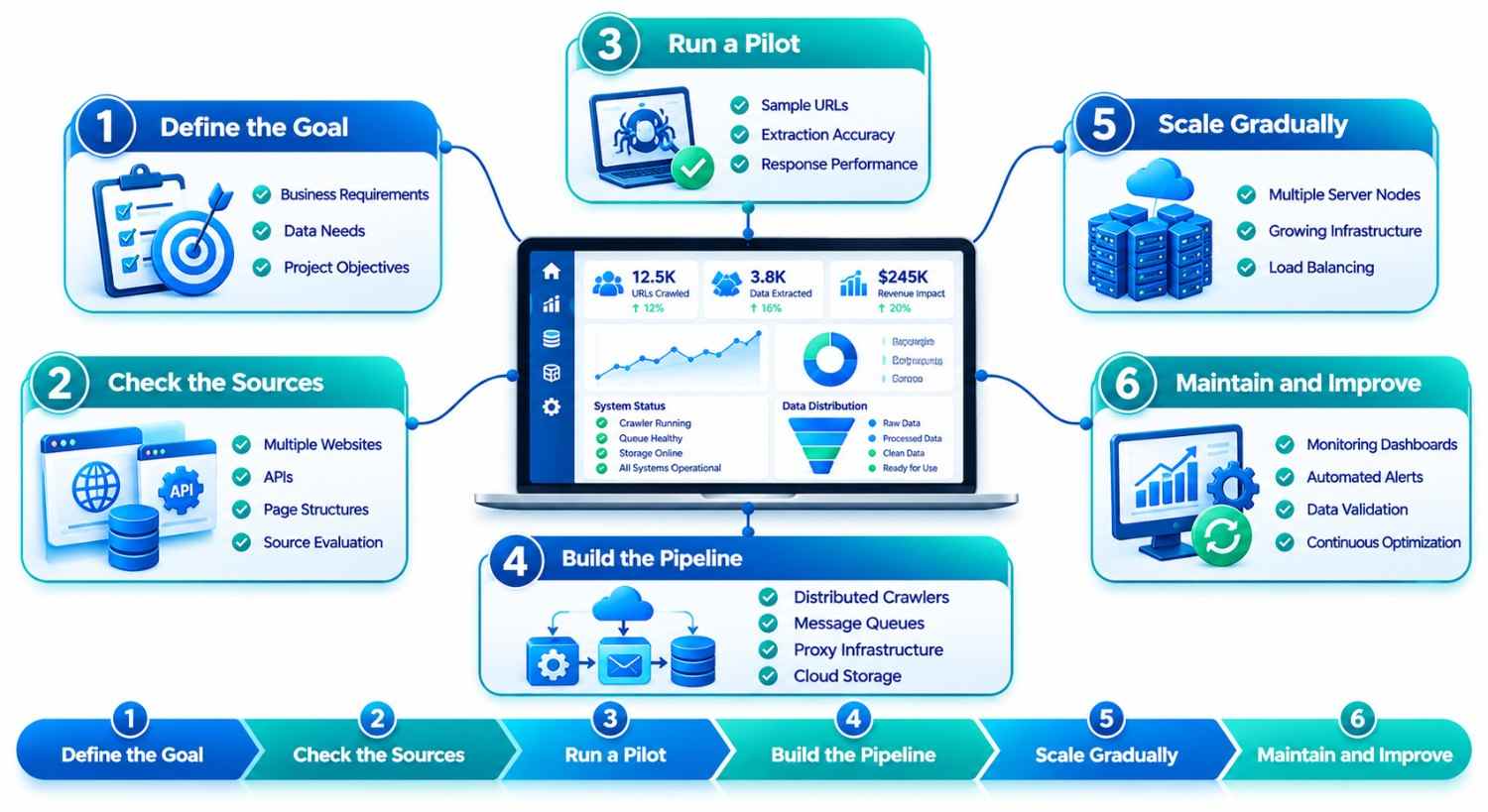
A clear process keeps the project calm. Most successful teams follow the same six steps:
- Define the goal. Write down the decision the data will support. For example, “adjust prices daily” is a better goal than “collect competitor data.”
- Check the sources. Look for official APIs, hidden JSON endpoints and robots.txt rules before you plan any crawling.
- Run a pilot. Scrape a small slice of each source. Then measure the success rate, speed and field accuracy.
- Build the pipeline. Add the queue, workers, proxy layer, storage and validation rules that the pilot proved you need.
- Scale gradually. Increase volume in stages, such as 10%, 50% and 100%. Meanwhile, watch block rates and data quality at every stage.
- Maintain and improve. Review alerts weekly, fix broken sources fast and retire sources that no longer add value.
Notice that building comes fourth, not first. Most failed projects jump straight to code. As a result, they scale problems that a short pilot would have exposed.
Where Large Scale Web Scraping Pays Off
Not every project needs this level of effort. Still, some use cases clearly justify it:
- Price and catalog intelligence: retailers track thousands of competitor products every day. Our page on price tracking across large catalogs shows how this works in practice.
- Real estate and travel: listings, availability and rates can change hourly.
- Market and lead research: company directories, job posts and news feeds feed sales and strategy teams.
- AI and analytics datasets: training data, search indexes and trend models need broad, fresh sources.
- Brand and review monitoring: ratings and mentions spread across many sites.
Common Mistakes in Large Scale Web Scraping Projects
Teams repeat the same errors, so learn from them early.
- Starting too big. Pilot first, then scale.
- Ignoring maintenance. Sites change, so plan for fixes.
- Using browsers for everything. Call the lighter data source whenever possible.
- Retrying aggressively. Back off, or you will trigger blocks.
- Skipping validation. Bad data costs more than missing data.
- Treating compliance as an afterthought. Fixing it later is slow and risky.
- Having no owner. Someone must answer when a source breaks.
Conclusion: Treat Scraping as a Data Product, Not a Script
Large scale web scraping works best when you treat it like a product. It needs an architecture, owners, quality rules and a budget. So start with a small pilot, add monitoring early, respect site rules and decide honestly who should run the infrastructure. As a result, your data stays fresh, accurate and trusted as it grows.
How Kanhasoft Can Help: We design custom scrapers built around your sources and run them as managed pipelines. That includes proxy handling, monitoring, validation and clean delivery in the format your team needs. If you already have a scoping list, share it with us, and we will map out a pilot.